
We’ve already suggested reducing your screen resolution, switching from millions of colors to thousands, and using Mac OS X 10.3.x Panther as ways to get better playback of YouTube videos. Several readers have written in with other suggestions, including adjusting video quality and using other programs to view the videos rather than using a web browser.
- Miro Is a Better Way to View YouTube on Older Macs
- Better YouTube Video Quality on G3s
- YouTube Videos on Older Macs
- How to Run YouTube Videos More Smoothly
- VLC Great for YouTube Videos
Miro Is a Better Way to View YouTube on Older Macs
From Tony Lee in response to YouTube Videos Run Poorly on Older Macs:
Hi Dan,
I read your discussion on watching YouTube videos on older Macs. I use a free program called Miro.
It does a better job with the videos than watching it on a browser, and you can search for videos on YouTube and Google Video on it. I think the program loads up the whole video and then its own video algorithm is more efficient than Adobe Flash’s. If the video you want to watch is long, like an Authors@Google video that’s an hour long, it takes a few minutes before the video is smooth, perhaps because it’s loading it up, but then otherwise it’s smooth even on a 700 MHz G3 iBook, full screen. It’s worth a try on older Macs.
Tony
Tony,
Thanks for writing. I’ve just downloaded Miro to my production machine and the Blue & White G3 next to me. I immediately noticed a big difference between Miro and using a browser to view YouTube: The browser works in real time and lets you watch a streamed video. Miro has to download the entire video before you can watch it. That’s going to make things a lot easier on older hardware, as it won’t be handling the download and displaying the video at the same time.
Running Mac Beautiful on Tiger is worlds better than running it in Safari. This is a 350 MHz G3, and the video looks quite smooth, much better than when it’s streaming. It’s really taxing the computer, but if it’s the only thing running, that doesn’t matter. I like being able to resize Miro’s window, and YouTube videos can even look good with the programs window maximized on a 1024 x 768 display – and surprisingly decent even at 1280 x 1024.
I’ve forwarded your suggestion to Flynn.
Dan
Better YouTube Video Quality on G3s
From Eli Fleming:
Dan,
I posted this on the LEM Pismo list a little while back ago. Right-click on the YouTube Player and choose “low” quality. If you wait for the video to completely download and then watch in at the low setting, it’s pretty good. Also, as someone else suggested, you can open the activity monitor window in Safari and find the .flv stream and download it to your machine locally. Then you can play it back with VLC or QuickTime Pro.
-Eli
Eli,
Thanks for writing. I wasn’t aware of the “hidden” options of selecting low and medium quality (low is pretty mediocre, but medium isn’t bad) by right-clicking (or Ctrl-clicking with a trackpad or one-button mouse). I’ll pass along your suggestions.
Dan
YouTube Videos on Older Macs
From Chris Kilner:
Dan:
The issue of YouTube video performance (and Flash games) on older Macs was a major influence on recent computer upgrades for my children. Their G3 iMacs with Panther/Safari just weren’t cutting it with Flash-based videos and games.
An upgrade to G4 towers running Panther (an AGP 450/ATI Rage Pro for the 8yo and a QS 867/GeForce 2 MX for the 11yo) improved things (i.e., they stopped complaining), but when I tried to move everyone to [OS X 10.5] Leopard, the video cards weren’t quite up to the task.
A GeForce 4 MX made the AGP tower acceptably fast enough under Leopard for the 8-year-old, and an ATI Radeon 9700 Pro made the QS tower faster than my 11-year-old thought possible from a 7-year-old computer without a processor upgrade. Of course, as part of the upgrade to Leopard, each tower received more RAM (from 512 to 768 MB) and newer/bigger/faster hard drives, but the video cards seemed to make the most difference in YouTube/Flash performance in Leopard.
This convinced me to get a GeForce 4 6200 for my 450 MHz Cube, which is now running Leopard and has replaced my 800 MHz G3 iBook as my primary computer.
Chris Kilner
Chris,
Thanks for sharing your experiences – and those of your children. This points to one big advantage Power Macs (and now Mac Pros) have over all the other Macintosh lines: You can replace an outdated video card rather than replace the whole computer.
That’s a whole area I hope to find the time to investigate this year with my aging G3 and G4 Power Macs.
Dan
How to Run YouTube Videos More Smoothly
From Mike Richardson:
Hey Dan,
I read your article about YouTube videos.
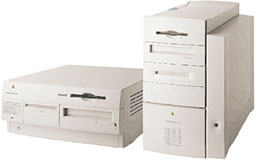 I remember I used to have a Beige G3 setup with Panther on it. It was your most basic 233 MHz model, but I had upgraded it with more RAM and a better hard drive, and even overclocked the CPU to 300 MHz. I used YouTube running in Safari as a benchmark. The overclock got me from 2 fps to maybe 3 fps.
What helped tremendously though is VLC. What you do is, paste the YouTube video URL into http://keepvid.com/ and get a download link. Control-click the link and copy to clipboard. Now launch VLC, press Command-N, paste in the URL, and click OK. The video will play in VLC with a much greater FPS than YouTube will ever give you on their site. On the Beige G3 I got at least 15-20 fps with the overclock, and I’m sure on a B&W G3 or low end G4 it would be full rate.
Thanks,
Mike Richardson
Mike,
Thanks for the tip. I’ve just installed VLC on the Blue & White and tried it. In a word: Wow! I’m streaming it at double default size, and it looks beautiful. It’s too bad there’s not an easier way to get to the YouTube videos.
Of all the suggestions from readers, this is by far the best for viewing YouTube. Thanks again!
Dan
VLC Great for YouTube Videos
From Lukas:
Hi,
Just a quick reply to Flynn Miller’s question regarding YouTube Videos on older Macs.
The video codec built into the Flash plugin is not optimized, thus hogging the CPU on fast Macs and producing choppy video on slow Macs.
The workaround is to use VLC: The Flash plugin downloads the YouTube video to a temporary file. Just pause the Flash video player in the browser and wait until the video has been downloaded completely. Then, open the temporary file in VLC. E.g., in a Terminal window, type:
open -a /Applications/VLC.app /var/tmp/folders.$UID/TemporaryItems/FlashTmp0
The shell will automatically replace the variable $UID with your user id. Usually this will be 501.
VLC’s video codecs are highly optimized, requiring just about 50% CPU time to decode a YouTube video on a G3/500 MHz. So the video will usually be decoded smoothly even if you do some other work on the machine in parallel.
Viewing YouTube videos in full-screen mode works smoothly with VLC as well. I think VLC is capable of using the hardware zooming functions built into all modern video chips (ATI Rage 128 et al).
You can also copy the temporary file to your home directory and play it back using VLC when you’re offline.
Instead of waiting for the complete video to download, you can also immediately open the video in VLC, but this will sometimes lead to slightly choppy video playback as the machine needs to do both the downloading and the decoding in parallel.
If you have opened multiple YouTube videos in the browser, the temporary files are called FlashTmp1, FlashTmp2, and so on. If you close a browser window with a YouTube video, its temporary file is deleted.
My suggestion is to keep VLC open while you’re surfing the web, and whenever you need to watch a YouTube video, just click on “FlashTmp0” in VLC’s playlist. That way, you don’t have to type the above-mentioned command line in a Terminal window over and over again.
The command line provided above is for Tiger. On Panther, the FlashTmp0 file was located in a different directory, /var/tmp/TemporaryItems/FlashTmp0 I think.
Note that some online video services do not save the video in /var/tmp, but rather download it to the browser’s cache. You will notice this when you’re playing a web video although there’s no FlashTmp0 file in /var/tmp. In these cases, you can either extract the video from the browser cache (in the case of Safari, this is $HOME/Library/Caches/Safari/ ), or you can hit Command-Alt-A to find out about the video’s URL and download it manually using “wget” or “curl”. You can select the URL in the Activity window and hit Command-C to copy the URL into the clipboard. Then, in a Terminal window type “wget ” and paste the URL using Command-V.
Best regards,
Lukas
Lukas,
Thanks for writing. You’re the first to explain the problem and the second to suggest VLC. I installed VLC on the 350 MHz G3 earlier this morning, and its by far the best video viewer for YouTube videos I’ve seen yet.
Dan
Keywords: #youtube #youtubeonoldmacs
Short link: http://goo.gl/YXMGuu
searchword: youtubeonoldermacs
