One Year with My 'Free' Mac mini
Low End Mac Reader Specials
TypeStyler For Mac OS X is Now Shipping! Download The Free Fully Functional 60 Day Tryout at www.typestyler.com
OWC: Get the Right Memory / Ram for your Mac. Top Quality, Competitive Prices, Lifetime Warranty. Expert Support and Video Installation Guidies too! 4.0GB Matched Sets from $87.99, Options up to 32GB. Click here
Don't install Parallels to play poker online! Poker Mac will show you how
to download and install a native Mac poker application such as Full
Tilt Poker Mac.
Laptop Hardware Provided by TechRestore - Overnight Mac & iPod Repairs.
Compare products like desktop computers, apple laptops, apple macs, and LCD Monitors side by side! All the information and reviews to make the best purchasing decision for new mobile phones, sat nav systems, or MP3 players. The Ciao online shopping community makes searching products easy for you.
- 2006.11.20
Bookmark in del.icio.us
Suggest to Slashdot
I've been lounging in the Low End Mac break room for a year now, telling jokes by the water cooler, drinking copious quantities of Earl Grey tea, and occasionally returning to my desk to get an article written.
Of course, there is no LEM break room, but the editorial staff does have its own email list, which is sort of the same thing. I've gotten to know several of our writers through email, both on and off the list. They're a talented group with vast experience in an impressive variety of areas.
Dan Knight has been a great editor. He makes very few changes to my submissions, but the ones he does make are well targeted. The result is that it almost looks like I can write.
In keeping with my column name, I have often tried to impart the kind of information that will help to "empower" low-end consumers like myself. The majority of your email has been very supportive, and I appreciate it when you take the time to let me know what you think - whether you agree with me or not. I do reply to all of the reader mail I get. To date, that has been 82 emails, not including additional replies from the same senders.
My mini's First Year
December marks one year since I started using a G4 Mac mini. For something the size of a fruitcake, the mini is a powerful little computer. Mine has seen daily use for word processing, browsing and email, web graphics, sound and music editing, and more. My wife also has a user account on the mini and uses it for Web access and word processing.
You might know that I'm also a fan of the Myst game series. The G4 mini's built-in graphics have handled these games admirably (with the exception of Myst URU, which is only for Windows).
After two weeks of use, I upgraded the mini's memory to 1 GB. I later purchased a 160 GB external FireWire hard drive, and I've been using that as my boot drive. The mini's original 40 GB drive is now residing in my Dual USB G3 iBook, replacing the slower, lower capacity one it came with.
Other peripheral purchases have been an iMic USB audio
interface and a Hyundai N91S 19" LCD
monitor from TigerDirect.com. The final cost
of the monitor was $140 after rebates. The quality of this monitor
is not quite on a level with higher-cost, better-known brands, but
it works fine for the work I do and is far superior in clarity to
every CRT monitor I've ever used. The deals are out there, if
you're willing to do the extra work involved.
mini Reliability
Although this mini has withstood its first year of hard hard use and has come through it like a champ, two small problems emerged.
As I have mentioned before, my only option to connect to the Internet is dialup. I connect over old, worn out, noisy phone lines. On a good day I can get an average of 24-28 kbps. And if it rains hard, I might not be able to connect at all!
I'm on a first name basis with the phone company repair man.
In October, the mini's internal modem suddenly started to refuse to hang-up, perhaps in protest. It would disconnect from the ISP normally but leave the line open.
Since I got my mini through a "free" promotion (see Yes, You Can Get a "Free" Mac mini - but Is It Worth the Hassles?), it was purchased by the promoter about two months before I got it, so by the time the modem started acting up, the warranty had expired. (An unexpected drawback of the "Free Mac mini" bargain.)
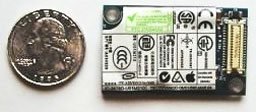
This same model of internal modem
(Model: U01M210) was also used in the iMac G5, eMac, some PowerBook
G4s, and other Macs, so I had no problem finding a used
replacement, which has been working fine.
Why this failure occurred is unknown. I use the surge protector that's incorporated into my battery backup. I was unable to find information about similar failures, so this may be an isolated incident. If the replacement fails, I will probably just add a USB modem to my already cluttered work space.
Do You Have the Correct Time?
With my slow connection, I have all user configurable automatic connecting and updating features turned off. At times I also browse with images disabled.
Since my date and time is not set automatically by Apple's time server, I have noticed that my mini's clock loses just over a minute a month. This isn't an excessive amount, and most users will never know if their clock is slow unless they, too, turn off the automatic updating.
It's interesting that the cheap quartz clock on my office wall is accurate to within several seconds between each seasonal time change.
All factors considered, the Mac mini has been a near-perfect fit
for my computing needs, and I expect it to continue to be for years
to come.
Recent Empowered articles
- Add desktop Trash and a classic Apple Menu to OS X for free, 11.13. Two favorite features from the classic Mac OS have never been part of OS X, but that doesn't mean you have to do without them.
- Deodorizing a stinky old iBook that smells like sweat, 10.19. Different ways to mask and otherwise attack the problem if your G3 iBook suffers from Stinky Keyboard Syndrome.
- A stinky old iBook that smells like sweat, 10.13. You just don't expect an iBook to smell like strong perspiration, but this problem seems to afflict a number of G3 iBooks.
- Alternatives to eBay when buying low-end Macs, 10.05. If you're looking to save money on older Macs, Craigslist, university surplus, and used Mac dealers can be great sources.
- More in the Empowered index.
Links for the Day
- Mac of the Day: 17" iMac G4/800 MHz, July 2002 - The iMac 'grows up' with a 17" 1440 x 900 display.
- Group of the Day: LisaList supports Lisa users.
- November 8 in LEM history: 99: OS 9: I think I like it - 01: The simplified Mac life - Soured on Windows - Flea market Mac - 02: Little room for improvement in new 'Books - Combo drive upgrade for iceBooks - 04: Re-Porter - 05: Fix the old iMac or buy a Mac mini? - Apple's Copland project - 06: MacBook Core 2 - MacBook value equation - Cheap is as cheap does - 07: Problems with Classic mode in Tiger - The G4 Power Mac that won't run Leopard
- Support Low End Mac
Recent Content on Low End Mac
- Quad-Core CPU Makes Sense in MacBook Pro, OS X 10.6 Causing Overheating, Overseas Power, and More, The 'Book Review, 11.06. Also Late 2009 MacBook reviewed, how to add RAM to new MacBook, 18.4in Acer notebook used Intel i7, and SanDisk SSD chosen for Sony VAIO X.
- Dumping Macs for Google Apps, SSD in iMac, Late 2009 iMac Performance Problems, and More, Mac News Review, 11.06. /newsrev/09mnr/1106.html
- WiFi Paranoia, iMac-O-Lantern, Magic Mouse Does Click, Free Clipboard Managers, and More, Charles W. Moore, Miscellaneous Ramblings, 11.05. Also strange time stamps, problem with ColorIt on Intel Mac, and the story behind OS X 10.5.4 install discs.
- IDE Is Dead; Long Live SATA!, Dan Knight, Mac Musings, 11.04. SATA has displaced parallel ATA. While IDE hard drives haven't disappeared, the best deals are in SATA hard drives.
- QuickTime X in Snow Leopard Imports, Trims, and Publishes Video Quickly and Easily, Alan Zisman, Zis Mac, 11.04. The long, slow process of importing video into iMovie to edit it, then render it to another format, is history as QuickTime X does that much more quickly.
- More links in our archive.
Recent Deals
- Best Mac Pro Deals, 11.03. Used 2.66 GHz 4-core, $1,300; 3.0 8-core. $2,299; refurb 2.66 4-core Nehalem, $2,149; 2.93, $2,549; 2.26 8-core, $2,799; 2.93, $4,999.
- Best iPhone Deals, 11.03. New 8 GB iPhone 3G, $$99; refurb 16 GB 3GS, $149; new, $199; 32 GB, $299.
- Best 12" PowerBook G4 Deals, 11.03. Used 867 MHz SperDrive, $348; 1 GHz, $499; 1.33 Combo, $298; SD, $559; 1.5 Combo, $448; SuperDrive, $589.
- Best Power Mac G3 and PCI Video Card Deals, 11.02. Used beige 300 MHz, $25; G4/366, $49; blue & white 350, $80; 400, $90; 450, $105; PCI video cards from $15; shipping additional.
- Best Power Mac G4 and AGP Video Card Deals, 11.02. Used 400 MHz, $50; 733 MHz, $69; 933 MHz, $209; 1.25 GHz dual, $299.
- Best 15" MacBook Pro Deals, 11.02. Used 2.0 GHz, $800; 2.2, $900; 2.4, $1,000; refurb 2.53, $1,449; 2.66, $1,699; 2.8, $1,949; 3.06, $2,169; new 2.53, $1,579; 2.66, $1,799; more.
- Best Mac mini Deals, 10.30. Used 1.33 GHz G4 mini, $379; 1.42, $389; 1.5, $419; 1.83 GHz Core Duo, $350; Core 2, $439; new 2.26 GHz nVidia, $580; 2.53 GHz, $770; Server, $990.
- Best G4 iBook Deals, 10.30. Used 12" 1.07 GHz Combo, $225; 1.33 GHz, $298; 14" 1 GHz, $349; 1.33 GHz, $398; 1.42 GHz SuperDrive, $498.
- Best Classic Mac OS Deals, 10.30. System 6.0.8 floppies, $10; 7.1, $12; 7.5, $20; 7.5 CD, $4; 7.6 $13; 8.1, $11; 8.5, $20; 8.6, $90; 9.0, $20; 9.2.2, $30.
- More deals in our archive.
About LEM | Support | Usage | Privacy | Contacts
Navigation
Used Mac Dealers
Apple History
Video Cards
Email Lists
Favorite Sites
MacSurfer
MacMinute
MacInTouch
MyAppleMenu
InfoMac
Macs Only!
The Mac Observer
Accelerate Your Mac
RetroMacCast
PB Central
MacWindows
The Vintage Mac
Museum
DealMac
DealsOnTheWeb
Mac2Sell
ramseeker
Mac Driver Museum
JAG's House
System
6 Heaven
System 7 Today
the pickle's Low-End
Mac FAQ
Abandonware
Petition
Mac vs. PC Info
Affiliates
The Apple
Store
Mac
Connection
B&H
MacMall
TechRestore
ExperCom
Crucial
Memory
batteries.com
Advertise
MacMinute
MacInTouch
MyAppleMenu
InfoMac
Macs Only!
The Mac Observer
Accelerate Your Mac
RetroMacCast
PB Central
MacWindows
The Vintage Mac
Museum
DealMac
DealsOnTheWeb
Mac2Sell
ramseeker
Mac Driver Museum
JAG's House
System 6 Heaven
System 7 Today
the pickle's Low-End
Mac FAQ
Abandonware
Petition
Mac vs. PC Info
Mac Connection
B&H
MacMall
TechRestore
ExperCom
Crucial Memory
batteries.com



