
Apple “refreshed” the Mac mini the same day it unveiled new iMacs, iLife ’08, and iWork ’08. The updated model finally moves the Mini from the outdated Core Duo to a Core 2 Duo processor, giving it 64-bit capabilities along with faster CPU speeds. Between the newer, more efficient CPU and 8-10% higher clock speeds, we expect 15-25% better overall performance compared to the Late 2006 model.
 The newest mini has the same 667 MHz memory bus as last year’s model, along with the same pedestrian Intel GMA 950 graphics. Because it uses a Core 2 CPU, it can support up to 3 GB of RAM (50% more than the Core Duo models), although Apple officially supports up to 2 GB.
There’s one memory bank with two DIMM sockets, so to upgrade RAM, you have to remove the modules that came with the Mini. Apple says that memory upgrades should only be done in matched pairs, but Other World Computing has discovered that you can use “mismatched” memory in the Mac mini (and many other Intel-based Macs where Apple specifies that upgrades should only be done with matched pairs). Their test results show that in general there is more benefit from having more RAM – even mismatched – than there is from having less RAM that is matched.
The base version now runs at 1.83 GHz and includes 1 GB of RAM, an 80 GB hard drive, and a Combo drive. It retails for US$599, the same price as the 1.66 GHz model it replaces. Except for the Core 2 Duo CPU and the lack of a SuperDrive, this is essentially the same model Apple was selling for US$799.
The better model has a 2.0 GHz CPU, a 120 GB hard drive, and a dual-layer 8x SuperDrive in addition to all the features of the 1.83 GHz model. At US$799, it seems a bit overpriced in comparison to the 1.83 GHz model. What you’re gaining for the $200 difference is a CPU with a larger cache, 40 GB more drive space (a $75 build-to-order option), the SuperDrive, and a 10% gain in CPU speed.
All Intel-based Mac minis use Intel GMA 950 graphics and “vampire video” (that’s where the video bites into system memory). The Intel graphics processor uses 80 MB of system memory for the display, so increasing memory is a good idea, especially if you’re going to OS X 10.6 Snow Leopard or beyond.
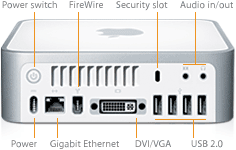 The Intel-based Mac mini looks like the G4-based one from the front, but the rear is different. The Intel-based mini has four USB 2.0 ports and no internal modem.
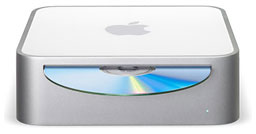
The tiny Mac mini (6.5″ square, 2″ high, 2.9 lb.) has a minimalist design. On the front, there’s just a slot-loading optical drive and a power light. On the rear, just enough ports to do everything important.
The Mac mini doesn’t include a keyboard or mouse. Apple says buyers can plug in their favorite USB keyboard and mouse – or buy Apple’s offerings. Mac OS X 10.4 and later includes support for remapping the Windows Alt and Option keys to Option and Cmd respectively.
Apple offered several Build To Order options, such as 120 or 160 GB hard drives; Mighty Mouse and Apple’s new keyboard, or a wireless Mighty Mouse and Apple’s new wireless keyboard, and a $49 USB modem. With a $19 DVI to Video Adapter, you can connect the Mac mini to most modern TVs using S-video or composite video.
This is the oldest Mac mini to officially support OS X 10.7 Lion.
Intel-based Macs use a partitioning scheme known as GPT. Only Macintel models can boot from GPT hard drives. Both PowerPC and Intel Macs can boot from APM (Apple’s old partitioning scheme) hard drives, which is the format you must use to create a universal boot drive in Leopard. PowerPC Macs running any version of the Mac OS prior to 10.4.2 cannot mount GPT volumes. PowerPC Macs won’t let you install OS X to a USB drive or choose it as your startup volume, although there is a work around for that.
Details
- introduced 2007.08.07 at US$599 (1.83 GHz Combo) and US$799 (2.0 GHz SuperDrive); replaced by Early 2009 model with Nvidia graphics on 2009.03.03
- Part no.: MB138 (1.83 GHz), MB139 (2.0 GHz)
- Model Identifier: Macmini2,1
Mac OS
- requires Mac OS X 10.4.10 to 10.7 Lion; not compatible with 10.8 Mountain Lion or later
- Mac OS X 10.6 Snow Leopard compatibility
- Grand Central Dispatch is supported.
- 32-bit booting only; cannot boot 64-bit OS.
- 64-bit software is supported.
- OpenCL is not supported with the Intel GMA950 GPU.
Core System
- CPU: 1.83/2.0 GHz Core 2 Duo T7200 Merom, Socket M makes upgrades possible (see CPU Upgrade Options for 2006 and 2007 Mac minis)
- L2 cache: 2/4 MB on CPU
- Bus: 667 MHz
- RAM: 1 GB, expandable to 3 GB using two PC2-5300 DDR SDRAM. Best performance with matched memory modules. 80 MB of RAM set aside as video memory.
- Performance:
- Geekbench 2 (Leopard): 2365 (1.83 GHz), 2604 (2.0 GHz)
- Geekbench 2 (Tiger): 2473 (1.83 GHz), 2668 (2.0 GHz)
- Xbench 1.3 (Snow Leopard, 2.0 GHz, SSD unless noted, HD is WD Scorpio Black)
- Overall: 181.82
- CPU: 140.08
- Memory: 122.23
- Quartz graphics: 173.09
- OpenGL graphics: 308.74
- Disk test: 34.28 HD/276.44 SSD
- Sequential: 79.82 HD/144.90 SSD
- Random: 21.82 HD/690.32 SSD
Video
- GPU: Intel GMA950 with resolution to 1920 x 1080 (VGA) and 1920 x 1200 (DVI).
- VRAM: 80 MB DDR2 SDRAM (shared with main memory)
- Video out: DVI, VGA with included adapter, S-video with optional adapter
Drives
- Hard drive bus: 1.5 Mbps SATA Rev. 1
- Hard drive: 2.5″ 80/120 GB 5400 rpm SATA standard; 120, 160 GB available as build-to-order options
- Optical drive bus: UltraATA
- Combo Drive: reads DVDs at up to 8x speed, writes CD-R discs at up to 24x, writes CD-RW discs at up to 16x, reads CDs at up to 24x
- SuperDrive DL: writes DVD±R discs at up to 8x speed, DL at 2.4x; DVD±RW at 4x; reads DVDs at up to 8x; writes CD-R discs at up to 24x, writes CD-RW discs at up to 16x, reads CDs at up to 24x
Expansion
- USB 2.0: 4 ports
- FireWire 400 ports: 1
- FireWire 800 ports: 0
- Ethernet: 10/100/gigabit
- WiFi: 802.11g AirPort Extreme built in
- Bluetooth 2.0: standard
- IR receiver: supports Apple Remote (included)
- no internal modem; external USB modem available
- Microphone: none
Physical
- size: 2.0 x 6.5 x 6.5 in/5.1 x 16.5 x 16.5 cm
- Weight: 2.9 lb./1.3 kg
- Power supply: 85W external power supply
- PRAM battery: 3V CR2032 lithium
Upgrades
- CPU can be replaced with a faster Core 2 Duo.
searchwords: macmini2007, macminimid2007
Online Resources




