Miscellaneous Ramblings
The Best Low Budget Macs
Charles W. Moore - 2001.04.24
What are the best low budget Macs, desktop and portable?
There is a short answer to that question. Buy an iMac, used or new. In terms of value, it's pretty tough to beat the iMac in a desktop machine.
Two years ago, I decided that it would be prudent to get a
reasonably capable backup computer to have on hand in case
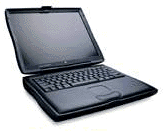 of problems with my then-new WallStreet PowerBook. I depend on my
computer to make my living, and residing in the outer boonies (150
miles from the nearest Mac dealer) coming up with a substitute
machine on short notice would be problematical.
of problems with my then-new WallStreet PowerBook. I depend on my
computer to make my living, and residing in the outer boonies (150
miles from the nearest Mac dealer) coming up with a substitute
machine on short notice would be problematical.
I had a couple of older Macs on hand - my old Mac Plus and LC 520, and both still work fine, but neither is up to the demands of my production work these days.
My original objective was to find a reasonably capable older Power PC machine - a desktop machine at least as fast as my old PowerBook 5300 (i.e., virtually any Power Mac) for less than Can$300 (about U.S. $200). Perhaps that was a bit ambitious, but I seemed to be off to a good start when my son gave me the carcass of a Power Mac 9500 that a Mac tech. friend of his had obtained gratis from an insurance company. The big 9500 had been stolen and stripped, but it still had its motherboard, power supply, and some RAM.
I won't recount the details of our adventures with that project in this article. If you're interested, you can read about them in the Miscellaneous Ramblings archives here on Low End Mac. Cutting to the chase, through scrounging and barter, we were eventually able to get the 9500 operational for under the arbitrary $300 budget target. It ran for about four hours. It's a sad and sorrowful tale.
On to Plan B, which involved the purchase of a never used Umax SuperMac S900 chassis and motherboard from Other World Computing for US$300. The original budget was immediately blown out the window, but I reasoned that I would be able to salvage a lot of stuff from the dead 9500, since the S900 has essentially the same Tsunami motherboard.
However, this has turned out to be anything but a bargain basement acquisition, notwithstanding the modest basic price, and the fact that I already had a processor card (actually two - 180 MHz and 200 MHz 604e cards), enough scrounged RAM for a total of 120 MB, a video card, sundry keyboards and mice, and a not great but serviceable VGA 15-inch monitor.
I also purchased a 2 GB Seagate hard drive with the S900 for $59.95, but it turned out to be the worst lemon of any piece of computer equipment I've ever owned, and I was eventually obliged to replace it with a Quantum 4 GB unit that I bought from reader for US$75.
I bartered columns for the processor card and video card that I got from Dan Knight, and I have also added USB and FireWire PCI cards. All that, combined with what it would have cost to purchase the various bits that were scrounged, and I estimate that I have the equivalent of about Can$1,100-1,200 in the S900, and I still only have a relatively mediocre 200 MHz 604e with a pedestrian video card, a crummy monitor, 120 MB of RAM, and a smallish hard drive.
For that outlay, I could just about have had a new 350 MHz iMac - or a good used one for considerably less - which would give me G3 power, a much better monitor, OS X support, onboard USB, better video, and a bigger hard drive.
I like the S900, and it more than fills the bill as an emergency backup, but in order to make it a really satisfactory production computer, I would still need to spend even more money for a G3 or G4 processor upgrade card, a better video card, a decent monitor, and more RAM. And while this machine's expansion potential is awesome (six PCI slots, eight RAM slots, seven drive days, and two SCSI buses), SCSI drives are expensive, and so are 168-pin DIMMs. Were this my number one computer, the sensible choice might be to grit my teeth and go the distance. On the other hand, the cost of going the distance would, in itself, give me of fairly substantial leg up on the cost of used iMac.
With the benefit of hindsight would I go this route again? Absolutely not. A used iMac would make a lot more economic sense, especially one of the more recent units with FireWire support.
Budget PowerBooks
In terms of a budget portable Mac, the equation is somewhat different. The portable equivalent of the iMac is the iBook, and used or refurbished Revision A iBooks are getting down into the US$800-900 range. However, these machines have puny 3.2 GB hard drives and just a single USB port (plus ethernet) for connectivity.
If these caveats are not problematical to you, then an $800
iBook is a reasonably good value. However, I would suggest also
considering 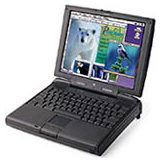 an original "Kanga" G3 PowerBook for about the same money
- or a used WallStreet G3
Series for a little more. Note that the Kanga doesn't support
OS X, while the iBook does, although a hard drive upgrade will
be almost obligatory if you want to run the new operating system on
one of these machines.
an original "Kanga" G3 PowerBook for about the same money
- or a used WallStreet G3
Series for a little more. Note that the Kanga doesn't support
OS X, while the iBook does, although a hard drive upgrade will
be almost obligatory if you want to run the new operating system on
one of these machines.
If G3 speed and OS X compatibility are not high on your priority list, then there is lots of potential in earlier PowerBooks for very attractive prices. I heard from a reader last week who had been offered a loaded PowerBook 3400c/180 for $300, asking if I thought it was a reasonable deal. I told him if he didn't want it, I would buy it!
You are more likely to find 3400s in the $500 to $700 range, at which price they offer reasonable value for folks who are looking for a portable machine on which to do word processing, email, spreadsheets, and Web surfing.
If the 8-pound 3400 seems just a little too hefty and bulky for serious roadwarrioring, there is also the contemporaneous PowerBook 1400, which is bog slow by today's standards but a solid and reliable machine with a great keyboard. It is also upgradable to G3 with Sonnet Technologies' 333 MHz G3 upgrade card. I question the economic wisdom of such an upgrade, given the 1400's 64 MB RAM ceiling, slow internal bus, and poky video support, but it is an option. A real used G3 makes more sense to me.
The PowerBook 2400 is a nice compact little package and the lightest decently performing Power PC 'Book, but they tend to be higher priced due to their form factor desirability.
Further down the food chain, if you just need a portable word-processing and email platform, a good, used, PowerBook 5300, 5xx series, or Duo can do the job for you, but I would suggest that $300 is the most money you should spend on any of these machines, and only then if they are in topnotch condition.