In our previous episode, I had
provisionally determined that plugging in my Que Fire! 16x10x40
FireWire CD-burner while my Umax
S900 was booting had somehow caused a malfunction - and perhaps a
failure of the computer's Macally PCI FireWire card. The S900 was
subsequently refusing to boot properly with the OS 9 FireWire
extensions enabled.
Monday afternoon, I popped the side cover off the S900 and pulled
the FireWire card. When I attempted to boot after I had removed the
card, I got a grey screen. No Happy Mac; no Sad Mac; no bomb;
nothing.
I stuck in the trusty OS 8.1 Disk Tools floppy, and the big Umax
booted up fine, but with no sign of the Quantum 4 GB internal hard
drive. However, when I shut down, removed the Disk Tools disk, and
powered up again, the machine finally recognized the hard drive and
booted smoothly into OS 9.1.
I opened Extensions Manager, reactivated the FireWire extensions,
and rebooted. Success again. Without the FireWire PCI card in place, I
didn't get the crash to the MacsBug debugger when the extensions
loaded.
I shut down again, hopefully reinserted the FireWire card in its PCI
slot, and rebooted, holding my breath as the extensions loaded. The
S900 breezed through startup, and the Desktop appeared normally.
Pressing on, I plugged in the Que Fire! burner and powered it up,
inserted a CD, and the CD icon appeared on the desktop as it should. I
launched Toast, which recognized the CD burner's presence. All systems
appeared to be functioning normally.
However, I'm still at a loss as to what had happened. It seems that
removing the FireWire card and booting the machine without it cleared
or reset whatever the glitch had been. I'm wondering whether the fact
that the Que drive was powered up when the hot plugging malfunction
occurred may have been significant. This time I waited until after the
FireWire cable was safely plugged in before I turned the power on.
I'm delighted that this issue seems to have been resolved with
relatively little hassle and no expense, but I will in the future make
sure to exercise more patience and wait until the computer is finished
booting before plugging in FireWire devices.
Coincidentally, MacFixIt posted a reader report on Monday (alas,
only available to paid subscribers) about what sounds like a similar
issue with a dual processor G4 tower machine:
"I have recently had a problem with my Power Mac G4 DP/533, where
both of my FireWire Ports went dead without any apparent reason. PRAM
zaps, Open Firmware resets and the like didn't help. So I shut down the
system, opened the Power Mac's case and pressed the motherboard reset
switch for a few seconds. After hooking everything up again, both
FireWire ports have been functioning flawlessly ever since."
Hitting the S900's motherboard CUDA reset button was the next item
on my list, had pulling and reinserting the FireWire card not
worked.
Speaking of FireWire cards, at the time I got mine in the fall of
2000 they were selling for around $79, but the price has dropped
substantially since then. Here are a few deals on FireWire cards from
around the Web this week. The above related adventure was the first
trouble I've had with my FireWire upgrade in more than two years use,
and I've been generally pleased wit the performance.
Other World Computing
Macally 3 Port FireWire PCI interface card features &
benefits:
- 400 megabits/second (50 megabytes/second) maximum data rate
- provides three FireWire (two 6 pin and one 4 pin) ports
- allows up to 63 devices to be chained together through it's
standard 6 pin interface
- uses a Texas Instruments Chipset
System requirements:
- any PCI based Macintosh or Macintosh clone including Apple's Power
Macintosh and Performa computers, and Umax SuperMac, Motorola StarMax,
Power Computing, and Daystar Digital Macintosh clones
- compatible with any version of the Mac OS 8.6 and above including
Mac OS X
Two year OWC fulfilled warranty.
For more information, visit:
http://eshop.macsales.com/Catalog_Item.cfm?ID=4143&Item=ATI100430237
BauCom Computers
- USB(2.0)/FireWire cards (External ports: 3 USB, 2 FW; Internal
ports: 1 USB, 1 FW), $68
- Orange Micro FireWire card (2 ports), $21
- Radius FireWire card (3 ports - 1997), $6
For more information, visit <http://www.vs-tech.com/bauc/>.
And for PowerBook users:
CableMax
2 Port PCMCIA 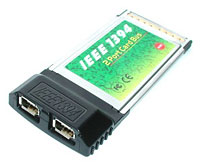 1394-FireWire Adapter
This
CableMax 2 Port PCMCIA 1394-FireWire Adapter AP-1002, is a
32-bit CardBus PC Card with dual 400 Mbps FireWire/IEEE 1394 ports. It
can enable your portable for high speed external devices.
Package contents:
- One FireWire/1394 Dual Port 32-bit CardBus PC Card
- 6-pin to 4-pin FireWire/1394 cable (6-feet)
- Ulead VideoStudio Basic SE v.4.0
- User manual
Warranty: Lifetime
System requirements: PowerBook with CardBus support (G3 Series May
1998 or newer)
Price: $49.50



