Tabbed browsing has been available for some legacy Macs - ones
with 266 MHz or faster processors - in the more recent versions of
Netscape and Mozilla, but these browsers are no longer being
developed for the Classic Mac OS, and they never supported 68k
Macs.
However, iCab 2.9.5,
the latest version of the lean, powerful, and stable German browser
now has tabbed browsing across the board, supporting machines back to
ancient 68020 models, such as the 1987 Mac
II and 1998 LC II, running
System 7.0.1 or newer.
iCab is the only browser still being developed for 68k Macs.
I think tabbed browsing is the greatest Web surfing innovation to
come along in years. I've continued to use iCab without it, as I
really like this browser, but the tabs are a very welcome
addition.
All the new features of the iCab 2.9.5 releases were planned for
iCab 3.0, but because so many people asked for tabbed browsing
support and because tabs were already implemented and working, iCab
decided to release another 2.9.x version before the iCab 3.0
release.
They've done an especially nice job with the implementation,
incorporating the best functionality of the tabbed browsing features
in both Apple's OS X only Safari
and Mozilla/Netscape while
adding the most intuitive and customizable tabbed browsing
preferences of any browser.
You can bookmark all of the Tabs of a window as "Tab group." The
"Tab group" is similar to a folder in the Hotlist, but it will
handled as a single item in the Hotlist menu or in the favorites
toolbar. Opening such a tabgroup will open all Tabs of the group at
once. In the hotlist window you can also modify Tab groups at any
time; you can add Web pages or remove pages, for example.
My daughter uses a 133 MHz PowerBook
1400 as her college computer. She has both Netscape 4.8 and one
of the Internet Explorer 5.x builds installed. Neither of these
browsers is fast or especially stable on the old 'Book running Mac OS
8.6, neither supports tabbed browsing, and both are very big and
RAM-hungry compared with iCab.
I downloaded iCab 2.9.5 to Deirdre's computer over the weekend,
and she must be a chip off the ol' block, because she especially
loves the tabbed browsing feature. iCab is faster than other browsers
as well, and it instantly became her browser of choice.
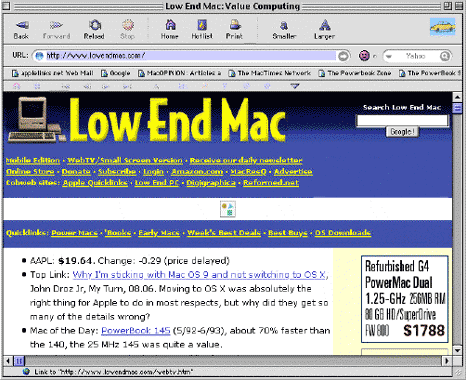
The user interface has also received a revamp in iCab 2.9.5, with
smaller icons and a convenient new search engine field, customizable
toolbars, and a new interface theme. There is also a new autocomplete
feature in the URL location field. After entering some characters in
the field a popup menu will list all known matching URLs. Toolbar
elements can now be dragged & dropped.
CSS support is still incomplete in iCab 2.9.5, which can make
pages with heavy CSS coding render badly - or not at all. However,
this version of iCab works fine on a couple of my online banking
sites and on my daughter's CSS-based course signup site.
The next update, iCab 3.0, will include much better implementation
of CSS. New CSS implementation requires many internal changes and
modifications. Parts of these changes are already finished in iCab
2.9 (albeit not visible, other than the increased speed of iCab), and
will be in iCab 3.0, and will make iCab much more compatible with
most web pages again.
Returning iCab features include:
Preferences dialog
- The Mac OS X version of iCab preferences dialog in the
OS X version is similar to the system preferences and shows
the Aqua visual effects and behavior. Configuring the favorites
toolbar of the preferences dialog now works by drag & drop, as
in the system preferences. The new dialog is no longer modal, so
it can be open all the time.
Ad blocking
- iCab can block unwanted images (using the Filter Manager) and
can also prevent popup windows containing advertising from opening
automatically (using unique "InScript filters").
Kiosk mode
- In Kiosk mode, iCab will cover the whole screen - all other
applications are blocked.
Error protocol (Smiley)
- iCab records all HTML errors of Web pages. A smiley-face will
indicate if the HTML code is okay (has no HTML errors or hazards).
In such sites, the smiley face will be green (and smiling). Errors
make the smiling face red and sad. By clicking the red smileys
iCab will open a window where all the errors are identified with a
small description. At http://validator.w3.org/
you can also test Web pages using the official validator of the
W3C.
Portable web archives in ZIP format
- HTML pages can be stored in a compact Zip-file, including all
images of the page. The advantage of the Zip format is that you
can use it with DOS, Windows, Unix, Linux, and nearly all other
operating systems as well.
Download manager
- I prefer iCab's Download Manager to that of any other browser,
and it is has been tool of choice for most download chores for
years. The path/depth of downloaded files can be configured to get
(only) the specified file, all linked files, all html, all images,
all files on the same site, or even all linked files from all
external linked sites.
Link manager
- When selecting this menu utility, a convenient split window
opens with all page links identified and listed on the left side.
Pick any link, and the respective site appears on the right side
of the window. Using the link manager you can comfortably search
through long lists of links (for example the result of a search
engine) without the need to open any new windows.on sources which
are not be useful to you. I also prefer the way iCab handles
bookmarks and history to the modes of other browsers.
Source code manager
- When selecting this menu utility, the source code of a page
will be displayed in any (chosen) editor or directly in iCab. iCab
can automatically reload and redisplay the entire page whenever
the HTML code is saved in the editor.
No system extensions (Classic Mac OS versions)
- iCab doesn't install any system extensions, does not create
any invisible files, and doesn't modify the system or any system
settings.
Open web page in new window or tab
- With this command, a link can be opened in a new window or tab
with Command-Click. With Shift-Command-Click, this window or tab
is opened in the background so that the main page remains on top
and can be read first. When you are finished with the main page
you can switch to the underlying pages, which will be fully
loaded.
This is all very cool, and it allows 68k and slower PowerPC legacy
Macs to enjoy modern, up-to-date browser technology. iCab is
definitely my browser of choice for power-challenged Macs, and
version 2.9.5 is the best iCab yet. (I use iCab a lot in OS X as
well.)
iCab 2.9.5 is only a 2-2.5 MB download (depending on version).
It's definitely well worth checking out, whatever speed Mac you
own.
New in the iCab 2.9.5 release:
- Support for "Tabbed browsing". iCab does now support "Tabs" in
a very comfortable way.
- Customizable Toolbars and a much better graphical user
interface (GUI) with many new features
- New autocomplete feature for the URL location field.
- The Mac OS X version is now an application package which
includes many different languages
- Many other bug fixes and small improvements...
System requirements:
- Minimum 5 MB free RAM
- System 7.0.1 or 7.1, if ThreadManager and DragManager are also
installed
- System 7.5 or newer (including Mac OS X)
- MacTCP or OpenTransport
- InternetConfig 1.2 (or Mac OS 8.5 or newer)
- 68020, 68030, 68040, PowerPC 601, 603, 604, G3, G4, or G5
iCab is free betaware.



