Today's humongous computer hard drives can store vast quantities
of information, but the big challenge is organization and retrieval.
It's one thing to know that you have something archived and often
quite another to be able to find it efficiently. And then there's
always stuff that you may have forgotten that you have, but which
could be useful if you were able to access it through key word or
phrase searches.
Enter information manager/organizer software - not just
databases, but rather comprehensive tools for storing, editing,
organizing, archiving, and searching your stuff. There are several of
these programs available for the Mac, and two of the best are
DEVONthink and Boswell.
Both of these applications do an anologically similar job, but do
it differently enough that one will likely appeal more than the
other, depending on your needs and tastes.
DEVONthink: Knowledge Management and Freeform Database
DEVONthink
is an application for users who need to store a lot of text or image
contents to collect, store, edit, and retrieve data. DEVONthink can
import files in many common formats: plain text, RTF/RTFD, SimpleText
files, PDF, source codes, HTML, XML and a variety of image types as
well as URLs (.webloc, .mailloc, .ftploc. and .inetloc).
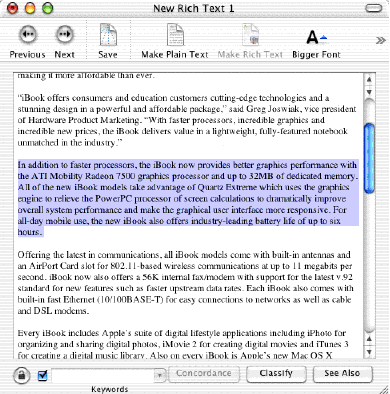
You can modify, rename, duplicate, touch, or delete all objects
stored in DEVONthink's database, and all advanced text editing
functions of Mac OS X are present, including fonts, styles,
rulers, and alignments up to find & replace, check spelling, and
speak text. With its integrated text and RTF editor you can use it
not only to enter short notes but to write letters, articles, and
even books. Highlighting functions and character/word counters will
help you, not to mention the split-screen view for navigating and
editing even thousands of archived documents almost instantly.
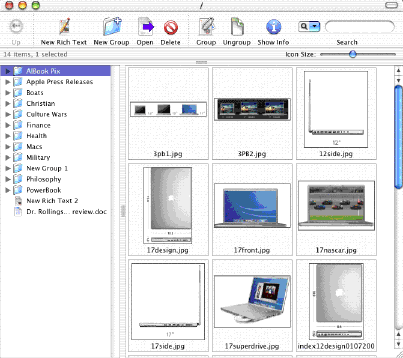
Without the need for indexing, DEVONthink fully or
semi-automatically classifies elements, lists similar contents and
words immediately using fuzzy algorithms, finds and compares text and
even images, summarizes texts intelligently, and provides high
performance concordance tools. As a Cocoa application, it's
integrated into Mac OS X including it's own Services for storing
and summarizing text clippings, has advanced text editing functions
including rulers, and provides a Finder-like interface with
contextual menus, Dock menus, different views, and drag-and-drop.
DEVONthink is the first product based on the powerful, language
independent DEVONtechnology.
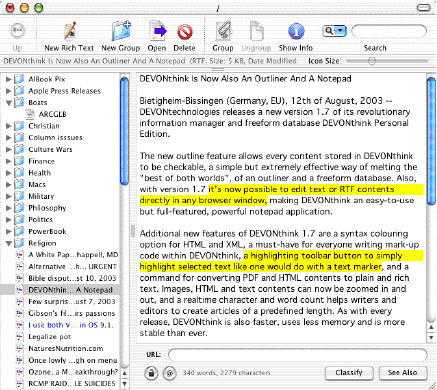
The big news with DEVONthink 1.7.4 is that it now displays HTML
pages using Apple's WebKit, the Safari engine, effectively making
DEVONthink an alternative browser. In the notepad and outline views,
selected URLs immediately display the web page they point to in the
preview area.
DEVONthink works on a "group" metaphor. When you create a new
group by checking an icon in the toolbar, a new folder icon appears
in the left pane of the interface window. You can then drag files
into that group's folder from the Desktop - or create new documents
in DEVONthink itself to be stored in the database or exported.
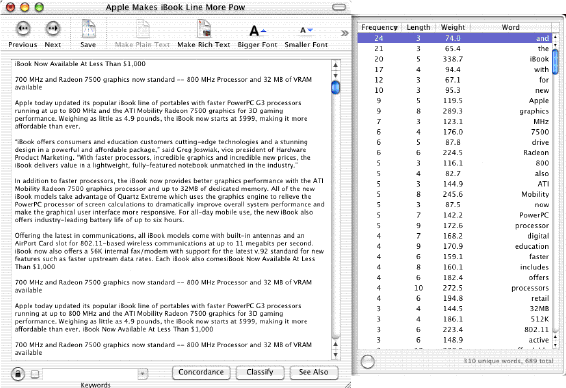
A "concordance" of the displayed content document appears when you
click on the Concordance button, and displays a list of statistics in
the pop-out drawer about the frequency, length, and weight of every
word in the document. You can also get a concordance from the tools
menu.
DEVONthink can help you find the document you're looking for in a
whole variety of ways. To find a document similar to another one,
select the one you have and select the "Similar" button (next to the
"Classify" button in the notepad view or in separate document
windows). Or you could use the search window ("Tools >
Search..."). Here you'll not only find the usual options but also two
buttons helping you to find the right search words: "Spelling" finds
words with a spelling similar to the one entered, "Context" provides
a list of words that appear to be similar to the search word based on
the context in which they appear. On the tab "Image" you can also
search for images similar to one you drag into the field on the right
hand side.
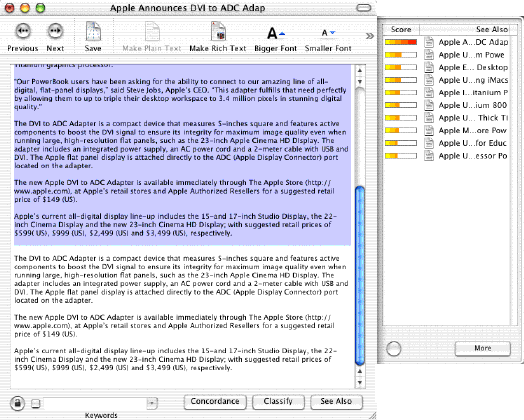
I've also found DEVONthink very convenient for opening Word
documents, since I don't use Microsoft Word, but from time to time
one receives Word files as attachments.
Key features:
- Stores whatever you like, from texts, images and HTML to
URLs
- Helps organizing your stuff with a built- in, simple
outliner
- Easy-to-use Finder- like user interface
- Super-fast navigation and display of contents
- Helps you to sort in new stuff (auto-classify, see also,
keywords)
- Advanced text editing including highlighting and realtime
character count
- Lightning- fast, intelligent search function
- Built to seamlessly integrate with Mac OS X What's
unique:
- Works with much more file formats than all alternatives
- Imports and exports huge amounts of data extremely fast
- Works flawlessly with huge databases (>100 MB)
- Does not need indexing and still searches the database faster
than all other freeform databases or scrapbook managers (which are
in both, handling and performance, built for small databases)
- Stays highly efficient even with big databases, i.e. double
the size of the database does not mean half the performance
- Is built around industry standards and uses all major features
of the operating system
DEVONthink requires Mac OS X 10.2 with Safari installed or Mac OS
X 10.3 and 256 MB RAM.
DEVONthink must be registered for $35 after the evaluation
period.
Boswell: A Tool to Archive and Retrieve Text
One way to describe Boswell
is "Google for your desktop." Boswell is a software application
designed to archive any text data, organize it using a notebook
model, and then let you find and use that information very quickly.
Boswell acts as your own personal librarian to organize, manipulate,
search, retrieve, and display it however you wish.
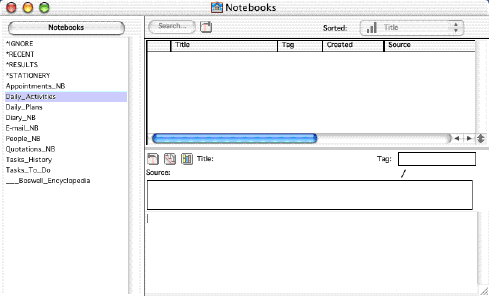
Boswell is a text information archiver, retriever, and organizer.
Once you give Boswell your text, you will be able to get it back
whenever you want. If you want Boswell to search through everything
it has for the mysterious phone number you just found scrawled on an
old piece of paper, Boswell can do that. Somewhat the way a Web
browser enables you to search and navigate the information on the
Internet no matter where it may be physically located, Boswell makes
all your own personal text equally accessible to you.
The Internet analogy is also useful to understanding how Boswell
works.
- The Web has pages; Boswell has entries.
- The Web has sites; Boswell has notebooks.
- The Web has search engines; Boswell has a Search Engine.
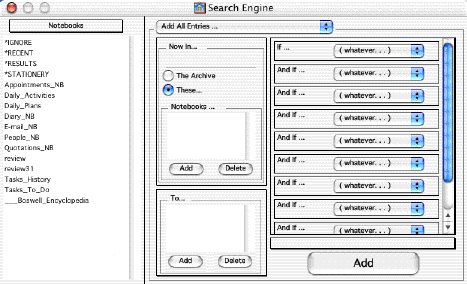
Boswell has a library of what you created or found: stuff like
your writings, old emails, addresses and contact information, class
notes, phone messages, personal diary, letters, articles you got from
the web, to-do lists, and research notes; any text you can think
of.
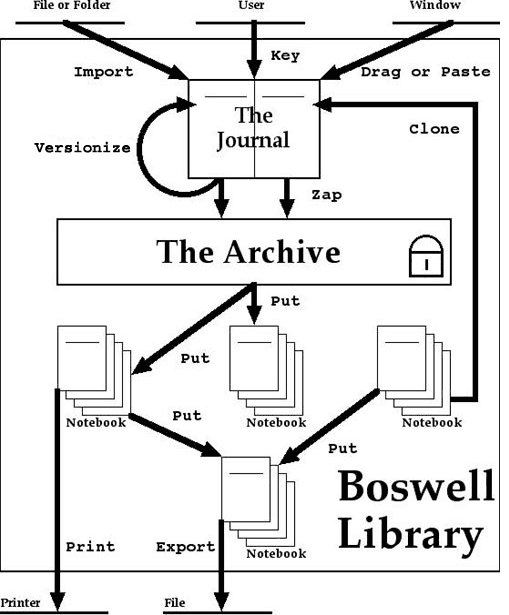
Boswell features:
- Boswell lets you file and view your data under thousands of
categories.
- You do not have to create these categories before you create
your data.
- Boswell automatically cross-references your text items among
as many categories as you want.
- You do not have to spend your time "filing things away."
- Boswell organizes your information without using a hierarchy
of folders.
- You cannot lose or mislay your data. Once you have told
Boswell to preserve it, your data cannot be deleted or changed -
even accidentally.
- Boswell takes care of iterating through several versions of
your writings.
- You can search your data by many criteria including contents,
time, or topic.
- You can easily compare items found in a search.
- You can easily remove items mistakenly found in a search.
- You can create a new category from the results of a
search.
- You can create "stationery" entries and clone them to create
new entries preformatted with recurring text. Think phone message
pads.
- When you are writing away in the heat of creation, you can
quickly preserve your work and keep on writing so you never again
have to worry about inadvertently deleting good stuff.
- Boswell efficiently stores everything just once, in one place
where it is always easy to backup.
System requirements: Mac OS 9 or higher
Boswell 3.1 runs under Mac OS X, as well as OS 9, and sells for
$99.95.
A demo version of Boswell available for download so you can take
it for a spin and see how it handles your own data. The demo version
(3 MB) comes complete with a manual and a small library to get
you started.
Conclusion
In summary comparison, DEVONthink is smaller, faster, and has the
advantage of being Cocoa-based, thus supporting OS X Services
fully. DEVONthink will also store graphics files as well as text, and
has the integrated Web browser function. Another advantage is that it
sells for just $35 - nearly two-thirds less than Boswell.
Boswell has the advantage of supporting both OS 9 and
OS X, which will allow folks still running the Classic Mac OS to
use it and then transition smoothly to an OS X version in the
future. Boswell's archiving system may also appeal to some users from
more than DEVONthink's (or vice-versa).
The best plan is to try them out for yourself and decide which one
you prefer. Both programs are available as downloadable demos.



