One of the more innovative approaches to ergonomic keyboard design
is the Kinesis Advantage Contour
Keyboard family, which comes in several models including Standard
and Pro USB models that support both Macs and PCs
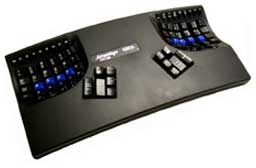
The central distinguishing feature of Kinesis keyboards is that the
alphanumeric keys are separated into two concave, bowl-shaped wells,
with smaller, subsidiary, thumb-operated keypads for operations like
shift, space bar, delete, command, option, and control.
This patented design is claimed to minimize stress on hands, wrists,
and shoulders that users experience from heavy use of conventional
computer keyboards.
 While it appears very funky-looking at first, Kinesis reports
that within a couple of hours practice, most new users are at 80% or
more of their previous speed and accuracy. Within 2-3 days, speed and
accuracy are usually 90-105%. Within 3-5 days, new users are typically
up to full speed with both alphanumeric typing and using the thumb keys
and arrow keys for editing.
While it appears very funky-looking at first, Kinesis reports
that within a couple of hours practice, most new users are at 80% or
more of their previous speed and accuracy. Within 2-3 days, speed and
accuracy are usually 90-105%. Within 3-5 days, new users are typically
up to full speed with both alphanumeric typing and using the thumb keys
and arrow keys for editing.
I'm not a touch typist, but after a few hours, I found myself
getting used to the Kinesis' unorthodox layout and very much enjoying
the comfort.
The Kinesis design resulted from two years of research and testing
and has proven itself in a decade of commercial use. The contoured
keyboard was designed not only to reduce the known risk factors
associated with repetitive stress injuries but also to provide a more
comfortable platform than other keyboards, improving productivity as
well as typing comfort.
I found the Kinesis unit I tested surprisingly relaxing and
comfortable to use. The contoured key wells minimize the need for long
finger movements and stretching - even for the numbered function keys
that live on the far side of the key wells. Giving the thumbs more work
to do seems like a logical way of spreading typing stresses more
evenly.
The mechanical key switches used by Kinesis have a pleasantly light
touch and smooth action, although my personal preference would be for
even shorter travel, more like the keys on PowerBooks and iBooks.
Quality of construction and materials on this keyboard seem first rate,
as befits a premium-priced unit.
The Kinesis Advantage keyboard is usable with both Macs and PCs,
which is convenient for folks who have to use a PC at work but have
their own Mac at home. This is not a minor issue, because it would be
awkward to switch back and forth between a standard keyboard and the
Kinesis on a regular basis.
The Advantage is shipped from the factory configured for the
Macintosh. Users can instantly change the configuration to a Windows or
non-PC layout. All Advantage keyboards models can also switch on the
fly between QWERTY and Dvorak key layouts.
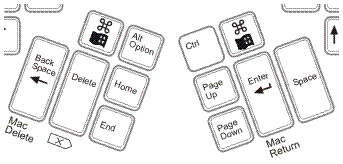 Some of the Advantage keyboard's thumb keys are
cross-platform labeled. There are two Mac Command keys (= PC Control),
which is a convenience. The Backspace key performs the Mac Delete
function and is operated by the left hand rather than the right, as is
the Mac norm. The Delete key works as Forward Delete in Mac mode. The
Enter key performs the Mac Return key function, and the Space key is
the Space key in both modes, operated by the right thumb. Page Up, Page
Down, Home, and End thumb keys are self-explanatory.
Some of the Advantage keyboard's thumb keys are
cross-platform labeled. There are two Mac Command keys (= PC Control),
which is a convenience. The Backspace key performs the Mac Delete
function and is operated by the left hand rather than the right, as is
the Mac norm. The Delete key works as Forward Delete in Mac mode. The
Enter key performs the Mac Return key function, and the Space key is
the Space key in both modes, operated by the right thumb. Page Up, Page
Down, Home, and End thumb keys are self-explanatory.
This probably sounds more confusing than it really is in practice.
Personally, I adapted fairly quickly, although the Delete/Backspace key
on the left tended to trip me up a bit.
The Kinesis keyboard has a compact footprint, since it has no
dedicated numeric keypad. Instead, a numeric keypad is embedded in the
right hand key well, a function you switch on and off by toggling Num
Lock or Shift + Num Lock. I rarely use numeric keypads except for the
handy Enter key, so I'll have to take their word for it that one would
adapt to this arrangement. You use the same fingers as with a
conventional keypad.
The Advantage Pro USB (advanced programmable) for Mac & PC
supports advanced programming features. Programmability allows users to
customize their keyboards to be more comfortable and more productive.
The user can move, copy, or "kill" any key action (using remapping) or
save keystrokes by storing them in the keyboard's memory (using
macros).
In addition, all Kinesis contoured keyboards support a foot switch
that allows the user to reallocate commonly used key actions from the
hands to the feet. Each keyboard can support up to two single-action
foot switches or the new triple-action foot switch. Using Kinesis
programmable contoured keyboards, single and triple foot switches can
be set to trigger any keyboard action, such as Esc, Tab, Enter.
To summarize my impressions of the Kinesis keyboard, I liked it and
found it quite comfortable to type with. I expect that I could become
used to it very quickly and that my speed would at least equal what I
can manage on a conventional keyboard. It is a bit pricey compared with
more conventional ergonomic keyboards, but independent test results
indicate that for someone with typing pain or typing injury especially,
it could be money well-spent.
Kinesis Advantage USB for Mac & PC features:
- Advanced ergonomics plus onboard programmability
- Compatible with both Mac and PC operating systems.
- Instant configuration for Mac, Windows, and non-Windows PC
operating environments, includes Mac and Windows legended keys.
- Integrated two-port USB hub
- USB devices can be hot-plugged safely
- Select 24, 36, or 48 macros (56, 38, or 28 characters long,
respectively)
- Supports triple action foot switch.
Kinesis Advantage Pro USB for Mac & PC differences:
- Automatically switch between Mac and PC operating systems.
- Double memory for longer macros (24 macros yields 142 characters,
36 macros yields 94, and 48 macros yields 70)
- Memory locking switch protects users or managers against accidental
or unauthorized programming of the keyboard
- Single-action foot switch included
- Glossy metallic finish
Compatibility:
- Available USB port
- Mac OS 8.6 and higher
- Windows 98 or newer
- No special drivers required
Dimensions:
- Width: 16.5 inches
- Height: Maximum is 2.9 inches high
- Depth (front-to-back): Approximately 8 inches
Pricing
- Advantage USB Contoured Keyboard for Mac & PC, White Case,
$299
- Advantage USB Contoured Keyboard for Mac & PC, Black Case,
$299
- Advantage QWERTY/Dvorak Switchable USB Contoured Keyboard for Mac
& PC, White Case only, $325
- Advantage Pro Contoured USB Keyboard for Mac & PC, $359
- Single-action foot switch, $30
- Triple-action foot switch, $89
Two year limited warranty.



