I'm a
longtime fan of of Ricardo Ettore's TypeIt4Me text macro utility,
without which my problems with typing pain would be much more
difficult to work around.
TypeIt4Me is a keystroke activated text macro application that
allows you to define a set of abbreviations to trigger automatic
entry of blocks of specified text, which may be a short as a single
word or as long as you wish. When you type the abbreviation (or
select it from TypeIt4Me's pop up menu) and hit the assigned
trigger keystroke(s), the Mac expands the entry as you continue
typing. This is especially useful for entering frequently used
phrases and other boilerplate stuff like your email address.
For example, I frequently type my name, so with TypeIt4Me I have
assigned it the abbreviation "ch." Now when I type "ch" and stroke
the spacebar, the two letters change to "Charles W. Moore."
You can also use TypeIt4Me to apply long passages of text. I'm
so used to depending on it it that I find it hard to adjust to
using a computer that doesn't have TypeIt4Me and my library of
macros installed.
Originally published in 1989, TypeIt4Me won the 1994 MacUser
Shareware Award for Best Publishing Tool and has become a classic
must-have program for anyone who does a lot of typing on their
Mac.
It was Mac pundit and author David Pogue, who suffers from
carpal tunnel syndrome, who first brought TypeIt4Me to my attention
in the mid-90s. Pogue says that it cuts the amount of typing
necessary for him by 25%. It also streamlines operations
remarkably, especially when your hands and arms are hurting and
every keystroke is an adventure in pain, as I know all too
well.
Unlike, say, Microsoft Word's autotext, TypeIt4Me's big
advantage is that it works in every application or text field.
There are other utilities that support text macros, but for many
years I never found anything that I like as well as TypeIt4Me (now
at version 2.2.2).
A big advantage of TypeIt4Me for me is that I find it much
easier to remember macro abbreviations that I make up myself than I
do memorizing prescriptive keyboard combinations.
Enter Textpander
However, since last summer there's been a new kid on the block:
a text macro utility by Peter Maurer called Textpander (now at
version 1.2), which offers TypeIt4Me-like features, adds a few new
interesting wrinkles of its own, and has a preference panel
interface that some may find more convenient and intuitive than
TypeIt4Me's menu selections - as well as being
freeware/donationware as opposed to TypeIt4Me, which is $27
shareware.
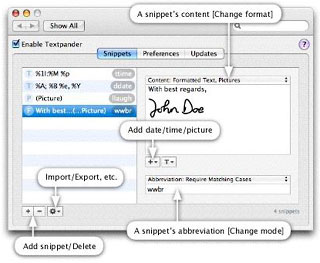
Like TypeIt4Me, Textpander monitors what you type and inserts
predefined text snippets on the fly whenever you enter their
corresponding abbreviations. Here are a few examples for what you
can do with either of these utilities:
- Insert standard greetings, text fragments, and signatures -
including formatted text and pictures.
- Insert the current date and time in any format you prefer.
- Use editor-independent code templates and have Textpander
position the cursor just where it needs to be.
- Type special characters without having to launch any special
characters palette.
- Have Textpander correct typos automatically.
- Long, hard-to-type words such as
'benzo-methyl-tricarbo-something-or-other';
- Your name and address;
- A standard end of letter signature
- An entire paragraph of legal or medical text;
- A short word that you often misspell (such as 'teh' instead of
'the');
- Just about anything else you need to type often.
I tried out the first public release of Textpander (Version 1.1)
and liked it in many respects. One Textpander feature I especially
like is that it can be configured to play a sound when a macro is
applied.
I'm not a touch typist, and I often type while looking at the
keyboard or hard copy I'm transcribing rather than that the screen,
so sound notification provides a heads-up if a macro is
inadvertently applied. As with TypeIt4Me, you can also exclude
specific applications from Textpander entries, which can include
plain or formatted text, or even pictures.
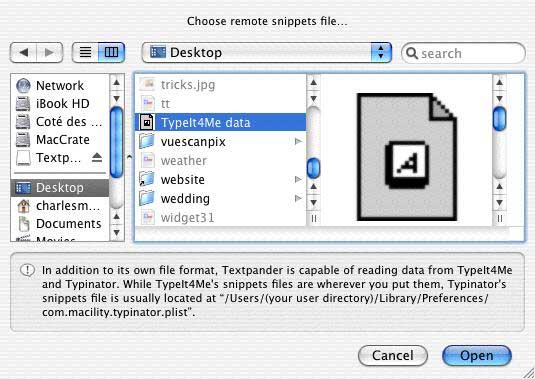
A convenient Textpander feature is its ability to import or
"subscribe to" existing TypeIt4Me (and Typinator,
another text macro utility) macro/snippet libraries - at least
theoretically. Unfortunately, in practice with Textpander 1.1 I
found that while most of the imported snippets worked, some were
truncated, necessitating the cumbersome workaround of configuring
them in Textpander's own snippet library and creating and
memorizing new, alternate abbreviations to trigger them.
This isn't a biggie if you're starting from scratch, but I have
over 100 TypeIt4Me macros.
However, a more serious issue related to snippet subscription in
version 1.1 was that applying macros from TypeIt4Me in Textpander
resulted in an invisible upside down question mark (hex value \x00)
character being inserted in the text of your document - and that
could cause a real problems, especially with HTML markup, for which
I use text macros extensively.
The pesky little upside down question mark characters were only
being inserted by imported TypeIt4Me macros (which still worked
fine in TypeIt4Me) and did not appear with native Textpander
snippets. However, the problem was serious enough that I stopped
using Textpander early on and went back to good, old reliable
TypeIt4Me.
Textpander 1.2
When Textpander 1.2 was released a month or two ago with a bug
fix that claimed to have fixed its external snippets parser, I was
eager to check it out.
Happily there were no more unwanted invisible characters being
inserted with applied macros in version 1.2. However, the macro
truncation issue was still there in some of the imported TypeIt4Me
macros.
Speed was improved. Also, unlike the OS X versions of TypeIt4Me,
with which I've had persistent "misfire" problems with some macros,
such as iBook, Pismo, and PowerBook, that seems not an issue with
Textpander, even though those macros are imported.
 As it
turned out, I switched to Textpander to try out Version 1.2 and was
so comfortable with it that I never got around to switching
back.
As it
turned out, I switched to Textpander to try out Version 1.2 and was
so comfortable with it that I never got around to switching
back.
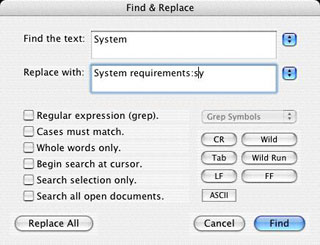
One residual bug that still needs squashing is that in the Tex
Edit Plus Find & Replace dialog, Textpander inserts the macro
abbreviation after the entry. I haven't encountered this elsewhere,
and it's annoying, but not a deal-breaker.
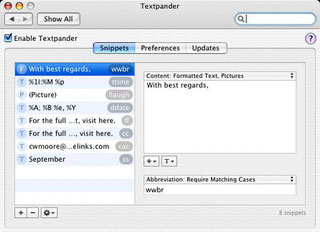
I like Textpander's three-panel preference pane, which is the
only user interface for the program aside from the menu bar
menulet. The program is very light on documentation (there isn't
any), but fortunately the configuration options are pretty
intuitive. You also have the option of having text macros applied
as you type or only after a delimiting keystroke, which you can
also specify to be retained or deleted after the macro is
applied.
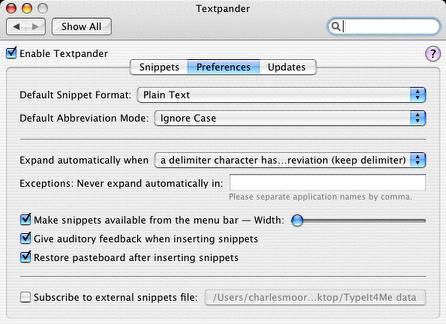
I opted for the delimiting keystroke configuration, sticking
with the spacebar as with TypeIt4Me.
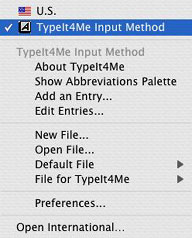 Textpander Is
activated/disabled using a check box on the preference panel, which
is positive and convenient. If you have both Textpander and
TypeIt4Me installed, you need to disable one or the other so you
don't get double-entries (that is, if you have Textpander subscribe
to TypeIt4Me's macro library). TypeIt4Me, incidentally, is
activated/disabled in the International preference panel, which is
not an intuitive location.
Textpander Is
activated/disabled using a check box on the preference panel, which
is positive and convenient. If you have both Textpander and
TypeIt4Me installed, you need to disable one or the other so you
don't get double-entries (that is, if you have Textpander subscribe
to TypeIt4Me's macro library). TypeIt4Me, incidentally, is
activated/disabled in the International preference panel, which is
not an intuitive location.
Last week, Peter Maurer released Textpander 1.2.1, which as the
hundredth-point version update indicates, is basically a minor nip
and tuck clearing up a few rough edges and adding a bit more
functionality and convenience.
New in version 1.2.1:
- The snippets list now supports copy & paste. In addition to
the obvious purpose of duplicating snippets (which was already
possible by doing an [option]-drag, by the way), you can also
create new snippets by pasting text to the snippets list. Moreover,
copying from the snippets list populates your clipboard with a list
of the selected snippets and their respective abbreviations. Paste
that into a text file and apply your formatting to create a
snippets cheat sheet.
- Textpander now works with iTerm.
- Available Languages: English, French, German.
New in version 1.2:
- Fixed a bug in Textpander's external snippets parser. This will
solve most problems experienced by users who have imported or
subscribed to their TypeIt4Me snippets. (You don't have to reimport
those. Textpander fixes corrupted snippets automatically.)
- You can now add a clipboard placeholder (%clipboard) to have
Textpander insert the current clipboard content into a snippet on
expansion. (Only the clipboard's plain text representation is used
here.)
- Textpander can now import or subscribe to "nlang" files from
Nisus Writer.
- Textpander Help should now work on Mac OS X 10.3.9.
- Available Languages: English, French, German.
After using it continuously for more than a month, I can affirm
that Textpander is capable of filling the text macro role very
satisfactorily, even for a heavy text macro user like me.
I still like TypeIt4Me, which is a mature application that works
extremely well and has a strong track record. TypeIt4Me also
supports all versions of OS X 10.3 Panther (version 2.2.2 no
longer supports 10.2 Jaguar), while Textpander wants OS 10.3.9 or
later, which might be the deciding factor for some users.
Of particular interest to many Low End Mac readers, TypeIt4Me is
also available in a Classic version that supports OS 8/9. You can
switch back and forth between OS X and Classic, sharing the
same abbreviations file, and even edit it on either side. Since you
can try both programs out without making any cash commitment, my
advice would be to sample them both and decide which one you like
best.
Textpander:
- System requirements: Requires Mac OS X 10.3.9
- Freeware/donationware
TypeiT4Me:
- System requirements: Mac OS 9.2.2 or Mac OS X 10.3 or
later
- TypeIt4Me X is $27 shareware.
- Link: Textpander
- Link: TypeIt4Me
- Link: Typinator



