InforMac
is a utility that works like Apple's System Profiler. It displays
information about your computer, such as hardware, software, and
settings.
"I already have Apple's System Profiler, so why should I bother
with a third-party application that essentially does the same
thing?" you might ask.
Well, because InforMac does it so much cooler - and it's free,
so why not?
InforMac has a much slicker interface than Apple's profiler.
It's been around in the same beta version for some time, but I've
found no obvious bugs (even though the developer suggests there may
be some), and it works just fine on my computers. It's PowerPC only
(so far).
With InforMac you can also save information as a file, protect
the personal data it contains, and read this file on any other
computer. InforMac can securly encrypt this data thanks to a
built-in encryption engine that will make your personal information
unreadable to any user without the proper password.
 When you start the program, you
are presented with a window similar to the System Preferences main
window showing rows of icons that, when clicked upon, open
information panes pertaining to various OS aspects and hardware
specifications. You can also use a handy pull-down menu to navigate
among the categories.
When you start the program, you
are presented with a window similar to the System Preferences main
window showing rows of icons that, when clicked upon, open
information panes pertaining to various OS aspects and hardware
specifications. You can also use a handy pull-down menu to navigate
among the categories.
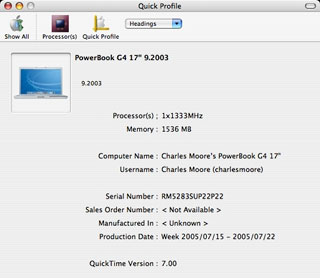
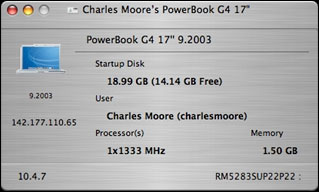
InforMac also displays a picture of your particular Mac in the
Quick Profile window, which tells me some interesting things, like
my Apple Certified Refurbished PowerBook , which I purchased in
February 2006, got its remanufactured serial number in July 2005.
If you have a non-refurbished Mac, the date and place of original
manufacture should be displayed.
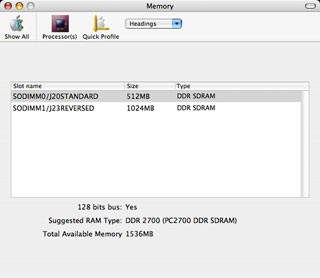 The Memory panel describes your
machine's memory configuration and the type of memory
recommended.
The Memory panel describes your
machine's memory configuration and the type of memory
recommended.
The Processor panel contains information about your CPU, system
bus and caches.
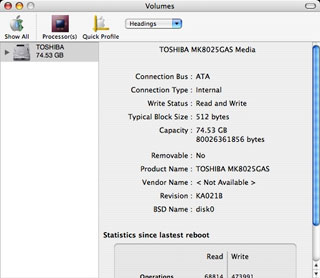 The Volumes panel provides
information about mounted volumes, including the make, type, and
size of your hard drive(s), and some statistics since your last
reboot. It confirmed that my PowerBook has a Toshiba hard drive,
and that the nominal "80 GB" is really 74.53 GB.
The Volumes panel provides
information about mounted volumes, including the make, type, and
size of your hard drive(s), and some statistics since your last
reboot. It confirmed that my PowerBook has a Toshiba hard drive,
and that the nominal "80 GB" is really 74.53 GB.
The System panel tells you what OS version you're using, ROM
specs, and uptime. It notes that there have been no kernel panics
recorded with this machine.
The ATA Devices panel shows info about ATA drives, including
Optical drives.
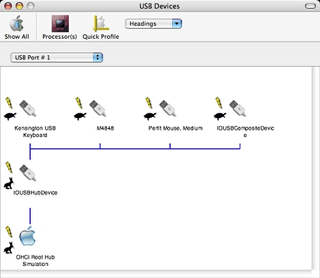 USB and FireWire panels show
names and connection schematics of peripheral devices.
USB and FireWire panels show
names and connection schematics of peripheral devices.
The Displays panel tells you about your display(s), including a
thumbnail of your current Desktop Picture.
The Panels window lists all of the System Preferences panels or
just the third-party ones,
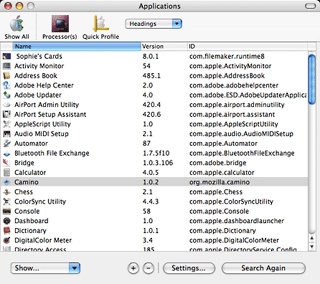 The Applications window does
likewise, and you can also specify whether you want ony apps.in the
Applications Folder displayed, all on the startup disk, or all
applications anywhere on mounted volumes.
The Applications window does
likewise, and you can also specify whether you want ony apps.in the
Applications Folder displayed, all on the startup disk, or all
applications anywhere on mounted volumes.
There are also Users, Network, Frameworks, Battery, and PCI and
AGP panels, the latter displaying video card information.
Besides the status panels, InforMac can also create an "identity
card" for your particular system, and also a profile report.
 InforMac works great, is
very quick (except for loading the Applications pane, which takes a
while), and is a lot more fun to use than System Profiler. There
are no online Help files, but the program is quite intuitive and
easy to use, looking and working very much like the OS X
System Preferences panes.
InforMac works great, is
very quick (except for loading the Applications pane, which takes a
while), and is a lot more fun to use than System Profiler. There
are no online Help files, but the program is quite intuitive and
easy to use, looking and working very much like the OS X
System Preferences panes.
In this version (0.1b1):
- Tiger compatible
- Added print function (that's right, you can print the app
list)
- Some of the panels can be exported to html/xml
- Library now supports FTP
- Some new info available
- Fixes memory leaks
- German and Japanese have been temporarily removed
System requirements: Mac OS X 10.2 or later
InforMac is freeware.
Link: InforMac



