I'm not a big fan of wireless mice. The absence of a cord is
moderately convenient, especially for use with a notebook in mobile
mode, eliminating cord tangles and the necessity of plugging and
unplugging the mouse cord, but I fail to see much advantage in a
wireless mouse for desktop use, with its requirement for periodic
battery changes or recharging, the hassle of Bluetooth device
pairing, and the minor annoyance of wake-up lag.
Nevertheless, wireless mice are becoming more and more popular,
so perhaps I'm in a minority.
Charges via USB
The RadTech BT600 Bluetooth Wireless 5-Button + Scrolling Mouse
is a full-size rodent that offers 5-button control along with 800
dpi optical tracking, rechargeable NiMH batteries, and in-mouse
fast-charging via USB cable. Simply attach the USB charging cable
to your computer, and the included NiMH batteries begin charging
while you continue working.
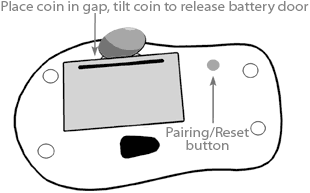
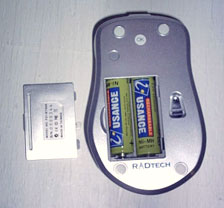
The BT600's battery compartment is accessed through a removable
cover panel on the bottom that releases by using a coin, or, as I
found, just with finger pressure. The two rechargeable AA NiMH
cells slid in easily, and it only took a few seconds. You can find
more information online.
Note: RadTech warns to only use rechargeable alkaline or NiMH
cells in these mice, and only to connect the USB charge cable with
NiMH cells installed in the mice (i.e.: don't try to charge regular
alkaline batteries using the USB cable).
 With
this rechargeable mouse, you never need to get stranded with dead
batteries - just connect the included USB charging cable and let
the batteries charge while you continue working with the equivalent
of a wired mouse.
With
this rechargeable mouse, you never need to get stranded with dead
batteries - just connect the included USB charging cable and let
the batteries charge while you continue working with the equivalent
of a wired mouse.
The scroll wheel doubles as a charge/connection status indicator
(blue/purple while connecting, red while charging, and green when
fully charged). The batteries charge very quickly - taking under an
hour for the indicator to turn green. The BT600 uses a cable with a
standard mini USB connector of the sort used to connect digital
cameras to computers or printers.
The BT600 automatically enters sleep mode after 2-3 minutes of
inactivity; click a button or move the mouse while in sleep mode,
and the connection is seamlessly restored in seconds. An easily
accessible power switch (located on the the top of the BT600)
allows the device to be manually powered down for extended periods
of nonuse and prevents accidental power up during transport.
Bluetooth Mouse Setup
Connecting the mouse is simple - no drivers are needed for Mac
or PC. OS X's Set Up Bluetooth routine (select from the
Bluetooth menu) found the BT600 quickly and with no hassle.
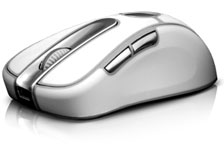 To activate the mouse
connection, make sure Bluetooth is active on your computer. In
OS X, check the "Discoverable" check box in the Bluetooth
preferences panel and also "Show Bluetooth Status in the Menu Bar".
On the mouse itself, make sure batteries are installed, and turn
the power switch on. You may or may not have to press the pairing
button (on the bottom near the optical sensor). The scroll wheel
should glow blue to indicate that the mouse is in "Discoverable"
mode.
To activate the mouse
connection, make sure Bluetooth is active on your computer. In
OS X, check the "Discoverable" check box in the Bluetooth
preferences panel and also "Show Bluetooth Status in the Menu Bar".
On the mouse itself, make sure batteries are installed, and turn
the power switch on. You may or may not have to press the pairing
button (on the bottom near the optical sensor). The scroll wheel
should glow blue to indicate that the mouse is in "Discoverable"
mode.
From the Bluetooth menu, select "Set Up Bluetooth Device" and
follow the instructions. When asked for "Device Type", select
"Mouse". If you're using the mouse in conjunction with a Bluetooth
keyboard, make sure to switch the keyboard on first and then the
mouse (after the mouse has been paired). If asked for a pairing
code, enter 0000 (four zeros).
Note: don't press press the pairing button once the mouse has
been paired. If pressed, connection will be lost and the pairing
process will need to be repeated.
Mouse Configuration
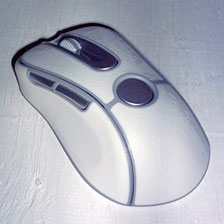 The BT600's buttons 4 and 5 are
positioned near the right thumb for right-handed users, and all
buttons are fully application assignable with no additional
software. All the mouse buttons are fully application assignable
with no additional software, but you can install RadTech's free
RadMouse configuration driver (see below) and
take even greater control of your digital domain.
The BT600's buttons 4 and 5 are
positioned near the right thumb for right-handed users, and all
buttons are fully application assignable with no additional
software. All the mouse buttons are fully application assignable
with no additional software, but you can install RadTech's free
RadMouse configuration driver (see below) and
take even greater control of your digital domain.
The BT600's main buttons are quite light and comfortable to
operate, although they could have a more robust feel to them.
They're basically just plastic flaps that bend when you click,
toggling a microswitch beneath. I don't think they would be
especially prone to failure, but I'm not crazy about the feel.
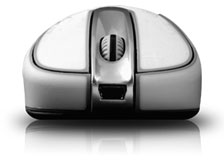 The scrollwheel works well,
although it is detented, while my personal preference is for a
smooth, rotary action. The scrollwheel also acts as the third
button and is much stiffer than I prefer - but that's usual with
scrollwheel click buttons.
The scrollwheel works well,
although it is detented, while my personal preference is for a
smooth, rotary action. The scrollwheel also acts as the third
button and is much stiffer than I prefer - but that's usual with
scrollwheel click buttons.
I was not impressed with the side-mounted fourth and fifth
buttons. The back one was way too stiff, and the front one even
stiffer. Not a biggie for me, as I rarely use more than two mouse
buttons routinely.
Otherwise this is a quite comfortable, full-size mouse with
scallop-contoured sides that the hand cups naturally. All tactile
contact surfaces are coated with a rubbery "traction" cladding -
smooth in the side-scallops and textured on top. I'm a bit
apprehensive about how grubby this off-white material will become
in use, but I expect it can be cleaned successfully.
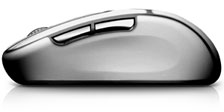 Styling-wise, this one doesn't
especially grab me, but the BT600 works very well with smooth,
light, and precise tracking. Note that there is a slight asymmetry
in it's contours, which are oriented toward right-handed users.
Styling-wise, this one doesn't
especially grab me, but the BT600 works very well with smooth,
light, and precise tracking. Note that there is a slight asymmetry
in it's contours, which are oriented toward right-handed users.
The BT600 is a good, solid choice in a full-sized Bluetooth
mouse. If wireless mice appeal and your Mac supports Bluetooth,
it's well worth considering.
Link: RadTech BT600
Rechargeable Bluetooth Mouse
BT600 Features in summary:
- Smooth tracking, maintenance-free 800 dpi LED optical
technology
- 5-button control plus scroll wheel make navigating your
workspace a breeze
- Button can be assigned by applications - perfect for Expose'
& Dashboard
- BT Class II - Supports the standard HID profile for use with
any device
- 10 Meter free space range - control your computer from across
the room!
- Frequency Hopping Spread Spectrum technology minimizes
interference from other devices
- Full-size form factor for those who prefer a larger mouse
- Use with non-BT equipped computers requires a USB Bluetooth
adapter
- Power switch conserves battery power when not in use or
stored
- Use RadTech's free RadMouse HID driver for unparalleled
control
BT600 Specs:
- Radio Class: Bluetooth II
- Frequency: 2.4 - 2.48 GHz
- Profile: Bluetooth HID
- Data Rate: > 700 Kbps
- Tracking Method: Optical (LED)
- Resolution: 800 dpi
- Power: 2-5 VDC
- 2 x AA NiMH Cells included
- Charging: Via USB Cable
- Charge Rate: 500 mAh; 290 min
- Dimensions: 109 x 67 x 36mm
- Weight: 126g with Batteries
- Product of Taiwan
System requirements:
- Mac OS X 10.3 or later
- PowerPC or Intel Processor
- 2 MB free hard disk space
- Any RadTech Bluetooth mouse
- Updated 04-26-2006
Price: $59.95
RadMouse Bluetooth HID Driver
Take full control of your RadTech Bluetooth mouse with RadMouse
- RadTech's Bluetooth HID Driver & System Pref. Map mouse
buttons and scroll wheel to single or multiple keystrokes or
actions, adjust cursor tracking and scrolling speed, acceleration
curves and more. And all custom settings can be global, or
application specific.
Link: RadMouse
Driver
Go to the Miscellaneous Ramblings Review index.



