Low End Mac Reader Specials
Memory To Go Special: MacPro 8 Core 8GB kit $232 / 4GB kit $116 / 2GB kit $72. New Macbook 2GB DDR3-$65. HARD DRIVES available -- Free shipping / LIfetime warranty.
Download Typestyler, still the Ultimate Styling Tool for Internet, Print and Video Graphics. Works great in Classic with a Native OS X Version on the way. Free Tryout: www.typestyler.com
LA Computer Company: Specials on AppleCare, iMac's, MacBook Pros and more. Optical Drives for Apple iBooks, Powerbooks, MacBooks, MacBook Pros in Stock. Call 1-800-941-7654 Click Here.
OWC: Big Drives, High Performance - Not High Prices! SATA 3.5" up to 1.5TB. Notebook up to 500GB. FW up to 6.0TB. 1.0TB Drive Models from as low as $97.99 www.MacSales.com
Don't install Parallels to play poker online! Poker Mac will show you how
to download and install a native Mac poker application such as Full
Tilt Poker Mac.
Laptop Hardware Provided by TechRestore - Overnight Mac & iPod Repairs.
Compare products like desktop computers, apple laptops, apple macs, and LCD Monitors side by side! All the information and reviews to make the best purchasing decision for new mobile phones, sat nav systems, or MP3 players. The Ciao online shopping community makes searching products easy for you.
Miscellaneous Ramblings
Miscellaneous Ramblings Review
Opera the Best Browser for the Mac
Charles Moore - 2007.02.26 - Tip Jar
For the past couple of years - ever since the first Opera 8.x public preview was released in early 2005 - I've used Opera as my front-line general surfing browser. I love Opera's speed, stability, and the way it renders pages.
The feature that allows you to resume your last browsing session is very convenient as well, although it is no longer unique to Opera - having gone mainstream with Firefox 2, and the best implementation of all being with the freeware CaminoSession plugin for Camino.
I always liked Opera's somewhat quirky user interface, which is much less quirky than it used to be, and its incredibly deep feature set.

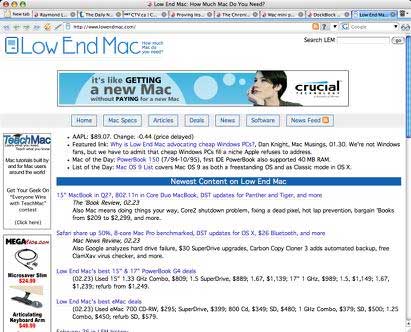
Low End Mac's homepage as rendered by Opera
Opera incorporates a full-featured POP3 email client, news reader, mailing list organizer and RSS/Atom newsfeed reader, an IRC chat client, and a BitTorrent client to download large files. It supports Secure Socket Layer (SSL) version 3, and TLS 1.0 and 1.1, as well as 256-bit encryption, the strongest standard encryption for the Web.
Other features include mouse gestures, allowing you to perform certain movements with the mouse to access commonly-used features, and one of Opera's coolest features is fast and easy Google search direct in the address field: just type 'g "search term" (without the quotation marks)' and press Enter. A Google search page of returns will appear. Slick.
That just scratches the surface. Opera is chock full of nifty touches like that. You really have to use Opera for a while to truly appreciate its capabilities, although the speed will be immediately apparent.
Incidentally, importing your Bookmarks/Favorites from other browsers is simplicity itself.
Opera Bugs
However, Opera does have some shortcomings. It takes forever to start up, even when you're not restoring a saved session. And worse, there is an erratic bug in Opera 8 and later that often causes the "Hide Opera" command to break after the program has been quit, especially after unexpected quits (I don't have them often, and it's usually the system's fault and not Opera's) and after running OS X maintenance scripts - but also sometimes after a completely normal application quit and restart. My workaround, when I remember to do it, is to make a copy of the Opera Preferences folder and compress it to a Zip archive before running system maintenance routines and then restoring it after the fresh reboot of Tiger. Inelegant, but it seems to work, and Opera is worth the trouble. (If I forget, it means trashing the Opera preferences and restarting the program, sometimes more than once, to restore the Hide function.)
On a lesser scale of aggravation, Opera's page load progress bar is lame. Another thing that bugs some users, although it's not a problem for me, is that Opera only supports plain text in OS X Services.
Since I use the hide function routinely, that bug as described is a major aggravation, and it's testimony to how much I like Opera that I have put up with this behavior in order to continue enjoying Opera's many superior features and its speed. It's probably some sort of Tiger incompatibility, as I don't recall the problem manifesting when I ran Opera 8 under Panther.
But it gets old.
Safari Not a Solution
Consequently, from time to time I get frustrated and switch to Safari for a while - but usually not very long. Safari does start up with satisfying dispatch, but once it's up and running, it takes a back seat to Opera in speed and responsiveness.
Another issue I have with Safari is that for some reason text copied and pasted from it doesn't retain paragraph breaks (although there is no such problem with text copied to DEVONthink via OS X Services). Text copied and pasted from Opera retains its paragraph formatting. This may be a small thing for many users, but I do a lot of copy and paste from websites.
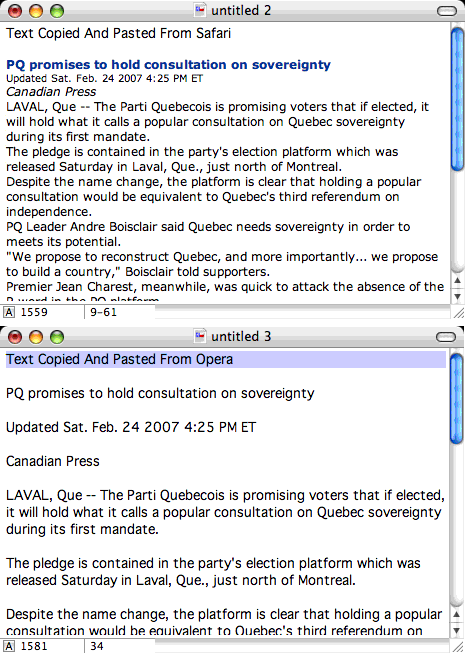
Cut and paste text comparison, Safari vs. Opera
SafariStand
An add-on that does make Safari a more well-rounded browser features-wise is Hetima Computer's freeware SafariStand, which adds on a raft of features, including:
- A sidebar with thumbnail tabs (similar to OmniWeb's tabs).
- 'Stand Bar' (Bookmark, History, Side Bar compatible, Simple RSS Reader)
- 'Quick Search'
- 'Stand Search - supports Spotlight
- 'Action Menu'
- 'Arrange Tabs' - by dragging and dropping
- 'Site Alteration' - alter aspects of sites you are viewing
- intelligent Plug-in blocking
- original bookmark property (color label, category, comment, rate)
- syntax coloring of html in viewed source
- open "_blank" Link in New Tab
I like SafariStand's implementation of thumbnail tabs better than OmniWeb's, because the tab sidebar stays within the main browser window area, rather than in a slide-out drawer. The sidebar can be positioned either on the left or the right.
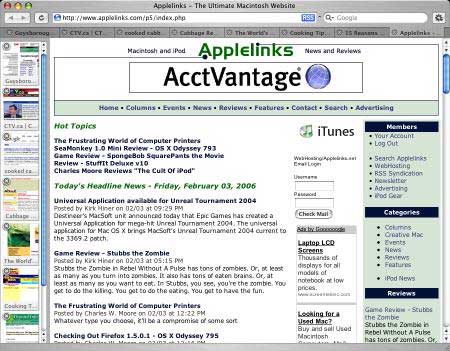
SafariStand's thumbnail sidebar
The standard menu itself is added to the right hand side of the Safari Help menu-bar location. This drop down menu enables you to change the text encoding as well as accessing the preference settings for Safari Stand.
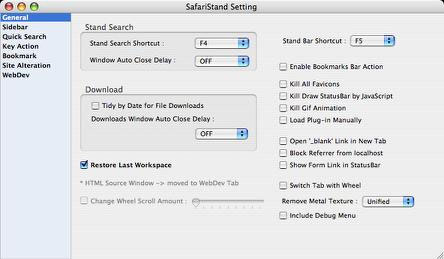

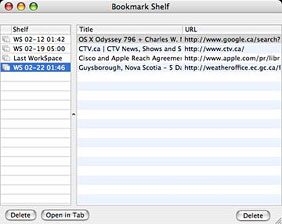
SafariStand's "Bookmark Shelf" is similar to session restore functions in Opera, Firefox, OmniWeb, and the CaminoSession plugin. After opening the Bookmark Shelf, select "Create Shelf from Current Workspace" from the Stand menu, and you'll get a new Shelf in the "Bookmark Shelf" window containing the addresses for all your opened tabs.
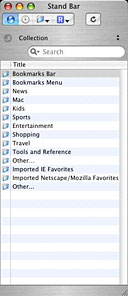
The stand bar feature is
similar to that of the side bar of the Mozilla-based browsers. With
SafariStand, this sidebar appears as an independent window. It can
be toggled on and off by way of a user definable hot-key (defined
in the SafariStand settings). It gives users four options,
Bookmarks, History, Side bar, and a simple RSS Reader.
Stand search is an independent window that can be toggled off and on using a user defined hot-key. It provides two search options; first to search bookmarks and a user's browser history for an item, and Second to enable a Spotlight search of your web archive and html on your system. You can select for the latter whether or not you wish to include file contents in your search.
Not Warm Toward Safari
Unfortunately, while I like SafariStand a lot, I've never warmed much to Safari. In general, I find it slower than Opera - substantially slower on some sites.
However, stability and responsiveness are also factors. Safari, after it's been up and running for a few days, becomes increasingly balky and recalcitrant, slowing down, refusing to respond after you click between tabs until after a good, long wait. Closing and restarting the program improves performance temporarily.
Once I get Opera working, it usually stays working until my next system reboot.
Safari also has a really lame Download manager, while Opera has an excellent one, with support for resumable downloads that actually works well.
How Do You Spell Relief? O P E R A
"Relief" is not too strong a word to describe returning to Opera again after several days on Safari. It's faster and smoother, and I can have a dozen or more tabs open at a time without the program slowing to a crawl or seizing up. Ahhhhhhhhhhhhh.
In my opinion, Opera is still the best all-round general surfing browser for Mac OS X, and Safari has a long way to go to even come close to matching it.
The current version of Opera is 9.10.
Note: these experiences have been on a 1.33 GHz PowerBook G4 with 1.5 GB of RAM
running Tiger (currently OS X 10.4.8) and with a very mediocre
dialup connection to the Internet. With other setups, your mileage
may vary.
Link: Opera

Charles Moore has been a freelance journalist since 1987 and began writing for Mac websites in May 1998. His The Road Warrior column is a regular feature on MacOpinion, and he is a news editor and columnist at Applelinks.com. If you find his articles helpful, please consider making a donation to his tip jar.
Recent Miscellaneous Ramblings
- Refurb MacBook Pro Deal, Fastest Mac Browser, 256 MB Modules for WallStreet, and More, 07.01. Also more Safari 4 feedback, praise for Camino, MacBook cracks, looking for Craigslist software for Macs, and more.
- Bravo to Apple for Pulling the Plug on Porn, 06.29. Last week the developers of 'Hottest Girls' moved from lingerie and bikinis to topless images, so Apple pulled the plug.
- Importance of FireWire, Replacement Battery Advice, RAM for WallStreet PowerBooks, and More, 06.24. Also what is IrDA good for? And reflections on Kodachrome, digital photography, and medium format cameras.
- An Affectionate Farewell to Kodachrome, 06.23. After 74 years on the market, Kodak has discontinued its most famous brand of transparency film.
- More in the Miscellaneous Ramblings index.
Links for the Day
- Mac of the Day: 'Yikes!' Power Mac G4, Aug. 1999 - The only Power Mac G4 with PCI graphics was built on a modified G3 motherboard.
- Group of the Day: Tiger List is for anyone using Mac OS X 10.4.
- July 5 in LEM history: 98: iMac: First of a family? - iMac perfect for schools - 00: Apple is not your friend - 01: 75 Mac Advantages - Exploring the fractal universe - Do you trust me? - 02: The joy of X with Classic - 05: No Quartz Extreme for Pismo - Brief history of NeXT - 06: Education iMac - TopXNotes - Battery reset utility for WallStreet and Clamshell iBooks
- Support Low End Mac
Recent Content on Low End Mac
- iPhone 3GS Overheating, Battery Life App, 240 GB Upgrade for 5G iPod, Total Baby App, and More, iNews Review, 07.02. Also low cost international calls, U-verse remote DVR control, Sync Blocker USB-to-Dock cable, Rocket Taxi improved, and more.
- MacBooks Top Amazon Sales, EFI 1.7 Problems, Pros and Cons of Built-in Batteries, and More, The 'Book Review, 07.02. Also make a bootable SD Card, Leopard on a 9" Dell netbook, MacBook Pro and Air reviews, triple WiFi range, bargain 'Books from $179 to $2,300, and more.
- Apple Tops in Satisfaction Again, Slim Profits on Mac mini, Ultimate Photo Setup, and More, Mac News Review, 07.02. Also tips for cloning hard drives and moving files from old Macs, Clickfree Transformer turns USB drive into a backup drive, maximum Mac Pro RAM, and more.
- Amazon.com v. Interstate Sales Tax: Everyone Loses, Dan Knight, Mac Musings, 07.01. Amazon.com is standing up to states that are trying to have it collect sales tax on interstate commerce, which most see as a violation of federal law.
- Introduction to Autofs in Mac OS X, Keith Winston, Linux to Mac, 07.01. "Autofs is often used in enterprise environments to set up network-based home directories and other network mounts for users at login."
- Optimized Software Builds Bring Out the Best in Your Mac, Dan Knight, Online Tech Journal, 06.30. Applications compiled for your Mac's CPU can load more quickly and run faster than ones compiled for universal use.
- Checking Out Safari 4 on an Old PowerBook, Charles W. Moore, 'Book Value, 06.30. Safari 4 is the fastest it's ever been, but it's not without some frustrating drawbacks.
- Intel's Promise Fulfilled: More Processing Power per Processor Cycle, Dan Knight, Mac Musings, 06.30. Apple promised improved CPU efficiencies when it announced the move to Intel in 2005. Three years of MacBooks show the progress.
- Is Steve Jobs' Health Essential to Apple's Future?, Frank Fox, Stop the Noiz, 06.30. Steve Jobs' health is an important thing, but Apple has demonstrated that it can be profitable without him.
- More links in our archive.
Recent Deals
- Best Mac Pro Deals, 07.02. Used 3 GHz 4-core, $2,000; 3.2 8-core, $2,900; refurb 2.8 8-core, $2,399; new 2.66 4-core, $2,290 a/r; 2.26 8-core, $3,070 a/r; 2.66, $4,499; more.
- Best Mac OS X 10.4 'Tiger' Deals, 07.02. Full version DVD, $140; 5 user family pack, $370; 10-user Server, $299.
- Best 17" PowerBook G4 Deals, 07.02. Used 17" 1 GHz PowerBook, $689; 1.67 GHz, $749; hi-res, $1,029.
- Best Xserve Deals, 07.02. Used 2 GHz single G5, $800; dual, $1,000; refurb 2.8 GHz 4-core Xeon, $2,100; new 2.26 4-core Nehalem, $2,888; 8-core, $3,449; 2.66, $4,799; 2.93, $5,999.
- Best iPod touch Deals, 07.01. Refurb 2G/8 GB, $179; 16 GB, $259; iG/32 GB, $279; new 2G/8 GB, $215; 1G 16 GB, $210; 2G, $275; 2G/32 GB, $369. Prices include shipping.
- Best 13" MacBook & MacBook Pro Deals, 07.01. Used 1.83 GHz, $595; 2.0, $629; new 2.0, $889; 2.13, $925 after rebate; refurb 2.0 Unibody, $949; 2.4, $1,099; new 2.26 MBP, $1,119 a/r; more.
- Best 12" PowerBook G4 Deals, 07.01. Used 867 MHz Combo, $400; 1.33 GHz, $448; 1.5 GHz, $599; 1 GHz SuperDrive, $509; 1.33 GHz, $599; 1.5 GHz SD, $679.
- Best Apple TV Deals, 07.01. Refurb 40 GB Apple TV, $199; new, $220; refurb 160 GB, $279; new, $320. Prices include ground shipping.
- Best G4 iBook Deals, 06.29. Used 12" 800 MHz Combo, $290; 1 GHz CD, $299; Combo, $370; 1.33 GHz, $428; 14" 1 GHz Combo, $399; 1.2, $465; 1.42 GHz, $500.
- Best Power Mac G3 and PCI Video Card Deals, 06.29. Used beige 300 MHz, $25; G4/366, $39; blue & white 350, $80; 400, $90; 450, $105; PCI video cards from $15; shipping additional.
- Best Mac OS X 10.0-10.3 Deals, 06.29. Mac OS X 10.0, $30; 10.1, $20; 10.2, $60; 10.3, $50; 10.3 Server, unlimited users, $130.
- Best Time Capsule and AirPort Deals, 06.29. Close-out 500 GB Time Capsule, $199; 1 TB, $350; AirPort Extreme Base Station, $130; refurb AirPort Express, $85.
- More deals in our archive.
About LEM | Support | Usage | Privacy | Contacts
Navigation
Used Mac Dealers
Apple History
Video Cards
Email Lists
Favorite Sites
MacSurfer
MacMinute
MacInTouch
MyAppleMenu
InfoMac
Macs Only!
The Mac Observer
Accelerate Your Mac
RetroMacCast
PB Central
MacWindows
The Vintage Mac
Museum
DealMac
DealsOnTheWeb
Mac2Sell
ramseeker
Mac Driver Museum
JAG's House
System
6 Heaven
System 7 Today
the pickle's Low-End
Mac FAQ
Abandonware
Petition
Mac vs. PC Info
Affiliates
The Apple
Store
Mac
Connection
MacMall
TechRestore
ExperCom
Crucial
Memory
batteries.com
Have a question?
Ask an expert!
Advertise
MacMinute
MacInTouch
MyAppleMenu
InfoMac
Macs Only!
The Mac Observer
Accelerate Your Mac
RetroMacCast
PB Central
MacWindows
The Vintage Mac
Museum
DealMac
DealsOnTheWeb
Mac2Sell
ramseeker
Mac Driver Museum
JAG's House
System 6 Heaven
System 7 Today
the pickle's Low-End
Mac FAQ
Abandonware
Petition
Mac vs. PC Info
Mac Connection
MacMall
TechRestore
ExperCom
Crucial Memory
batteries.com
Ask an expert!