About a year and a half ago I
reviewed MacMice's The Ball Bluetooth cordless trackball, which
I found quite comfortable, although I questioned the basic concept
of using cordless connectivity, with its added complexity, often
mediocre accuracy and responsiveness, and necessity for batteries
at desktop workstations - and you would hardly take a freestanding
trackball on the road to use with a laptop.
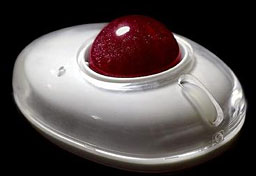
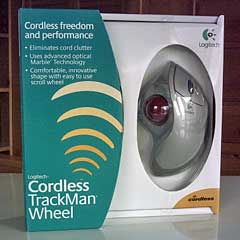
Logitech's TrackMan Wheel is another approach to trackball
input. It comes in both corded and cordless versions. Our test unit
is the cordless version, but (unlike The Ball) it's not a Bluetooth
device. Rather, it uses Logitech's "digital radio technology",
which lets you work within a 6' radius of the receiver with no line
of sight issues.
More about the relative merits of these two wireless interfaces
in a moment.
Before I could use it, the Logitech driver and configuration
software had to be installed, and the computer rebooted.
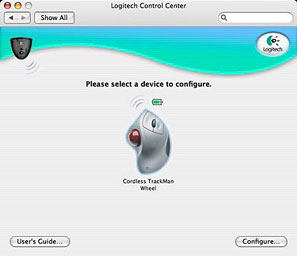
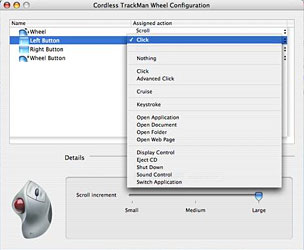
You can use the Logitech Control Center preference panel to
custom configure mouse button and scroll wheel commands.
The other major distinction between The Ball and the TrackMan
Wheel is that while you actuate the former's tracking ball with
your index and/or big fingers, the TrackMan Wheel's ball is
actuated with the thumb. The thumb, with its wide range of motion,
is arguably the logical digit to use with trackballs, and
thumb-actuation makes it easy to traverse the entire width of my
17" PowerBook's widescreen display with one quick motion. Indeed, I
found thumb trackball navigation so slick, quick, and articulate
that I soon preferred it to certain keyboard shortcuts I use
frequently, such as Command > Delete for banishing highlighted
files to the Trash.
On the
other hand, while The Ball is completely ambidextrous, the TrackMan
Wheel is radically right-hand oriented, which may be an issue for
lefties.
Aside from the unorthodox configuration of its trackball, the
TrackMan Wheel offers the usual standard trackball/mouse features:
left and right buttons and a "clickable" scroll wheel that also
serves as a third button. It uses optical tracking technology that
works whether the trackball is clean or not, although it's good
practice to pop the ball out and wash it whenever it begins to get
grubby just as a matter of form.
Hands On
I have to say that the smoothness and effortlessness of the
trackball rotation isn't quite up the the standard of The Ball,
whose tracking ball rests on three tiny stainless steel ball
bearings rather than three nylon ones, but it's not a big
issue.
One disadvantage of non-Bluetooth cordless trackball is
that you are obliged to use up a precious USB port to connect the
receiver. Bluetooth is another matter, since it is built into the
computer and operating system, and it requires no external receiver
dongle unless your Mac predates Apple's adoption of Bluetooth. On
the plus side, the Logitech wireless technology, unlike Bluetooth,
has no latency on wake-up and does not need to be "paired" - both
attributes appreciated by me.
Corded makes more sense to me, especially with trackballs. Since
the trackball housing remains stationery in normal use, having a
direct cord connection doesn't inhibit its desktop functionality in
the slightest, and the receiver module is just something else to
lug around and possibly get lost for portable users.
My recommendation for the TrackMan Wheel would be to go with the
US$20 less expensive corded version and dispense with the need to
replace a single AA battery every 3-4 months, (Logitech's "Smart
Power Management" helps extend battery life). A battery indicator
warns you when the battery is low.
Supports Mac OS 8.6
One aspect that should be of particular interest to some Low End
Mac readers is that the Logitech Cordless TrackMan Wheel supports
Macs back to OS 8.6, while Bluetooth support didn't come along
until well into the OS X era, so the TrackMan is a wireless
solution for older machines with no Bluetooth, if that's something
that would appeal.
In terms
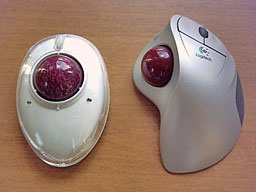
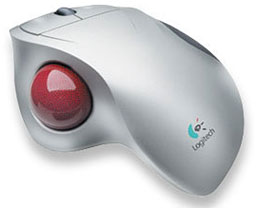
of form factor, the TrackMan Wheel is about the size of a large
mouse, with the buttons and scroll wheel where you would expect
them to be. The trackball itself is embedded in the left-hand side
of the housing, where it is manipulated by the thumb of the user's
right hand.
The TrackMan Wheel is trapezoidally molded to accommodate the
shape of the human hand. Personally, I would have preferred the
palm rest to be somewhat more vertical in orientation rather than
the relatively flat angle it is, facilitating more neutral
pronation of the hand and forearm - the AerO2bic mouse (formerly Quill Mouse) being a good example of what
I'm getting at.
The TrackMan Wheel's styling is typically Logitech, with a matte
silver gray main housing accented with darker gray bottom panel and
a marbled dark red trackball, which seems to be a popular color for
trackballs because MacMice's The Ball uses it as well.
 The scroll wheel is dark grey and is more
stiffly detented than is to my liking (my preference is for scroll
wheels with an effortless action and no detents at all, as on The
Ball and the MacMice mice). The click buttons fall naturally under
the index and middle fingers and have a nice, light, positive
action.
The scroll wheel is dark grey and is more
stiffly detented than is to my liking (my preference is for scroll
wheels with an effortless action and no detents at all, as on The
Ball and the MacMice mice). The click buttons fall naturally under
the index and middle fingers and have a nice, light, positive
action.
Using the TrackMan Wheel's thumb-actuated ball configuration
quickly becomes intuitive, and the thumb is in most applications
better suited to manipulating the ball than fingers would be. One
exception, perhaps, would be ultra-precise movements required in
graphics editing, but IMHO a mouse is better for that sort of work
anyway.
Cursor Speed
I'm
inclined to like fast cursor response, and to that end, use the
cool little MouseZoom
utility set at "Extremely Fast" or about 4.48x (Apple's fastest
speed configurable with the OS X Preference panel is a poky
1.7x). MouseZoom can actually take you up to a factor of 10x, which
is, as they put it, "crazy fast", but I expect a lot of users would
find my setting of less than half that plenty nervous.
With the TrackMan Wheel, I found that dropping the
tracking speed back into the Apple supported range - even the
lower-end of it (say .50) - was preferable, and a thumb-sweep of
the trackball would still traverse the Desktop quickly and
efficiently.
 My first
priority in choosing a pointing device for production work is of
necessity imposed on me by physical limitations - fibromyalgia and chronic peripheral
neuritis. For me, keeping one's forearm and wrist stationary
while using a trackball - whether thumb or finger activated -
causes more fatigue than having them mobile, especially with the
Quill/AirO2bic Mouse, where motion
is mainly initiated from the elbow rather than the wrist.
My first
priority in choosing a pointing device for production work is of
necessity imposed on me by physical limitations - fibromyalgia and chronic peripheral
neuritis. For me, keeping one's forearm and wrist stationary
while using a trackball - whether thumb or finger activated -
causes more fatigue than having them mobile, especially with the
Quill/AirO2bic Mouse, where motion
is mainly initiated from the elbow rather than the wrist.
On the other hand, someone with
carpal tunnel syndrome or other species of repetitive strain
injury (RSI) may do better with the trackball.
Matching the Tool to the Job
I think that the suitability of trackballs as productivity
enhancers depends to a considerable degree on what sort of work you
do with them. I find the trackball is great for general Finder and
menu navigation, especially in the Finder, where its speed and
quick maneuverability are a delight.
As previously noted, for things like image editing, where you
need very tight and precise incremental cursor control, I have to
say that the thumb-actuated trackball is not ideally suited, and
that, at least for me, a finger-activated trackball or trackpad
works better - and a conventional (wrist-articulated) mouse works
best of all.
As with most tool choices - whether with computers, woodworking,
or auto mechanics - the best tool to use depends on the demands and
conditions of the job at hand and what you're most comfortable
with.
System Requirements (for Logitech Control Center)
- Mac OS X version 10.1.2 or higher.
- Macintosh computer with built-in USB port.
- Any PCI PowerMac using a USB adapter card.
The installer will check for the OS version and will not install
the Logitech Control Center if your Macintosh is not running a
supported version of Mac OS X.
The Cordless TrackMan Wheel is covered by a five year warranty
and retails for US$49.95.
Go to the Miscellaneous Ramblings Review index.



