I mentioned J.D. Biersdorfer's iPod: The Missing Manual in
Resetting the iPod's Display
Language When You Don't Know the Language It's Using. This
reference and resource for iPod users is currently in its sixth
edition, covering the iPod classic, the third generation iPod nano with
video, the latest iPod shuffle, and the iPod touch. The iPhone, which
has its own Missing Manual, isn't included.
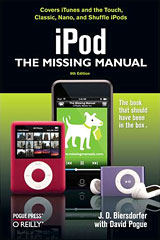
iPod: The Missing Manual got
a major makeover with its 5th edition in 2006, transitioning from the
classic Missing Manual motif to a new black and green cover theme. In
contrast with the previous editions' copious white spaces, it now has
color illustrations instead of the erstwhile grayscale ones. Page,
chapter, and topic information appear in Aqua-style title bars, albeit
positioned at the page bottom. It also has a slimmer book format and a
reduction in price from $24.99 to $19.99.
In terms of appearance, the 6th edition is very much an evolutionary
development from the 5th, but the comprehensive update of Apple's four
iPod lines across the board, plus one entirely new model (the iPod
touch), necessitated a substantial rewrite of the book's editorial
content.
As author J.D. Biersdorfer observes, "By the end of my book, readers
will understand how the iPod works, not only for playing music and
video, but all the other things it can do, like storing phone numbers
or keeping your mind working with a few rounds of iQuiz."
Perhaps a testimony to the substantial collaborative effort required
to bring what has become the standard and authoritative reference for
keeping iPod users up to date, Missing Manuals series founder David
Pogue is back sharing co-authorship credit.
The iPod touch especially (an interesting stylistic note: for some
reason the authors have chosen not to use the Apple convention of all
lower case for the iPod models' names; they capitalize Nano, Classic,
Shuffle, and Classic throughout this volume) with its touchscreen
interface required a lot of completely new tutorial material.
"That touchscreen interface used on the touch," says Biersdorfer,
"has the potential change how we interact with computers of all types.
When you see how easy it is to manipulate photos or tap your way across
the Web on the touch, you can't help but think about when this
technology is going to start dominating the rest of the computers we
work on."
 And
author says one of her favorite things to do with the iPod touch is use
the Safari Web browser to visit http://www.apple.com/trailers.
"Most of the time you just need to tap the arrow on the video window to
start streaming that movie across the touch screen," she notes. "I also
like to stream Internet news broadcasts off the BBC's Website," she
adds, "tap a download link for a show, and you get an earful about
what's going on in the rest of the world."
And
author says one of her favorite things to do with the iPod touch is use
the Safari Web browser to visit http://www.apple.com/trailers.
"Most of the time you just need to tap the arrow on the video window to
start streaming that movie across the touch screen," she notes. "I also
like to stream Internet news broadcasts off the BBC's Website," she
adds, "tap a download link for a show, and you get an earful about
what's going on in the rest of the world."
iPod: The Missing Manual 5th edition took a serious trip to
the fat farm, trimming down from the fourth edition's portly 315 pages
to a svelte 240, but this edition is up to 278. It includes a
completely new chapter, "Touring the Touch", and the big iTunes chapter
in edition five is now broken down into separate chapters for iTunes
"Basics" and "Power Moves". There is some other chapter rejigging, and
another all-new chapter covers the iPod as personal assistant, for a
total of 13 chapters.
Even with the extra pages, something had to get the heave-ho, that
being any specific instructions for, or even passing reference to,
earlier generations of the iPod. Models covered include only the four
iPod model families introduced in 2007. This is arguably a sensible and
necessary rationalization, and if you have an older iPod, much of the
information in the 6th edition will still be relevant and useful, but
it may be better for you to look around for a remaindered or used
earlier edition of iPod: The Missing Manual.
The instructions that are provided for the current iPod models are
considerably leaner and less prolix than in 4th and earlier editions,
but the new edition is, if anything, even more profusely illustrated
with full-color photos, screenshots, and graphs than the 5th Edition
was.
Chapters
Chapter 1 is called "Meet The iPod: Out of the Box and Into Your
Ears in 15 Minutes", which thematically sets the pace and motif for
what is to follow. Covered in this chapter are concise descriptions of
the current iPod model families, plus short tutorials on unpacking a
new iPod, installing iTunes, locating music, connecting the iPod to
computers, charging the unit, and using the various controls.
Chapter 2, "Bopping Around the iPod", tells you what you need to
know about getting the most out of playing music on the iPod, how to
navigate and manipulate the menus, searching for songs, adjusting
volume, exterior appearance maintenance, playing games on your iPod,
and security tips.
Chapter 3, "Touring the Touch", provides 15 pages of tutorial
information on using the new iPod touch, including the home button and
Home Screen, the other screen icons, the Music, Videos, Photos, and
Settings menus, tips on fingerwork, customizing menus, Cover Flow, and
more.
Chapter 4, "iTunes Basics", addresses the stuff you would expect
from the chapter title.
Chapter 5, "iTunes Power Moves", takes you well beyond the basics
with 24 subhead topics ranging from finding and rating songs through
improving playback quality with the Graphic Equalizer, accessing
Internet Radio, editing, adding artwork and lyrics, using iTunes to
configure the iPod, making backups, and much more.
Chapter 6, "The Power of Playlists", tells you what you need to know
about creating and managing playlists on your iPod - and even burning
them to a CD.
Chapter 7 is "Shop the iTunes Store", with instructions and tips on
buying songs, albums, movies, videos, books, and games at Apple's
online
iTunes Store, and what you can do with them once they're
downloaded. There is even a section addressing issues dialup users will
encounter with the iTunes Store.
Chapter 8, "Videos Everywhere", gives you the lowdown on using
videos and movies on your iPod, whether they're ones you download from
online sources or that you create yourself with a digital video camera
and Apple's iMovie.
Chapter 9 is about "Picturing Your Photos on the iPod", using the
iPod as a photo archive and slideshow device, either on its own display
or outputting to a TV.
Chapter 10 brings you up to speed on all the "The iPod as a Personal
Assistant", such as serving as an electronic address book or calendar,
a stopwatch or world clock, a portable hard drive, a text file reader,
and an audio recorder.
Chapter 11, "iPod Touch(ing) the Web", tells you how to connect via
WiFi, walks you through using the mobile version of the Safari browser,
tells you how to use the touch keyboard, covers working with Safari
Bookmarks, audio and video on the Web, and a variety of other Internet
- related topics.
Chapter 12, "iPod Out Loud", tackles taking your iPod on the road,
playing it through FM radio speakers and connecting it to an automobile
stereo system, alternate power sources, connecting the iPod to your
home entertainment system, streaming music over Airport Express or
through portable speakers, and where to find cool iPod stuff.
Chapter 13 is the troubleshooting chapter, entitled "What To Do When
the iPod Isn't Working Right". It begins with the "5 (or 6) -Rs" of
iPod repair - Reset, Retry, Restart, Reinstall, and Restore, plus a
specifically iPod touch set of Rs: Recharge, Restart, Reset, Remove,
Reset Settings, and Restore, with corresponding tutorials on each
category. There is also a section on understanding the iPod's battery
messages and some tips on prolonging battery life, as well as on
AppleCare, finding professional repair help, and Apple troubleshooting
resources.
For more detailed chapter outlines, visit the iPod: The Missing Manual
"Missing CD-ROM" page.
The book's price has held at $19.99 for US readers or £12.50
for UK readers. The book is also available in PDF format for $15.99, or
in Print plus PDF for $25.99
iPod: The Missing Manual 6th edition really is a resource you
should have if you own any current model iPod and want to get the most
out of it. At the price of twenty dollars, it's a great deal.
I have to concede that I lament the passing of the classic Missing
Manual look, but the attractiveness of the full color presentation
compensates a fair bit, and while I'm partial to the more prolix and
detailed text content of the early editions, I'll concede that for the
average iPod user, this more bare-bones approach makes sense, and the
book will be more likely to be referenced frequently.
Low End Mac Rating, 3 out of 4.
- iPod: The Missing Manual, Sixth Edition
- By J.D. Biersdorfer, David Pogue
- $19.99 USD
- £12.50 GBP
- PDF Price: $15.99
- For more information, visit http://oreilly.com/catalog/9780596514914/



