Low End Mac Reader Specials
TypeStyler For Mac OS X is Now Shipping! Download The Free Fully Functional 60 Day Tryout at www.typestyler.com
Don't install Parallels to play poker online! Poker Mac will show you how
to download and install a native Mac poker application such as Full
Tilt Poker Mac.
Laptop Hardware Provided by TechRestore - Overnight Mac & iPod Repairs.
Compare products like desktop computers, apple laptops, apple macs, and LCD Monitors side by side! All the information and reviews to make the best purchasing decision for new mobile phones, sat nav systems, or MP3 players. The Ciao online shopping community makes searching products easy for you.
Miscellaneous Ramblings
Google Chrome Mac Preview Has Made a Convert
Charles Moore - 2009.11.02 - Tip Jar
Follow Low End Mac on Twitter.
Popularity: ![]()
![]()
![]()
![]()
Tweet this article. Short link: http://bit.ly/2hlKOJ
Google has finally released a public (well, "developer") alpha preview of its Chrome browser for the Mac.
The program starts up amazingly quickly - it's even faster than Safari, which was the previous champion in this context.
Import Bookmarks: Now or Never
When you first start Chrome, a dialog comes up asking if you want to import your bookmarks from either Safari or Firefox. I chose Firefox, and then a second dialog came up telling me that I had to quit Firefox in order to execute the import.
With 10 tabs open in Firefox I wasn't enthusiastic about quitting it right then, so I declined and hit the proceed without import button, expecting to find a manual import command somewhere in the menus, but alas, I did not. Quitting and restarting the program again did not produce the import dialog, so I guess I'm stuck with adding bookmarks one at a time. Not a big deal, but slightly annoying.
The Bookmark Manager itself isn't implemented yet either.
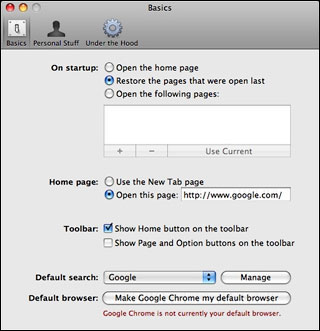
Chrome's preferences pane.
I very much like Chrome's preferences, which only have three panels and are very clear, sensible, and intuitive.
Like Opera and Safari, Chrome lets you get to your favorite websites with just a click from thumbnails of your most visited sites in its the New Tab page.
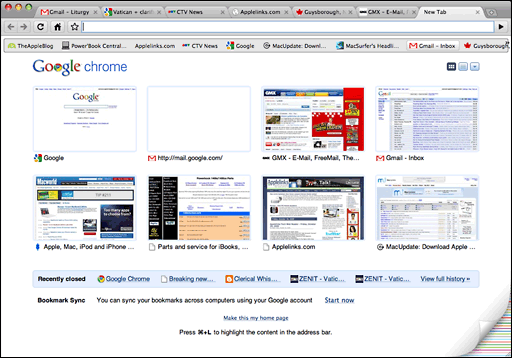
Chrome's "most visited sites" page.
I just love the tabs and the way they smoothly pop up when you summon a new one. Very cool. Indeed, I'm quite smitten with the Chrome interface already, which has a very clean attractive and functional look, and the minimalism - just the key features that you need and nothing more - also appeals.
I know I blow hot and cold on this latter matter, having long praised Opera and iCab for their deep feature sets, but there's a case to be made for either approach.
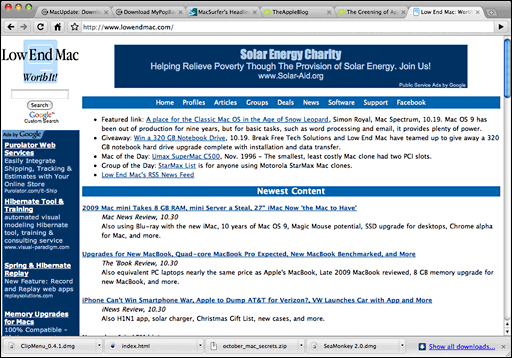
The Low End Mac home page as seen in Chrome for Mac.
Speaking of appearance, if you like something a bit more adventurous than the standard Chrome user interface, there is a selection of alternate "themes" you can download for free. I didn't count, but it looks like there would be maybe 75 to 100 choices. I decided to stick with the standard interface, which I find quite attractive and like a lot better than Safari's or Firefox's default look.
å
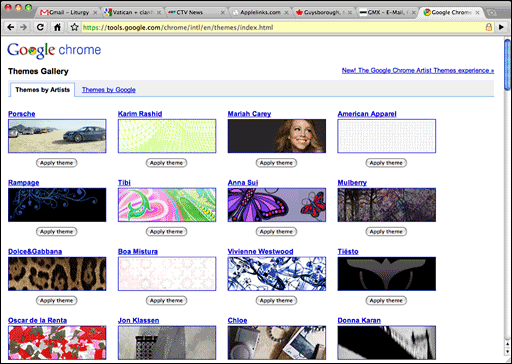
Chrome gives you dozens and dozens of themes to choose from.
Hallelujah! - drag and drop from Chrome into text apps works (it doesn't with Opera, which is one of the few things I don't like about that browser).
I've fallen in love with Chrome already, and I've only been using it for a few days. This is the fastest browser I've ever used, bar none. Wheeee!
I also love Chrome's tab implementation, especially the way it opens a page beside the referring page when you Command-click a link rather than way off to the right like other browsers. As for the tabs being at the top, it's not a big deal to me one way or the other. Top is fine, and Apple's ephemeral experiment with tabs in the menu bar with the Safari beta was lame compared with the slickness of Chrome's tabs. In Chrome's case, there's still plenty of menu bar to grab the top of the window and no sacrifice of vertical height in the content window.
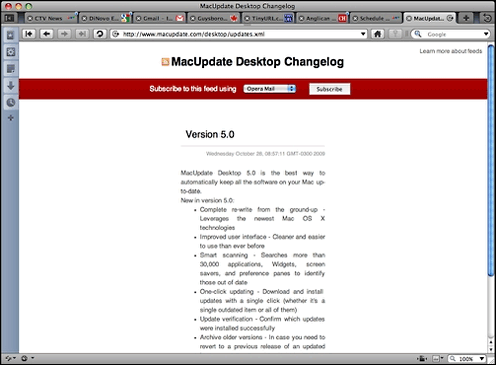
There are a few hiccups. Chrome doesn't always play well with Spaces in Leopard (i.e.: clicking on the Chrome icon in the Dock doesn't always bring forward the space where Chrome is), but that's a minor thing. It also doesn't handle PDF downloads particularly well, and some regular pages don't render well either. For example, here is the same page opened in Chrome and Opera 10.01 respectively.
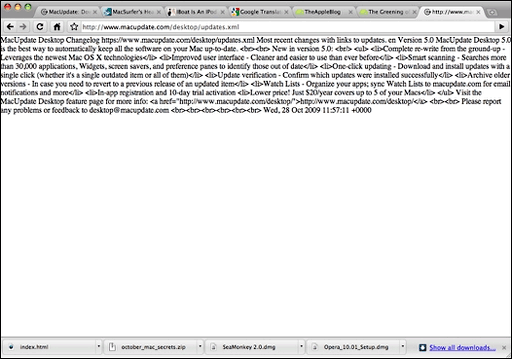
MacUpdate in Chrome (above) and Opera (below).
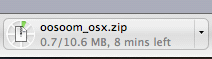
The download manager is minimalist, with the progress
monitoring readout consisting of a small thumbnail in the bottom margin
of the interface window.
However, it is expandable to give you more detailed information on download history, with a rather nice configuration.
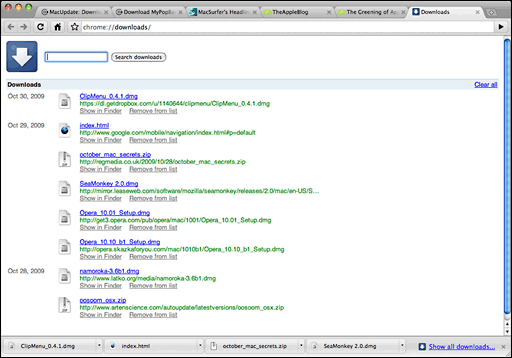
Chrome's download manager has a tab of its own.
However, in general I've been pleasantly surprised - blown away, really - by how stable and smooth-performing the Chrome alpha build is, and it's already become my browser of choice for most surfing, with the exception of tasks where security is an important priority (such as online banking or credit card purchases), since Google warns that this Mac build still "lacks certain privacy features, and is not appropriate for general consumer use."
Last week Google cofounder Sergey Brin said that he personally is using this pre-beta version of Chrome for the Mac. In my as-yet limited experience, Chrome has been handling everything I throw at it, aside from the few exceptions above-noted.
Google projects having a final build of Chrome for the Mac out the door by year-end. The performance I'm enjoying with this build makes that seem a very achievable objective.
Mac System Requirements:
- Intel CPU
- Mac OS X 10.5.6 or later

Charles Moore has been a freelance journalist since 1987 and began writing for Mac websites in May 1998. His The Road Warrior column is a regular feature on MacOpinion, and he is a news editor and columnist at Applelinks.com. If you find his articles helpful, please consider making a donation to his tip jar.
Recent Miscellaneous Ramblings
- Do We Really Need Another Mac Email Client?, 02.08. Mac users have a host of free and low-cost email clients to choose from. Does Brent Simmons' 'Letters' project make any sense at all?
- iPad Should Support a Stylus, CoolBook Quiets MacBooks, Puppy Linux for PowerPC Macs, and More, 02.03. Also the iPad as a genie in a bottle, Eudora Classic 6.2, notebook battery life, and more uses for 'obsolete' technology.
- Waiting for WindowShade X before Going Snow Leopard, 02.01. For anyone used to windowshading, nothing else will do. Unsanity is working on WindowShade X for Mac OS X 10.6.
- Search for a Quieter MacBook, AC Adapter for Lombard PowerBook, Apple Magic Tablet, and More, 01.27. Also Logitech Unifying Receiver and diNovo keyboard, and is everything ultimately political?
- More in the Miscellaneous Ramblings index.
Links for the Day
- Mac of the Day: 'WallStreet' PowerBook G3, May 1998 - WallStreet offered 3 screen sizes and CPU speeds from 233 to 292 MHz.
- Group of the Day: Mac UK is for Mac users in the United Kingdom.
- February 9 in LEM history: 00: Think choices - Promoting the Macintosh - 01: Apple vs. Mac clones - 05: Apple and the $100 laptop - Yojimbo - Core Duo vs. G5 - 07: The story behind After Dark - Microsoft Office 2007
- Support Low End Mac
Recent Content on Low End Mac
- MacBook Pro a Revelation, Dan Knight, Mac Musings, 02.08. After using G4 Macs for over a decade, spending a weekend prepping a first generation MacBook Pro was a real eye opener.
- 42 Reasons a Netbooks Is Better than an iPad, Hard Drive Upgrade Value, Faster Netbooks, and More, The 'Book Review, 02.05. Also why the iPad can't compete with netbooks, 802.11n WiFi card for older Intel MacBooks and Mac minis, and a DJ keyboard cover for MacBooks.
- iPad Perfect for Handheld Computing, John Hatchett, Recycled Computing, 02.05. You can hold the iPad in one hand and operate it with the other, giving it real advantages over a laptop computer.
- iPad Targets Netbook Users, iPad 'Flaws' Don't Matter, In-page Search for iPhone Safari, and More, iNews Review, 02.05. Also FSF considers iPad 'iBad' for freedom, Touch Mouse app turns iPhone into wireless keyboard and trackpad, privacy screen for iPhone, and more.
- Touch Shifts the Apple Empire, Tim Nash, Taking Back the Market, 02.05. Apple dominates mobile computing, and it will be difficult for competitors to match the value of the iPad.
- 90% of Premium PCs Are Macs, OS and Browser Market Share, Chrome Browser to Dominate, and More, Mac News Review, 02.05. Also 27" iMac too popular for supply, eco-friendly 2 TB hard drive, Puppy Linux for PowerPC Macs, 6-core Mac Pro rumored, and more.
- More links in our archive.
Recent Deals
- Best 15" MacBook Pro Deals, 02.02. Used 2 GHz, $700; 2.4, $999; refurb 2.53, $1,449; 2.8, $1,699; 3.06, $2,199; new 2.53, $1,610; 2.66, $1,839; 2.8, $2,109; 3.06, $2,550; more.
- Best G3 iMac Deals, 02.02. 500 MHz CD-ROM, $40; 450 MHz DVD-ROM, $60; 600 MHz CD-ROM, $230 shipped; 700 MHz CD-RW, $300 shipped.
- Best eMac Deals, 02.02. 1 GHz SuperDrive, $269; 1.25 Combo, $100; SD, $360; 1.42 GHz Combo, $299; SD, $439.
- Best Mac mini Deals, 02.01. Used 1.25 GHz G4 Combo, $369; 1.5, $399; Core Solo, $399; 1.83 GHz Core Duo SD, $439; new 2.26 GHz nVidia, $580; 2.53 GHz, $759; Server, $985.
- Best iBook G4 Deals, 02.01. 12" 1.07 GHz Combo, $200; 1.33 GHz, $259; 14" 1.42 GHz SuperDrive, $399.
- Best Titanium PowerBook G4 Deals, 02.01. 800 MHz Combo, $285; 867 MHz SuperDrive, $400; 1 GHz Combo, $549.
- Best 13" MacBook & MacBook Pro Deals, 01.29. Used 1.83 GHz, $570; 2.0, $599; 2.4 GHz, $800; 2.26 MB, $849; new, $925 after rebate; Pro, $1,108, 2.53, $1,399 a/r.
- Best Power Mac G5 Deals, 01.29. 1.8 GHz single, $399; dual, $479; 2.0, $549; 2.5, $609; 2.7, $799; 2.3 GHz dual-core, $709; 2.5 GHz Quad, $939.
- Best Mac OS X 10.0-10.3 Deals, 01.29. Mac OS X 10.0, $30; 10.1, $20; 10.2, $50; 10.3, $50; 10.3 Server, unlimited users, $130.
- More deals in our archive.
About LEM | Support | Usage | Privacy | Contacts
Navigation
Used Mac Dealers
Apple History
Video Cards
Email Lists
Favorite Sites
MacSurfer
MacMinute
MacInTouch
MyAppleMenu
InfoMac
Macs Only!
The Mac Observer
Accelerate Your Mac
RetroMacCast
PB Central
MacWindows
The Vintage Mac
Museum
DealMac
DealsOnTheWeb
Mac2Sell
ramseeker
Mac Driver Museum
JAG's House
System
6 Heaven
System 7 Today
the pickle's Low-End
Mac FAQ
Abandonware
Petition
Mac vs. PC Info
Affiliates
The Apple
Store
Mac
Connection
B&H
MacMall
TechRestore
ExperCom
Crucial
Memory
batteries.com
MacMinute
MacInTouch
MyAppleMenu
InfoMac
Macs Only!
The Mac Observer
Accelerate Your Mac
RetroMacCast
PB Central
MacWindows
The Vintage Mac
Museum
DealMac
DealsOnTheWeb
Mac2Sell
ramseeker
Mac Driver Museum
JAG's House
System 6 Heaven
System 7 Today
the pickle's Low-End
Mac FAQ
Abandonware
Petition
Mac vs. PC Info
Mac Connection
B&H
MacMall
TechRestore
ExperCom
Crucial Memory
batteries.com


