If you're looking for a Christmas gift in the $30 range for Mac
users on your list - especially someone new to the platform - check out
Wallace Wang's My New Mac: Snow Leopard Edition.
The book has been completely revised and updated to address the new
features of Mac OS X 10.6 Snow Leopard and is not a manual
substitute like David Pogue's Mac
OS X Snow Leopard: The Missing Manual and several other
similar volumes.
No Starch Press publisher Bill Pollock defines this book as "a
project-based get-it-done-without-a-a lot-of-fuss-guide to using a Mac
- not a tedious and boring manual - because who wants to read those
anyway?" Well, personally, I like reading manuals, but I know a lot of
folks don't, so there's definitely room for volumes like this on the
bookshelves too.
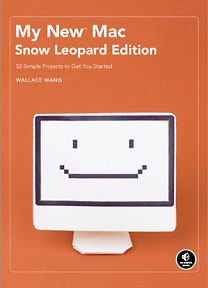 This edition of My New Mac, like its predecessors, is
structured in a format of semi-discrete projects - in this instance 54
of them - that instruct the reader, especially readers new to the Mac
OS, how to do many useful things with their Macs without the necessity
of climbing a steep learning curve.
This edition of My New Mac, like its predecessors, is
structured in a format of semi-discrete projects - in this instance 54
of them - that instruct the reader, especially readers new to the Mac
OS, how to do many useful things with their Macs without the necessity
of climbing a steep learning curve.
Wallace Wang says that "instead of burdening users with technical
details, the Macintosh lets them get useful stuff done right away.
That's why I designed My New Mac as a project-oriented book that
focuses on accomplishing specific tasks, rather than a book that lists
all the possible menu options." Fair enough; appendices full of menu
options are not my favorite part of manual volumes.
The first
edition (2008) of My New Mac was a bestseller in Apple
stores and bookstores around the world, and this completely revised
Snow Leopard Edition should sell robustly as well, since it's a concept
that will appeal to many Mac users.
Notwithstanding that My New Mac makes a point of not getting
bogged down in technical minutiae and detail, it's no lightweight
(although very readable in style), containing 500 pages and being
nearly an inch-and-a-half thick. There's plenty of content for your
$29.95.
The 54 projects covered are grouped in five category sections plus
an Introduction and a whimsical appendix with a template for building a
paper computer model.
With 54 of them, the project tutorials are relatively relatively
short subjects that can be approached much like recipes in a cookbook.
Each project describes a common problem you may may encounter when
using your computer, explains how the Mac can help you solve the
problem, and then lists all the steps you need to follow in order to
reach the solution in the inimitable Macintosh way.
This format allows the neophyte reader or new Mac owner to discover
how to do fun and useful things with the computer right away, walked
through the processes with hands-on, illustrated instructions. Readers
are completely new to the Macintosh will probably benefit from starting
at the beginning, with the first section: Part One: Basic Training.
Aside from that consideration, you can pretty much dive in anywhere you
like after scanning through the table of contents for projects that
particularly pique your interest, while skipping stuff that doesn't
interest you without any worries about loss of continuity.
The first section, Basic Training, starts with the very fundamental
basics like turning your Mac on and off, and the several possible ways
that can be addressed. There is also a section on learning to use the
mouse or trackpad, how to toggle commands using the menu bar,
understanding dialog sheets, dealing with the Mac OS X Dock
(including customization options), and, of course, using and getting
the best out of some of the more advanced Mac OS X features like
Exposé, Spaces, navigating the Finder, managing files and
folders, and there's even a chapter on energy conservation when using
your Mac.
Part Two: Making Life Easier with Shortcuts, is what it sounds like,
beginning with the eponymous keyboard shortcuts, but also addressing
topics like controlling your Mac with "hot corners", finding files
quickly with Spotlight, using QuickLook to check out files without
actually opening them in an application, file organization, using the
Dashboard and widgets, configuring multiple personalities and user
accounts as well as parental controls (if desired), adjusting view
options, and using the Stickies program.
Part Three is called Putting Your Macintosh to Work, beginning with
tutorials on using the iCal and Address Book applications, playing
audio CDs and audio files with iTunes, ripping and burning audio CDs as
well as making file archives on CD or DVD-ROM discs, working with
images on your Macintosh using iPhoto to organize your pictures as well
as doing the basic image editing that iPhoto supports, creating
slideshows, sharing files with Bluetooth and much more.
Part Four, Touching the World Through the Internet, is exactly what
it sounds like, with instructions on getting your Mac online and
configuring and using the Safari browser and Mail email client
programs, as well as instant messaging with iChat.
Part Five: Maintaining Your Macintosh, is the book's most technical
section, starting with some basics on how your Mac works, then moving
on to tutorials on such topics as installing, updating, and
uninstalling software, and dealing with troubleshooting issues like
ejecting stuck CDs or DVDs, as well as addressing security issues like
configuring password protection, encrypting your data and setting up a
firewall.
The book ends with a one-page essay called "The Next Step", which
summarizes My New Mac: Snow Leopard Edition as being analogous
to training wheels that give the reader a gentle push in the right
direction, and encouraging them to take them off and ride on their own,
in the knowledge that one of the things that makes the Macintosh
different from any other personal computer is that learning how to use
it can actually be fun.
My New Mac: Snow Leopard Edition is copiously illustrated
with screenshots, albeit rendered in monochrome, which helps keep the
price down, and there is a comprehensive 10 page index.
The book's page layout is attractive and reads easily, in a
no-nonsense sans serif font and with plenty of white space breaking up
the text, which is incidentally printed on Sustainable Forestry
Initiative Certified Fiber Sourcing stock.
The prose style is conversational and easygoing, which you would
expect from an author who wears another hat as a successful standup
comic who has appeared on A&E's Evening at the Improv and
appears regularly at the Riviera Comedy Club in Las Vegas.
If you're a seasoned Mac veteran, My New Mac: Snow Leopard
Edition is probably not your best choice if you're planning on
buying only one Snow Leopard book (although it would still be a handy
reference to have around, and I'm sure there are things virtually any
Mac user could learn from it), but for folks who are new to the Mac -
or even experienced non-power-users who have never progressed past the
basics of Mac operation - it should hit the sweet spot.
- My New Mac:
Snow Leopard Edition
- 54 Simple Projects to Get You Started
- By Wallace Wang
- No Starch Press
- August 2009
- 512 Pages
- $29.95
- Can$37.95
Currently available from Amazon.com
for $19.77.




