My quest for a satisfactory, up-to-date replacement for Netscape
Navigator 9 to use on my workhorse Pismo PowerBook running
Mac OS X 10.4.11
continues, and the newly released SeaMonkey
2.0 is the strongest contender I've found yet.
I've been using version 2.0 for the past week or so and am pretty
pleased with it. The speed improvement over version 1.x is quite
tangible - and indeed competitive with the best of the other
Tiger-compatible browsers I use. I wish Google Chrome, the public
preview alpha of which has become my standby on the Unibody MacBook, thanks to its
prodigious speed, supported PowerPC, but it doesn't, so that's that,
and in lieu, I'm finding this version of SeaMonkey no slouch in
context.
With Version 2, the SeaMonkey project at Mozilla has completely
refurbished this last of the all-in-one Internet application suites,
melding the motif pioneered by the legacy Netscape Communicator
browsers we all used to use back in the 90s with Gecko browser engine
underpinnings based on the fully modern Firefox 3.5
platform, including all security fixes as well as audio/video,
downloadable fonts, and JIT-compiled JavaScript, and more.
The Internet suite aspect of SeaMonkey doesn't interest me much in a
practical sense - I basically just use the browser module - but if the
one-stop shopping combo of Internet browser, email and newsgroup
client, HTML editor, IRC chat, and web development tools is your cup of
tea, then SeaMonkey is really the only game in town,* and it's a big
help that it's a very decent Web browser.
Aside from the upgrade to Firefox 3.5 spec under the hood, another
SeaMonkey 2.0 marquee feature is enhanced add-on (plugin) management.
Other new stuff with this Version 2.0 release includes:
- feed support (including an RSS and Atom feed reader in the mail
component)
- a modern look
- restoration of browser tabs and windows after crashes or
restarts
- tabbed mail
- automated updates
- smart history search from the location bar
- faster JavaScript
- HTML5 features (for example, video and downloadable fonts)
- support for the Lightning
calendar add-on (which will issue a beta for installation on SeaMonkey
2.0 in the next few weeks)
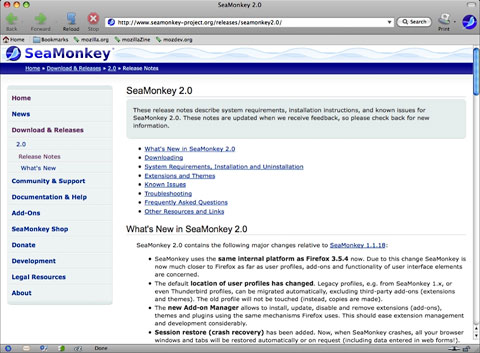
SeaMonkey 2.0 provides a more up-to-date look, better speed, and
more.
Mail archiving is also supported now. History is stored using a
better database solution, and autocomplete has been tweaked, as has
been the Password Manager. There's also a popup ad blocker and image
manager that lets you block images to speed up the rendering of web
pages. Find as you type lets you just start typing to jump from link to
link or to find a word or phrase within a page.
For a full changelog inventory, see the Appendix at the end of this column.
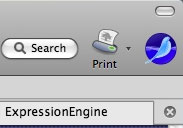 SeaMonkey 2.0 has also received some long-overdue and much
welcome interface tweaks, with an updated, brighter, more contemporary,
and, IMHO, more attractive look, although there are still a few
residual antiquated touches such as a tab close button on the far right
of the tab bar rather than having one more-conveniently placed on each
tab.
SeaMonkey 2.0 has also received some long-overdue and much
welcome interface tweaks, with an updated, brighter, more contemporary,
and, IMHO, more attractive look, although there are still a few
residual antiquated touches such as a tab close button on the far right
of the tab bar rather than having one more-conveniently placed on each
tab.
The download manager is completely reworked, including (hooray!)
support for cross-session resumable downloads, plus there are new-tab
and new-window command line options and fully customizable toolbars.
With SeaMonkey 2, everything I need is there: tabbed browsing, a real
progress bar, and (hooray again) session restores are now fully
supported (i.e.: not just after an unexpected quit).
However, as nice as it is, SeaMonkey isn't quite the substitute for
Navigator 9 I've been hoping for. The fly in the ointment, so to speak,
is its appetite for memory. I really should upgrade my Pismos to a full
gig of RAM apiece, but I have procrastinated and only have 640 MB in
the unit I use and 576 MB in my wife's machine. All is well for the
first day or two after a fresh restart, but after that thinks go
downhill precipitously, with lots of swapfile activity, and eventually
everything slows down to a crawl (or virtual standstill) until I
reboot.
This does not happen with Navigator 9 - at least not for a much
longer "grace" period. I think that with a gigabyte of RAM, the problem
would be solved, but until I work out the wireless dropout issue that
is afflicting both the Pismos using my wireless router (no problem with
the MacBook and G4 PowerBook), I'm not inclined to invest in more
memory yet, but that's another movie.
If you have a respectable amount of RAM, SeaMonkey is worth checking
out, on Intel Macs as well as these old PPC rigs.
System Requirements, Mac
Operating Systems
- Mac OS X "Tiger" (10.4)
- Mac OS X "Leopard" (10.5)
- Mac OS X "Snow Leopard" (10.6)
Minimum Hardware
- Macintosh computer with an Intel x86 or PowerPC G3, G4, or G5
processor
- 256 MB RAM
- 200 MB of free hard drive space
The SeaMonkey project provides official versions of SeaMonkey 2.0
for Windows, Linux, and Mac OS X in US English and other languages.
Community volunteers are also contributing builds for other platforms.
Appendix:
SeaMonkey 2.0 Final Changelog
SeaMonkey 2.0 contains the following major changes relative to
SeaMonkey 1.1.18:
- SeaMonkey uses the same internal platform as Firefox 3.5.4 now. Due
to this change SeaMonkey is now much closer to Firefox as far as user
profiles, add-ons and functionality of user interface elements are
concerned.
- The default location of user profiles has changed. Legacy profiles,
e.g. from SeaMonkey 1.x, or even Thunderbird profiles, can be migrated
automatically, excluding third-party add-ons (extensions and themes).
The old profile will not be touched (instead, copies are made).
- The new Add-on Manager allows to install, update, disable and
remove extensions (add-ons), themes and plugins using the same
mechanisms Firefox uses. This should ease extension management and
development considerably.
- Session restore (crash recovery) has been added. Now, when
SeaMonkey crashes, all your browser windows and tabs will be restored
automatically or on request (including data entered in web forms!). In
addition, users can select to always restore the browser windows and
tabs from their last open session when starting SeaMonkey.
- Reopening closed browser windows (Undo Close Window) is now
possible.
- History is now stored in a better database solution, so that it can
easily keep more information, and the location bar determines which
addresses to autocomplete and/or show in the drop down menu with a
smarter algorithm based on what you type, searching in both URL and
title of visited pages by default.
- Toolbars in the browser, main MailNews and message compose windows
are now fully customizable, including icon size and whether to display
icons and/or text for every major toolbar, all available via their
context menus.
- The MailNews component now includes support for reading RSS and
Atom feeds. The browser detects feeds offered by web pages, can preview
them and offers different ways to subscribe to them.
- New IMAP accounts will now keep local offline copies by default, as
a part of a number of speed improvements when working with IMAP.
Synchronization can be disabled per account or for individual folders,
and limited to the most recent messages in the Synchronization &
Storage settings.
- Tabbed Mail enables accounts, folders and even single messages to
be opened in tabs inside the Mail & Newsgroups window. This feature
also enables the Lightning extension to be installed into SeaMonkey for
calendering functionality.
- Password Manager was switched to an improved version, allowing
easier searching, and notification bars replacing modal dialogs for
remembering logins.
- Download Manager has been completely reworked, including support
for cross-session resumable downloads.
- A new form manager replaces all previous web form management, and
automatically keeps a record of what you type into forms and presents
you these options in a drop-down list when you come back.
- Cookie Manager has been improved and now allows searching for
cookies by site and cookie name.
- Gecko, the rendering engine used in SeaMonkey, has seen many
improvements since the version used in the last stable release. Changes
range from a better graphics backend (Cairo/Thebes) to improved support
for fonts, CSS, DOM and JavaScript. SeaMonkey 2.0 passes the Acid2 test
and most of Acid3 and includes all the HTML5 and other new web-facing
features also included in Firefox 3.5, such as audio/video elements,
downloadable fonts and JIT-compiled JavaScript.
- Most of the icons in the default theme have been exchanged for
newer images that fit better with the look of modern desktop
environments.
- The default theme on Mac OS X was completely renewed to better fit
with the look of Leopard and Snow Leopard.
- For extension developers, SMILE is introduced, making interfaces
known from FUEL and STEEL also available in SeaMonkey.
- Support for Windows 95, 98, Me and NT 4 was dropped. GTK 2.10 or
higher is now required on Linux/Unix. Support for Mac OS X 10.3
("Panther") and 10.2 ("Jaguar") was also dropped.">SeaMonkey uses
the same internal platform as Firefox 3.5.4 now. Due to this change
SeaMonkey is now much closer to Firefox as far as user profiles,
add-ons and functionality of user interface elements are
concerned.
- The default location of user profiles has changed. Legacy profiles,
e.g. from SeaMonkey 1.x, or even Thunderbird profiles, can be migrated
automatically, excluding third-party add-ons (extensions and themes).
The old profile will not be touched (instead, copies are made).
- The new Add-on Manager allows to install, update, disable and
remove extensions (add-ons), themes and plugins using the same
mechanisms Firefox uses. This should ease extension management and
development considerably.
- Session restore (crash recovery) has been added. Now, when
SeaMonkey crashes, all your browser windows and tabs will be restored
automatically or on request (including data entered in web forms!). In
addition, users can select to always restore the browser windows and
tabs from their last open session when starting SeaMonkey.
- Reopening closed browser windows (Undo Close Window) is now
possible.
- History is now stored in a better database solution, so that it can
easily keep more information, and the location bar determines which
addresses to autocomplete and/or show in the drop down menu with a
smarter algorithm based on what you type, searching in both URL and
title of visited pages by default.
- Toolbars in the browser, main MailNews and message compose windows
are now fully customizable, including icon size and whether to display
icons and/or text for every major toolbar, all available via their
context menus.
- The MailNews component now includes support for reading RSS and
Atom feeds. The browser detects feeds offered by web pages, can preview
them and offers different ways to subscribe to them.
- New IMAP accounts will now keep local offline copies by default, as
a part of a number of speed improvements when working with IMAP.
Synchronization can be disabled per account or for individual folders,
and limited to the most recent messages in the Synchronization &
Storage settings.
- Tabbed Mail enables accounts, folders and even single messages to
be opened in tabs inside the Mail & Newsgroups window. This feature
also enables the Lightning extension to be installed into SeaMonkey for
calendering functionality.
- Password Manager was switched to an improved version, allowing
easier searching, and notification bars replacing modal dialogs for
remembering logins.
- Download Manager has been completely reworked, including support
for cross-session resumable downloads.
- A new form manager replaces all previous web form management, and
automatically keeps a record of what you type into forms and presents
you these options in a drop-down list when you come back.
- Cookie Manager has been improved and now allows searching for
cookies by site and cookie name.
- Gecko, the rendering engine used in SeaMonkey, has seen many
improvements since the version used in the last stable release. Changes
range from a better graphics backend (Cairo/Thebes) to improved support
for fonts, CSS, DOM and JavaScript. SeaMonkey 2.0 passes the Acid2 test
and most of Acid3 and includes all the HTML5 and other new web-facing
features also included in Firefox 3.5, such as audio/video elements,
downloadable fonts and JIT-compiled JavaScript.
- Most of the icons in the default theme have been exchanged for
newer images that fit better with the look of modern desktop
environments.
- The default theme on Mac OS X was completely renewed to better fit
with the look of Leopard and Snow Leopard.
- For extension developers, SMILE is introduced, making interfaces
known from FUEL and STEEL also available in SeaMonkey.
- Support for Windows 95, 98, Me and NT 4 was dropped. GTK 2.10 or
higher is now required on Linux/Unix. Support for Mac OS X 10.3
("Panther") and 10.2 ("Jaguar") was also dropped.</a>
The changes
page has an even more exhaustive list.
* Opera has built-in email,
newsreader, and IM clients, but no HTML composer.



