Most of us can probably think of innovations that seemed like a good
- even inspired - idea at first blush but turned out to be mediocre or
worse in actual use. Much better are concepts that seem perhaps clever
at first, but questionably practical, yet play out much better than we
expected in real world service.
The latter is the case with Targus Touch Scroll technology, which is
used in the new Targus for Mac Wireless Mouse, Bluetooth Laser Mouse,
and Bluetooth Presenter products.
Touch Scroll replaces the traditional mouse-top scroll wheel
(or trackball) with a solid state optical sensor that allows 4-way
scrolling using fingertip gestures in the desired direction over the
optical sensor. This sounds like an interesting idea, if a bit
gimmicky. However, the more I use the Targus for Mac Wireless Mouse,
the more addicted I've become to Touch Scroll.
I had been happily using the
Logitech V-550 Wireless Mouse for a couple months prior to the "for
Mac" mice arriving, and it is a choice piece of equipment with a very
comfortable feel, accurate tracking, and the finest scroll wheel I've
yet encountered.
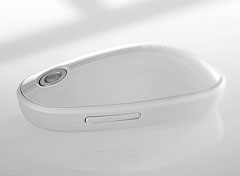 When I first checked out the Targus mice, their feel, while
nice enough, didn't grab me immediately the way the the V-550 had. At
first I found the sort of humpbacked, center-ridged shape a bit
off-putting (it's actually very attractive visually), although I do
like large mice, which these are (exterior dimensions: 2.51" x 1.45" x
4.64"), and the Touch Scrolling would definitely take some getting used
to.
When I first checked out the Targus mice, their feel, while
nice enough, didn't grab me immediately the way the the V-550 had. At
first I found the sort of humpbacked, center-ridged shape a bit
off-putting (it's actually very attractive visually), although I do
like large mice, which these are (exterior dimensions: 2.51" x 1.45" x
4.64"), and the Touch Scrolling would definitely take some getting used
to.
However, get used to it I did, and after a week or so the shape of
the Targus mice also begin to make sense and feel quite comfortable as
well. They have always been smooth customers on the mouse pad, gliding
about almost effortlessly, which is no mean engineering achievement for
a wireless mouse packing two heavy AA cell batteries. The left/right
click buttons also have a nice, light (but not hair-trigger) positive
action.
And as I've related, Touch Scroll is seductive once you
(quickly) get to the stage where it becomes intuitive. Brushing your
finger across the smooth optical scroll scanner surface feels natural
and effortless and is the best solution to horizontal scrolling I've
experienced.
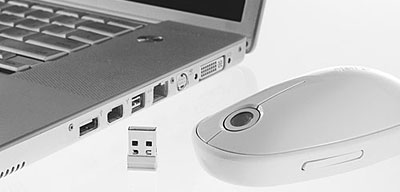
They Logitech V-550 also supports horizontal scrolling with sideways
nudges of the scroll wheel, but it's not nearly as slick as Touch
Scroll for that - and also requires installation of Logitech's Control
Center driver software, while the Targus for Mac mice don't (you do
need proprietary Targus driver software in order to use the to
programmable buttons configured in a rocker switch on the lower left of
the mouse housing).
 Personally, I find two buttons ample for my needs
and prefer to not load up a lot of third-party drivers if it's
avoidable. For example, the Logitech Control Center has a conflict with
my favorite production application, Tex
Edit Plus, so I prefer to pass on the features not supported by the
default Mac drivers, which unfortunately includes horizontal
scrolling.
Personally, I find two buttons ample for my needs
and prefer to not load up a lot of third-party drivers if it's
avoidable. For example, the Logitech Control Center has a conflict with
my favorite production application, Tex
Edit Plus, so I prefer to pass on the features not supported by the
default Mac drivers, which unfortunately includes horizontal
scrolling.
The Touch Scroll is also great for breezing through long documents,
and while I'm not a spreadsheet user, I can appreciate how much easier
horizontal scrolling will be for working with spreadsheets.
I also prefer will look of the Targus for Mac mice to the V-550,
which is handsome enough in a conventional way - but nothing
extraordinary. The Targus units styling I would describe as
"retro-futuristic"" like some of the hardware seen in, say, 2001: A
Space Odyssey 40 years ago.
The color theme of the entire Targus for Mac line is called
"Lunar Grey" quite appropriately. The Touch Scroll sensor itself
reminds me very much of the "eye" of the HAL 9000 rogue computer in
Stanley Kubrick's 2001, especially when it glows red, and I
would be interested to know if that's coincidental or if HAL played a
part in inspiring the designer.
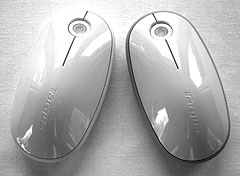 As I mentioned, there are two
Targus for Mac mice - the Targus wireless Mouse, which uses a 2.4 GHz
RF interface requiring a USB receiver dongle at the computer end, and
the Bluetooth Laser Mouse, which connects via Bluetooth. Other
distinctions are that the RF unit has a 1,200 dpi optical sensor, while
the Bluetooth model gets a 1,200 dpi laser sensor. Other than that and
the Bluetooth model's two-tone livery with Lunar Gray over a darker
grey lower case, the mice are identical in form factor.
As I mentioned, there are two
Targus for Mac mice - the Targus wireless Mouse, which uses a 2.4 GHz
RF interface requiring a USB receiver dongle at the computer end, and
the Bluetooth Laser Mouse, which connects via Bluetooth. Other
distinctions are that the RF unit has a 1,200 dpi optical sensor, while
the Bluetooth model gets a 1,200 dpi laser sensor. Other than that and
the Bluetooth model's two-tone livery with Lunar Gray over a darker
grey lower case, the mice are identical in form factor.
Bluetooth for Mice? No Thanks
Personally I've never found a Bluetooth mouse that didn't
drive me nuts with response latency, and the Targus for Mac unit is no
exception to this. The laser sensor may be considered superior to the
optical unit in the RF version, but it's kind of hard to tell because
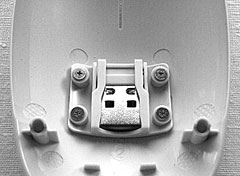
of the Bluetooth response lag. While it is a pain to have to occupy a
precious USB port with a receiver, especially on a laptop (the
low-profile receiver unit can in most cases remain in situ for transit
or storage and stores in a slot inside the battery bay when removed),
RF Wireless Mouse is far and away superior in tracking response
precision, and I have been able to detect no latency at all with
it.
 It's also right there almost immediately when you wake
the computer from sleeping (in fact, nudging it on the mouse pad will
wake the machine), as opposed to the Bluetooth unit, which has to
dither and collect itself while reestablishing a connection. The RF
mouse is also truly plug-and-play, while with Bluetooth you have to
muck about with device detection and pairing. And the RF wireless model
is $20 cheaper as well. Definitely my choice, but some folks like
Bluetooth, so whatever your preference, Targus has you covered.
It's also right there almost immediately when you wake
the computer from sleeping (in fact, nudging it on the mouse pad will
wake the machine), as opposed to the Bluetooth unit, which has to
dither and collect itself while reestablishing a connection. The RF
mouse is also truly plug-and-play, while with Bluetooth you have to
muck about with device detection and pairing. And the RF wireless model
is $20 cheaper as well. Definitely my choice, but some folks like
Bluetooth, so whatever your preference, Targus has you covered.
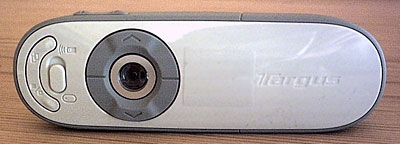
Targus Bluetooth Wireless Presenter for Mac
As mentioned, the Targus Bluetooth Wireless Presenter for Mac also
incorporates Touch Scroll tracking. Briefly, the $79.99 Presenter is
pitched as a remote presentation controlling device and cursor
controller with more versatility and features than the Apple
Remote.
 Low End Mac ratings:
The Targus Bluetooth Laser Mouse for Mac retails for $69.99, and the
Targus Wireless Mouse for Mac retails for $49.99.
Purchase Links



