Firefox is mainstream, Chrome is gaining fast, and even
Opera is a significant player these
days with its 2.35% global market share in February (more than half of
Safari's 4.45%). However, there are still a gaggle of other browser
choices that cumulatively share about 1% of the total browser
market.
In my ongoing quest for up-to-date, high-performing browsers that
still support PowerPC Macs running Mac OS X 10.4 "Tiger" - such as
my two treasured Pismo
PowerBooks - I've been giving the Japanese based Shiira version 2.3, released a couple of
weeks ago, a fresh checkout, and I'm finding much to like.
Safari 4 works decently
well on my old G4-upgraded Pismos, but it's a resource hog that tends
to corrupt the memory heap, requiring more frequent reboots. Shiira
starts up a bit (not much) slower than Safari (which presumably
benefits in that department from its close integration with the OS),
but it seems more lithe, lively, and a better software citizen in
general. Because it's based on the same WebKit rendering engine as
Safari, Web pages display pretty much the same in Shiira 2.3 as they do
in Safari.
Shiira 2.3 is also proving to be very fast - both loading pages and
in Finder responsiveness - certainly one of the fastest OS X
browsers I've experienced in Tiger on a PowerPC Mac, if not the
fastest, and it has an attractive and genuinely innovative user
interface and feature set that are as interesting as Safari and Firefox
are dull.
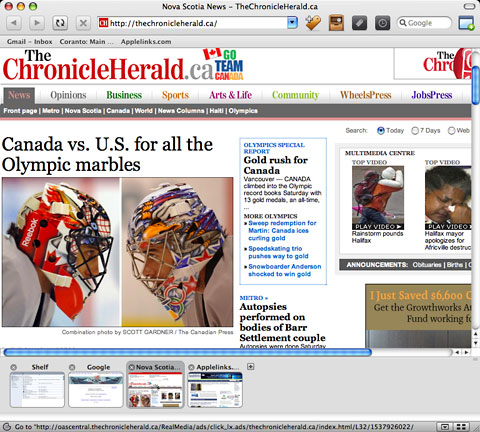
Shiira uses the same WebKit rendering engine as Safari.
Shiira is is delightfully small (the compressed download file is
only 8 MB) and has interesting features, like its "Page Dock" thumbnail
icon type tab bar, located at the bottom of the browser window rather
than at the side or along the top, which displays mini-previews of open
browser tabs. I'm not a big fan of thumbnail tab icons, but Shiira
provides settings options that make them more tolerable, including the
facility to resize them by dragging the window/tabs partition up or
down and a convenient button that dismisses them entirely, giving you
the full depth of the application window for displaying content.
 There's no conventional page load progress bar, but the
thumbnail icons progressively fill with blue as each page loads. This
is pretty cool once you get used to it.
There's no conventional page load progress bar, but the
thumbnail icons progressively fill with blue as each page loads. This
is pretty cool once you get used to it.
I'm not terribly smitten with Shiira's download manager. It's
serviceable but has no frills. There is no pause and resume download
function.
One Glitch
I wish there was a way to reposition the thumbnail tabs to the sides
or top of the UI window. Well, maybe there is. I wouldn't know, since I
can't persuade any of Shiira 2.3's Preferences panels to open and
reveal what settings options are available. This isn't a glitch peculiar to my
install of Shiira 2.3 on the old Pismo. I tried downloading a fresh
copy on my Intel
MacBook and encountered the same bug. The Preferences window opens,
but clicking on various category icons elicits no response. Hopefully
this will soon be patched.
Aside from that, I haven't encountered any other major bugginess so
far in Shiira 2.3, although there are still plenty of rough edges.
Based on forum reports I've seen, not everyone has been as fortunate,
especially running Shiira 2.3 with OS X 10.6. For example, a cool
Shiira feature borrowed from Apple's OS X Exposé playbook
lets you click a button at the bottom of the browser window, and all
open tabs display, downsized appropriately to fit the screen space
available - in theory. This worked great in version 2.2, but like the
Preferences, it refuses to function at all in 2.3.
On the other hand, program stability, not a particularly strong
point with versions 2.1 and 2.2, has been impeccable so far with
version 2.3 in more than a week's use.
Updated User Interface
With version 2.3, Shiira has received another user interface
refreshment - something its developer seems to like doing more
frequently than is customary. I actually have mixed feelings about
Shiira's interface. On the one hand, it's aesthetically attractive with
very nice toolbar icons, although unfortunately no mouseover tooltips
to clue you in to what the various buttons do. The basic
backward/forward/reload/stop-loading set are intuitive, but the others
require some experimentation to suss out what they do, since
documentation is minimal and there is no English language Help
file.
A major Shiira 2.3 shortcoming, at least as far as I can determine
without access to the Preferences, is lack of the session restore
function to pick up where you left off after a restart without
reloading all your open pages from scratch that users of Opera, Google
Chrome, Firefox, Camino, and
(in a somewhat clumsy implementation) even Safari all enjoy. This
feature omission is a major pain once you're used to having it.
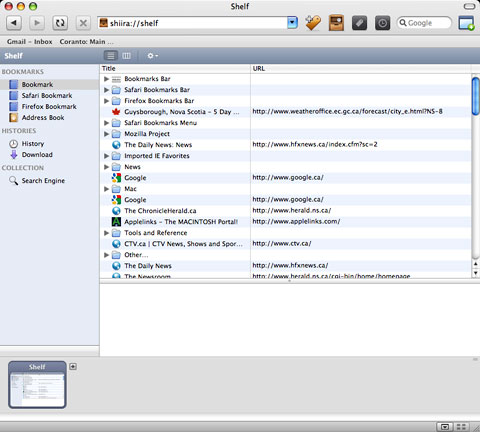
Shiira's "Shelf" lets you use Firefox and Safari bookmarks.
There's no provision to import bookmarks from other browsers into
Shiira's main Bookmarks menu, but a major mitigation of that is
Shiira's "Shelf", which opens up access to Safari and Firefox bookmarks
and allows you to monitor and manage bookmarks, downloads, history, and
search engines all within the main browser window.
Shiira's handling of PDFs is also a bit raggedy, but on the plus
side you can save any Web page as a PDF document from the File Menu in
Shiira, which is convenient. OS X Services (still missing in
Firefox) are supported, meaning you can export selected Web page
content into, say, TextEdit Plus or DEVONthink with a menu
selection.
Shiira is definitely a work in progress, but within its limitations
it works nicely - and with speediness that counts for a lot, especially
on older Macs. It really flies on Intel Macs. If you haven't tried
Shiira, I think you'll find it worth checking out.
Low End Mac rating: Only 2 out of 4 until they get that Preferences
bug squashed and add session restore, but I'm finding myself not in any
hurry to stop using Shiira 2.3 and go back to Safari 4 as my WebKit
browser pick.
Features in a Nutshell
- Tabbed windows
- Bookmark management
- Sharing bookmarks with Safari
- Side drawer showing bookmarks and history
- Bookmarks toolbar
- Search field with choice of search engine
- Customizing toolbar
- Cache control panel
- Window appearance switching (Aqua and Metal)
- Toolbar icons switching
- Removing Cookie and cache at the termination
- Displaying favicon list
- Enable/disable favicon with bookmark
- Help document (Japanese only)
- Multiple source windows per one browser window
- Displaying HTTP header in source window
- Wheel button operation (open in new tab, and tab switching)
- Auto-tab for bookmark folder
- Displaying back-forward list on toolbar buttons
- Search text field for bookmark and history
System requirements: Mac OS X 10.4 or later
System Support: PPC/Intel




