This column was first published in the MUGOO Newsletter
in February 2001.
Time to make a movie short worthy of an Oscar! The material is video
of my dog Floppy, and a MIDI track 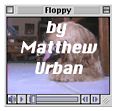 called
Nina's Eyes. The video editing software is Avid VideoShop, 3.0 circa
1993. I take several steps in getting to a final product; first, setup;
second editing; and last, saving the file. Let's go!
called
Nina's Eyes. The video editing software is Avid VideoShop, 3.0 circa
1993. I take several steps in getting to a final product; first, setup;
second editing; and last, saving the file. Let's go!
The first step is to set up my
Performa to optimize Avid Video Shop performance. The application
is on the Home Movies volume with System 7.5 and a lean set of control
panels and extensions configured to reduce interruptions to the movie
making process. The Apple CD-ROM extension is turned off so that the
Mac isn't checking the CD-ROM drive, and a floppy disk is placed in the
floppy drive for the same reason. The RAM for Avid VideoShop software
memory is set at 1,5360K of RAM. We are ready to get to work.
Fortunately the software is easy to use; after all this is a Mac.
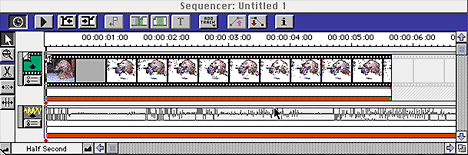
Avid VideoShop is running, and I open the Floppy movie and Nina's Eyes
files. Next, the Floppy movie video track is cut and pasted in the
video track in the sequencer window. Then a I create a MIDI track to
hold Nina's eyes, and cut and paste again. Last of all, a title track
is added to hold the open and closing credits. The tracks are resized
to run at 14 seconds each, and the editing is complete. The file is
saved as a video sequencer file, a format which can easily be edited at
a later time. Now the last step: making a movie.
There are several choices to making a movie in Avid VideoShop. One
is to save the movie in QuickTime format; another choice is to create a
self-contained movie that can be played on any platform. What are the
results? The time to create a Quick Time movie 14 seconds in length,
with no compression and low quality is approximately 100 seconds. The
time required to create a self-contained movie with high compression,
Cinepak, highest video and audio quality mix, is 100 minutes.
The difference in file size is 16 MB for the QuickTime file and 3.1 MB
for the Cinepak file, which is a self-contained application.
Next time: Working with Images



