
Buying the best display for your Mac has never been easy, unless you wanted to pay for Apple-branded products. In the old days, Mac video ports were different from those used in the PC world, and today you need to research whether the display you’re interested in has VGA or DVI input.
Apple has gone its own way with video connectors too many times over the years. You can’t plug a VGA display into the original 15-pin Mac video port, and a lot of companies made money selling Mac users VGA adapters.
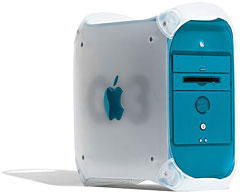 In Apple’s defense, VGA was introduced at about the same time Apple unveiled its first video cards, but it wasn’t until the Blue & White Power Mac G3 that Apple finally adopted the industry standard VGA port – twelve years later.
That didn’t keep Apple from creating the HDI-45 video port in the interim, which was used to route video, sound, and ADB signals from early Power Macs to a handful of special Apple monitors. It never caught on.
Let’s Get Digital
With the Power Mac G4, Apple added digital output using the DVI port along with analog VGA.
And then Apple almost repeated the fiasco with their ancient AV connector by introducing ADC, which provided both digital video signals and monitor power – but only to a handful of displays designed to work with this proprietary port. It didn’t catch on either, and ADC to DVI adapters remain popular for Macs with ADC ports.
Today’s Macs are back to using DVI ports, and with the proper adapter, they can work with VGA displays as well.
For video display, digital is better than analog. Repeat: Digital is better than analog.
There are a lot of flat panel displays on the market that only have analog VGA input. They’re usually cheaper than ones with DVI, and they’ll work with just about any computer made in the past 15 years, but the digital-to-analog conversion in the video card complemented by the analog-to-digital conversion in the display can only reduce image quality.
Some people find it much easier on the eyes to read a display using DVI input than a VGA-connected one. (If you have a flat-panel display with both inputs, you might want to conduct your own test.)
With DVI, the digital information on the video card goes right to the flat panel display, which is also a digital device. If you want the best video from your modern Mac, you want a display with DVI input.
Older Computers
We know there are millions upon millions of Macs and Windows PCs and Linux boxen with old fashioned analog VGA video ports instead of digital DVI ones. And that’s one reason you might want to buy a display with VGA input.
Good idea, and the quality certainly isn’t bad, but odds are your next computer will have DVI. Why not plan ahead and find a flat panel display with both VGA and DVD input?
If I were buying a Mac mini (it’s tempting!) and replacing one or both of my eMacs, that’s the route I’d take. I’d still want to be able to connect the display to my old Dell Windows PC, my 400 MHz PowerBo, or one of the other Macs with analog video output.
It’s not always easy to determine whether a display is VGA only, DVI only, or supports both standards when doing online research. (A good place to start looking – go to dealmac and search for “dvi vga”.)
Picking a Display
I’d be very happy with a 15″ 1280 x 960 display, but nobody seems to make one. Every 15″ flat panel display I’ve run across has 1024 x 768 resolution, which is less than I’m comfortable with. I’d even be content if Apple repackaged the 1280 x 854 screen in the 15″ PowerBook, but it hasn’t happened yet.
Most 17″ displays offer 1280 x 1024 resolution, although I’d rather see one with a wider than 1200 pixel display (how about 1440 x 900?).
There seem to be some nice 17″ 1280 x 1024 displays that have both VGA and DVI input in the US$220 and up range, and 1280 x 1024 would be a small improvement over my eMac’s 1280 x 960 or the low-cost Samsung 7000DF I use with my Dell (1152 x 854 resolution).
I’m not ready to switch to a Mac mini with a DVI display in the near future, but it’s helpful to see how competitive a mini with a flat panel display is compared with the big, bulk, heavy eMac.
I may have to reconsider once OS X 10.4 Tiger ships with new Macs – if Apple offers 7200 rpm hard drives in the mini. Then again, it might be just as easy to transport a 17″ iMac G5 as a Mac mini plus a display and just as easy to afford one as a Mac mini plus displays for both locations (family home and apartment, which I switch between too often). And that 1440 x 900 resolution of the iMac’s 17″ display would be very nice as well. (Which raises the question: Why doesn’t Apple sell a 17″ 1440 x 900 display?)
Just thinking out loud. Except for the size and weight, I’m still pretty happy with my 1.25 GHz eMacs.
Update: Some time later I bought a 19″ Dell with 1280 x 1024 resolution, and in 2014, I’m still using it with one of my Macs. The other three production Macs have 22″ 1600 x 1200 displays, which is just wonderful for working on two things at once – writing and researching on the web, for instance.
Keywords: #dvi
Short link: http://goo.gl/UeVSrE
searchword: dviorvga
