Ever since Apple introduced the 13.3" MacBook in May
2006, fans of the 12" PowerBook have been wondering when, if ever,
Apple would introduce a true successor to the smallest footprint 'Book
Apple has ever sold. (It has a 8.6" x 10.9" footprint, vs. 8.94" x
12.78" for the 13"
MacBook Pro, which is about the same weight as the 12" aluminum
PowerBook.)
At issue is a bit under 2" of extra width.
1024 x 768 History
In all other respects, the MacBook is the superior machine. It has a
larger, higher resolution display, an Intel dual-core CPU, and
excellent battery life. Still, those who used the 12" PowerBook loved
both its small footprint and its perfectly adequate 12.1" 1024 x 768
display.
Yup, 1024 x 768, although the screen is somewhat smaller at
9.7".
Apple first introduced a 1024 x 768 laptop display with the first
generation 13" and 14" WallStreet PowerBook G3 in
May 1998. It retained that resolution with the 14" Lombard and Pismo PowerBooks, replacing it
with a widescreen 1154 x 872 display when the PowerBook G4 was
introduced in January 2001.
Four months later, 1024 x 768 was back with the new 12" dual USB iBook, and when
Apple decided to add a 12" model to the PowerBook line in early 2003,
it had that resolution as well.
Although the worlds of desktop and notebook computers have gone
widescreen - typically with 16:10 or 16:9 displays nowadays - Apple has
bucked that trend with the iPad. Instead of a display 60-70% wider than
it is tall, the iPad's display is just 33% wider (or taller, in
portrait mode).
Why would Apple do that?
Because the requirements for a tablet computer are different than
those of a desktop or laptop, where the screen is only used with a
horizontal orientation. The iPad is specifically designed to work just
as well in portrait mode, and while a 1366 x 768 display would be
better for watching hi-res video, 1024 x 768 just works better for all
the other things you'll be doing with the handheld iPad.
12" PowerBook Reborn?
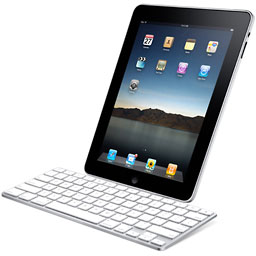
With its docking keyboard, the iPad becomes a much
better writing tool. While the onscreen keyboard is usable, for
extended writing, a tactile keyboard makes a world of difference.
One really nice feature of the iPad is that you can use it in either
orientation, and one disappointing feature of the docking keyboard is
that it only supports portrait mode. I'm not knocking portrait mode -
when I worked in publishing, our editors had Mac Portrait Displays and
loved being able to work on a full page at a time.
However, portrait mode isn't always ideal, and I'm hoping someone
will devise a keyboard with a dock or stand that can hold the iPad in
either horizontal or vertical orientation. Do that, and you've just
about replaced the 12" PowerBook. One solution could be a hard case for
the iPad that has a keyboard built into the cover: open the case, and
you have an instant netbook-like computer.
One Things Seems to Be Missing
The iPad's design is brilliant for use as a tablet, less so for use
as a notebook replacement. A few others have already noted that there's
no provision for connecting a mouse. There's not even a built-in USB
port - just Apple's dock connector, which it shares with the iPhone and
iPod.
To be useful as a notebook replacement or as a mini desktop, the
iPad needs to be able to use a pointing device, whether a trackpad, a
mouse, a trackball, or something else. Using your fingers on the screen
is fine in tablet mode, but it's far from ideal when you're at the
keyboard.
Fortunately the iPad has a couple options. The dock port includes
USB, so with an adapter, it should be possible to use the iPad with any
USB keyboard and mouse - assuming it has mouse drivers. (If not, it's
definitely something the iPad should have.)
The other option is Bluetooth, so - again assuming the presence of
mouse drivers - it should be possible to use a Bluetooth keyboard and
mouse with the iPad.
The Next Gaming Platform
With its 1024 x 768 9.7" display, 1 GHz Apple A4 CPU,* the iPhone
OS, Bluetooth, and video output, the iPad will be more than just a
portable gaming platform. Apple's Dock Connector to VGA Adapter
supports 1024 x 768 resolution on a VGA monitor - or a high definition
TV with VGA input. Apple also supports 576p and 480p with its Component
AV Cable and 576i and 480i with its Composite AV Cable. The stereo
headphone jack takes care of audio output.
Add Bluetooth controllers, connect the iPad to your TV, and you
could have a great gaming platform. The iPad supports higher resolution
than Nintendo's Wii, and its 1 GHz CPU (which may be dual-core - Apple
isn't saying) could be more powerful than the 729 MHz "Broadway"
PowerPC chip in Wii.
While the iPhone and iPod touch make for a nice pocketable gaming
platform, the iPad blows them into the weeds with its larger display
and greater processing power.
All Things to All People
The iPad is meant to be your on-the-go computing solution. It has
Internet access and 140,000 apps, can be used with 3G networks (a lot
slower than WiFi), supports iTunes and iBooks, has real productivity
apps (the iWork suite), and has a remarkably reasonable price. It's
probably a better ebook reader than the $489 Kindle DX, and the large
screen and fast CPU make it a great alternative to the iPod touch for
those who hate squinting at a tiny display.
Just as the Apple II first made color computing available to the
rest of us and the Macintosh first made computing power available to
non-geeks, the iPad makes mobile computing available to the rest of us
in a whole new way. From a geek's standpoint, there are things to
complain about (minimal multitasking, for instance), but from a user's
perspective, the iPad will be a great platform for communication,
research, entertainment, and gaming.
The iPad goes well beyond replacing the 12" PowerBook or the iPod
touch. It's a powerful new tool that can become all things to all
people.
I'm looking forward to its release, as well as the clever hardware
add-ons that are bound to follow.
* Technically, the A4 is much more than a CPU. In
addition to a CPU, it contains a graphics processor, a memory manager,
and handles I/O, making it a System-on-a-Chip (SoC). That said, it's
easier to use the familiar term than use an unfamiliar one.
Dan Knight has been using Macs since 1986,
sold Macs for several years, supported them for many more years, and
has been publishing Low End Mac since April 1997. If you find Dan's articles helpful, please consider making a donation to his tip jar.
Links for the Day
Mac of the Day: Power Mac G5 (Early 2005), (2005.04.27. At 2.7 GHz, the fastest G5 CPU Apple ever used, also 16x SuperDrive and it shipped with OS X 10.4 Tiger.)

 With its docking keyboard, the iPad becomes a much
better writing tool. While the onscreen keyboard is usable, for
extended writing, a tactile keyboard makes a world of difference.
With its docking keyboard, the iPad becomes a much
better writing tool. While the onscreen keyboard is usable, for
extended writing, a tactile keyboard makes a world of difference.