Low End Mac Reader Specials
TypeStyler For Mac OS X is Now Shipping! Download The Free Fully Functional 60 Day Tryout at www.typestyler.com
Don't install Parallels to play poker online! Poker Mac will show you how
to download and install a native Mac poker application such as Full
Tilt Poker Mac.
Laptop Hardware Provided by TechRestore - Overnight Mac & iPod Repairs.
Compare products like desktop computers, apple laptops, apple macs, and LCD Monitors side by side! All the information and reviews to make the best purchasing decision for new mobile phones, sat nav systems, or MP3 players. The Ciao online shopping community makes searching products easy for you.
14 Years of Useful Service from a Macintosh LC III
- 2008.02.26
Popularity: ![]()
![]()
![]()
![]()
My Turn is Low End Mac's column for reader-submitted articles. It's your turn to share your thoughts on all things Mac (or iPhone, iPod, etc.) and write for the Mac web. Email your submission to Dan Knight .
It started life as a 'multimedia powerhouse.' Purchased in the summer of 1993 along with an external NEC SCSI Multispin CD-ROM drive, this little LC III was placed prominently in a middle school library. It was mainly dedicated to running Grolier's Multimedia Encyclopedia and a few other multimedia titles. It also was loaded with the library's card catalog and several student-made Hyperstudio stacks full of information gathered from field trips and other projects.
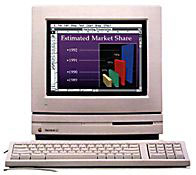
Macintosh LC III
This wonderful pizza box shaped machine served this purpose nicely for two years, until a newer, faster, all-in-one 5200 replaced it and sent the LC III to the corner for word processing. Gradually it was getting less and less use and was starting to gather a little dust.
Jump ahead to the fall of 1996. The school district I was working for was getting its first dedicated Internet service. I needed to put up a mail server quickly and inexpensively. I didn't have the time to teach myself Unix, and I really did not want to purchase another Windows machine and software, though it looked like that was what I would have to do.
A few phone calls gave me a recommendation for the free Apple Internet Mail Server. I grabbed the lonely little LC III, not sure it had enough beef to run email for 100+ clients, but I thought it was worth a try. Within two hours I had the machine loaded with the AIMS software and fired it up. It did not take long before it was moving thousands of email messages every day, and it was up to the task. I attached an external SCSI drive that I used for periodic backups, and the machine required almost no maintenance, just faithfully doing its job without missing a beat.
I did tweak the machine a little bit, installing a minimal configuration of System 7.6.1 and an upgrade to a 1 GB internal drive with 16 MB of RAM. There were very few other changes made or necessary. Apple Internet Mail Server later became Eudora Internet Mail Server, so I did make that change.
This machine did the trick for over three years until spam began to be more of an issue. There was little protection from relaying in the program, so an upgrade to a more powerful program and more powerful machine became necessary. The LC III barely made it to the new millennium, being retired early in 2000.
In 2001 I took a job with a private company providing sales, training, and technical support for school districts. When I went back to visit my old district, there were several old machines being earmarked for disposal. I bought a few of the machines and walked away with the LC III for free, not sure what I would do with it, if anything.
In 2003, I was helping a very small rural school district get their network set up. Their Internet provider promised email service as part of their package, but said it would be at least six months before they could get it set up. I grabbed the LC III and set it up, providing a very nice temporary solution. Later, the Exchange Server in our office went down and the LC III filled the bill for about two weeks. 10 years after its original purchase, this machine was still being useful.
Missing the school setting, I quit the private business and took an elementary teaching job. Almost as an afterthought, I picked up the LC III as I was cleaning out my office, feeling pretty sure that it had outlived its usefulness. My new school was not very high tech and was officially all PC based. I did manage to scrape together a few older iMacs for student use, but I needed a printer for them to print to. I found an old Personal LaserWriter 4/600, but it was a LocalTalk only printer, lacking an Ethernet port, and the iMacs had no LocalTalk port.
The light bulb turned on, and the LC III was once again pulled out of retirement. I knew of a free download from Apple of a control panel called LocalTalk Bridge, and I was able to connect the printer to the LC III and share it across the network using the LC III as a print server. With a wireless router, I was even able to set up wireless printing in my classroom with almost no investment. The printer is slow but reliable, and with the LC III churning away, it eventually printed everything we sent to it.
I did manage to get a faster printer with a built-in Ethernet port, so once again the LC III is sitting on a shelf. It had found use into its fourteenth year, and I would not be surprised if it comes out of retirement once again to fill a need. Though some Apple machines have been more reliable than others, for the most part, Macs outlive their usefulness long before they wear out.
But maybe they never really do outlive their usefulness. It's more a matter of understanding what can be done with a low-end machine. I don't know what use I may find for this 15-year-old computer, but whatever it may be, I'm sure the LC III will be ready and willing.
Share your perspective on the Mac by emailing with "My Turn" as your subject.

Recent My Turn articles
- Using Low End Macs for Internet Radio, 08.18. When the local public radio station moved classical music to HD radio, it was time to find another way to listen. An old iMac with iTunes solved the problem.
- 'That's Not a Computer', 07.30. Salvaging a broken PowerBook by turning it into a desktop computer.
- Upgrading a Digital Audio G4 to work better in Leopard, 06.02. In its original configuration, the dual 533 MHz Power Mac G4 was slow with Mac OS X 10.5, but add the right upgrades, and it runs Leopard quite nicely.
- My 4 favorite PowerBooks, 05.28. The PowerBook 150 has a big screen for a vintage PowerBook, the 165c has color, the 100 is diminutive, and Lombard has USB and a great keyboard.
- More in the My Turn index.
Links for the Day
- Mac of the Day: iMac Core Duo, Jan. 2006 - The first Intel-based iMacs ran at 1.83-2.0 GHz, came with 17" and 20" displays.
- Group of the Day: Mac Pro List is for those using a Mac Pro.
- November 23 in LEM history: 99: Should I buy a USB card? - 01: Can a low-end Mac be an only Mac? - Palm Desktop without a PDA - CyberDog saves the day - 05: How Consumer Reports could compare Macs fairly - Speakers for your Mac - Living with the hi-res 15" PowerBook - Birth of the PowerBook - Daystar 1.9 GHz iMac G4 upgrade - 1.92 GHz PowerBook upgrade
- Support Low End Mac
Recent Content on Low End Mac
- Why Spaces is My Favorite Leopard (and Snow Leopard) Feature, Charles W. Moore, Miscellaneous Ramblings, 11.23. Spaces, a feature introduced with OS X 10.5, is like having several monitors on your Mac without the cost and space of using multiple displays.
- i5 iMac Benchmarked, Mac mini 'Shouldn't Be Overlooked', Twitter Client for Classic Mac OS, and More, Mac News Review, 11.20. Also why Apple leaves the low end to others, 10.6.2 fixes video playback problem in 27" iMac, 3D Leopard and Snow Leopard performance, and more.
- Apple's Tablet an End Run Beyond Netbooks, Frank Fox, Stop the Noiz, 11.20. Whatever Apple has planned will leverage existing technologies while going beyond what its competitors can offer.
- Apple #4 in Reliability, Apple Tablet a Gadget for All?, HP's i7 Notebook Outdoes Mac Rivals, and More, The 'Book Review, 11.20. Also Flash 10.1 improves video on Hackintosh netbooks, thin-and-light notebooks impress, Windows XP finally on the way out, and more.
- NASA Chemical Sensor for iPhone, Smartphone Death Match, iPhone Earrings, and More, Ian R Campbell, 11.20. Also mobile phone dangers, new apps, GPS solution for iPod touch, new iPod and iPhone cases, and more.
- Replacing the Hard Drive in a Clamshell iBook, John Hatchett, Recycled Computing, 11.19. Yes, it is one of the most difficult Apple notebooks to disassemble and reassemble, but a 10 GB hard drive just will not do.
- IBM Model F: A Great Old Keyboard with an Outdated Layout, Tommy Thomas, Welcome to Macintosh, 11.19. Although it used a different technology than the revered IBM Model M keyboard, the Model F was a great keyboard in its own right.
- More links in our archive.
Recent Deals
- Best Time Capsule and AirPort Deals, 11.23. Used 802.11g AirPort Extreme, $49; 500 GB Time Capsule, $150; new, $190; 1 TB dual-band, $280; 2 TB, $469; 802.11n AirPort Extreme, $170.
- Best 12" PowerBook G4 Deals, 11.23. Used 867 MHz SuperDrive, $348; 1 GHz Combo, $379; SD, $519; 1.33 GHz, $529; 1.5 GHz Combo, $549; SuperDrive, $609.
- Best Mac Pro Deals, 11.23. Used 2.66 GHz 4-core, $1,300; 3.0 4-core. $1,919; refurb 2.66 4-core Nehalem, $2,149; 2.93, $2,549; 2.93 8-core, $4,999; new 2.26 8-core, $2,290.
- Best eMac Deals, 11.18. Used 1 GHz Combo, $100; SuperDrive, $269; 1.25 GHz Combo, $119; SD, $319; 1.42 GHz Combo, $289; SD, $498.
- Best Mac OS X 10.6 and Mac Box Set Deals, 11.18. "Snow Leopard", single user, $25; 5 users, $45; Mac Box Set, single user, $139; 5 users, $180; Server, $414. Shipping included.
- Best Xserve Deals, 11.18. Used 1 GHz dual G4, $649; 2.3 dual G5, $795; 3.0 4-core Xeon, $1,899; refurb 2.26 4-core, $2,499; new, $2,888; refurb 8-core, $2,999; new, $3,449; more.
- Best 15" MacBook Pro Deals, 11.17. Used 1.83 GHz, $750; 2.16, $800; 2.33, $900; refurb 2.4, $1,299; 2.53, $1,449; 2.66, $1,699; 2.8, $1,899; new 2.53, $1,579; 2.66, $1,799; more.
- Best Power Mac G4 and AGP Video Card Deals, 11.17. Used 400 MHz, $50; 933 MHz, $80; 500 dual, $60; 867 dual, $90; 1 GHz dual, $150; 1.25 GHz dual, $225; 1.42 GHz, $499.
- Best Mac OS X 10.5 Deals, 11.17. "Leopard" upgrade, $80; single user license, $135; 5 users, $173; Mac Box Set, 5 users, $230; Server, 10 users, $340; unlimited, $850. Shipping included.
- More deals in our archive.
About LEM | Support | Usage | Privacy | Contacts
Navigation
Used Mac Dealers
Apple History
Video Cards
Email Lists
Favorite Sites
MacSurfer
MacMinute
MacInTouch
MyAppleMenu
InfoMac
Macs Only!
The Mac Observer
Accelerate Your Mac
RetroMacCast
PB Central
MacWindows
The Vintage Mac
Museum
DealMac
DealsOnTheWeb
Mac2Sell
ramseeker
Mac Driver Museum
JAG's House
System
6 Heaven
System 7 Today
the pickle's Low-End
Mac FAQ
Abandonware
Petition
Mac vs. PC Info
Affiliates
The Apple
Store
Mac
Connection
B&H
MacMall
TechRestore
ExperCom
Crucial
Memory
batteries.com
Advertise
MacMinute
MacInTouch
MyAppleMenu
InfoMac
Macs Only!
The Mac Observer
Accelerate Your Mac
RetroMacCast
PB Central
MacWindows
The Vintage Mac
Museum
DealMac
DealsOnTheWeb
Mac2Sell
ramseeker
Mac Driver Museum
JAG's House
System 6 Heaven
System 7 Today
the pickle's Low-End
Mac FAQ
Abandonware
Petition
Mac vs. PC Info
Mac Connection
B&H
MacMall
TechRestore
ExperCom
Crucial Memory
batteries.com



