Low End Mac Reader Specials
TypeStyler For Mac OS X is Now Shipping! Download The Free Fully Functional 60 Day Tryout at www.typestyler.com
Don't install Parallels to play poker online! Poker Mac will show you how
to download and install a native Mac poker application such as Full
Tilt Poker Mac.
Laptop Hardware Provided by TechRestore - Overnight Mac & iPod Repairs.
Compare products like desktop computers, apple laptops, apple macs, and LCD Monitors side by side! All the information and reviews to make the best purchasing decision for new mobile phones, sat nav systems, or MP3 players. The Ciao online shopping community makes searching products easy for you.
Synergy Time for Apple
Tor Fosheim - June 20, 2000
My Turn is Low End Mac's column for reader-submitted articles. It's your turn to share your thoughts on all things Mac (or iPhone, iPod, etc.) and write for the Mac web. Email your submission to Dan Knight .
I've had some thoughts brewing for a while on the future of Mac
hardware, its strengths and core technologies, and how they can merge
to form some really cool products. The radically new design wave at
Apple which gave us the iMac, hasn't stopped yet - and I'm sure Apple
is full of crazy thoughts that will eventually land us the next Great
Product, maybe as soon as Macworld in July.
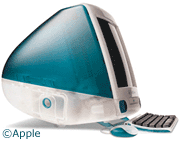
The wave at Apple has been synergy from the get-go. The iMac was a merge between compact Macs, portable PowerBooks, and powerful and expandable desktops. The first iMac was essentially a PowerBook motherboard with a monitor on top, a few different ports, and a beautiful case thrown in for good measure.
I expect this line of thinking is still dominant at Apple, and this is intended to be a small peek into what kinds of ideas might be circulating around Infinite Loop.
Make the PowerBook display removable
Imagine not having to crouch over a PowerBook every time you need to write something. With the screen placed just above the keyboard, the PowerBook makes a great companion on the road, but when it comes down to sitting down and using it in the office, its not very ergonomic. In fact, it can be downright terrible for those who don't have industrial-strength backs. My back always ends up in a curl, and I have to take frequent breaks from my work. This isn't Apple's fault; it's an inherent design flaw of the laptop concept.
But no more.
There are very few cables that run from the 'Book to the screen, and there's a lot plastic connecting it to the base unit. Why is it stuck there? Imagine how neat it would be to remove the display at the click of button or push of a lever, extend a bar at the back and, voilà, have a state-of-the-art TFT desktop display! And when you're ready to go on the road, the display simply clicks back on, complete with an Apple-logo at the back.
Of course, with the current 'Books you can simply attach an external screen, but I have yet to see a price/performance screen that can beat the one on my 'Book. It's simply too beautiful for me to ever want to close it and go with a CRT, which usually doesn't sport the same crisp and fresh display. With a detachable screen, we could just remove it and put it on the desktop with some kind of support mechanism, turning a PowerBook into a desktop machine in seconds. Also, for presentations you can control the screen with mouse and keyboard without taking up all the space in front of it, forcing the people who should be watching to instead watch you neck.
The AirPad or iPad
Apple doesn't want anyone thinking they have a PDA in the works. They probably don't, but that's just because the PDA is yesterdays news - and old technology. The new Apple isn't about taking old technology into new wrapping; it's simply not enough of a challenge for the likes of Jobs and Ive. They'll be looking to take the Palm-relationship to the next logical level and still fill the box-beyond-the-box hole in their product lineup.
Apple's Next Great Product could very well be the AirPad or iPad, running a blazing fast low-powered G3 with a touch sensitive screen and AirPort. All that in a package the size of a coffee-table book, about 1 inch thick with a vertical 600x800 display (or, if were lucky, 768x1024).
Add the handwriting-recognition from Newton, remove the mouse and keyboard, and you a giant-sized colour Palm or a perfect web reader for the home.
It's the perfect home companion. You could read the newspaper anywhere and get recipes off the web while in the kitchen - all without wires, without worrying about stains and dirt, and without any significant weight to carry around.
The iPad would sport the same rugged design as the iBook, of course, and could even be waterproof so you can read today's New York Times while you shave or when you're in the bathtub.
The iBox
This has been a favourite among the Mac press for a while, and Apple
still hasn't denied it to my knowledge. Essentially a monitorless iMac
in the slimmest ever case brought to market, the iBox would bring Apple
back to its set-top dreams without compromising the desktop role, as it
would have both TV-out for set-top televisio
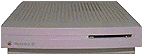
n use as well as a monitor capability that
allows the monitor to simply slide on top of the box - much like the
early pizza cases of the first
LCs.
We might even see a wireless solution, with the iBox containing both CPU and keyboard, with both AirPort for internet and a small base for receiving TV signals.
The size of the iBox would be its killer feature, since it might also fit into a briefcase and be very portable. We're talking really slim here, smaller than a Vaio. You could take it to meetings and hook it up to a projector, monitor, or TV wherever you go.
Basically, all these things could fit into Steve Jobs' Beyond the Box strategy, especially since in the not-so-far future there won't be any boxes as we know them, and the raw processing power you can get from IBMs new G3 chips lets you put a full G3 processor into a really small package that communicates wirelessly with peripherals around it.
None of these ideas are really radical, and none of the technology is beyond Apple's reach. The most interesting part for Apple is probably price/performance and parts concerns.
So what part of this is unfounded rumours and crazy dreams? All of
it. But Apple has been know to turn dreams into reality.
Share your perspective on the Mac by emailing with "My Turn" as your subject.

Recent My Turn articles
- Using Low End Macs for Internet Radio, 08.18. When the local public radio station moved classical music to HD radio, it was time to find another way to listen. An old iMac with iTunes solved the problem.
- 'That's Not a Computer', 07.30. Salvaging a broken PowerBook by turning it into a desktop computer.
- Upgrading a Digital Audio G4 to work better in Leopard, 06.02. In its original configuration, the dual 533 MHz Power Mac G4 was slow with Mac OS X 10.5, but add the right upgrades, and it runs Leopard quite nicely.
- My 4 favorite PowerBooks, 05.28. The PowerBook 150 has a big screen for a vintage PowerBook, the 165c has color, the 100 is diminutive, and Lombard has USB and a great keyboard.
- More in the My Turn index.
Links for the Day
- Mac of the Day: Mac mini Core Solo, Feb. 2006 - The only Mac to use a Core Solo CPU, this model ran at 1.5 GHz, has integrated graphics, and includes a Combo drive
- Group of the Day: SuperMacs is for those using Umax SuperMac clones.
- November 24 in LEM history: 98: Microsoft's heavy hand - 00: Looking at the iMac - 04: The best Mac for the holidays - Picking the right replacement for a dead mouse - Better battery for 15" AlBook
- Support Low End Mac
Recent Content on Low End Mac
- Pismo WiFi Networking Issue Finally Solved?, Charles W. Moore, Miscellaneous Ramblings, 11.24. It turns out the problems wasn't the Pismo, the Buffalo WiFi card, or Mac OS X 10.4. It was the Wireless G router - Linksys to the rescue!
- Mini VGA to S-video Adapter a No Go for eMacs, Dan Bashur, Apple, Tech, and Gaming, 11.24. You might think that Apple's Mini VGA S-video adapter is a cheap way to connect your eMac or G4 iMac to your TV. You would be wrong.
- Google Calendar with iPhone or iTouch Is Great for Scheduling, John Hatchett, Recycled Computing, 11.24. Web-based Google Calendar allows access and updates from any computing platform, including Mac, Windows, Linux, and iPhone OS.
- Why Spaces is My Favorite Leopard (and Snow Leopard) Feature, Charles W. Moore, Miscellaneous Ramblings, 11.23. Spaces, a feature introduced with OS X 10.5, is like having several monitors on your Mac without the cost and space of using multiple displays.
- i5 iMac Benchmarked, Mac mini 'Shouldn't Be Overlooked', Twitter Client for Classic Mac OS, and More, Mac News Review, 11.20. Also why Apple leaves the low end to others, 10.6.2 fixes video playback problem in 27" iMac, 3D Leopard and Snow Leopard performance, and more.
- Apple's Tablet an End Run Beyond Netbooks, Frank Fox, Stop the Noiz, 11.20. Whatever Apple has planned will leverage existing technologies while going beyond what its competitors can offer.
- Apple #4 in Reliability, Apple Tablet a Gadget for All?, HP's i7 Notebook Outdoes Mac Rivals, and More, The 'Book Review, 11.20. Also Flash 10.1 improves video on Hackintosh netbooks, thin-and-light notebooks impress, Windows XP finally on the way out, and more.
- NASA Chemical Sensor for iPhone, Smartphone Death Match, iPhone Earrings, and More, Ian R Campbell, 11.20. Also mobile phone dangers, new apps, GPS solution for iPod touch, new iPod and iPhone cases, and more.
- More links in our archive.
Recent Deals
- Best G4 iMac Deals, 11.24. Used 15" 700 MHz CD-RW, $150; 800 MHz Combo, $229; 1 GHz, $289; 17" 1.25 GHz, $200; 20" 1.25 GHz, $509.
- Best MacBook Air Deals, 11.24. Used from $899; refurb from $1,099; new 1.6 GHz/120 HD, $1,150 after rebate; 1.8/64 SSD, $1,150 a/r; 1.86/128 SSD, $1,350 a/r; 2.13/128 SSD, $1,694 a/r.
- Best PowerBook G3 Deals, 11.24. Used 233 MHz WallStreet, $75; 266 MHz, $160; 400 MHz Lombard, $199; 400 MHz Pismo, $289; 500 MHz, $350.
- Best 12" PowerBook G4 Deals, 11.23. Used 867 MHz SuperDrive, $348; 1 GHz Combo, $379; SD, $519; 1.33 GHz, $529; 1.5 GHz Combo, $549; SuperDrive, $609.
- Best Mac Pro Deals, 11.23. Used 2.66 GHz 4-core, $1,300; 3.0 4-core. $1,919; refurb 2.66 4-core Nehalem, $2,149; 2.93, $2,549; 2.93 8-core, $4,999; new 2.26 8-core, $2,290.
- Best Time Capsule and AirPort Deals, 11.23. Used 802.11g AirPort Extreme, $49; 500 GB Time Capsule, $150; new, $190; 1 TB dual-band, $280; 2 TB, $469; 802.11n AirPort Extreme, $170.
- Best eMac Deals, 11.18. Used 1 GHz Combo, $100; SuperDrive, $269; 1.25 GHz Combo, $119; SD, $319; 1.42 GHz Combo, $289; SD, $498.
- Best Mac OS X 10.6 and Mac Box Set Deals, 11.18. "Snow Leopard", single user, $25; 5 users, $45; Mac Box Set, single user, $139; 5 users, $180; Server, $414. Shipping included.
- Best Xserve Deals, 11.18. Used 1 GHz dual G4, $649; 2.3 dual G5, $795; 3.0 4-core Xeon, $1,899; refurb 2.26 4-core, $2,499; new, $2,888; refurb 8-core, $2,999; new, $3,449; more.
- More deals in our archive.
About LEM | Support | Usage | Privacy | Contacts
Navigation
Used Mac Dealers
Apple History
Video Cards
Email Lists
Favorite Sites
MacSurfer
MacMinute
MacInTouch
MyAppleMenu
InfoMac
Macs Only!
The Mac Observer
Accelerate Your Mac
RetroMacCast
PB Central
MacWindows
The Vintage Mac
Museum
DealMac
DealsOnTheWeb
Mac2Sell
ramseeker
Mac Driver Museum
JAG's House
System
6 Heaven
System 7 Today
the pickle's Low-End
Mac FAQ
Abandonware
Petition
Mac vs. PC Info
Affiliates
The Apple
Store
Mac
Connection
B&H
MacMall
TechRestore
ExperCom
Crucial
Memory
batteries.com
Advertise
MacMinute
MacInTouch
MyAppleMenu
InfoMac
Macs Only!
The Mac Observer
Accelerate Your Mac
RetroMacCast
PB Central
MacWindows
The Vintage Mac
Museum
DealMac
DealsOnTheWeb
Mac2Sell
ramseeker
Mac Driver Museum
JAG's House
System 6 Heaven
System 7 Today
the pickle's Low-End
Mac FAQ
Abandonware
Petition
Mac vs. PC Info
Mac Connection
B&H
MacMall
TechRestore
ExperCom
Crucial Memory
batteries.com



