I have always been involved with the Mac, starting with my first
128K unit that
wowed me with MacDraw and MacPaint and the 400k floppy disks.
I started my first ISP based around the Macintosh in 1993. There was
only one internet mail server for the Mac, Apple Internet Mail Server
written by Glenn Anderson. I had to use Unix for everything else. I
even used a Quadra 950 with the
special board in it so I could run A/UX, Apple's version of Unix. It
ran great.
But I used Sun equipment for DNS and other vital services.
All management machines were Macs, including billing and
customer information. I wrote a HyperCard stack that allowed us to
create users and passwords, then set them up into a Livingston
Portmaster with a special modem rack system I developed because at that
time there were no racked modems that were cost effective.
Over time, since we were one of the first ISPs around, we had a
large number of customers and were getting more and more every single
day. It was crazy. We were adding sometimes 30 or 40 people a day to
the system. Everyone, of course, thought we ran everything with Windows
machines, but even then there was nothing really of use on the PC side
of things for doing ISP work.
Clients were led to believe that their email was running on a very
large Sun server. The reality was that over 2500 mail users were being
served from an SE/30 with 32
MB of memory, a large (for an SE/30) 2 GB hard drive, and a Dayna
internal ethernet interface.
I made nightly backups of the data files. It crashed really hard
once in the beginning, and I could not resurrect the data files and
user files, so I sat through an entire night recreating all the email
logins. What a nightmare. But I learned my lesson. I started doing
backups nightly without fail. I never had a problem after that.
Understand, that over the years I started getting larger and larger
clients, from Huffy Sports to Allen Bradley and many other large
corporate clients. From time to time some of the IS folks from these
companies would come by and want to see my set up or see the server
clusters, etc. They all thought that since I was so into computers, I
would have to have some kind of big powerful machine.
It was obvious I couldn't use something less than a mainframe
with all the clients we had and networks we managed. After all, I liked
toys, and many of them knew that. I would get asked the question all
the time, "What machine serves your personal email?" I would then point
over to this giant refrigerator looking thing. In fact, it was bigger
than a refrigerator. It was a Sun MP690 solid steel housing complete
with blinking lights and whirring fans running (really loud fans
sounding like two F16s taking off). My clients would just oooohhh and
ahhhh over this thing and think it must be doing some enormous
calculation or some task beyond the comprehension of mere mortals. Of
course, I did not make them think anything different, after all,
thinking different was not the fad back then.
The reality was that the Sun MP690 was an authentic Multi Processor
Sun box that at one time had housed a very large Sun computer. It
weighed some 400 to 500 pounds. However, I had since removed the
computer and all its components 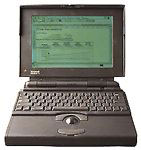 except
for the blinky lights and whirring fans. I left the fans in to cool it
down. I left a shelf in it and put my giant enormous computer in there
- a PowerBook 170.
except
for the blinky lights and whirring fans. I left the fans in to cool it
down. I left a shelf in it and put my giant enormous computer in there
- a PowerBook 170.
This was not just any PowerBook 170. This poor little computer had
been through hell. The trackball no longer worked, the screen only came
up half way, you could not even move the curson to get to any controls,
and the modem port had been taken out by lightning. If you put a
battery in it, the thing would spark and shut down immediately. I put
an APC battery back up on the poor thing, turned it on, and away it
went! Then installed Timbuktu. That is how I got around the mouse and
screen problem.
Your probably wondering how I connected it to the network. I then
used a Farallon SCSI ethernet adapter. Keep in mind that Farallon never
made them compatible with Open Transport, so I had to install a special
version of the OS and AppleTalk Networking - and then use MacTCP to set
it up.
Timbuktu worked like a champ. If the 170 crashed, it was a simple
matter of unplugging it from the APC unit and hitting the power button.
It was back on in a minute. It had 8 MB of memory (the maximum it could
take) and a 500 MB hard drive.
I never once was questioned on what I was using. I had many many
clients actually using that machine that were personal friends and not
one knew that it was a PowerBook on its last leg. That machine actually
kept running night and day for over 4 years. It finally gave up the
ghost one day when a technician touched the ethernet adapter and nailed
it with a static charge. It popped the mother board. That was it.
To this day I am still using that same copy of Apple Internet Mail
Server that was written so long ago. What is it running on today? I'd
like to say a G4 fully loaded, but that would be a lie, and it would
certainly not be using the Low End Mac to its fullest. I am
using a Quadra 700 and running
over 30 domains from it with over 140 email accounts.
I also have a large AS/400 steel cabinet, and that only has a fan in
it as well, but the cabinet is full of SE/30s. People think it's an
AS/400. I don't tell them otherwise. Why ruin the illusion?
How is that for touting the Low End Mac? Show me any Windows box
made the same year as the SE/30 (1989-90) or the Quadra 700 (1991-93)
running Internet apps for so long and so reliably.
In fact, I am guessing that you can't even find a Windows box that
could come close to the PowerBook 170, which is the newest of the three
machines.
Share your perspective on the Mac by emailing with "My Turn" as your subject.




