Low End Mac Reader Specials
TypeStyler For Mac OS X is Now Shipping! Download The Free Fully Functional 60 Day Tryout at www.typestyler.com
Don't install Parallels to play poker online! Poker Mac will show you how
to download and install a native Mac poker application such as Full
Tilt Poker Mac.
Laptop Hardware Provided by TechRestore - Overnight Mac & iPod Repairs.
Compare products like desktop computers, apple laptops, apple macs, and LCD Monitors side by side! All the information and reviews to make the best purchasing decision for new mobile phones, sat nav systems, or MP3 players. The Ciao online shopping community makes searching products easy for you.
The Practical Mac
Why OS X Matters
- 2001.09.18
I have read numerous reports and reviews wherein the writer declares, in some form or another, "I will stick with the Classic Mac OS!" I understand this sentiment. Although the number of Carbon or Cocoa applications grows daily, native versions of a number of important Mac applications remain months off. My wife runs OS 9.1 on her iMac DV+. I am writing this column on my iBook 466, newly updated to OS 9.2.1. I installed the latest OS update with the anticipation that I will, at some point, upgrade to OS X. But for now, the Classic OS suits me just fine.
It would be a mistake, however, to assume that I can or would even want to maintain the status quo indefinitely. I have installed OS X on an iMac and an upgraded Power Mac 8500 at the office. I like OS X. It is a sleek, modern OS with one huge advantage over all other Graphical OSes on the market: it is rock-solid in its stability. This OS should, and indeed must, be the future of computing.
At this point, a brief history of computing might be in order. For
all practical purposes, computing consisted primarily of typing in
arcane and confusing commands at a text-based prompt until 1984. In
1984,
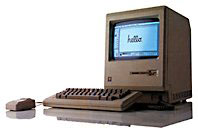
Apple introduced the original Macintosh with
its Graphical User Interface (GUI). Instead of typing in commands,
which had to be done either from memory or from some form of notes or
manuals, one could maneuver around a graphical screen and select
commands from a list of possible alternatives. It was revolutionary, it
was practical, and it was a hit! For eleven years, it was unique.
Not until Microsoft introduced Windows 95 in late 1995 did any other OS even approach the Mac in simplicity and ease of use. This was extremely important to the consumer/home user. To the business user, however, other factors were just as important, if not more important. Chief among these was the stability of the OS. It did not necessarily matter how easy to use an OS was. If it was unstable and continually crashed, it adversely impacted productivity and was unacceptable for business use.
For eleven years following the introduction of the Mac, Apple stood head and shoulders above other OSes in the stability category as well. In 1995, Microsoft slowly began to close this stability gap. With the introduction of Windows 2000, the race arguably drew dead even.
With the introduction of OS X, Apple once again opened up the stability gap, possibly wider than it has ever been. The foundation of OS X is Unix, and Unix, used primarily on servers, has always represented the Holy Grail of stability in heavy-duty computing environments. It is not unusual to have the uptime of Unix servers measured in years. This is the potential that OS X brings to the desktop. It allows a special privilege to those of us who long ago grew weary of the "three-finger salute." [Probably only you fellow DOS-converts will know that this means. We'll publish the answer next week!] It allows us boast that we run the most stable consumer OS in the world and know that only the technologically illiterate would argue with us.
Our iMac installation of OS X is over four months old and has not crashed - not once. And it is used daily. My installation on the accelerated Power Mac 8500 is about three months old and has only destabilized once. This was while running an application in the Classic environment. It still did not "crash" per se. I was able to successfully reboot using the menu choice, without having to resort to a "hardware reset." No Windows PC in our company can go for more than a few days without having to be rebooted - in addition to being shut down and turned off nightly.
After a few years on the ropes, the Mac once again offers a clear advantage. In order to increase market penetration in the business sector, the Mac must offer exactly this sort of "head and shoulders above" advantage.
Letters, I Get Letters
I sincerely appreciate and look forward to the email I receive each week. Somehow, as I look into my crystal ball, I predict that the volume this week may be heavier than usual. As I said, I like the Classic Mac OS. Yes, it aggravates me that some of the commands in OS X are now in different places. I miss the Chooser (I really do!).
It is certainly not my position that everyone should toss their older Mac and buy a new G4 preloaded with OS X. I plan on keeping my G3-accelerated Power Mac 7500 at home for a long time yet. I have invested a lot of money in upgrades over the years. I currently run OS 9.1, but I keep a dual boot of 8.1 available so I can use my PC-compatibility card!
I realize that some feathers were ruffled when Apple decided that older accelerated Macs would not be supported by OS X out of the box. However, with a number of different manufacturers producing accelerator cards, it could be argued that it would be difficult to support every one, and any impression of favoritism could be disastrous. I am just glad that companies like Sonnet, and even some individuals, have written installers and drivers which will allow users of older Macs to employ the latest OS.
It's the Productivity, Stupid!
I am responsible for supervising a staff whose job it is to insure
that hundreds of computers stay up and running. Downtime adversely
impacts productivity, which in turn adversely impacts profits. Success
is measured in uptime. That is why virtually all of my servers run
either Novell NetWare or Linux. That is also why I hope that someday
all of my workstations run Mac OS X. l may have realized too late
that it was the economy, but I have had a more timely epiphany that it
really is the productivity!
Steve Watkins is the Vice President for Information Technology for a mid-sized bank and also an attorney. He has been a Mac user for about ten years. He has owned some PCs along the way - but always came back to the Mac. If you find Steve's's articles helpful, please consider making a donation to his tip jar.
Recent Practical Mac Articles
- 5 things Apple is doing right in 2008 - and 5 it could do better, 03.24. Apple has made great strides in the past five years, but there are still a few areas that need to be addressed.
- MacBook Air a compelling option for the true road warrior, 02.22. Although it's not intended as a desktop replacement and has a few shortcomings, the lightweight MacBook Air with its 13" display could be the perfect field computer.
- Mailsmith a simple, powerful, spam fighting alternative to Apple Mail, 04.23. Mailsmith is bundled with SpamSieve, integrates with Address Book, and has very flexible scripting tools combined with elegant simplicity.
- Can your spam with SpamSieve, 02.02. "Right out of the box, SpamSieve exceeded the accuracy of the Apple Mail filter I've been training for over a year."
- More in the Practical Mac index.
Links for the Day
- Mac of the Day: Mac mini Core Solo, Feb. 2006 - The only Mac to use a Core Solo CPU, this model ran at 1.5 GHz, has integrated graphics, and includes a Combo drive
- Group of the Day: SuperMacs is for those using Umax SuperMac clones.
- November 24 in LEM history: 98: Microsoft's heavy hand - 00: Looking at the iMac - 04: The best Mac for the holidays - Picking the right replacement for a dead mouse - Better battery for 15" AlBook
- Support Low End Mac
Recent Content on Low End Mac
- Why Spaces is My Favorite Leopard (and Snow Leopard) Feature, Charles W. Moore, Miscellaneous Ramblings, 11.23. Spaces, a feature introduced with OS X 10.5, is like having several monitors on your Mac without the cost and space of using multiple displays.
- i5 iMac Benchmarked, Mac mini 'Shouldn't Be Overlooked', Twitter Client for Classic Mac OS, and More, Mac News Review, 11.20. Also why Apple leaves the low end to others, 10.6.2 fixes video playback problem in 27" iMac, 3D Leopard and Snow Leopard performance, and more.
- Apple's Tablet an End Run Beyond Netbooks, Frank Fox, Stop the Noiz, 11.20. Whatever Apple has planned will leverage existing technologies while going beyond what its competitors can offer.
- Apple #4 in Reliability, Apple Tablet a Gadget for All?, HP's i7 Notebook Outdoes Mac Rivals, and More, The 'Book Review, 11.20. Also Flash 10.1 improves video on Hackintosh netbooks, thin-and-light notebooks impress, Windows XP finally on the way out, and more.
- NASA Chemical Sensor for iPhone, Smartphone Death Match, iPhone Earrings, and More, Ian R Campbell, 11.20. Also mobile phone dangers, new apps, GPS solution for iPod touch, new iPod and iPhone cases, and more.
- Replacing the Hard Drive in a Clamshell iBook, John Hatchett, Recycled Computing, 11.19. Yes, it is one of the most difficult Apple notebooks to disassemble and reassemble, but a 10 GB hard drive just will not do.
- IBM Model F: A Great Old Keyboard with an Outdated Layout, Tommy Thomas, Welcome to Macintosh, 11.19. Although it used a different technology than the revered IBM Model M keyboard, the Model F was a great keyboard in its own right.
- More links in our archive.
Recent Deals
- Best G4 iMac Deals, 11.24. Used 15" 700 MHz CD-RW, $150; 800 MHz Combo, $229; 1 GHz, $289; 17" 1.25 GHz, $200; 20" 1.25 GHz, $509.
- Best MacBook Air Deals, 11.24. Used from $899; refurb from $1,099; new 1.6 GHz/120 HD, $1,150 after rebate; 1.8/64 SSD, $1,150 a/r; 1.86/128 SSD, $1,350 a/r; 2.13/128 SSD, $1,694 a/r.
- Best PowerBook G3 Deals, 11.24. Used 233 MHz WallStreet, $75; 266 MHz, $160; 400 MHz Lombard, $199; 400 MHz Pismo, $289; 500 MHz, $350.
- Best 12" PowerBook G4 Deals, 11.23. Used 867 MHz SuperDrive, $348; 1 GHz Combo, $379; SD, $519; 1.33 GHz, $529; 1.5 GHz Combo, $549; SuperDrive, $609.
- Best Mac Pro Deals, 11.23. Used 2.66 GHz 4-core, $1,300; 3.0 4-core. $1,919; refurb 2.66 4-core Nehalem, $2,149; 2.93, $2,549; 2.93 8-core, $4,999; new 2.26 8-core, $2,290.
- Best Time Capsule and AirPort Deals, 11.23. Used 802.11g AirPort Extreme, $49; 500 GB Time Capsule, $150; new, $190; 1 TB dual-band, $280; 2 TB, $469; 802.11n AirPort Extreme, $170.
- Best eMac Deals, 11.18. Used 1 GHz Combo, $100; SuperDrive, $269; 1.25 GHz Combo, $119; SD, $319; 1.42 GHz Combo, $289; SD, $498.
- Best Mac OS X 10.6 and Mac Box Set Deals, 11.18. "Snow Leopard", single user, $25; 5 users, $45; Mac Box Set, single user, $139; 5 users, $180; Server, $414. Shipping included.
- Best Xserve Deals, 11.18. Used 1 GHz dual G4, $649; 2.3 dual G5, $795; 3.0 4-core Xeon, $1,899; refurb 2.26 4-core, $2,499; new, $2,888; refurb 8-core, $2,999; new, $3,449; more.
- More deals in our archive.
About LEM | Support | Usage | Privacy | Contacts
Navigation
Used Mac Dealers
Apple History
Video Cards
Email Lists
Favorite Sites
MacSurfer
MacMinute
MacInTouch
MyAppleMenu
InfoMac
Macs Only!
The Mac Observer
Accelerate Your Mac
RetroMacCast
PB Central
MacWindows
The Vintage Mac
Museum
DealMac
DealsOnTheWeb
Mac2Sell
ramseeker
Mac Driver Museum
JAG's House
System
6 Heaven
System 7 Today
the pickle's Low-End
Mac FAQ
Abandonware
Petition
Mac vs. PC Info
Affiliates
The Apple
Store
Mac
Connection
B&H
MacMall
TechRestore
ExperCom
Crucial
Memory
batteries.com
Advertise
MacMinute
MacInTouch
MyAppleMenu
InfoMac
Macs Only!
The Mac Observer
Accelerate Your Mac
RetroMacCast
PB Central
MacWindows
The Vintage Mac
Museum
DealMac
DealsOnTheWeb
Mac2Sell
ramseeker
Mac Driver Museum
JAG's House
System 6 Heaven
System 7 Today
the pickle's Low-End
Mac FAQ
Abandonware
Petition
Mac vs. PC Info
Mac Connection
B&H
MacMall
TechRestore
ExperCom
Crucial Memory
batteries.com



