The iPod revolution . . . think back to how cool it was in
2001 and how it grew into a mega empire. Sometimes it's hard to believe
that there are actually competitors to the iPod. Perish the thought,
some of you quip in your minds.
Quip all you want, but there are definitely competitors. Today I
take a look at one of the smallest, yet most useful competitors that
can easily compete and beat the shuffle, the Sansa Clip from
SanDisk.
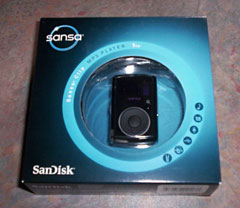
Upon first inspection, the size is small. Quite small, in fact.
It's a little thicker and longer than a shuffle. The Sansa Clip is a
flash player like the shuffle, but with one major difference right off
the bat - a screen. The screen is an OLED screen, and it's tiny, but
nonetheless, it's there. Teal and yellow are the two colors you'll see
here. The screen is sharp and easy to read, along with easy to read
icons.
Before I go any further, I'll say this up front, you can use
this in Mac OS X and Linux as a removable drive using MSC mode.
You can drag and drop your music without having to go through iTunes or
another program. For more info on how to safely use the Clip in
OS X, check out this article:
FAQ: Using Your Sansa Clip with Your Mac, Including a Script for
Exporting iTunes Playlists.
Now for a little about the player itself. The Clip comes in
1 GB and 2 GB models, along with a few different color
choices. I'm reviewing the 1 GB black Clip.
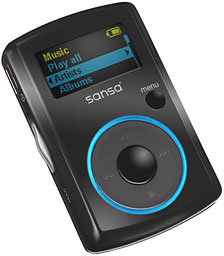 The buttons are
a little on the small side, but not too small. With the Clip facing
you, you'll see what looks like a traditional iPod-like click wheel,
but it's purely click based. The Menu button and the Play/Pause button
are reversed on the Clip compared to the iPod. You'll find the former
on the bottom and the latter at the top. You'll find Rewind and Fast
Forward on the left and right respectively. The Select button is in the
middle, just like on an iPod. To the upper right of the click wheel
you'll find a tiny button which is the Home button. No matter where you
are, you can press this button and be back at the main menu.
The buttons are
a little on the small side, but not too small. With the Clip facing
you, you'll see what looks like a traditional iPod-like click wheel,
but it's purely click based. The Menu button and the Play/Pause button
are reversed on the Clip compared to the iPod. You'll find the former
on the bottom and the latter at the top. You'll find Rewind and Fast
Forward on the left and right respectively. The Select button is in the
middle, just like on an iPod. To the upper right of the click wheel
you'll find a tiny button which is the Home button. No matter where you
are, you can press this button and be back at the main menu.
On the left side of the player, you'll find the Power/Hold switch
along with the mini-USB connector. That's another welcome change from
the iPod and other players that use a proprietary connector. The Clip
uses a standard mini-USB connector, making finding a replacement cable,
should the need ever arise, far easier and cheaper.
To turn the Clip on, you push and hold the switch for a second or
two - and it'll spring back in place. To turn it off, do the same
thing, but for an extra second. To disable the buttons, push the switch
down, and it will slightly lock.
On the right side of the Clip, you'll find that volume is controlled
with a rocker type button. Press the upper end to crank up the volume,
press the lower end to tame it some.
Above the volume button is the headphone jack. The earbuds have a
very good sound quality to them, especially compared to the truly awful
sound of the stock iPod earbuds. They fit comfortably in the ears and
deliver enough bass and treble to make your listening experience
pleasurable. The sound quality for a device so small is simply
unmatched. Whether you use the stock earbuds or go to the high end,
it's unbelievable that such great sound quality can come out of
something so small.
One can't forget the reason it's called the Clip in the first place
- it has a nice, strong, removable clip on the back.
Once you go to the link, and see how to set up the Clip in OS X (or,
if you prefer, to set it up in Windows), you'll find it has your
standard drag and drop way of putting music on it. On the Windows
front, you'll have to use Windows Media Player to create custom
playlists on it. You can also setup an instant playlist, called the
GoList, right on the Clip.
Navigation is pretty simple and routine. You can browse through your
music in the Music menu by Artists, Albums, Songs, Genres, Playlists,
My Top Rated, and Recordings, and you can also play audiobooks. I'm not
an audiobook listener, so I didn't review this part of it, but the
response I've heard from others who have the Clip, say it does a great
job with audiobooks.
You can rate songs, so you can browse them by rating. Another great
thing about the Clip is you can delete a song right from the Clip - no
need to use special software or have it connected to your computer.
There's also an equalizer, which I found useful on different songs,
but mainly I leave it off because the sound is so good without using
the EQ.
One thing I thought was pretty cool, even though most people
probably wouldn't think about it: While you're playing a song, press
the center button, and you'll see a cool graphic of the different sound
levels rising and falling with the beat!
MP3s aren't the only thing the Clip can do.
Included is a feature all the iPod's have lacked as standard fare is
an FM radio. Here's a trick a lot of MP3 players with a radio can't do.
Say you hear your favorite song on the radio and want to record it. Not
a problem! You can record a song in .wav format so you can go back
later, transfer it to your Mac or PC, then convert it to the file
format of your choice.
That's not all. Have a need to take notes? The Clip has a built-in
microphone. It has really good sound quality that rivals more expensive
players.
Before you can start jammin' to your tunes, you'll have to hook it
up to your Mac or PC via USB, or hook it up to a power adapter to let
the Clip fully charge. The Clip comes with a half charge, but as with
all electronics with batteries that need charging, it's best to fully
charge it out of the box.
The Clip comes with great instructions to help you get started.
Battery life is on par with the estimated 15 hours of play time. You
can see the remaining battery life left in upper right hand corner via
the battery icon. The Clip even has a selectable power off mode after
so many minutes of inactivity as well as sleep mode that's
selectable.
You'll find many options in the Settings menu. You can select the
Equalizer you want. Among the settings you can change: when the Auto
Power mode kicks in as well as when you want it to sleep, how long you
want the backlight to stay on, as well as the brightness of the screen,
the language you want, what region you use the FM radio in, and whether
you want it in stereo or mono, as well as other things. There's so much
packed into the Clip - which makes it well worth the money!
The only serious flaw I see with the Clip is a problem a lot of MP3
players have - no user-replaceable battery.
Why is this an issue for me? Because I don't like the throwaway
society we live in. I'm sure someone will attempt to take the Clip
apart and find a way to replace the battery via soldering. In the case
of the Clip, it may not have been feasible to add a user-replaceable
battery and retain the small size. It would be nice to see a
user-replaceable battery on the Clip; it's something I've want to use
for a long time.
Now for the answer to the question of how much is the Clip? The 1 GB
Clip starts at a very reasonable $29.99. No matter which size or which
color you get, you'll get a very good, very capable MP3 player for a
great price. 
Amazon.com Purchase Links
Free ground shipping on orders over $25. Prices updated 2008.11.24.
- Sansa
Clip 1 GB, currently $29.51
- Sansa
Clip 2 GB, black, currently $42.99
- Sansa
Clip 2 GB, red, currently $45.85
- Sansa
Clip 2 GB, blue, currently $39.95
- Sansa
Clip 2 GB, pink, currently $48.45
- Sansa
Clip 4 GB, silver, currently $63.52
- Sansa
Clip 8 GB, black, currently $100.48



