Much has been made in recent weeks about the dearth of acceptable Web
solutions for legacy Macs. To some extent, I agree with the
position taken suggesting older Macs are in fact limited by their
software in an increasingly connected, global community.
However, I find there remain several very good, existing
solutions for pre-OS X Macs. Obviously, my choices are colored by
my own needs and work flow. However, I think the applications
listed in this two-part introduction will either find a home or
will already be at home, on the Macs of many Low End Mac
readers.
Part one focuses on the 68k Mac platform, but the information
should prove useful to any pre-OS X Mac user.
While there is no one perfect browser for 68k Macs, arguably
there is no perfect browser on any platform. There are two
applications which do a credible job of filling the gap - iCab
2.9.8 and WannaBe.
WannaBe
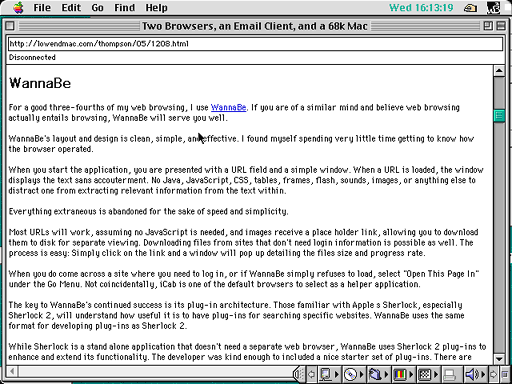
For a good three-fourths of my web browsing, I use WannaBe. If you are of a similar
mind and believe web browsing actually entails browsing, WannaBe
will serve you well.
WannaBe's layout and design is clean, simple, and effective. I
found myself spending very little time getting to know how the
browser operated.
 When you start the application, you are
presented with a URL field and a simple window. When a URL is
loaded, the window displays the text sans accouterment. No Java,
JavaScript, CSS, tables, frames, flash, sounds, images, or anything
else to distract one from extracting relevant information from the
text within.
When you start the application, you are
presented with a URL field and a simple window. When a URL is
loaded, the window displays the text sans accouterment. No Java,
JavaScript, CSS, tables, frames, flash, sounds, images, or anything
else to distract one from extracting relevant information from the
text within.
Everything extraneous is abandoned for the sake of speed and
simplicity.
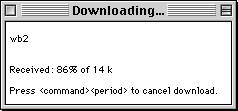
Most URLs will work, assuming no JavaScript is needed, and
images receive a place holder link, allowing you to download them
to disk for separate viewing. Downloading files from sites that
don't need login information is possible as well. The process is
easy: Simply click on the link and a window will pop up detailing
the files size and progress rate.
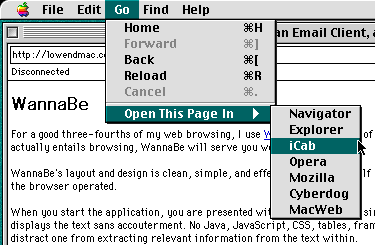 When you do come across a site where you need to
log in, or if WannaBe simply refuses to load, select "Open This
Page In" under the Go Menu. Not coincidentally, iCab is one of the
default browsers to select as a helper application.
When you do come across a site where you need to
log in, or if WannaBe simply refuses to load, select "Open This
Page In" under the Go Menu. Not coincidentally, iCab is one of the
default browsers to select as a helper application.
The key to WannaBe's continued success is its plug-in
architecture. Those familiar with Apple s Sherlock, especially
Sherlock 2, will understand how useful it is to have plug-ins for
searching specific websites. WannaBe uses the same format for
developing plug-ins as Sherlock 2.
While Sherlock is a stand alone application that doesn't need a
separate web browser, WannaBe uses Sherlock 2 plug-ins to enhance
and extend its functionality. The developer was kind enough to
included a nice starter set of plug-ins. There are many sources for
extra plug-ins which we will explore in a future article.
iCab 2.9.8
This leads us to iCab, the second
half of our dynamic duo. Other graphical browsers may be available
for 68k Macs, but iCab 2.9.8. is the only one to see any sort of
development effort in recent years.
If I am not mistaken, both Charles Moore and Dan Knight also
have high regard for this little browser. (Yes, I felt the need to
reach to a higher source, since I have not yet established a
reputation comparable to my esteemed colleagues.)
If you are still doubtful as to why iCab 2.9.8 is worth a look,
here are some more reasons:
- Tabs - the only 68k browser with tabs
- Customizable interface - move, add, and remove interface
elements (buttons, URL field, search field, etc.)
- JavaScript filters - useful for getting rid of annoying popups,
popunders, etc.
- Filter Manager - a flexible way to fine tune browsing
preferences for spec
- Modest system requirements, although you can't ever have too
much RAM.
I'd suggest spending a couple days playing with the preferences
and fine tuning iCab to fit your work flow. In fact, I'll spend
time detailing my own iCab setup in a future article. Fun stuff
indeed.
Unfortunately, all is not rosy with iCab 2.9.8. Many pages are
not rendered correctly or have limited features because CSS, Java,
and JavaScript are in various stages of implementation. Further,
development has halted for the time being on the 68k version, but
there is some hope that maybe one day the new features can be
backported from the iCab 3.0 beta (more information on iCab 3.0
beta to follow in the PPC section).
Although continued development on the 68k version is not likely,
there is enough substance to make do. iCab 2.9.8 remains the only
credible graphical web browser for 68k Macs.
SweetMail
The last of the web trifecta is SweetMail.
SweetMail is a very nice email client, with one big advantage over
other email clients - SMTP authentication. Many ISPs and email
services require authentication to validate you are indeed the
user, and not a spammer. The dubious benefits in preventing SPAM
aside, SweetMail is one of only two email clients providing this
feature for 68k Macs. I believe Musashi may be the other, but
SweetMail is freeware. True, I am a cheap fellow.
Beyond the necessity to authenticate outgoing email and the
great price - free - SweetMail has flexible customization options.
You can set keyboard shortcuts, items to display, filters,
mailboxes, address book shortcuts, and many more small, clever
touches make SweetMail a joy to use. Fast, flexible, and stable,
there is nothing better.
My advice to customize your SweetMail work flow in order to
improve productivity:
- Use the address book to enable shortcuts in order to avoid
excessive typing every time you need to address an email.
- Be aggressive with your filters. When your mail arrives, let
the software do your sorting for you.
- If there are keyboard shortcuts, use them. If not, set up
keyboard shortcuts for frequently used tasks. No need to keep
reaching for the mouse or trackpad.
Even with these three applications, there are holes in the 68k
software library for interacting with the Web. I hope I've
presented a few ways to keep older Macs running strong.
My next article will focus on the PowerPC side of the fence.
After we get these introductory pieces completed, we'll delve into
more specific ways to keep our platform, pre-OS X Macs, viable
despite with the increased abandonment by Mac developers.
OS X may be the present and future, but we do not have to
abandon the past. Why throw the baby out with the bath water?



