
Embracing Obsolescence
TopXNotes Classic: A Powerful, Easy to Use, Low Cost Information Organizer for OS 9
- 2006.02.10
While compiling what was to be my latest article for Low End Mac, a column detailing my media center project, I was simultaneously testing a program for review.
I'm sure my adventures setting up a Mac media center are positively engrossing and will be sorely missed, but TopXNotes Classic has proven itself a helpful addition to my set of frequently used applications. The Mac media center article will be delayed until next week while I do my best to get the word out about an application that has ingratiated itself so thoroughly into my work flow.
Disclosure
The president of Tropical Software (the developer behind this great application), who was very helpful to me when offering assistance with my file sharing dilemma from column's past, brought TopXNotes Classic to my attention late last week. Once I realized exactly what the application could do, I jumped at the opportunity to review TopXNotes Classic.
I've been searching for this sort of tool for at least four years. I've used Z-Write and an old version of Idea Keeper for the classic Mac OS platform, MacJournal in OS X, and a host of other multi-application approaches.
If you're familiar with those applications, you will understand the basics in this long running quest to keep track of the various notes cluttering up my computer. Everything from research from the Web, books, magazines, or other tomes to recipes, writing projects, to do lists, etc.
My relationship with Tropical Software stems from a passing connection brought about from our mutual interests in the Mac platform and not some preconceived business arrangement. This disclosure can be viewed as a general announcement for anything I may review in the future. If I do have a more direct connection with a company, I will let you know, because my aim is to never mislead the Low End Mac community.
With that out of the way, now we can get to how TopXNotes Classic works and whether you should give this application a run on your own Mac.
Features
TopXNotes Classic is billed as the best little notepad for Macs. A quick list of features straight from the developer's website, will provide a quick overview of what this application can do.
Basic Features:
- Color text, style, font and font size, all user selectable, all saved, all cut/copy/paste, internal drag & drop note view to note view
- Cut/copy/paste and drag and drop to and from external applications
- Recognize links (ftp, web & email, other?) and launch from them by a single click
- NoteOrganizer is an advanced table of contents (TOC) as separate window. Each note (page) can be identified by its number, full title, and organized by groups and categories you specify.
- Minimum 50 pages, theoretically unlimited Page turning arrows
- Save automatically on page turn
- Customize with many user Preferences
- Optional save on a time interval Optional basic encryption
- Export as either straight text or RTF Template pages for easily creating new kinds of notes
- A set of 10 templates installed as part of this release including Web Accounts, Financial Accounts, and Serial Numbers and various other lists. Provided a unique note pad for each system user
Advanced Features:
- MultiView - view more than one note view at once, as many as will fit on your display
- NoteOrganizer - and advanced table of contents with category and group
- Preferences - tune TopXNotes Classic just the way you like it
- QuickNotes menu - keep your "top 10 notes" in a floater always on your desktop for easy access
Streamlined Work Flow
TopXNotes Classic has enabled me to streamline my work flow from using multiple applications performing separate tasks to using one central repository for collecting, browsing, and organizing information.
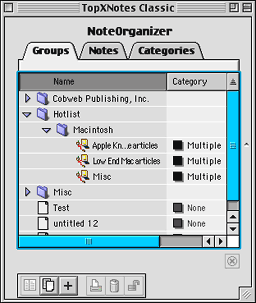 TopXNotes Classic combines a multiple tab and multiple panel
approach to displaying notes. The first panel displays your
NoteOrganizer, which contains three tabs: Groups, Notes, and
Categories. These tabs are used to quickly sort how you view your list
of notes.
TopXNotes Classic combines a multiple tab and multiple panel
approach to displaying notes. The first panel displays your
NoteOrganizer, which contains three tabs: Groups, Notes, and
Categories. These tabs are used to quickly sort how you view your list
of notes.
The Groups tab was the tab I used most often for keeping track of my notes. Oftentimes a note you've created will contain information related to other notes, and you may want to view all these related notes from a single group. This task is easily accomplished by creating a group, which is displayed as a folder, and dragging and dropping the relevant notes onto the new group folder.
You can created subgroups by simply creating a new group within an existing group. Also, you can move an existing group into another group with a simple drag and drop. All related notes will follow its current group folder into the new group. You can sort your list of groups by name or by category.
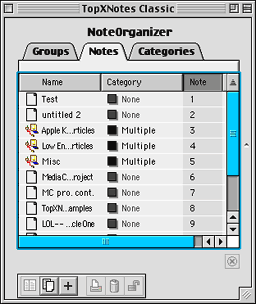 The Notes tab works a little
differently. Instead of seeing all the groups, subgroups, and notes
you've created, there is a simple list of notes organized by name,
category, or note number. If you want to quickly identify individual
notes without sorting through groups, this view can prove helpful.
The Notes tab works a little
differently. Instead of seeing all the groups, subgroups, and notes
you've created, there is a simple list of notes organized by name,
category, or note number. If you want to quickly identify individual
notes without sorting through groups, this view can prove helpful.
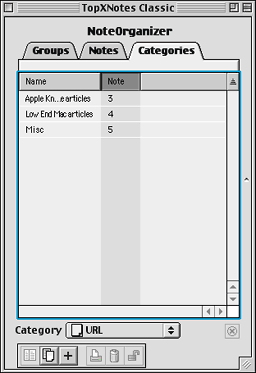 The Categories tab displays created notes by category. When
viewing this tab, the bottom of the NoteOrganizer panel has a menu
where you can select what category of notes you want to display. The
default setting gives you two categories, None and Quick Note. More
categories may be created as the user sees fit. You can sort this tab
by name or note number.
The Categories tab displays created notes by category. When
viewing this tab, the bottom of the NoteOrganizer panel has a menu
where you can select what category of notes you want to display. The
default setting gives you two categories, None and Quick Note. More
categories may be created as the user sees fit. You can sort this tab
by name or note number.
I mentioned that TopXNotes uses both a multiple tab and multiple panel setup. The NoteOrganizer panel is the only panel to make use of tabs.
You can have multiple panels open at the same time. The NoteOrganizer counts as one panel when open and is always located to the far left of the notes panels. The other panels can each display a different view of the same note or altogether different notes. The amount of notes that can be displayed is limited to the size of your screen.
Multiple panels do not have to be open at the same time; you can view one panel or multiple depending on need.
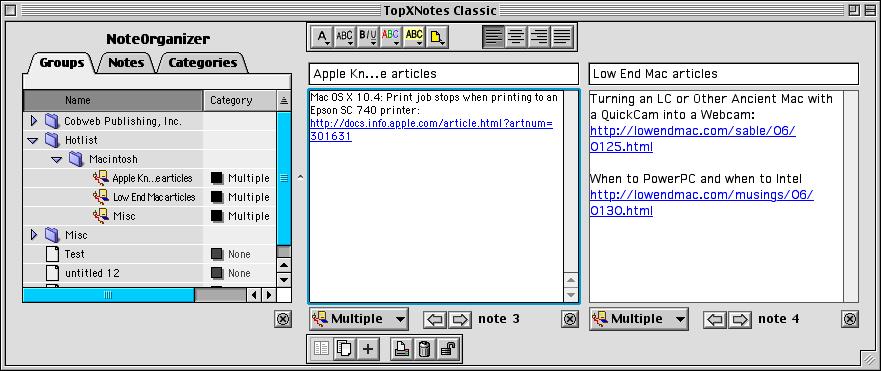
The note panels differs from the NoteOrganizer panel by the tool bar present at the top of the panel. The top tool bar has icons for formatting a note's text, which mirror the choices found within the Text drop down menu. While every note panel has access to this toolbar, only the current note actually displays the top toolbar.
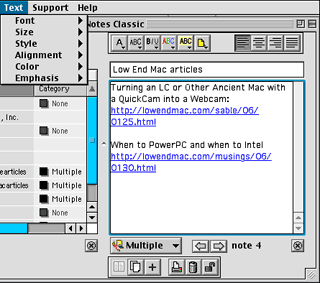 The bottom tool
bar contains icons for creating new notes, new views of the current
note, printing notes, deleting notes, and locking notes to prevent
modification (some of these features are also present on the
NoteOrganizer panel). These tools can also be found under the File,
Edit, and Notes menus. While every note panel has access to this
toolbar, only the current note actually displays the bottom
toolbar.
The bottom tool
bar contains icons for creating new notes, new views of the current
note, printing notes, deleting notes, and locking notes to prevent
modification (some of these features are also present on the
NoteOrganizer panel). These tools can also be found under the File,
Edit, and Notes menus. While every note panel has access to this
toolbar, only the current note actually displays the bottom
toolbar.
Also present are arrows for navigating sequentially between notes, an icon for closing the view (this icon is also present on the NoteOrganizer Panel), and a pull down menu for categorizing the note. This selection of tools is always visible, whether the focus is upon the note or not.
I should note (sorry, bad pun) that many features found within the upper and lower toolbars have corresponding keyboard shortcuts. Overall, creating, navigating, displaying, and modifying notes, groups, and categories are done in a logical manner with a very clean layout. I found myself able to quickly acclimate to TopXNotes Classic's various tools and features by simply poking around as I worked on creating and organizing my notes.
 The last
interface element is the Quick Note floating panel. Up to 10 notes can
be designated with the Quick Note category, which adds these notes to
the floating panel. Since this floating panel remains in the foreground
of the desktop, you can quickly gain access to commonly needed notes
from any application or the Finder.
The last
interface element is the Quick Note floating panel. Up to 10 notes can
be designated with the Quick Note category, which adds these notes to
the floating panel. Since this floating panel remains in the foreground
of the desktop, you can quickly gain access to commonly needed notes
from any application or the Finder.
A click on the panel brings forth a menu listing your Quick Notes in alphabetical order. You do have to keep TopXNotes running in order to access your Quick Notes, but the application can be hidden.
A few additional features deserve to be address before I wrap up this review. Some people may be concerned about having there data stuck in some proprietary format with no hope of retrieval if they switch applications, the company abandons the product, or some other such mishap. Fret no longer my friends - you can export your notes to Text or Rich Text Format (RTF).
I will test the export features further and let you know how well formatting is retained when notes are opened in another application (assuming you save as RTF). You can also print your notes if you have need of a hard copy.
Also, the ability to lock notes with separate passwords can be handy, especially if you take the lead of the included templates and keep track of credit cards, banking information, serial numbers, or any other sensitive information. The password I created for testing included numbers, punctuation, and upper- and lower-case letters. The password was ten characters long, so protection seems fairly robust.
The question always boils down to how I would rate this application. Since, I don't have a sophisticated testing procedure or scale for rating quality, I have to keep things simple. Bottom line: I can wholeheartedly recommend TopXNotes Classic to anyone who uses needs a way to keep data organized in a convenient flexible application. The price is low (only US$19.95), there is a corresponding version for OS X, and the application is easy to use and not resource intensive.
For testing I use a Power Mac 7600 upgraded with a 312 MHz G3 and 256 MB of RAM. TopXNotes classic suffered three low memory crashes at the default RAM allocation setting (3 MB) while running alongside six or seven other applications. That's nothing out of the ordinary for the classic Mac OS, and the official word from Tropical software suggests 20 MB, but I seem fine now with 6.5 MB allocated to TopXNotes Classic.
One small nitpick. While the Tropical Software indicates TopXNotes Classic will run on any version of Mac OS 9.x, the installer said that I needed Mac OS 9.1. (Since version 1.1 is only a week old, the site may not have been updated with this information.) I'll have to remember to send an email to Tropical Software to ask about this discrepancy.
About LEM Support Usage Privacy Contact
Follow Low End Mac on Twitter
Join Low End Mac on Facebook
Favorite Sites
MacSurfer
Cult of Mac
Shrine of Apple
MacInTouch
MyAppleMenu
InfoMac
The Mac Observer
Accelerate Your Mac
RetroMacCast
The Vintage Mac Museum
Deal Brothers
DealMac
Mac2Sell
Mac Driver Museum
JAG's House
System 6 Heaven
System 7 Today
the pickle's Low-End Mac FAQ
Affiliates
Amazon.com
The iTunes Store
PC Connection Express
Macgo Blu-ray Player
Parallels Desktop for Mac
eBay

