Snow storms and decrepit phone lines may have knocked me off course
the last couple weeks, but now I'm back on track. Since Verizon finally
repaired my phone lines, I may even be able to get DSL again.
Short story: I had DSL for almost a year before service evaporated
into the ether and Verizon decided they didn't want to spend time
fixing the aging phone lines. Fast forward four months to the present
time. Since the problem began effecting my home telephone service and
dialup connection (by the consequence of running along those same
wires), Verizon was forced to repair the problem. Hence, my reason
behind pondering a return to the world of DSL.
The Low End Mac Media Center
Nevertheless, it's time to revisit my media center project. Most of
my computing revolves around email and light Web browsing. The writing
I do can be accomplished with a simple text editor or the ancient (but
thoroughly well developed) Nisus Compact.
I enjoy listening to music and occasionally watching television
while I peck away at ye olde keyboard. Not wanting to have several
pieces of equipment cluttering my work area - beyond my family of old
Macs anyway - I decided dedicate one of my Macs for the sole purpose of
entertainment.
But which Mac would prove the best tool to meet my multimedia
demands. Ideally, it would have DVD playback, television tuning, and
perhaps a remote control, all to accompany the more routine task of
digital audio jukebox.
Performa 6400?
Except for DVD playback, my description could imply a leaning
towards the Performa 6400. Yes,
the very same Performa 6400 I have periodically mentioned in past
columns.
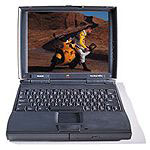 Revealing my contrarian
nature, I promptly arranged a trade sending the Performa 6400 across
country in exchange for a PowerBook
1400c/133 and a grab bag of assorted Mac goodies.
Revealing my contrarian
nature, I promptly arranged a trade sending the Performa 6400 across
country in exchange for a PowerBook
1400c/133 and a grab bag of assorted Mac goodies.
Perhaps this decision seems incongruous to my goal of building a
media center, but I want to assure the dedicated Low End Mac readership
that this task was not decided on some bout of whimsy. Instead, I
choose to believe this event transpired through clear-headed critical
thinking.
The 6400 certainly has many features that seem ideally suited for
media center duty. In no particular order: TV tuner with remote, FM
antenna, audio/video/S-video inputs, a fast G3 processor upgrade, and
an ATA bus for accepting cheap, fairly large hard drives (up to 128
GB).
But not all was rosy with the 6400, or I would have made do without
the trade. In no particular order, my reasons for deciding against it
include being limited to thousands of colors (unless a video card is
added), the case is a bear to work with in comparison to the 7600's outstanding case design,
and I have too many 7600 upgrade parts to ignore better flexibility and
usability.
I was simply aghast that the Performa 6400/Power Mac 6500 design team could
commit such egregious transgressions against us poor, hapless Mac
users. I spend too much time fiddling with my computers to not
appreciate an easy to access case design. Still, I did find the
6400/6500 case to be pleasing to the eye in a curvaceous, beige sort of
way.
Power Mac 7600
Unbeknownst to me, the Power Mac 7600 was already upgraded with a G3
processor. Coupled with the amount of upgrades I already had for that
family of Macs (RAM, PCI cards, hard drives, etc.) and the truly
brilliant ease of use, I chose to part with my heavily upgraded
Performa 6400.
Although I don't currently own any high capacity SCSI drives, I did
get both my USB/FireWire card and 10/100 ethernet card functioning with
the 7600. These upgrades should allow me to connect high capacity
external drives to hold all my media files. Hopefully this will correct
the one sore spot the 7200, 7500, 7600, 7300, 8500, 8600, 9500, 9600
model Macs all have - there is no cheap way to add high capacity hard
drives without an ATA PCI card.
Having the ability to use two or more monitors with a minimum of
fuss is another perk. In theory, I could have one monitor facing my
relaxation area and another facing my work area, each displaying
millions of colors with separate resolutions and desktops if need
be.
Okay, enough fluff. I'm sure everyone who has made it this far is
wondering how I went about assembling my Mac media center. I won't go
into much detail today, but I'll provide an overview of topics for the
rest of this series.
The Digital Jukebox
First, I decided to approach this project in segments. I needed to
determine which aspects of the media center were most important to me.
For instance, I tend to listen to audio much more than I watch
television/videos or spend time gaming, because it requires the least
amount of dedicated attention. As such, my next article will focus on
digital audio jukebox functionality.
Setting up a digital audio jukebox requires several steps, which
will be broken down as such:
- An overview of the different digital audio formats and the various
digital audio software available for the classic Mac platform.
- My favorite ways of getting my physical music collection into
digital form, included an overview of software and hardware.
- Sources of digital audio on the Web compatible with the classic Mac
OS platform. I have a decent selection of places to find digital audio
downloads (either paid or free, but all legal), but I'm not terribly
familiar with the different sources of streaming audio on the Web,
especially these days with dialup being my connection to the world.
I'll need feedback from readers to fill out any information on online
radio stations.
- How to connect your new Mac jukebox into other audio/media
components.
While explaining each of those steps, I'll give examples of how I
worked through setting up my own digital jukebox.
Okay, I apologize for declaring an end to the fluff while not adding
anything terribly exciting, but I needed a teaser for the next series
of articles.
Back to 680x0
I should mention before we part yet again, my intentions of getting
back to more 68k Mac information. I know most Mac users are using shiny
PowerPC or - gasp - Intel-powered Macs with their new-fangled OS X
(or "OS eX", as non-Mac people tend to call it).
I continue to accomplish many important tasks by using simple 680x0
Macs from the bygone era of Sculley and Spindler. Please look forward
to future articles featuring twin LC
IIs powering a collaborative network environment, a PowerBook 520c used to monitor headless
Linux and Mac devices, and how a free 1 MB word processor can be
used to manage a project involving multiple documents scattered across
multiple folders, drives, and networks.



