I still live in the universe where a 10 GB hard drive seems huge - I
have over 3 GB free on the drive in my TiBook. At the same time,
when it comes to buying a 3.5" hard drive these days, it's hard to find
anything that small.
I had a 15.2 GB IDE hard drive in my SuperMac S900. I needed to put an IDE
drive in the SuperMac C600 I was
setting up for my son, and I soon discovered it was far more cost
effective to buy a 30 GB drive for the S900 and put the old 15.2 GB
drive in the C600 than pick up a smaller drive.
I bought an IBM Deskstar 75GXP 30 GB drive from
Buy.com for $137.95 in December. It's one of the best values of
price and performance on the market. I never did install it in the
SuperMac. Once I knew the PowerBook G4 was coming, I postponed the C600
surgery. That machine now has the 15.2 GB drive, and I've sold the
TurboMax card that let me put an IDE drive in my S900.
The smart thing to do might be to sell it, but there are other
options.
FireWire Depot sells the
Flex-HDD 3.5" FireWire/USB enclosure as the FHD 352 for $184.99. It's an
attractive translucent case that would look 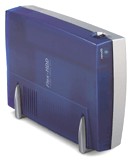 right
at home next to an indigo iMac or iBook. The enclosure is 8" deep, 5.8"
tall, and 2" wide standing upright. It has feet so you can lay it
sideways. When oriented vertically, as in the photo, the fan and power
switch are on the top. There are two FireWire ports and one USB port on
the back.
right
at home next to an indigo iMac or iBook. The enclosure is 8" deep, 5.8"
tall, and 2" wide standing upright. It has feet so you can lay it
sideways. When oriented vertically, as in the photo, the fan and power
switch are on the top. There are two FireWire ports and one USB port on
the back.
The Flex-HDD came with no instructions - not that you really need
any. I spent a few minutes trying to figure out which screws to remove
to open the case. There were none. You install the screws once you've
put an IDE hard drive inside the enclosure.
In went the IBM Deskstar, in went the screws, in went the FireWire
and power cables. Power up. Connect to the TiBook. Format the drive.
Plug and play simplicity. Preliminary tests told me the drive was
pretty darned fast.
I also copied the System to the FireWire drive to see if I could
really boot from it. I could.
FireWire Performance
Of course, that's never enough for Low End Mac. We want numbers. We
want benchmarks. So I ran MacBench 5, which rates the internal 10 GB
drive in my TiBook at 1377. The Flex-HDD/Deskstar combination averaged
1426, just 3.5% faster than the internal drive.
The next test was TimeDrive 1.3, which measures the internal drive
of my TiBook at 10,485 KBps (kilobytes per second) for writes and
31,457 KBps for reads. In this test, the external drive took second
place, scoring 7,864 KBps for writes (75% of internal speed) and 10,485
KBps for reads (one-third internal performance).
The following table shows results using the ATTO Tools Benchmark on
the IBM Deskstar 75GXP in the Flex-HDD enclosure and compares this to
results for the internal 10 GB Toshiba drive in my TiBook and results
reported for the 10 GB IBM drive on Accelerate Your Mac!
ATTO Tools Benchmark, default
   Drive          Peak Read   Sust. Read   Peak Write   Sust. Write
   FireWire       11.25 MBps  10.94 MBps    7.94 MBps    7.84 MBps
   USB             0.84 MBps   0.84 MBps    0.73 MBps    0.73 MBps
   10 GB Toshiba  50.21 MBps  49.50 MBps   35.93 MBps   10.86 MBps
ATTO Tools Benchmark, 8 MB test
   Drive          Peak Read   Sust. Read   Peak Write   Sust. Write
   FireWire       11.34 MBps  11.17 MBps    8.04 MBps    7.99 MBps
   10 GB Toshiba  37.61 MBps  13.41 MBps   28.67 MBps   13.02 MBps
   10 GB IBM*     37.26 MBps  15.79 MBps   24.29 MBps    5.67 MBps
      * results from Accelerate Your Mac!, 2/19/01.
No matter the benchmark, the FireWire results fall short of those
for the internal 10 GB Toshiba hard drive. This is probably due to the
bridge that adapts IDE drives for use with FireWire. Better bridge
electronics will provide much better throughput (see Bare Feats for more),
potentially providing better performance than the internal hard
drive.
USB Performance
The Flex-HDD isn't quite plug and play with USB. FireWire Depot
emailed me Radiologic drivers. Once I dropped these into the System
Folder and restarted, the 30 GB IBM drive showed up - plug and play
once you have the driver installed.
Of course, USB is slow. It's fine for floppies, okay for
Zips, and barely adequate for CD burners. As for hard drives, it's far
from ideal. MacBench scored the Flex/IBM combination at 303, just 22%
of the speed of the internal drive. TimeDrive made that score look
good: writes were measured at 714 KBps (9% of FireWire throughput and
under 7% of internal drive throughput) and reads at 827 KBps (just
under 8% of FireWire speed, 2.6% of internal drive speed).
Conclusion
At this time, external FireWire drives are pretty expensive.
External USB drives are so slow they should be avoided unless they also
have FireWire for future use. At US$185, the Flex-HDD FireWire/USB is
not a small investment. On the other hand, you can use it to create a
30 GB external FireWire/USB drive for about $300. The lowest price for
a FireWire-only 30 GB drive from MacMall is a $230
Western Digital with a 5400 RPM mechanism. Faster 7200 RPM mechanisms
start at $300.
At the same time, it does provide the flexibility of supporting both
USB and FireWire, making it compatible with older iBooks and iMacs that
only have USB and with newer models with FireWire ports. If you're
looking for an external drive for a USB-only Mac, a FireWire/USB drive
makes a lot more sense than one that only supports USB.
The real value of the Flex-HDD enclosure comes if you already have
an IDE drive you can put inside it, as I did with the Deskstar drive I
bought in December, and would benefit from having both USB and FireWire
ports on an external drive.
Then again, we don't have any USB-only iBooks or iMacs, so I'd elect
to save some money and look at FireWire-only enclosures. Fortunately,
FireWire Depot (among other
sources) has quite a selection of FireWire and FireWire/USB cases for
3.5" and 2.5" drives, and they range in price from $129.99 to $184.99.
I'd probably look closely at their BT 3.5 and DT Crystal 3.5
enclosures, each of which sells for $139.99, probably leaning to the
smaller, lighter BT 3.5 enclosure.
The other unknown is performance: Are some FireWire-to-IDE
converters faster than others? I'm hoping to test others and answer
that question.
Manufacturers and distributors: Interested in having your product
reviewed? Please read our review
policy.



