Apple can't seem to make up its mind about some things. All the current Power Macs can
burn CDs (either CD-R or CD-RW), but 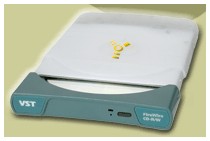 only the SuperDrive can read or write DVDs. These are
computers that sit in offices, often have Zip drives installed, and are
often backed up over a network.
only the SuperDrive can read or write DVDs. These are
computers that sit in offices, often have Zip drives installed, and are
often backed up over a network.
At the same time, the PowerBook G4 can run CDs and
DVDs, but can't record without a peripheral drive. These are computers
that travel, whether that's around the house, around the office, or
around the world. But there's no built-in way to back up your data.
Given the option, I'm sure some Power Mac buyers would prefer a DVD
player or a combination DVD reader/CD burner. Likewise, there are
PowerBook G4 buyers who would just as soon have a CD-RW or Combo
DVD/CD-RW drive as the DVD player built into the TiBook by Apple.
TiBook owners have several options, such as USB Zip drives, external
hard drives, and now FireWire CD burners. In my desktop days, which
lasted until January 2001, I used a Zip to easily transport data
between home and work computers. I also backed up my entire home
network using a VXA tape drive and Retrospect.
USB
But my Zip drive is SCSI, so I'd need an expensive adapter to
connect it to my TiBook. In fact, it would cost less to pick up a USB
Zip 100 from MacMall for $58.99 than
to buy a USB-to-SCSI or FireWire-to-SCSI converter. The Zip drive is
relatively compact, and this model also requires a power brick - and
USB on the Mac is slow, limited to 5.44 Mbps/680 KBps (not the 12
Mbps/1.5 MBps USB claims to be capable of, see
Why You May Be Unable to Burn a CD at 4x on a USB CD-RW Drive on
MacFixIt for details).
The reason burning audio CDs at 4x speed to Mac USB
recorders fails is due to the design of the Apple USB device driver.
Apple's philosophy is that USB should be used primarily for
low-bandwidth devices such as keyboards and mice, rather than for
high-bandwidth devices, such as hard disks and CD recorders, for which
it developed the high-speed FireWire interface. Therefore Apple's USB
device driver was designed to optimize the small data transfers
associated with low-bandwidth devices, and has a maximum data transfer
rate of 680 KB/sec. This is obviously inadequate to support the 4x burn
speed of 700 KB/sec.*
That 680 Kbps limit also means USB CD burners can't burn reliably at
4x - that demands 700 Kbps.* A USB CD-RW drive just wouldn't make sense.
The Zip is cheap and tempting, but another alternative came along.
FireWire
Iomega now makes 250 MB Zip drives that are powered via USB or
FireWire, eliminating the need for a power brick. The USB Zip with a
FireWire adapter costs a lot more than the older 100 MB Zip drives
MacMall is
blowing out - $220 vs. $59!
But there's something Steve Jobs noticed a few months back: People
want to burn CDs. That's why the switch from DVD drives to CD-RW drives
with the Digital Audio
Power Mac G4. That's why Apple released iTunes. That's why my
kids keep bugging me for a CD burner.
I know of three FireWire CD burners that are powered via FireWire
instead of a separate power cord. Of the three, SmartDisk's VST
FireWire CD-R/W Drive (what a mouthful!) is the smallest, slowest, and
right in the middle of the price range. Here's a quick overview:
| Drive |
write/rewrite/read |
size (WxHxD), weight |
retail |
| Formac FDR-1012-1 |
12x/10x/32x |
6.0 x 3.0 x 10.5", unknown |
$329 |
| Formac FDR-1016-1 |
16x/10x/40x |
6.0 x 3.0 x 10.5", unknown |
$499 |
| SmartDisk's VST FireWire CD-R/W Drive |
4x/4x/20x |
5.5 x 1.0 x 7.0", 16.3 oz. |
$399 |
If you're using your computer primarily at home or in the office,
the 3" thick Formac drives might be attractive. But if you're toting a
Pismo or the new
titanium PowerBook G4, the slim, light SmartDisk drive comes into its
own. Sure, you can't burn a full CD in as little as 5 minutes (18 is
more like it), but it's also less than 1/4 the volume of the large
Formac drive. (VST deliberately chose size over speed. When faster
compact CD-RW drives become available, I suspect VST will make them
available.)
The drive currently ships with Roxio Toast 4.1.2, the leading CD
burning application for the Macintosh. You can use Toast to duplicate
music or data CDs, backup data to CD-R or CD-RW media, or burn music
CDs from your favorite tracks, even putting MP3 files on disc.
Toast works fine, but it's an older program. That means it ties up
your computer when you burn a CD. That's the old paradigm. The new
paradigm, which is exemplified with Apple's iTunes software and will be
part of Toast 5, is burning in the background. That lets you create
your playlist or start backing up your files and then get back to work
while the CD-RW drive burns in the background.
SmartDisk hopes to have an iTunes driver soon. They can't ship the
drive with Toast 5 yet, since that version remains in beta.
CD-R and CD-RW
There are two types of discs you can burn: CD-R and CD-RW. CD-R disc
are record once; you can't change the information once it's burned.
That's perfect for making CDs to listen to or archiving files. It's
also inexpensive. If you shop around and take advantage of rebates, you
can end up with a net cost of 20¢ per disc or less. (If you don't
shop around, you could end up paying over $1 each.) I picked up 50 top
quality Kodak CD-R blanks at the local CompUSA for $25, which is a
decent price for name brand media.
The alternative to CD-R is CD-RW, a rewritable medium. CD-RW is more
expensive than CD-R, but if you're need to transfer temporary data or
are just learning the ins and outs of CD burning, it lets you reuse the
media. I picked up a pack of five Memorex CD-RW discs for $6, about
2-1/2 times the cost of CD-R. Even nicer, these discs came in jewel
boxes, while the Kodak CD-R was raw media.
Is SmartDisk the Smart Choice?
Whether it's worth $330, $400, or even $500 to have a FireWire
powered CD-RW drive is a tough question. Bus powered Zip drives are
cheaper and more compact, but media is costly. Besides, you can't
listen to Zips on your car stereo.
CD-R is far more archival than Zip and other magnetic media; some
discs are rated at 50 years of data storage. Also, it's very likely
anyone with a computer less than three or four years old can read a CD;
they may not have a Zip drive.
If you're looking for speed or only need to burn CDs at home or in
the office, you probably don't need a bus powered drive to begin with.
You'll have a lot more options than the few listed in this article.
If you need portability, the compact size of the SmartDisk VST
FireWire CD-R/W Drive puts it head and shoulders above the competition.
No power brick. No 3" thick case. Just a compact drive and a FireWire
cable to tote.
It's not the fastest drive on the market, but that will be less of
an issue once you can burn in the background with iTunes and Toast 5.
Until then, it remains small, light, and moderately priced.
Manufacturers and distributors: Interested in having
your product reviewed? Please read our review policy.



