What I thought would be a simple upgrade
turned out to be something just a bit more complicated. Sure, the
machine worked all right after I moved the hard drive over - I was able
to get online and do most basic things.
But what if I wanted to print?
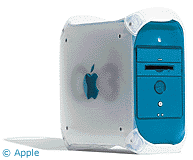
Since the blue & white G3 doesn't
have any serial ports, I had a couple of options. I could try to get a
new USB printer, or I could add a gPort adapter in
place of the modem in order to gain a serial port. While I was thinking
of doing this, I noticed that my printer, an Epson Photo Stylus 1200,
actually has USB. (And I advise anyone else in that position: Check
your printer, just in case). This surprised me a little bit for such an
old printer (1998 or so), but all I had to do was buy a USB cable and
change the setting in the Chooser. That was it. Not hard at all.
Then I wanted to play a CD in my computer, so I pushed the F12 key,
which ejects the CD-ROM drawer on most recent Macs. It did nothing. I
knew that I could reach down and push the button to eject the tray, but
I don't like pushing on the tray in order to get it back in again - and
on the b&w G3, you can't just push the CD eject button again, since
it's actually located on a flap that folds down when the tray
extends.
 After a bit of searching on the
Internet, I found a piece of software called EjectDisk from Beyond Midnight
Software. This allows you to select any key or key combination on the
keyboard to eject any disk in the machine - or just disks in a specific
drive. It was exactly what I needed, and now my CD-ROM tray ejects like
I'd want now with the push of the F12 key.
After a bit of searching on the
Internet, I found a piece of software called EjectDisk from Beyond Midnight
Software. This allows you to select any key or key combination on the
keyboard to eject any disk in the machine - or just disks in a specific
drive. It was exactly what I needed, and now my CD-ROM tray ejects like
I'd want now with the push of the F12 key.
I was also a bit concerned over how my iPod would work under
OS 9, since I'd updated the firmware in OS X several times.
Thankfully, it connected and showed up just fine under
iTunes 2.
The scanner was a bit of a challenge to set up. First of all, the
SCSI card wasn't recognized. I finally realized that it was because the
Adaptec 2906 needs driver software under OS 9 (OS X has built
in drivers for it). I downloaded and installed the software, and it
appeared in the system profiler with my scanner as SCSI ID 5. Fine, I
thought, and tried to scan something.
"Scanner not found" it told me. Come on, it says that it's connected
in the system profiler!
So I checked the SCSI termination; it wasn't terminated, but that
had never given me a problem on my beige G3. I connected it to another
external hard drive, since I couldn't find a terminator, and it worked
fine.
This whole little episode started getting me thinking that I might
want to look into a more modern scanner at some point. I'd like one
that will scan negatives, as my neighbor's has this capability and I
think it's a nice capability to have. Right now, though, this one still
works fine. Yes, it's SCSI, which no modern Mac includes, but I'm still
able to scan photographs and drawings. That's what really matters.
The last little minor annoyance is when the machine freezes. Unlike
my beige G3, command-control-power doesn't restart it - I have to reach
down, find the restart button, and try to poke it with my fingernail or
something else somewhat pointy. It's not the most convenient thing in
the world. Considering that when the machine came out, OS 8.5 was the
current OS, Apple probably should have made it a bit easier to restart
the computer after freezes and crashes.
Still, in the past week I've only had one freeze, and that was in -
you guessed it - Internet Explorer.



