Last week I looked at the upgradeability of Apple's notebooks
(see Apple, Please Bring Back Flexible, Easy to
Upgrade 'Books). This week I'm going to discuss the
requirements for a decently upgradeable machine and talk about how
Apple could position such a machine - and why they might not want
to sell it on upgradeability alone.
The prime example of an upgradable notebook is the IBM ThinkPad
600E. It's a relatively small and light notebook, and the
classic black ThinkPad look makes this 1999 model appear just as
modern as the latest T60 to any casual observer.
The Keyboard
I mentioned last week that I had a new keyboard on its way. This
was because the cable for the keyboard lies just below the hinge of
the screen, so each time the screen is opened and closed, the cable
is stressed - and eventually it just gives way. Then the keyboard
no longer works. (Apple's had similar problems with screen cables
on its PowerBook 100 series as well as the 13.3" WallStreet G3, which was in need of
constant screen cable replacement - and the model was short-lived
because of it.)
The new keyboard, which I purchased on eBay for about
$25 (interestingly enough, PowerBook G3 keyboards are about $5-10
cheaper), can be user-installed.
Yes, there were a number of screws to remove, but IBM provided
documentation on exactly how to take apart the computer. A simple
visit to IBM's website allows you to download a service manual
showing you how to access every part of the computer. (Apple has
service manuals but makes it very hard for end users to find and
download them.)
The overall procedure of installing the keyboard took about 15
minutes. I had a class at 2:30, started the procedure at 2:00, and
took the computer to class.
Apple had an even better idea - making the keyboard simply lift
out like on the PowerBook G3 models, the iBooks, and the PowerBooks
G4s. An easily replaceable keyboard should be the start of a
perfectly designed portable.
Memory Upgrades
Many notebooks today have two RAM slots. On the newer IBM
T-series, one is located at the bottom while the other is below the
keyboard. On the MacBook,
the slots are in the battery compartment.
This is another idea that Apple's come up with which I
particularly like. Accessing the battery, RAM, and hard drive from
one compartment brings the upgradeable components together and
makes the procedure simple for someone who wants to replace either
the RAM or the hard drive - or both. (For those interested in
aesthetics, this machine looks much cleaner on the underside with
only the battery compartment visible.)
Processor Upgrades
That said, I believe that the processor should also be
accessible from underneath the keyboard, as on my IBM. This
ThinkPad features a removable chip, and nearly any Pentium II chip
up to 400 MHz will function in the slot. I've even read on the
ThinkPads.com forums that some
users have success with special versions of 600 MHz chips (although
they don't always run at the full speed).
Regardless, now that Apple is using Intel chips, the ability to
replace the CPU with a faster one would be very welcome, especially
since the G4 PowerBooks were not designed to accept processor
upgrades (something once popular with PowerBook 1400 and G3 owners).
The Device Bay
The most important part is a removable optical drive. The
PowerBook G3s had it, and they could accept an extra battery for
extended runtime. ThinkPads have had this for a while, and the
higher-end Dells also have this option. Since most notebooks only
run for 2-5 hours on battery power, a second battery would
dramatically increase the runtime for someone who has limited
access to electrical outlets.
The MacBook and the IBM 600/T-series illustrates that a small,
light notebook doesn't have to be completely upgrade-unfriendly.
The MacBook could go further, however.
Hard Drive Upgrades
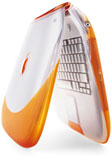 ThinkPads are mainly purchased by businesses,
because they appreciate the easily interchangeable parts and rugged
construction. MacBooks are consumer notebooks. Their upgrade
options are a far cry from the
original tangerine and blueberry iBooks launched in 1999, where
the hard drive was nearly impossible to access.
ThinkPads are mainly purchased by businesses,
because they appreciate the easily interchangeable parts and rugged
construction. MacBooks are consumer notebooks. Their upgrade
options are a far cry from the
original tangerine and blueberry iBooks launched in 1999, where
the hard drive was nearly impossible to access.
Today's consumer needs extensive hard drive space for digital
music, photographs, and video. For example, a friend of mine
recently bought a white MacBook with a 60 GB hard drive. Her
previous notebook, a Sony VAIO, had a much smaller hard drive, but
it also had limited capabilities, and she almost exclusively used
it for Internet browsing and email. With her MacBook, she's copied
her CDs to the hard drive, as well as downloaded some music. At
this point, the 60 GB hard drive - which sounded big at first - is
already getting full.
She just bought this computer, so buying another one would be
ridiculous. When I explained that she could easily replace the hard
drive with a larger one, she was surprised and very pleased to know
that she had an elegant way to increase the computer's storage
capacity without dealing with an external drive or burning DVDs of
her data.
A Solution that Feels Good
Perhaps it won't make the computer last any longer, but the
ability to change parts when your needs change lets you feel good
about your purchase in the long run.
Want a double-layer DVD burner? If you have a machine with a
media bay, you can just slide one in.
Apple already has a base-level MacBook with no interchangeable
optical drive and fairly limited upgradeability.
But what if they added a "MacBook Plus" that featured a media
bay that accepts either a second battery or an optical drive?
College students would be all over this model, and sales of second
batteries would most likely be fairly high. If a MacBook already
gets four hours on battery power, imagine getting eight hours!
That's more than a day of lecture time. People who travel would
also appreciate this model, as eight hours of battery life would
allow nonstop use on a flight from New York to London.
Apple could sell the MacBook Plus on the basis of long battery
life alone (selling anything electronic based on upgradeability is
a bad idea; it's like saying, "Buy this model and you can ignore
our upcoming ones"), and maybe give this machine a 14" screen.
The MacBooks would remain at the bottom, from US$1,100-1,500,
and the MacBook Pros would be at the top. The "Plus" would fit in
snugly in US$1,500-2,000 range and would have the potential to sell
very well.



