Compiled by Charles Moore
and edited by
Dan Knight
- 2005.11.18
This Week's PowerBook, iBook, and Notebook News
General Apple and Mac desktop news is covered in The Mac News Review. iPod news is covered
in The iNews Review. News about
Apple's transition to Intel CPUs and other Intel developments is
covered in The Macintel Report.
All prices are in US dollars unless otherwise noted.
News & Opinion
Tech Trends
Reviews
Products and Services
Software
Windows Watch
News & Opinion
Upgrading iBook to Match PowerBook Features
Cheaper at Apple Store than DIY
TUAW's Fabienne Serriere says:
"MacBidouille (and its English counterpart Hardmac.com) posted a
step-by-step tutorial for upgrading an iBook G4 (supposedly on the
cheap) to rival the hardware specs of a PowerBook....
"Taking their figures from the article, they payed [sic] a total
of 1598 Euros for their upgraded 12" iBook. Currently on the French
Apple Store one can purchase a 12" iBook with all the same specs,
minus the SuperDrive for 1269 Euros...."
Link:
Upgrading to an iBook G4 Cheaper at the Apple
Store
$100 Laptop Project Shuns Free OS X Offer
The Wall Street Journal's Steve Stecklow reports:
"A novel plan to develop a $100 laptop computer for distribution
to millions of schoolchildren in developing countries has caught
the interest of governments and the attention of computer-industry
heavyweights.
"First announced in January by Nicholas Negroponte, the founding
chairman of the Massachusetts Institute of Technology's Media Lab,
the initiative appears to be gaining steam. Mr. Negroponte is
scheduled to demonstrate a working prototype of the device with
United Nations Secretary General Kofi Annan on Wednesday at a UN
technology conference in Tunisia.
"Mr. Negroponte and other backers say they have held discussions
with at least two dozen countries about purchasing the
laptops....
"Steve Jobs, Apple Computer Inc.'s chief executive, offered to
provide free copies of the company's operating system, OS X,
for the machine, according to Seymour Papert, a professor emeritus
at MIT who is one of the initiative's founders. 'We declined
because it's not open source,' says Dr. Papert, noting the
designers want an operating system that can be tinkered with. An
Apple spokesman declined to comment.
"Under present plans, the first production version of the laptop
will be powered by an AMD microprocessor and use an open-source
Linux-based operating system supplied by Red Hat."
Link:
MIT $100 Laptop Project Shuns Jobs' OS X Offer
How to Safe Sleep Most Recent Macs
Andrew Escobar says:
"Mac users have become quite familiar with using Sleep mode. In
Sleep mode, Macs go into a very low-power mode, while saving the
current session for later use. Putting a Mac to sleep will continue
to power RAM in sleep mode, so that whatever was in RAM when the
computer went to sleep will still be there when the computer wakes.
Sleep mode is almost instantaneous, consumes very low power, and as
a PowerBook owner its indispensable to me. Still though, it
requires a power-source (however low) and there are times when
laptop batteries are completely depleted or a user wants to
completely power-off their Mac.
"Similar to Sleep, Windows 'Hibernates,' while Linux 'Software
Suspends'. They are not as fast as Sleep mode, but they take it a
step further by not using any power. When Hibernating, a PC quickly
saves the current session to the hard drive, shuts-down, and
completely powers-off the computer. Upon powering-on, the user is
quickly returns to the previous session.
"Up until recently, Mac users didn't have a similar Sleep mode
which required no power. When Apple announced new PowerBooks in
October 2005, it also introduced Safe Sleep to Mac OS X, an
extension to Sleep mode that allows for hibernation without
power....
"Safe Sleep is so-far only officially available on the new
PowerBooks. But Safe Sleep is very much software based, not
hardware based. With Apple's release of Mac OS 10.4.3, Safe Sleep
can be enabled on many Macs thanks to an excellent hack. To enable
Safe Sleep you must be running Mac OS X Tiger, and be
up-to-date to with version 10.4.3 (or above)."
Editor's note: Users reports indicate success with all G4
iBooks (problems with screen spanning hacks), aluminum PowerBooks
(1 GHz and higher), 1 GHz and faster eMacs, the Mac mini, and
mirror drive door Power Mac G4s. Nobody has reported success with
any G3 or G5-based Mac, and earlier G4 Macs seem not to work. (So
much for my 400 MHz TiBook!)
One posting on Escobar's page indicates that the supported
models all seem to have the Kauai ATA controller, while earlier
Macs (such as TiBooks) have the KeyLargo ATA controller.
Anyone want to write a freeware program that enables Safe Sleep
only on supported hardware so people don't have to use the
Terminal? If so, please email
Dan Knight
.
Link:
How to Safe Sleep (Hibernate) Your Mac
Option Globetrotter GSM/GPRS Card Causes Two
AirPort Ports to Appear on HR PowerBook G4
A new Apple Knowledge Base Article says:
"If you install the Option Globetrotter GSM/GPRS card in a
PowerBook G4 (Double-Layer SD), two AirPort ports will be displayed
in the Network pane of System Preferences.
"This is a cosmetic issue only - the Globetrotter card functions
as expected."
Link: PowerBook
G4 (Double-Layer SD) Option Globetrotter GSM/GPRS Card Causes Two
AirPort Ports to Appear
Tech Trends
Does Alienware's 12" Sentia m3200 Widescreen
Notebook Point to iBooks to Come?
It's widely anticipated that Apple will announce a new iBook
line early in 2006 with at least one 12" widescreen model. The
screen size, dimensions, and weight of Alienware's new lightweight
Sentia m3200 notebook could give us a clue as to the general form
factor such a new iBook might take, albeit with Apple styling of
course.
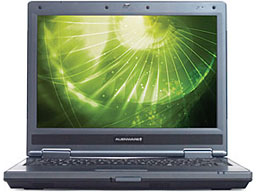 As the thinnest and lightest notebook in Alienware's
award-winning line of mobile systems, the four pound Sentia m3200
gives users flexible wireless options, instant-on access to
multimedia and extended battery life.
As the thinnest and lightest notebook in Alienware's
award-winning line of mobile systems, the four pound Sentia m3200
gives users flexible wireless options, instant-on access to
multimedia and extended battery life.
The Sentia m3200 features a 12.1" widescreen (1280 x 800 pixels)
LCD with ClearView technology that delivers sharp, vibrant image
quality and allows the system to fit comfortably in
space-restricted areas such as airplanes and dorm rooms. Powered by
cutting-edge Intel Centrino mobile technology, the Sentia m3200
provides fully integrated wireless LAN capability that includes
802.11a/b/g for maximum versatility and performance in various
wireless environments.
In addition, the Sentia m3200 offers an available PCI-Express
slot that can be used for a variety of add-on functions, including
Bluetooth support and external sound card solutions. For those
users requiring the highest level of hard drive support for large
multimedia and business presentation files, the Sentia m3200 can be
configured with a fast 100 GB drive that runs at 7200 RPM.
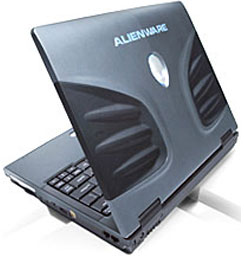 Additional benefits of
the Sentia m3200 include a built-in, 4-in-1 media card reader and
Instant-On functionality that allow users to immediately access
videos, music, digital photos, and other multimedia content while
conserving battery life. The Sentia m3200 also features battery
control technology, which maximizes battery longevity and noise
reduction at the push of a button.
Additional benefits of
the Sentia m3200 include a built-in, 4-in-1 media card reader and
Instant-On functionality that allow users to immediately access
videos, music, digital photos, and other multimedia content while
conserving battery life. The Sentia m3200 also features battery
control technology, which maximizes battery longevity and noise
reduction at the push of a button.
"The Sentia m3200 continues Alienware's successful expansion of
its notebook line, giving mobile customers a remarkably compact and
portable option," said Frank Azor, Senior Vice President and
General Manager of Alienware's Worldwide Product Group. "Not only
does the Sentia m3200 deliver optimum mobility without sacrificing
performance, it also comes at an affordable value that won't break
your budget."
"Intel Centrino mobile technology was designed from the ground
up for mobility in easy-to-carry notebooks like the Sentia m3200,"
said Karen Regis, marketing director of Intel's Mobile Platform
Group. "With the superior performance and battery life that Intel
Centrino mobile technology based laptops offer, travelers and
students can connect at Centrino verified WiFi hotspots or anywhere
else you travel for today's on-the-go lifestyle."
Link: Alienware 12" Sentia m3200
Notebook
Reviews
How Fast Is the iMac G5/2.0 GHz 17" vs. the
PowerBook G4/667 MHz 15"
Short answer: a lot faster....
MacReviewZone's Ask Johnny AppleSpeed compares the 17" iMac G5/2.0 GHz vs. the 15" PowerBook G4/667 MHz (DVI).
In Performance the iMac G5/2.0 GHz 17" is ....
Products and Services
Make Your PowerBook Even Cooler with iBreeze
Stand
PR: The iBreeze is a dual fan-cooled, USB-powered, clear
acrylic desk stand for your Apple PowerBook or iBook. It is powered
by the computer's USB port, and provides a passthrough port, so you
don't lose the use of that USB port when using the iBreeze. The
iBreeze is built to provide quiet cooling, as well as improved
ergonomics (by providing a nicely raised angle for using the
keyboard).
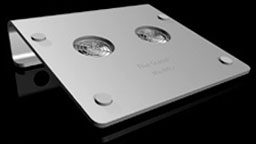 As PowerBooks have gotten smaller, thinner, and
more powerful, they have also gotten hotter. That heat can make the
top and bottom panels uncomfortable to touch, and can, over time
contribute to deterioration of your PowerBook's performance and
reliability. Also, using a PowerBook on a standard height desk
surface requires lifting your elbows and curling your fingers down
to the keyboard - a decidedly unnatural posture. The iBreeze lifts
the rear of your PowerBook just enough to match the natural angle
of your arms, and avoid much of this physical stress and
discomfort.
As PowerBooks have gotten smaller, thinner, and
more powerful, they have also gotten hotter. That heat can make the
top and bottom panels uncomfortable to touch, and can, over time
contribute to deterioration of your PowerBook's performance and
reliability. Also, using a PowerBook on a standard height desk
surface requires lifting your elbows and curling your fingers down
to the keyboard - a decidedly unnatural posture. The iBreeze lifts
the rear of your PowerBook just enough to match the natural angle
of your arms, and avoid much of this physical stress and
discomfort.
iBreeze Specifications:
- Width: 10.9" (fits 12 - 17" 'Books)
- Depth: 9.5"
- Height: 2.25" (at rear)
- Voltage: 5.0V
- Current: 130mA
- Cooling: -5 to -15 degrees F
- USB Cable: 18.0" length
Also available in Silver.
Price: $24.99
Link: iBreeze
Software
Temperature Monitor 3.1
PR: Temperature Monitor is an application to read out all
available temperature sensors in Macintosh computers. The program
can display and visualize measured values in a large variety of
fashions. The application supports the following operations on the
measured readings:
- display in a default window
- output in a screen display in front or in the background of the
screen
- tabular display in an overview window
- display in the menu-bar
- display of a maximum of two readings in the Dock
- graphical display of short-term and long-term history
curves
- speech output of readings
- display of minimum and maximum values
- export to text files
Moreover, the application can display additional technical
information about your computer. Among other information this
includes:
- Processor type
- Processor and bus frequencies
- Manufacturing information
Of course the application can read out the data only if your
computer is equipped with the necessary sensors, and if Mac
OS X can access them without needing third-party device
drivers. Beginning in summer 2002, Apple has begun to massively
drive forward the use of monitoring probes in the PowerMac series,
the Xserve series, and in portable computers. Some models are
equipped with 38 and more sensors. But Temperature and Hardware
Monitor can detect sensors on many older systems as well if they
are available.
We try to detect all sensors on as many Macintosh computer types
as possible. However, a prediction which sensors are available in
which models is not possible, because Apple very often releases
"silent product updates", where the hardware equipments of some
models are changed but the names are not (specifications are
"subject to change without notice"). The particular graphics card
and hard disk configuration used is also important because these
parts can include independent sensors, too.
Please note that Apple does not support an official or
standardized way of reading out sensor data in Mac OS X (the
only exception is the Server Monitor application for the Xserve
series).
New in version 3.1:
- The new version contains a workaround for the problem that Mac
OS X did not update the readings for some specific low-priority
sensors of certain Macintosh models. Now all sensor values are
refreshed under all conditions. This affects temperature sensors of
the 15" and 17" PowerBook G4 models released in 2005, as well as
the ambient air temperature sensors of PowerMac G5 models.
- Added support for the new PowerMac G5 Dual Core systems.
- Added support for the new PowerBook G4 (Super Drive Dual Layer)
systems.
- Added support for ambient light sensors found in the latest
PowerBook models (Hardware Monitor only).
- Added support for several new S.M.A.R.T. hard disk
sensors.
- The display of the extreme value table in the drawer of the
history window has been optimized.
- Corrected a problem where keyboard navigation in the sensor
preference outline view did not update the entry fields.
- Corrected a problem where curves in the history graphs were
displayed with the wrong time scale for certain intervals.
- Corrected a problem where the clock frequencies of the local
computer were displayed in the system info window although a remote
computer was selected.
System requirements: Mac OS X 10.2.5 or later.
Temperature Monitor is free.
Link: Temperature
Monitor
Temperature Monitor Widget 1.2
PR: Temperature Monitor Widget Edition is the Dashboard
version of its "bigger brother" Temperature Monitor. It is
recommended that you use Temperature Monitor first before using the
widget edition to learn more about the sensor equipment of your
computer. The applications are designed to give you access to all
temperature sensor readings Mac OS X uses to monitor and cool
your computer.
The widget allows you to select two of your computer's
temperature sensors which should be displayed via Dashboard. The
sensor readouts are displayed in a compact panel:
Unlike other widgets, Temperature Monitor is capable of
processing the hardware calibration data Apple stores individually
into each G5-based computer. So it displays the exact readings Mac
OS X internally uses for cooling control, not just an
"educated guess".
Note that we also offer shareware versions of Temperature
Monitor and Temperature Monitor Widget Edition which are called
Hardware Monitor and Hardware Monitor Widget Edition, respectively.
The shareware versions can additionally display hardware sensors
for other quantities (e.g. voltage, current, battery capacity, fan
revolution, etc.) if your computer is equipped with them.
System requirements: Mac OS X 10.4 or later.
Temperature Monitor Widget is free.
Link: Temperature
Monitor Widget
Windows Watch
AMD Paints White-box Notebook Vision
The Register's Tony Smith reports:
"AMD is to develop a series of barebones notebook PCs in a bid
to bring OEMs and system builders into the company's fold, the chip
maker said yesterday.
"Speaking at the firm's annual analyst conference, Marty Seyer,
head of AMD's microprocessor business, said the system would bundle
AMD processors, integrated chipsets from ATI and Nvidia, plus
ancillary I/O chips.
"Seyer said the systems would help smaller computer-makers bring
notebooks to market more quickly."
Link: AMD Paints White-box Notebook Vision
Bargain 'Books
Bargain 'Books are used unless otherwise indicated. New and
refurbished units have a one-year Apple warranty and are eligible
for AppleCare.
There are two different versions of WallStreet running at 233
MHz, the cacheless MainStreet
version and the later Series II
with a level 2 cache. It's not always possible to determine from
the vendor's listing which is being offered, so we've included
links within this paragraph to the two models. The same goes for
the PowerBook G4/667 (VGA) and
G4/667 (DVI), the titanium vs.
aluminum 15" PowerBook G4 at 1 GHz, and 1.25 GHz to 1.5 GHz 15"
PowerBooks.
Amazon.com
- refurb 15" PowerBook G4/1.5 GHz, 512/80/Combo, APX, BT,
$1,445
- refurb 15" PowerBook G4/1.67 GHz, 512/80/SuperDrive, APX, BT,
$1,595
- refurb 17" PowerBook G4/1.67 GHz, 512/100/SuperDrive, APX, BT,
$1,995
- used 12" iBook G4/1 GHz, 256/30/CD, $599.95
- used 12" iBook G4/1 GHz, 256/30/Combo, $699.95
- refurb 12" iBook G4/1.2 GHz, 256/30/CD, $699
- refurb 12" PowerBook G4/1.33 GHz, 256/60/Combo, APX,
$1,099
- refurb 15" PowerBook G4/1 GHz, 256/60/Combo, $1,299
- refurb 17" PowerBook G4/1.5 GHz, 512/80/SuperDrive, APX,
$1,799
- used 14" iBook G3/800 MHz, 256/30/Combo, $579.99
- used 17" aluminum PowerBook G4/1 GHz, 512/60/SuperDrive, APX,
$1,479.99
- used PowerBook WallStreet G3 233, 128/4/CD, $185
- used PowerBook WallStreet G3/266, 128/6/CD, $205
For more deals on current or recently discontinued models, see
our best aluminum PowerBook G4
deals, best titanium PowerBook G4
deals, best iBook G4 deals,
best PowerBook G3 deals, and best iBook G3 deals.



