Compiled by Charles Moore
and edited
by Dan Knight
- 2006.05.05
This Week's MacBook, PowerBook, and iBook News
MacBook Pro users irritated by the notebook's whining are
calling for a one-day "Whine In" on May 20 to let Apple support
know how widespread their frustration is.
On a possibly related issue - since more heat means more work
for the MBP's cooling system, which increases stress on its power
system - is the discovery that the MBP is being assembled with far
more thermal paste than necessary. This has the negative effect of
turning a heat conductor into an insullator.
The solution - disassembling the MBP, removing the paste from
the CPU and GPU, applying the proper amount, and then reassembling
the computer - is not for the faint of heart. With great timing,
iFixit has published their MacBook Pro disassembly guide.
On the PowerBook front, PowerPage has uncovered a spate of 80 GB
hard drive failures in 1.5 GHz PowerBooks. Their advice: Be
prepared by backing up religiously.
All prices are in US dollars unless otherwise noted.
General Apple and Mac desktop news is covered in The Mac News Review. iPod news is covered
in The iNews Review. News about
Apple's transition to Intel CPUs and other Intel developments is
covered in The Macintel Report.
MacBook Pro Issues
1.5 GHz PowerBook Drive Death
Tech Tips and Info
Products and Services
Software
Tech Trends
MacBook Pro Issues
Graph Shows MacBook Pro Whining Noise
MacFixIt reports:
"We have extensively covered an issue where some MacBook Pros generate a high-pitched,
irritating whine.
"As noted in our MacBook Pro special report and several
follow-up reports, the problem has to do with power draw. When a
certain amount of power is being drawn, the problem manifests. This
explains why some users experience alleviation of the noise when
toggling display brightness or turning off one processor using
Apple's CHUD tools (which are included among the Developer Tools
that ship with the MacBook Pro).
"The most common fix has been turning on the MacBook Pro's
built-in iSight, which temporarily changes the power draw."
- Link: MacBook
Pro Whining: Audio Graph Displaying the Noise (only accessible
to paid MacFixIt Pro subscribers)
MacBook Pro Users Call for End to Whining with
Organized Whine
Ars Technica's Shane Stacks says:
"There's no doubt that MacBook
Pro users have encountered unexpected annoyances with their
shiny new Intel-based notebooks. With widespread reports of both
overheating and whining issues, there has been a lot of grumbling
and outright frustration.
"It seems Apple may soon feel the scorn of the people. The OSx86
Project ('the undisputed leader in news and analysis regarding
OS X on x86 hardware and Apple's Intel transition') is calling
for a one-day, unified assault on Apple's customer service over the
whole "heat and whine" issue:
"It doesn't take very long in the Apple support forum (and
elsewhere) to discover the main issues on the minds of most MacBook
Pro owners - heat and whining problems. Apple seems to be taking
these annoyances very lightly, and as such, something needs to be
done."
- Link: MacBook
Pro Users Call for an End to Whining by . . . More
Whining?
MacBook Owners Plan Day of Whining to
Apple
The Register's Tony Smith reports:
"A loose affiliation of MacBook
Pro owners who together might be called the Apple Noise
Abatement Society is calling on fellow users to join them in a
worldwide day of action to protest at what they maintain is Apple's
unwillingness to solve the noisy notebook issue.
"And since the new Intel-based portable Macs seems have a
problem with temperature, the group suggests the protest should
highlight this too."
- Link:
MacBook Owners Plan Mass Whine About Whining Laptops
Hot MacBook Pros Suffer from Too Much Thermal
Grease
The Apple Core's Jason D. O'Grady says:
"There's a theory making the rounds that the MacBook Pro's high
temperatures are attributed to a misapplication of 'thermal grease'
that's applied to the CPU and GPU chips during the manufacturing
process....
"The amazing part is that if true, Apple techs are assembling
MacBook Pro's with too much thermal paste because the MBP service
manual tells them to! According to MacBook Pro service manual
'0.2-0.3cc' of thermal grease should be applied to all three chip
mating surfaces. Interrupting Moss however, states that reapplying
thermal grease 'properly' dropped the running temperature of his
MBP by 14 degrees Celsius....
"The thermal grease modification is not for the faint of heart
as it requires almost complete disassembly of your MacBook Pro. It
will most likely void your warranty and most have said that it
causes the fan to run more often...."
- Link: Thermal
Grease Theory
Toasty MacBook Pros Cooled with Less Thermal
Paste
The Register's Tony Smith reports:
"If you think your 15.4in MacBook
Pro is running too hot, it appears you could do a lot worse
than to reapply the thermal paste Apple uses to conduct heat away
from the notebook's processors. Contributors to a number of online
forums have opened up their MacBook Pros and found . . .
that Apple's manufacturer's have been a little too enthusiastic in
slapping on the paste."
- Link:
Toasty MacBook Pros Cured with Paste Transplant
MacBook Overheating Problems: A Beginner's
Mistake?
Hardmac's Lionel says:
"On their website, http://home.sc.rr.com shows photo of a
disassembled MacBook Pro, and what is displayed is very
surprising:
"This is a usual beginner's mistake!! There is on the CPU, the
GPU and the chipset 5 to 6 fold too much thermal paste!
"The thermal paste is there to ensure a tight contact between
the electronic components and their dedicated cooling system, in
other words it has to be as thin as possible. If there is too much
of it, one will get 2 problems:
"- a thick layer as shown on photos will behave as a thermal
insulation while it was suppose to enhance heat transfer...."
- Link: MacBook Overheating
Problems: A Beginner's Mistake?
MacBook Pro Complete Disassembly Guide
As Jason O'Grady notes in an above item, opening your MacBook Pro to address the thermal grease
issue is fraught with pitfalls and will probably void your
warranty, but if you are determined to proceed, iFixIt's teardown
guide should be of considerable help.
- Link: MacBook
Pro Guide to Complete Disassembly
Silent Recall on MacBook Pro Batteries?
The Apple Core's Jason D. O'Grady says:
"If it wasn't bad enough that to have processor and CPU whine,
poor AirPort reception and solar ambient temperatures, it appears
that some early MacBook Pro batteries are now failing.
"Christopher Price from PCSIntel.com has uncovered what appears
to be a potential issue with the first batch of MacBook Pro
batteries.
"According to his blog entry 'Now The MacBook
Pro Batteries...' Chris' MBP battery fried last night and a bit
of prodding from AppleCare got the serial number block. AppleCare
said there was a known issue with some early MBP batteries and are
cross-shipping out new ones to customers having similar
symptoms."
- Link: Silent
Recall on MacBook Pro Batteries?
1.5 GHz PowerBook Drive Death
Are 1.5 GHz PowerBook 80 GB Drives Dropping
Like Flies?
PowerPage contributor Mark Standen says:
"June two years ago and my friend and I bought two 1.5 AL PowerBooks on the same receipt.
Lovely machines, albeit somewhat hot to the touch.
"Fast forward to three weeks ago and my hard drive starts
exhibiting signs of a terminal illness; not booting, death rattles,
all the normal 'you're about to lose all your data' type stuff.
"Gulp....
"Here's the interesting bit. Exactly a week later my friend's
sister machine did exactly the same thing!"
"So, fellow PBers, here is the pre-warning, if you have a 1.5 Al
PowerBook delivered in June 2004, with the 80 GB 5400 upgrade, for
the love of data, backup now!"
Editor's note: A troubling report and good advice. Sigh of
relief that my 17" BigAl has a 4200 RPM 80 GB drive. cm
- Link:
1.5 GHz PowerBook Drives Dropping Like Flies
Something to 1.5 GHz PowerBook Drive Death
Story?
PowerPage contributor Rick "RickMacMerc" Yaeger says:
"I was reading Mark Standen's story from yesterday entitled 1.5
GHz PowerBook Drives Dropping Like Flies [above] and if it hadn't
just happened to me also (yes, seriously) I would have looked at
the piece as a story of a couple of coincidental drive
failures.
"It was the morning of April 19th when my PowerBook locked up
and, upon restarting, I got the endless spinning startup Apple. I
managed to reset the PMU and get my 1.5
GHz Aluminum PowerBook to boot. I was ill equipped to back up
at the time and used what I had at hand: Apple's Backup. Not ideal
but it did preserve all my data to an external FireWire drive."
- Link:
Is There Something to This 1.5 GHz PowerBook Drive Death
Story?
Tech Tips and Info
MacBook Pro (early 2006) Firmware Update
1.0.1
This update is for MacBook Pro
computers with Intel processors only. It now runs on localized
systems that use languages that read right to left.
To update the firmware on your Intel-based MacBook Pro:
- Quit all other open applications.
- Click Shut Down in the MacBook Pro Firmware Updater window and
wait for your computer to shut down.
- Press and hold the power button on your MacBook Pro until the
power indicator light flashes repeatedly to begin the update.
A status bar indicates the progress of the update.
Important: Do not interrupt the update.
Your computer restarts automatically when the update is completed
and opens the MacBook Pro Firmware Updater.
- Click OK, if the firmware is now up-to-date.
If these instructions appear on your screen again, the firmware
update was not successful. Repeat steps 2, 3 and 4.
File Size: 2.8 MB
System Requirements
- Mac OS X 10.4.5 or later
- MacBook Pro (early 2006)
- Link:
MacBook Pro (early 2006) Firmware Update 1.0.1
Products and Services
FastMac Reduces Pricing on Pismo G4
Upgrade by $50
PR: FastMac has announced it has lowered the price on its
popular PowerBook G3 (Pismo) to G4
processor upgrade by $50. The G4 550 MHz upgrade now starts at
$239.95.
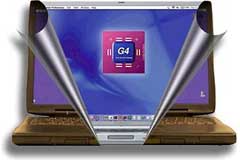 The
upgrade utilizes a low power Motorola 7410 chip and features
1 MB of high speed backside cache that results in up to 2
times speed and performance improvements.
The
upgrade utilizes a low power Motorola 7410 chip and features
1 MB of high speed backside cache that results in up to 2
times speed and performance improvements.
The upgrade comes with a 1 year warranty and includes a free
copy of Mac OS X 10.3 Panther. Upgrade to Mac OS X 10.4
Tiger for an additional $59.95.
"From NASA to the Pentagon to MIT, our Pismo upgrades have gone
to war, gone to the South Pole, and even into space" said Michael
Lowdermilk, Business Development Manager for FastMac Performance
Upgrades, Inc. "Today's price drop and bundle offerings make this
popular upgrade even more affordable."
FastMac offers two upgrade options: an advance exchange option
with zero down time and the standard upgrade process which requires
the original board to be sent in for upgrade first.
- Link: FastMac
New Transceiver Can Double Wireless
Range of MacBook Pro
PR: MacBook Pro users can now get up to a 100%
improvement in wireless performance using the new MacBook Pro
Transceiver from QuickerTek, Inc. This new Transceiver works with
all of the common 802.11b/g networking hardware including Apple
AirPort and AirPort Express Base Stations. The MacBook Pro
Transceiver is available from QuickerTek dealers for a suggested
retail price of $200.
Who needs betwen 50% and 100% better wireless performance? Those
people who want to use their MacBook Pro up to twice as far away
from the AirPort Base Station or access point. Sit in the back
yard, use your MacBook across the street at a neighbor's house, sit
at the far end of office from the Base Station, or even someone who
doesn't necessarily need more range, but would thoroughly enjoy
faster transfer rates from their wireless network.
This new Transceiver offers 500 miiliwatts of RF power. Compared
to less than 50 milliwatts of RF power found in most laptops, this
Transceiver makes a huge difference in not only your ability to sit
further away from the Base Station or access point, but also in
retaining a strong and full-speed signal.
The MacBook Pro is still very easy to use when equipped with a
Transceiver. There are no drivers or other changes to the normal
wireless routine. The internal antenna and Bluetooth still work -
in other words you're not required to disconnect anything to get
the dramatically better wireless. The antenna end of the
Transceiver easily clips onto the top of the case without velcro
and won't mar the finish or alter the case in any way.
You also can use any popular wireless networking hardware
including access points from LinkSys, Belkin, dLink, and, of
course, Apple AirPort and AirPort Extreme Base Stations. That means
just about any 802.11b or 802.11g networks are within your power to
use.
The MacBook Pro Transceiver attaches internally and a fine cable
extends out of the case to the external antenna. This cable exits
through the AirPort Express port on the MacBook Pro.
Like most QuickerTek products, it's backed with a one-year
warranty on parts and labor.
QuickerTek has been a recognized leading innovator of antennas
and RF products for Apple Power Macintosh, iMac, PowerBook, iBook
and MacBook Pro computers. QuickerTek products can be purchased
online and from authorized dealers.
- Link: MacBook
Pro Transceiver
Waterfield SleeveCase for 17" MacBook
Pro
PR: The famous Waterfield SleeveCase can be ordered in a
wide range of configurations, sizes, and the assessorization. More
than 40 different size options are available, including ones to fit
every PowerBook and iBook model, and the new MacBook Pros. A
version, Size 43, to fit the new 17"
MacBook Pro has just been added. The slightly smaller 17" PowerBook takes Size 42.
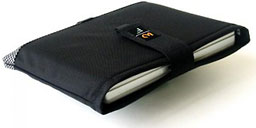 The SleeveCases are designed both as a standalone product,
and to serve as an inner protective module for Waterfield's larger
computer bags like the Cargo and Cozmo models, with which it can be
purchased in ensemble bundles called "Mambo Combos"
The SleeveCases are designed both as a standalone product,
and to serve as an inner protective module for Waterfield's larger
computer bags like the Cargo and Cozmo models, with which it can be
purchased in ensemble bundles called "Mambo Combos"
Proper protection starts with a proper fit. The MacBook Pro
SleeveCase envelops the MacBook Pro for a snug fit, cushioned with
high-grade neoprene and wrapped in a ballistic nylon shell.
SleeveCases feature Waterfield's tasteful, understated styling
in black ballistic nylon with textured Indium accent across the
bottom.
The basic SleeveCase has a robust closure strap of two-inch
nylon webbing that fastens with a generous Velcro panel, while the
flap on the other case also is secured with Velcro, in both
instances making for security with quick access. Another thoughtful
and convenient detail touch it is the nylon pull-loops at the
bottom of each case, that greatly facilitate removal of the
computer from the bag, which literally does fit like a glove.
Everything is beautifully stitched, and the materials have a rich,
luxury feel.
While the Computer entirely fills the SleeveCase's internal
compartment, and the external pocket can only accommodate very thin
items like papers or a magazine, Waterfield offers a solution to
peripherals carriage in the form of a small, clip-on, auxiliary
case it calls a "Piggyback," which describes its function like
handily.
Made from the same ballistic nylon as the SleeveCase outer
shell, and with reinforced zippers the Piggyback has soft divider
pockets inside to protect your power adapter, even a small external
drive or other bits and incidentals.
The MacBook Pro 17" SleeveCase is $40.
- Link: Waterfield
SleeveCase for 17" MacBook Pro
Software
BatteryInfo Widget
PR: BatteryInfo dashboard widget has been updated to
version 1.5.
This widget is designed to be a better looking, dashboard based
replacement for the menu bar battery monitor. Thanks go to Luis
Moreno for the graphics and Marc Wolfgram for helping add
dual-battery support.
Features:
- Graphically display battery status
- Display the percentage charge remaining
- Display the time remaining on current charge
- Dual battery support
- Localized in multiple languages
New in version 1.5:
- Fixed display of several languages which would not show
accented characters
- Improved display of percentage battery charge
- Optimisations reducing widget size
System requirements: Mac OS X 10.4 or later.
System support: PPC/Intel
Free
- Link: BatteryInfo
Temperature Monitor Updated
PR: Temperature Monitor is an application to read out all
available temperature sensors in Macintosh computers. The program
can display and visualize measured values in a large variety of
fashions. The application supports the following operations on the
measured readings:
- display in a default window
- output in a screen display in front or in the background of the
screen
- tabular display in an overview window
- display in the menu-bar
- display of a maximum of two readings in the Dock
- graphical display of short-term and long-term history
curves
- speech output of readings
- display of minimum and maximum values
- export to text files
Moreover, the application can display additional technical
information about your computer. Among other information this
includes:
- Processor type
- Processor and bus frequencies
- Manufacturing information
Of course the application can read out the data only if your
computer is equipped with the necessary sensors, and if Mac
OS X can access them without needing third-party device
drivers. Beginning in summer 2002, Apple has begun to massively
drive forward the use of monitoring probes in the PowerMac series,
the Xserve series, and in portable computers. Some models are
equipped with 38 and more sensors. But Temperature and Hardware
Monitor can detect sensors on many older systems as well if they
are available.
Apple has restricted the use of monitoring applications on
Intel-based Macintosh systems. Thermal management of those
computers is no longer done by the operating system, but controlled
by an undocumented hardware device, the Apple System Management
Controller. Only a few sensors are accessible by application
programs.
We try to detect all sensors on as many Macintosh computer types
as possible. However, a prediction which sensors are available in
which models is not possible, because Apple very often releases
"silent product updates", where the hardware equipments of some
models are changed but the names are not (specifications
are"subject to change without notice"). The particular graphics
card and hard disk configuration used is also important because
these parts can include independent sensors, too.
Please note that Apple does not support an official or
standardized way of reading out sensor data in Mac OS X (the
only exception is the Server Monitor application for the Xserve
series). Moreover, there is no documentation or other technical
note about the individual function of the sensors. For this reason,
the development of Temperature Monitor and Hardware Monitor is very
costly because the necessary data has to be determined by reverse
engineering and tests run on a variety of computer models. Please
support the development of the applications by purchasing a
registration key for Hardware Monitor.
New in version 3.5:
- Added support for several new S.M.A.R.T. hard drive
sensors.
- The format of labels for the y-axis of history graphs has been
enhanced.
- The policy for the display of alert messages has changed: The
application no longer locks its user interface until the user has
acknowledged an alert. If multiple alert messages arrive before the
user has acknowledged a message, new alerts will overwrite previous
ones.
- The panel for computers which don't contain sensors has been
enhanced.
System requirements: Mac OS X 10.2.5 or later.
System support: PPC/Intel
Free
For my full review of TemperatureMonitor, see
Temperature Monitor 3.4 And The Quest For Quiet Computing.
cm
- Link: Temperature
Monitor
Temperature Monitor Widget Edition
PR: Temperature Monitor Widget Edition is the Dashboard
version of its "bigger brother" Temperature Monitor. It is
recommended that you use Temperature Monitor first before using the
widget edition to learn more about the sensor equipment of your
computer. The applications are designed to give you access to all
temperature sensor readings Mac OS X uses to monitor and cool your
computer.
The widget allows you to select two of your computer's
temperature sensors which should be displayed via Dashboard. The
sensor readouts are displayed in a compact panel:
Unlike other widgets, Temperature Monitor is capable of
processing the hardware calibration data Apple stores individually
into each G5-based computer. So it displays the exact readings Mac
OS X internally uses for cooling control, not just an "educated
guess".
Note that we also offer shareware versions of Temperature
Monitor and Temperature Monitor Widget Edition which are called
Hardware Monitor and Hardware Monitor Widget Edition, respectively.
The shareware versions can additionally display hardware sensors
for other quantities (e.g. voltage, current, battery capacity, fan
revolution, etc.) if your computer is equipped with them.
New in version1.51:
Adds support for several new S.M.A.R.T. hard drive sensors.
System requirements: Mac OS X 10.4.2 or later
System support: PPC
Free
- Link: Temperature
Monitor Widget Edition
Tech Trends
Samsung Launches First Ultramobile Tablet PC
eWeek's David Morgenstern reports:
"Samsung Electronics on May 1 launched its Q1 here-not the
company's latest quarterly earnings results, but its first
ultramobile PC. The device is the first using the "Origami"
mini-Tablet reference design from Microsoft and Intel, introduced
in March at the CeBIT expo in Germany.
"According to officials, small computers, running the Tablet
version of Windows, will be available from Best Buy's online store
starting May 7 and in stores in the summer."
- Link: Samsung
Launches First Ultramobile Tablet PC
Acer Extends 17" Laptop Line
'ard Reg reports:
"Acer has revamped its Aspire notebook line-up with four 17in
models based on 1,440 x 900 displays pitched at mainstream home and
office buyers, and punters looking for a large laptop on a small
budget.
"The 9400 and 9410 sport Pentium M and Core Duo processors,
respectively, with Intel 945GM and 915PM chipsets. Both use an
Nvidia GeForce Go 7300 GPU with 64 MB of GDDR 2 video memory,
though it can take up to 192 MB of system memory too. Both provide
up to 120 GB of hard drive storage, dual-channel DDR 2 SDRAM and
multi-format DVD writers."
- Link:
Acer Extends 17in Laptop Line
Bargain 'Books
Bargain 'Books are used unless otherwise indicated. New and
refurbished units have a one-year Apple warranty and are eligible
for AppleCare.
There are two different versions of WallStreet running at 233
MHz, the cacheless MainStreet
version and the later Series II
with a level 2 cache. It's not always possible to determine from
the vendor's listing which is being offered, so we've included
links within this paragraph to the two models. The same goes for
the PowerBook G4/667 (VGA) and
G4/667 (DVI), the titanium vs.
aluminum 15" PowerBook G4 at 1 GHz, and 1.25 GHz to 1.5 GHz 15"
PowerBooks.
PowerBook and iBook profiles linked in our Portable Mac Index.
TechRestore offers a $25 discount to The 'Book Review readers
off any PowerBook or iBook in stock. Just enter the code CWM during
checkout when ordering online. The coupon code is valid from now
through 2007.12.31.
- used 12" Book G3/900, 256/40/Combo, 6 month warranty, 30 day
refund, $549.99
- used 15" PowerBook G4/1 GHz, 512/60/SuperDrive, 6 month
warranty, 30 day refund, $1,049.99
- used 15" PowerBook G4/667 DVI, 256/30/Combo, $619.99
- used 15" PowerBook G4/867, 256/30/Combo, $719.99
- used 15" PowerBook G4/1 GHz, 256/60/ Combo, $809.99
- Upgrade to 2x SuperDrive, $129.99 installed
- Upgrade to 8x SuperDrive, $169.99 installed
- Upgrade to 512 MB RAM, $59.50
- Upgrade to 1 GB RAM, $189.99
- Upgrade to 40GB hard drive, $69.50 installed
- Upgrade to 60GB hard drive, $79.50 installed
- Upgrade to 80GB hard drive, $109.50 installed
- Add an AirPort Wireless card, $119.99 installed
- Targus carrying case, $0.99
- iBook G3/500, 256/15/CD, $325
- iBook G3/700, 256/20/CD, $359
- used 15" PowerBook G4/667 VGA, 256/20/Combo, $625
- refurb 12" PowerBook G4/1.33 GHz, 256/60/Combo, APX,
$1,049
- refurb 15" PowerBook G4/1.33 GHz, 256/60/Combo, APX,
$1,299
- refurb 15" PowerBook G4/1.5 GHz, 512MB/80/Combo, APX, BT 2.0,
$1,399
- refurb 15" PowerBook G4/1.5 GHz, 512/80/SuperDrive, APX,
$1,499
- refurb 15" PowerBook G4/1.67 GHz, 512/80/SuperDrive, APX, BT
2.0, $1,499
- refurb 17" PowerBook G4/1.67 GHz, 512/100/SuperDrive, APX, BT
2.0, $1,849
- used 12" PowerBook "Kanga" G3/250, 96/2/floppy, $229.95
- used 14" PowerBook "WallStreet" G3/292, 128/6/CD, $249.95
- used 14" PowerBook "Lombard" G3/333, 128/3/CD, $329.95
- used 15" PowerBook G4/500, 256/40/DVD, $599.95
- used 15" PowerBook G4/1.67 GHz, 512/80/SuperDrive, APX, BT,
$1,399.95
For more deals on current or recently discontinued models, see
our best 15" MacBook Pro deals,
our best 17" MacBook Pro deals,
12" PowerBook G4 deals, 15" aluminum PowerBook G4 deals, 17" PowerBook G4 deals, titanium PowerBook G4 deals, iBook G4 deals, PowerBook G3 deals, and iBook G3 deals.



