Low End Mac Reader Specials
TypeStyler For Mac OS X is Now Shipping! Download The Free Fully Functional 60 Day Tryout at www.typestyler.com
OWC: Plug & Play Hardware RAID up to 8.0TB. High Performance, Data Redundant Solutions. FireWire 800, FireWire 400, USB2, or eSATA. Hot Swappable Bays, Data Rates over 200MB/s. Click here
Don't install Parallels to play poker online! Poker Mac will show you how
to download and install a native Mac poker application such as Full
Tilt Poker Mac.
Laptop Hardware Provided by TechRestore - Overnight Mac & iPod Repairs.
Compare products like desktop computers, apple laptops, apple macs, and LCD Monitors side by side! All the information and reviews to make the best purchasing decision for new mobile phones, sat nav systems, or MP3 players. The Ciao online shopping community makes searching products easy for you.
The Webb Chronicles
Falling for the Sony Alpha α200 DSLR
- 2008.06.19 - Tip Jar
Popularity: ![]()
![]()
![]()
My conversion to the Mac occurred as my creative side began to blossom in 2002. At that time, I began editing video on my Sony TRV-33 ($1,000 at the time). Starting with iMovie 1.0 and eventually graduating to Final Cut, which I still use today.
Enjoying Still Photography
At the same time, I started seeing just how enjoyable photography was as well.
When my TRV-33 started malfunctioning on vacation in 2006, I opted to stick to photography and swore never to buy another Sony product again (Italians can hold grudges like that for a long time). At this point, I was shooting with a Konica Minolta Dimage Z3 4.0 megapixel (MP), a great camera with plenty of flexibility and a nice 12x zoom lens. Using iPhoto, I was able to easily enhance my images, learning the advantages of various exposure settings, etc.
On a later trip to Peru in late 2006, I picked up a little Canon PowerShot A530 for under $100. I opted not to bring the Dimage due to its size - and (since I was unfamiliar with Latin America at the time) it would have been more likely to be stolen. The 3.2 MP Canon worked great, and by now I was running Aperture on my PowerBook for added photo editing functions.
For my next trip, I wanted something with better resolution and a little smaller size. I sold the Dimage and gave the Canon to my sister; I picked up a Canon Elph SD850 IS, an 8 MP camera with an image stabilizer and a 4x zoom lens.
Longing for More
In December of 2007, I headed to northern India with the Elph. Pictures came out beautifully, but I couldn't help but miss the zoom and extra creative control the Dimage had over the Canon, not to mention that one of the group members had a Nikon D80 digital SLR (DSLR) with her, which was the focus of my envy.
Upon returning to the States, I started thinking about selling my little Canon. Travel is one of the greatest joys in my life, and I want to capture my adventures the best I could. A few months passed. I received a new MacBook Pro as an early graduation present and purchased a copy of Aperture 2 (which ran too poorly on my old G4). I gave in to the itch and sold the Canon.
Which DSLR?
I wanted a DSLR, but I didn't want to spend more than $600 to $700 for my first model. What were my options?
I started learning about DSLRs and narrowed down my choices to the following three models: Nikon D40x, Olympus Evolt E-510, and, last but not least, the Sony Alpha α200.
I went out to the stores and checked out each camera to get a good feel for them. After researching the specs on all of them, here's what I found to be the pros and cons for each model:
Nikon D40x
- 10.2 MP with 18-55mm lens (27-82mm equivalent)
- Pros:
- Nikon quality
- Nice 10.2 MP Sensor
- Solid Feeling Camera
- Cons:
- Image Stabilizer is built into the lens, meaning upgrades cost more
- Too many controls have to be set within the menu system
- No Live View
Olympus e510
- 10.2 MP with 14-42mm lens (28-84mm equivalent)
- Pros:
- Live View (which allows you to use the LCD screen for picture taking)
- Excellent Dust Removal Function
- A little more portable then the rest
- Image stabilizer was built into the Body
- Cons:
- Difficult to find lenses
- Didn't have a good feel when shooting
Sony Alpha α200
- 10.2 MP with 18-70mm lenses (27-105mm equivalent)
- Pros:
- Built in Image Stabilizer
- Dedicated buttons for critical settings
- Really nice screen with tilt feature
- Rock solid feel Best Lenses out of the box
- Easy to find lenses (can use old Maxxum lenses)
- Cons:
- No live view
- Still unsure about Sony due to previous experience
Once I picked up the α200, I was sold. It just felt perfect in my hands. It had so many features found in more expensive cameras, such as the Nikon D80, and it was such a joy to use.
I was concerned about picking up another Sony product, but since my video camera died in 2006, I had picked up a PS3 and PSP and was on the road to forgiving Sony for the shabby product it sold me all those years ago. I headed out to my local Ritz Camera and shelled out the $600 for the Alpha.
I've owned this model for about two months, and I'm really happy with it. The battery life is amazing, and some of the pictures I've taken with it so far have been breathtaking. Admittedly, I'm still learning to use all the features a DSLR has to offer, but I'm progressing quite rapidly.
Trial by Fire
The α200 traveled with me to Italy for three weeks, a perfect trial run for my new toy. The Sony functioned as my primary camera, while my iPhone, with its fixed focus lens and 2 MP resolution, functioned as a good backup when I was wasn't a tourist.
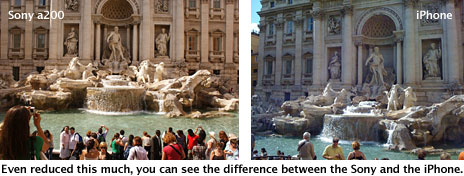
My results were happily very good. The α200's battery life was superb - during my 3 week stay I only charged it three times, and that was with over 1000 total pictures taken. The zoom lens was adequate, but an upgrade would be desirable before my next trip. Low light situations aren't as good, but thanks to the high amount of customization options, they're definitely doable with some tweaking (sans flash).
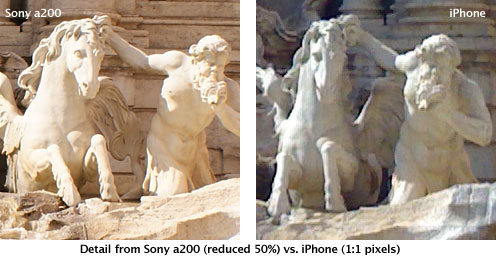
Post processing was accomplished using Aperture 2.0 on my MacBook Pro. I was happy the fantastic results transferred to my machine and shared with Web Gallery to everyone back in the old country. My only gripe is with the widescreen setting that causes some artifacts to occur on the picture in certain circumstances, but this could have been a poorly set configuration option on my part.
My only regret is not having waited for the α300 with Live View. This would have made life easier for shots that required a higher vantage point or odd shooting angle. But reselling the α200 shouldn't be an issue if I really want the next level up.
If you're in the market for a DSLR, keep the Sony Alpha line in mind
while you shop; it's really giving Nikon and Canon a run for their
money.
Recent PowerBook Beat articles
- Clamshell iBook still a fun and practical notebook, 08.11. "Granted, this iBook isn't a speed demon in any way, but it's amazing what a 7-year-old Apple notebook can do."
- Italy, a virtually untapped market ready for the Mac, 07.27. iPods are everywhere in Italy, but finding a Mac in use or a dealer that sells them is another story.
- The PowerBook 3400: Surprisingly useful and spry with the Classic Mac OS, 05.16. The last PowerBook before the G3, the PB 3400 actually outperforms the "MainStreet" PowerBook G3 - and it's generally available for under US$100.
- Picking a Power Mac G4: How much Mac do you need?, 03.22. Today's laptop computers can be great primary computers, but sometimes you need things only a desktop model can offer. A used Power Mac G4 can be a good choice.
- More in the PowerBook Beat index.
Links for the Day
- Mac of the Day: 15" MacBook Pro Core Duo, Jan. 2006 - The first Intel-based MacBook launched at 1.83-2.0 GHz, had several teething problems.
- Group of the Day: System 6 is the email list for those who choose System 6.
- November 22 in LEM history: 99: Gradebooks - 00: Leveraging Apple design - Quadra 630 to Power Mac 5200 - 02: Laptop or desktop? - 04: SuperDuper: Quick, easy, efficient backup - Cross-platform programming for the rest of us - 05: Mac video surveillance on the cheap - Which OS is best for my vintage Mac? - No 'best browser' for the Mac - Sorry state of browsers for classic Macs - 06: Core 2 means cooler running 'Books - 2.0 GHz G4 upgrade
- Support Low End Mac
Recent Content on Low End Mac
- Apple's Tablet an End Run Beyond Netbooks, Frank Fox, Stop the Noiz, 11.20. Whatever Apple has planned will leverage existing technologies while going beyond what its competitors can offer.
- i5 iMac Benchmarked, Mac mini 'Shouldn't Be Overlooked', Twitter Client for Classic Mac OS, and More, Mac News Review, 11.20. Also why Apple leaves the low end to others, 10.6.2 fixes video playback problem in 27" iMac, 3D Leopard and Snow Leopard performance, and more.
- NASA Chemical Sensor for iPhone, Smartphone Death Match, iPhone Earrings, and More, Ian R Campbell, 11.20. Also mobile phone dangers, new apps, GPS solution for iPod touch, new iPod and iPhone cases, and more.
- Apple #4 in Reliability, Apple Tablet a Gadget for All?, HP's i7 Notebook Outdoes Mac Rivals, and More, The 'Book Review, 11.20. Also Flash 10.1 improves video on Hackintosh netbooks, thin-and-light notebooks impress, Windows XP finally on the way out, and more.
- Replacing the Hard Drive in a Clamshell iBook, John Hatchett, Recycled Computing, 11.19. Yes, it is one of the most difficult Apple notebooks to disassemble and reassemble, but a 10 GB hard drive just will not do.
- IBM Model F: A Great Old Keyboard with an Outdated Layout, Tommy Thomas, Welcome to Macintosh, 11.19. Although it used a different technology than the revered IBM Model M keyboard, the Model F was a great keyboard in its own right.
- Soft Touch Keyboards, Wireless Mouse Options, Loving SeaMonkey 2, and More, Charles W. Moore, Miscellaneous Ramblings, 11.18. Also the future of browsing with PowerPC Macs and the multiple mouse input bug introduced with OS X 10.5.8.
- More links in our archive.
Recent Deals
- Best eMac Deals, 11.18. Used 1 GHz Combo, $100; SuperDrive, $269; 1.25 GHz Combo, $119; SD, $319; 1.42 GHz Combo, $289; SD, $498.
- Best Mac OS X 10.6 and Mac Box Set Deals, 11.18. "Snow Leopard", single user, $25; 5 users, $45; Mac Box Set, single user, $139; 5 users, $180; Server, $414. Shipping included.
- Best Xserve Deals, 11.18. Used 1 GHz dual G4, $649; 2.3 dual G5, $795; 3.0 4-core Xeon, $1,899; refurb 2.26 4-core, $2,499; new, $2,888; refurb 8-core, $2,999; new, $3,449; more.
- Best 15" MacBook Pro Deals, 11.17. Used 1.83 GHz, $750; 2.16, $800; 2.33, $900; refurb 2.4, $1,299; 2.53, $1,449; 2.66, $1,699; 2.8, $1,899; new 2.53, $1,579; 2.66, $1,799; more.
- Best Power Mac G4 and AGP Video Card Deals, 11.17. Used 400 MHz, $50; 933 MHz, $80; 500 dual, $60; 867 dual, $90; 1 GHz dual, $150; 1.25 GHz dual, $225; 1.42 GHz, $499.
- Best Mac OS X 10.5 Deals, 11.17. "Leopard" upgrade, $80; single user license, $135; 5 users, $173; Mac Box Set, 5 users, $230; Server, 10 users, $340; unlimited, $850. Shipping included.
- Best Mac mini Deals, 11.16. Used 1.42 GHz G4 mini, $379; 1.66 GHz Core Solo, $419; 2.0 Core 2, $450; new 2.26 GHz nVidia, $580; 2.53 GHz, $769; Server, $990.
- Best iBook G4 Deals, 11.16. Used 12" 1.07 GHz Combo, $210; 1.33 GHz, $298; 14" 1.33 GHz, $398; 1.42 GHz, $479; SuperDrive, $498.
- Best iPod shuffle Deals, 11.16. Used 1 GB, $35; 4 GB, $65; refurb 1 GB, $39; 2 GB, $59; new 2 GB, $55, 4 GB, $75. New and refurb prices include shipping.
- More deals in our archive.
About LEM | Support | Usage | Privacy | Contacts
Navigation
Used Mac Dealers
Apple History
Video Cards
Email Lists
Favorite Sites
MacSurfer
MacMinute
MacInTouch
MyAppleMenu
InfoMac
Macs Only!
The Mac Observer
Accelerate Your Mac
RetroMacCast
PB Central
MacWindows
The Vintage Mac
Museum
DealMac
DealsOnTheWeb
Mac2Sell
ramseeker
Mac Driver Museum
JAG's House
System
6 Heaven
System 7 Today
the pickle's Low-End
Mac FAQ
Abandonware
Petition
Mac vs. PC Info
Affiliates
The Apple
Store
Mac
Connection
B&H
MacMall
TechRestore
ExperCom
Crucial
Memory
batteries.com
Advertise
MacMinute
MacInTouch
MyAppleMenu
InfoMac
Macs Only!
The Mac Observer
Accelerate Your Mac
RetroMacCast
PB Central
MacWindows
The Vintage Mac
Museum
DealMac
DealsOnTheWeb
Mac2Sell
ramseeker
Mac Driver Museum
JAG's House
System 6 Heaven
System 7 Today
the pickle's Low-End
Mac FAQ
Abandonware
Petition
Mac vs. PC Info
Mac Connection
B&H
MacMall
TechRestore
ExperCom
Crucial Memory
batteries.com



