When we last left our 12" PowerBook G4 laptop, I had taken a shelfof parts from two different PowerBooks and made one working PowerBook.However, I did not have enough RAM to install Mac OS X 10.5 Leopard, so I bit thebullet and bought a 1 GB stick from OtherWorld Computing.
With a full 1.125 GB installed, the old (introduced in late 2003)867 MHz PowerBook hasa faster startup time and is much quicker when Safari loads pages.Streaming video still leaves a lot to be desired, but YouTube is nolonger jerky.
However, the real reason I got the extra memory was to install"Leopard" and (sort of) join the modern world.
As I mention for the hundred-millionth time, I am fortunate inhaving retail copies of both OS X 10.4 Tiger and 10.5 Leopard,allowing me to install either operating system on any computer that canrun them. I wish I could say that the install went flawlessly, but youalways have a hiccup. During the install process, Apple allows you toimport Files, Preferences, and Applications from another computer. Forunknown reasons, the G4 would not recognize my Pismo PowerBook in Target Disk Mode.
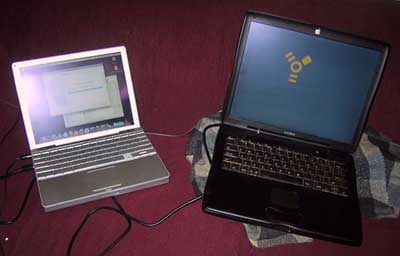
Pismo connected to 12" PowerBook using Target Disk Mode.
I continued with the install and then proceeded to update thePowerBook to OS X 10.5.8. That took time. Of course, it's a hugeupdate.
I then turned my mind to solving my account importation issue. Ifound that if I connected the Pismo to the PowerBook G4 (with both ofthem logged in and running), I could reboot the Pismo in Target DiskMode and zingo - the Pismo showed up on the PowerBook's desktop. I ranMigration Assistant, and after yet another long time interval all mystuff was on the PowerBook G4.
One of features on Leopard that I was really looking forward to wasTime Machine. I normally backup the Pismo by cloning the drive to adrive that I have in MCE hard drive module. This takes a couple ofhours, and the ease of Time Machine really had me anxious to give it awhirl. Of course, the first backup takes forever. But this is just theprice of progress and once it is done, all future backups will beshort, sweet and in the background.
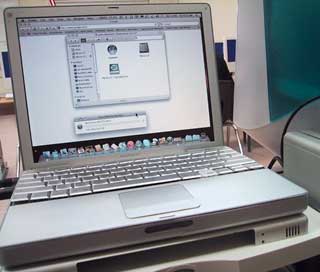 My built-like-a-battleship La Cie160 GB external hard drive sits to the right of the PowerBook.
And what about this rare form factor of the Aluminum PowerBook? Whatis it like to use? Why is it going to take the place of my belovedPismo as my main work computer?
- It is much smaller than the Pismo and easier to lug to work andback.
- It runs Leopard and Time Machine.
- Even though it only has a 12" screen, it has a full sizedkeyboard.
- Mobile Me works with it.
- It doesn't look like anyone else's laptop.
I suppose the last point is more important than anything else. Likea hot rod enthusiast, I just don't like having the same computer thateveryone else owns. This would be harmless in itself, but I issue youfair warning that if you ask me what sort of computer I have, you willlearn far more than you need to know.
True nirvana can never be reached, and the PowerBook G4 has someflaws. At 4 pounds, it is no lightweight. And it does run hot - so hotthat I can see Temperature Monitor being added to my list of StartupItems.
It cannot be beat in terms of cost. $50 got me a running PowerBookG4, and now it has Leopard installed.
Happy recycling! 



