Now that the Kool-Aid has worn off, I'd like to talk a little bitmore about the iPad.
I am a little dismayed at all negative sniping that has been goingon. Both the iPod and iPhone had their critics when they wereintroduced, but look where both devices are now. The iPad may notsatisfy all of the computer punditocracy, but it provides abreakthrough in how we define what a computer is.
I know that I have been using my iPod touch for so long that thereare times when I want to "pinch" my Pismo screen and "tap" apicture in Safari to get a closer look. The touch interface of theiPhone/iPod touch is revolutionary and works perfectly when the user ismobile or on their feet.
An iPad allows the same interface on a larger screen; which lendsitself to specialized situations, such as medical usage.
The iPad lends itself to portable use. Try walking around a factoryor store with a laptop or netbook. You can hold the iPad with one handand control it with the other, just like the iPhone and iPod touch.Netbooks and laptops need to have a horizontal surface in order tofunction, but you can use a touch device anywhere and anytime.
Imagine giving a presentation with the ability to modify it on thefly, not tethered to a computer lying on a desk next to the projector.Imagine delivery drivers using it to update orders while they in thestore talking to the store manager. As a photographer, I can foreseeslipping an iPad into my camera bag so I can look at an image I justcreated on a much larger screen. That would be real cool.
PSP Beats iPod touch for Viewing Video
And now for a sort of related story to the iPad......
I don't like watching movies or videos on my iPod touch. Yeah, it'sdoable in emergencies, but the screen is tiny, and there are nospeakers (I have a first generation iPod touch). I would really likemore screen real estate.
As a temporary measure, I have repurposed one of my son's PSPs intoa video player. The latest PSP (PSP Go) is Sony's attempt to competewith Apple's iPod touch: It has 16 GB and has done away with theUMCdisc drive that Sony built into my son's PSP. Now gamers download gamesand other media from Sony's website.
Sony never made an UMC disc recorder or made the technologyavailable to other manufacturers. I suppose that it doesn't matter, nowthat CD and DVD content is available for download, but it seems a shamethat you can't take the DVD you own and record it to a UMC mini-disc.It would preserve the quality of the video and make viewing it muchmore pleasurable.
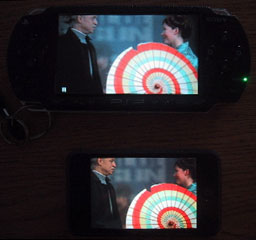
4.3" PSP display vs. 3.5" iPod touch screen.
Instead, I have to follow a long and unexciting process to convert aDVD to a video file - and then load it onto a Sony Memory Stick.I lose quality at every step, but viewing an episode of Joss Wheaton'sFireflyon the PSP's 4.3" 480 x 272 pixel screen is much better than watchingit on my iPod's 3.5" 480 x 320 display.
Of course, you have to "decrypt" your DVD (I use DVD43 on our Windows Dell) and then "rip" adigital file with HandBrake. I then"sneaker net" the file over to my Pismo and load it into a MissingSyncapplication. Here it gets encoded (this takes forever on the 500 MHzG3) and synched with the PSP.
I use MissingSync because I can also sync photos, music, contacts,bookmarks, and calendar information to the PSP from my Pismo. The PSPis in no way a substitute for the iPod touch (the browser on the PSPsucks eggs), but I believe in having data in as many spots as possible- and viewing a video is better than on the tiny iPod screen.
What About DVDs?
Getting back to the iPad, the larger 9.7" 1024 x 768 screen willmake portable video viewing much, much better than my currentrepurposed PSP. However, it is time to take Apple and the movie studiosto task for not expanding iTunes to include DVD conversion. I can slipa music CD into my Mac's optical drive, and iTunes seamlessly importsit into my iTunes Library. I can even convert records and cassettetapes into digital files and load them into my iTunes Library.
Why can't I do the same with my DVDs? If I shell out the shekels forthe physical DVD, why can't I put it on my electronic devices?
I've noticed that some studios are releasing "electronic" copies ofthe movies they are selling on DVDs, but how does that help with theDVDs you have already purchased? ? Why should I pay twice for the samematerial?
Inquiring minds would like to know.!--#includevirtual="/bullet.htm"--



