 Hello again, gang. Next
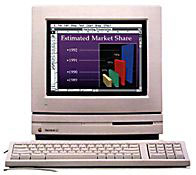
up in my collection are a couple favorites: My LC "pizza box" Macs.
Hello again, gang. Next
up in my collection are a couple favorites: My LC "pizza box" Macs.
I own two: an original LC (dual floppy
converted with internal hard drive - more on that below) and my own
champion workhorse, a maxed out, overclocked wonder of an LC III.
My LC III
How did it all begin? Well, several months after I acquired my
Plus, I was craving a little more
power, a little more color, and a little more Internet. I quickly
hopped on
eBay (a great resource for Macs back in the day, and a shame
it no longer is). I came across a nice package: an LC III with a
matching 12" color monitor and a keyboard and mouse. I paid $70 for
that bundle, shipping included (shipping is what bloated it, stupid
CRTs).
It was also my first "waiting for a delivery" experience. When I
took out the money to pay for that, I got some strange looks from the
teller, but I let it pass; good times were ahead.
Before I even bought that machine, I hopped on to Low End Mac and
looked at everything it had to offer, inside and out. First thing I
noticed is that I had made a good choice. Small, cheap, and PDQ. I also
learned it took a standard 72-pin SIMM, which is what my father's old
486 used. I quickly dived in to his scrap RAM pile and came up with a
whopping 32 MB SIMM, enough to max this baby out to 36 MB (4 MB
are soldered on the motherboard). Fortunately, I didn't have to pay for
this, and once I looked up 1993 RAM prices, I was glad I didn't.
As soon as the machine came, I upgraded the RAM and the hard drive
(it came with an 80 MB, but I had a 250 MB from school removed from a
dead Performa), as well as a PDS ethernet
card from Dayna (again, from school). This worked with the proper
drivers.
I hopped on the Internet once again and found out Apple offers
System 7.5.3 for a free download, and also
the four disk 7.5.5 update. Boy was I happy we had DSL! A couple hours
later (and a few breaks to treat the couple cases of Disk Swappers
Elbow [DSE] I received), I had a clean install of 7.5.5 on my shiny new
LC III. System 7.5.5 is awesome with 36 MB, the System itself taking up
less than 1/10 of the RAM.
On the Interweb
Now that I had a broadband card as well as a clean OS, I needed a
browser. I looked around. I needed one that could fit in the space of a
floppy disk, since I had no other means of storage. My browser of
choice at the time was Internet Explorer. (I know, I know, boos and
hisses once again. Don't worry, I have moved on to greener pastures to
the land of Safari, Firefox, and iCab.) I found a very, very old
version of IE for the Mac, version 2.0, which would just barely fit on
a floppy. Another case of DSE later, and I had a dbrowser, if you could
call it that.
I quickly hopped on the Net (on the LC this time), and after a few
page load failures, I found a more recent copy of IE that could be
downloaded. I think it was version 4.0, the last 68k version.
I eventually found a nice external Panasonic SCSI CD-ROM, which
played nicely with the LC III with the right drivers (once again, they
came with the hardware). That made it easy to install other programs
that I got from the school on the machine. This included ClarisWorks
4.0 (which made the machine a nice writing platform), and many, many
old games. I wasted hours playing the old color classics: Space Cab,
Oregon Trail, and Marathon, as well as many others.
To the Max
Of course, I wasn't done with this machine yet. I had to max it out.
Yes, I had already maxed the RAM, added a larger hard drive, and added
an ethernet card.
I dug out a dual SCSI cable and a Molex power splitter, and I hooked
up the original hard drive and splayed the cables though the side of
the case, turning the 80 MB hard drive into an external one, laying on
it's side. It worked very well, and the extra space came in handy for
backups.
Also, as I soon found out, this already fast machine could go
even faster. Through detailed instructions and moving a single
resistor, I boosted this machine from 25 MHz, to a whopping 33 MHz.
Essentially, I turned it into it's short lived cousin, the LC III+. This made the whole machine faster, and
the machine survived, despite my shoddy soldering skills, and a 1970s
era heat gun.
There was one drawback, which I noticed as soon as I plugged the
machine back in and turned it on: My sound was gone! After double
checking my connections, I plugged in a set of external speakers (and
an external microphone); however, this had no effect. My sound was just
plane gone. Oh well, at least everything else worked, and it was
noticeably faster.
Unfortunately, when transforming this machine from an LC III to an
LC III+, I also lost the ability to boot from my existing 7.1 floppies.
Since the machine identified differently, it needed a different
enabler, which I can't find in my never-ending Google searches. Oh
well, a universal 7.5 floppy boots it well enough - and that comes in
handy, as you will see soon.
I used that machine as my primary Mac for six months and then used
it sporadically, until I had to shelve it because of space concerns.
Unfortunately, when I pulled the machine out again at the end of June
to prep it for use in the RetroChallenge, but as soon as I
booted it up, I was not presented with a happy 7.5.5 "Welcome to
Macintosh", but the dreaded blinking question mark. I quickly ran for
my nearest system 7.5 boot disk. It worked like a champ, booting in
less than a minute.
I thought I had it made, but as soon as it was booted, I discovered
my hard drive wasn't being recognized. Not by the Finder, not by Disk
First Aid, and not even by Apple SC HD Setup. Not a thing. So I double
checked my connections. Still nothing. As far as the LC III was
concerned, the hard drives did not exist. So I powered down the machine
and removed the hard drive.
As I had found out a few months ago, my external SCSI CD-ROM is just
an internal CD-ROM in a case. So, I took out the CD-ROM, hooked in the
hard drive, and connected the setup to my PowerBook 1400. It found it all right, with my
data safe and sound. Unfortunately, this means the internal SCSI
controller has blown, and neither the internal or external channels
work. This has led me to believe the overclocking has finally caught up
to it, and the only fix is a motherboard swap. Therefore I have been
forced to put it away for a bit, as nice as the machine is.
Even Older, an Original LC
About six months ago, I got a hankering for a dual floppy machine.
Apple used to believe in floppies so much that they sold special
dual-floppy configurations of the Macintosh SE, II, and LC to the
education market. I figured I already had the former, since my
Macintosh Plus has a external floppy drive (FDHD, but it acts fine in
800K mode).
So I figured an original LC was in order. Besides, I had 68000 and
68030 Macs, but no 68020 Mac. All I needed to round out the collection
was a 68020 machine, of which Apple only produced two: the Macintosh
LC, and original Macintosh II. I figured I
could get both a 68020 and a dual floppy with an original LC - and save
a ton of space in the process. I may get a Mac II of some sort one
day.
I ordered one, and it soon arrived. This one was sans monitor,
mouse, and keyboard. I figured if I needed them, I could borrow them
from one of my other machines with ADB. However, once the machine
arrived, it turned out to be a total disappointment: The machine was
badly yellowed, towards the back it was more of a brown color it was so
bad, one of the latches to the top case was broken off, and it was not
dual floppy.
Yes, it did have the two floppy slots on the top case, but someone
had replaced the left floppy with a dead 160 MB hard drive, and the
other floppy drive was flaking out. I was lucky the machine even
booted.
It did, however, have a 256 KB VRAM SIMM, which I soon transplanted
into my LC III to max it's VRAM to 768 KB. This means the LC III can
now do thousands of colors at 640 x 480, so I guess it wasn't a wasted
experience.
So what am I going to so with these machines? I've been thinking of
selling the original LC (look out, LEMswap), but I have a hard time parting with
any machine in my collection. I may turn it into a stripped down
server, if I decide to give it a working hard drive and track down a
cheap ethernet card.
As for the LC III, I need a new motherboard, and my team of hunters
here at CS HQ are busy tracking one down. Not really, but I have also
been thinking of putting in a Quadra 605 motherboard, giving it
everything the Q605 had (except the cute little feet, or feets,
as I call them), including a socketed (i.e., upgradeable) 68(LC)040,
but I want to keep things as close to stock as possible, so I may just
do a like-for-like swap. I hope to have this one prepared in time for
next year's RetroChallenge.
Yes, these little pizza box Macs were exactly what Apple positioned
them as: Low Cost. And by the time the 500
series arrived, you had all the greatness of a low cost Mac with
the addition of a built-in monitor.
And the great part is, they still remain a great value today - and
quite a lot of fun. I say, if you find one for cheap, get it. 



