It's not every day you see an app that tries to totally reinvent the
wheel. It's much safer to go with the flow, adding a few minor tweaks
in the interface or functionality to make your app stand out.
But Bloom Studios has done just that, reinventing the media player
with its first app, Planetary.
Overview
From the intro screen, where the Planetary logo is suddenly and
unexpectedly eclipsed by the silhouettes of three planets, to the
amazing galaxy of music that defines Planetary's interface, the whole
purpose of this free app seems to be making music a physical experience
again. Instead of LPs, tapes, or CDs, however, your music is
represented by celestial bodies.
Interface
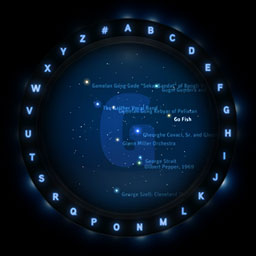
Planetary's interface is relatively straightforward - your entire
iTunes music library is represented as a "galaxy" (I'd call it a star
cluster, but then I don't yet have a huge music library). You select
music by tapping the first letter of an artist's or group's name. These
letters are displayed in a ring of letters around the galaxy.
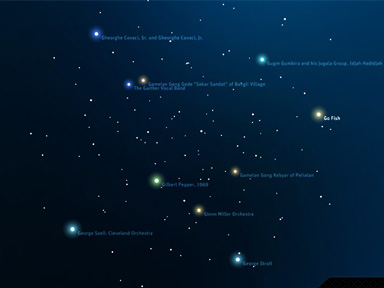
Next, select your artist by tapping his, her, or the group's
star.
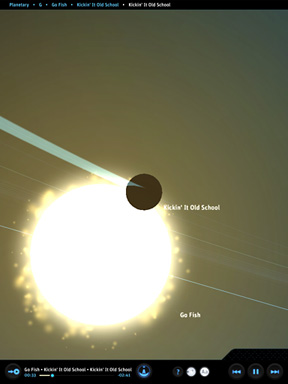
You are then taken to the solar system that represents all the
albums you own by that artist. To select an album, tap on the planet
representing it.
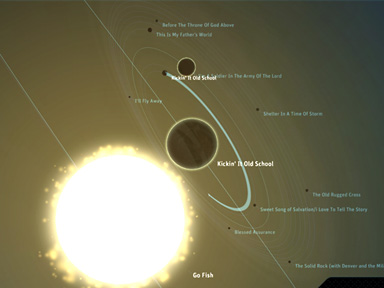
Then, to select a song, tap the moon representing the song you want
to hear (the album advances automatically once a song has been
selected). To go backwards in the process, just use the standard pinch
to zoom out gesture.
An optional control bar inhabits the bottom of the screen, sporting
a few interface options (toggle help, text, and orbit lines, fly to
current track, go to nav, and - of course - the usual play/pause, back,
and forward), but this can be mostly hidden with a single tap to its
hide/show button.
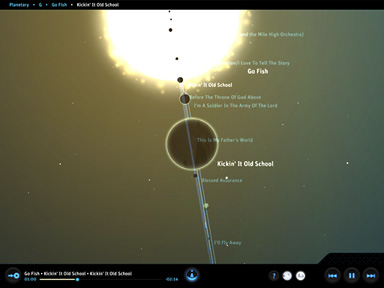
As a little aside, turning off text can make things much more
interesting - you'll basically be picking random tracks, unless you can
memorize what color your favorite artist's star is, what your favorite
album's planet looks like, and so on.
Experience
Planetary is a bold app - it totally redefines the media player
experience. Despite the otherworldly setting, the music selection
process feels totally natural and organic. It's also mostly lag-free -
a testament to the care and effort that was obviously put into the
app's design.
Other than on a single album that constantly gives me trouble (I
won't name names, but it's not likely an album you'd be listening to),
Planetary has never crashed, which is miraculous at such an early stage
in its life. It's incredibly stable during every part of the music
selection process.
If I had to sum up the experience in one word, I would have to say
"gourmet" - your music is literally being served on a celestial
platter.
Conclusion
Planetary is one of the most amazing apps I've added to my sizable
app collection in a long time. If you are even a casual music lover who
also enjoys beautiful visuals, this is the app for you.





