I'd been wanting to try Safari 4 since the final was released at the
WWDC, but I have been stymied on my Intel MacBook by the fact that
Safari 4 for Leopard requires the Mac OS X 10.5.7 Update, which
I've been reluctant to install due to the extraordinary number of
problem reports, especially with laptop computers.
However, I did manage to get Safari 4 for OS X 10.4 "Tiger"
installed on my old 550 MHz G4 Pismo PowerBook last weekend.
Safari 4 for Tiger requires OS X 10.4.11, which I already had
installed, and the OS X Security Update 2009-002, which I hadn't, so
that involved another updater download. The installations took about 20
minutes cumulatively, including two mandatory reboots on the old
PowerBook, and I was good to go.
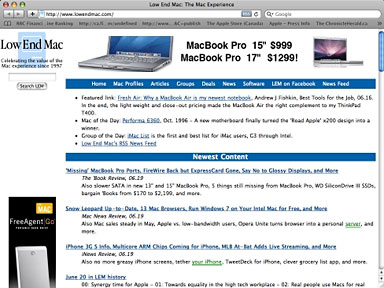
Low End Mac as seen in Safari 4.
I've never been much of a fan of Safari's user interface, and I was
disappointed that Apple wimped out on shifting tabs up into the title
bar, as they did with the Safari 4 public betas. I wasn't in love with
having the tabs up there, but it did give the bland, grey Safari visage
a bit more character.
Progress?
However, Safari 4's advantages lie elsewhere, in its close
integration with the operating system, which I assume helps account for
its delightfully quick startup even on an old 550 MHz G4, and its
speed, which on my slow rural dial-up connection is second only to
Opera 10 with the
Turbo feature engaged.
 While the tabs are back in the conventional place, the other
controversial UI change from the Safari 4 betas - namely doing away
with the blue progress bar that crept across the address field in
earlier Safari versions - has been retained in the final. I have mixed
feelings about this. I never really liked the progress bar sharing the
address field, which seemed untidy and clumsy to my sense of order and
aesthetics, and it never seemed especially accurate either.
While the tabs are back in the conventional place, the other
controversial UI change from the Safari 4 betas - namely doing away
with the blue progress bar that crept across the address field in
earlier Safari versions - has been retained in the final. I have mixed
feelings about this. I never really liked the progress bar sharing the
address field, which seemed untidy and clumsy to my sense of order and
aesthetics, and it never seemed especially accurate either.
On the other hand, I do like having a progress bar, which may seem
superfluous to folks who have DSL or cable connections, given the speed
of today's browsers, but they are far from a trivial matter for the
sizable proportion of the world's Internet users who are still stuck
with dial-up - or even the slower species of broadband.
As Betalogue's Pierre Igot, who (like me) lives in rural Nova
Scotia, Canada, where many of us still don't have access to cable or
DSL, noted in a recent column,
Apple's replacement of the blue progress bar in the address field with
a little spinning wheel icon is yet another illustration of Apple's
historical disregard for and lack of concern about the needs of users
in low-bandwidth situations.
For we second-class netizens still treading the donkey-path beside
the information superhighway, browser progress bars serve two important
functions, the first providing an indication of how much of a Web page
has loaded and thus a projection of how long one has still to wait, and
the second being a visual, real-time confirmation that anything is
happening at all - or not if a page load stalls, which they often do on
dialup.
This may seem quaint to those who take broadband speed for granted,
but I assure you it's anything but with many page-loads measured in
minutes (sometimes many minutes) rather than seconds. "Progress" takes
on a profoundly different shading, and being informed that it has
ceased and further waiting for an automated time out is an exercise in
time-wasting futility. This is far from a trivial consideration.
With the little spinnywheel thingie and the hopeful accompanying
message "Loading", there is no positive indication whether progress is
being made or not, since the wheel just keeps on spinning (good
metaphor) even if the load stalls until the time-out toggles, and there
is no sense of how much longer it's going to take.
However, Safari 4's speed does go some way toward mitigating the
aggravation, and at least a stop page load button is incorporated in
the wheelspinner field - something that was missing in the Safari 4
beta I tested.
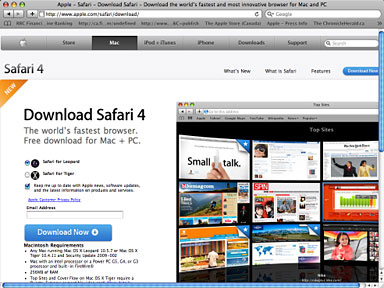
Apple's Safari 4 page.
Back to Safari 3
Nevertheless, I ended up reverting to Safari 3 on the old Pismo for
reasons entirely unrelated to version four's browsing performance.
As I mentioned, the system requirements demanded the OS X
Security Update 2009-002 be applied before installation, which I did.
I'm not sure whether the security update or Safari for itself was the
culprit, but whichever, I discovered after a couple of hours use when I
happened to open the Network System Preferences pane and a dialog sheet
popped up informing me that the system settings had been modified by
another application - best guess: Safari 4 - and when I attempted to
dismiss the sheet, it immediately reappeared in a sort of a
whack-a-mole closed loop. I couldn't access any of the preferences
controls or, for that matter, even close the network panel. My only
recourse turned out to be killing System Preferences with Force
Quit.
I was still able to dial up to the Internet using Internet Connect,
but I couldn't change its or other network settings - obviously not a
tolerable state of affairs for the machine that I use as my road
computer for logging onto WiFi networks and such.
I tried running a full slate of system maintenance routines - Repair
Permissions, cron scripts, cache dumps, using OnyX - but no joy. Next I
tried the more drastic approach of trashing Safari 4 and
everything associated, such as preferences files (I did salvage the
bookmarks plist), but still the same behavior in system preferences.
The problem may well have been the security update itself having some
incompatibility with my setup, but there was no way to determine
that.
I eventually rectified the situation by booting into Mac OS 9, which
I have installed on another partition on the Pismo's hard drive,
trashing the OS X 10.4.11 system file, and then reinstalling Tiger
from the install DVD. I also had the OS X 10.4.0 combo updater
installer and the OS 10.4 .11 incremental "Delta" update installer, so
I ran them as well. That was how I spent much of my Saturday afternoon,
ending up essentially where I had begun in the morning prior to
installing the security update and Safari 4.
Needless to say, I did not reinstall the security update, so it
appears that running Safari 4 on the old machine is not an option
either. I will eventually install Safari 4 on my MacBook, but probably
not until after Apple releases a 10.5.8 update to fix the bugs
affecting 10.5.7.
Safari Features
Anyway, back to a bit more about Safari 4. One of its marquee
features borrowed from (or at least inspired by) Opera's Speed Dial
feature, is Top Sites,
which provide an at-a-glance preview of your favorite websites when you
open a new tab or browser window. Opera has had Speed Dial for several
years now, but Safari 4 takes the basic idea and runs with it, not only
creating thumbnail links for favorite sites, but tracking the sites you
browse and ranking your favorites, presenting up to 24 thumbnails on a
single preview page.
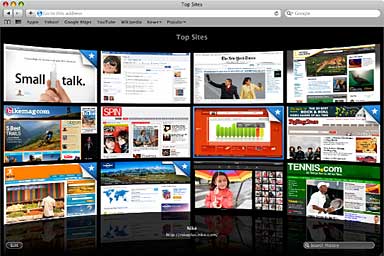
Top Sites in Safari 4.
You can also customize the display by pinning a favorite site to a
specific location in the grid, which locks it into position so you know
where to find it every time you open Top Sites.
Wondering which sites have changed since your last visit? Sites with
a star in the upper-right corner have new content. A single click opens
the page and updates its thumbnail. Whenever you want to return to your
ever-evolving Top Sites page, just click the new Top Sites button in
the bookmarks bar.
Top Sites is significantly more attractive - stunning really -
compared with Speed Dial's looks, although you can skin Speed Dial. I
digress.
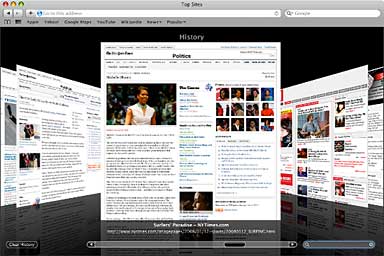
Full History Search in Safari 4.
More Safari 4 features include Full History
Search, with which you can search through titles, web addresses,
and the complete text of recently viewed pages (just type a word or
phrase in the History Search field in Top Sites, and Safari quickly
presents you with a list of possibilities). You can search for anything
that was on a page previously visited, even photo captions.
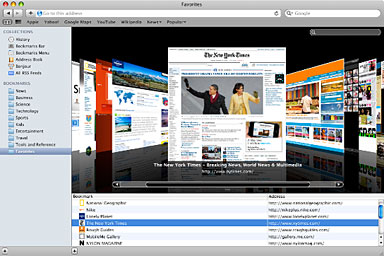
Cover Flow in Safari 4.
Then there's Cover Flow,
which lets you flip through Web history or bookmarks; Full Page Zoom,
which lets you take a closer look at any website without degrading the
quality of the site's layout and text (Opera's implementation of this
is slicker and more convenient); and built-in Web developer
tools to debug, tweak, and optimize a website for peak performance
and compatibility.
Apple says Safari 4's new Nitro
Engine processes JavaScript up to 30 times faster than Internet
Explorer 7 and up to 4.5 times faster than Safari 3, based on
performance in leading industry benchmark tests: iBench and SunSpider.
Apple also claims that in addition to superior JavaScript performance,
Safari 4 offers topflight HTML performance - the best on any platform -
loading pages 3 times faster than Internet Explorer 7 and almost 3
times faster than Firefox 3. Safari 4 includes HTML 5 support for
offline technologies and support for advanced CSS effects, enabling an
entirely new class of web applications that feature rich media,
graphics, and fonts.
Where Safari 4 Falls Short
Well, not over my dialup connection, where I would seat-of-the-pants
rate Safari 4 as a bit faster than non-turbo Opera and Firefox - but
not by much. Broadband may be a different story.
Unfortunately, Safari's Download Manager is still lame compared with
the excellent one in Opera, which is IMHO state of the art in browser
download managers by a wide margin over everything else.
It's all academic to me at this point, since I no longer have it
installed on any of my computers. I'm finding it no hardship with Opera
10, Firefox
3.5, Camino, and iCab all giving me great service.
Safari will run as a 64-bit application in Mac OS X 10.6 "Snow
Leopard", boosting the performance of the Nitro JavaScript engine by up
to 50%, according to Apple. Snow Leopard will also make Safari more
crash-resistant (although I've always found Version 3 quite stable in
both its Intel and PPC iterations, and ironically there are widespread
reports of the final version of Safari 4 being more crash-happy than
the beta versions was) running plugins in a separate process, so even
if a plugin crashes, Safari will continue to run and all you'll have to
do is reload the affected page.
As for system requirements, Safari 4 for Mac requires either
OS X Leopard v10.5.7 or OS X Tiger v10.4.11 - the latter
updated with Security Update 2009-002, a minimum 256 MB of memory and
is designed to run on any Intel-based Mac or a Mac with a PowerPC G5,
G4, or G3 processor and built-in FireWire.



