Bare Bones Software, makers of the popular BBEdit, Text Wrangler, and
MailSmith, has released Yojimbo,
a new tool for information management on the Mac.
There is a growing need for information management on a computer
system. The growing number of files, folders, and file types fills
up hard drives and makes even the most meticulous and
obsessive-compulsive filing system difficult to maintain. New
methods and tools are required to effectively find small pieces of
information amid the growing masses.
Spotlight, the much-touted search tool built into OS X
10.4.x, provides some help with this: on-the-fly searches, "smart"
folders, and content-indexing of entire volumes are strong starts
toward a solution. And while Spotlight has gotten mixed reviews,
with some having substantial (and valid) complaints about its
effectiveness, Apple is certainly moving in the right
direction.
But even when it is improved, Spotlight won't meet the needs of
every situation. Users are finding many creative ways to deal with
handling information, from something as simple as a huge,
always-open text file to things as complex and elaborate homemade
databases.
Additional tools to manage an information workflow have become
useful, if not necessary, additions to many die-hard users'
software toolboxes.
There are a handful of products available, ranging from
elegantly simple to staggeringly powerful, that provide a place for
bits of information, small and large, to be stored and recalled
with simplicity and ease, making organization and accessibility of
your information fairly straightforward. A comprehensive list in
this category would have to include, in no particular order, Devon
Technologies' DEVONthink and DEVONnote, Hog Bay's Mori (formerly
NoteBook), Circus Ponies NoteBook, Chronos' StickyBrain and Soho
Notes, Eastgate's TinderBox, VortiMac's Dossier, Flying Meat's
VoodooPad, AquaMind's NoteTaker, and Notational Velocity. (I'm sure
I've left some off the list - let me know if your favorite is not
there.)
Some of these applications are basic notepad or note-taking
systems, while others are outliners or freeform databases. Each
offers some degree of text-editing capability so that clipboard
contents can be easily dumped into a container for later retrieval.
Many of them allow storage of more than just text, including media
files, documents of a specific format (.doc, PDF, or RTF, for
example), and website bookmarks and/or archives. And some offer
specialized ways of storing data, such as serial numbers,
passwords, and other private information.
Depending on which application you choose, you may encounter a
fairly steep learning curve before you can tap into the program's
usefulness. Typically, there is a correlative degree of difficulty
based on the inherent power and capability of the program.
Sometimes usability means a sacrifice in the robustness of the
program.
Useful and Accessible
Enter Yojimbo. Bare Bones set out to create an information
management application that was usable and friendly to get oriented
with - in fact, their website boasts, "There is no learning curve."
Yet they also wanted a product that would have enough power to be
useful. An obvious but elusive goal: both useful and
accessible.
For the most part, they have succeeded in reaching that goal.
The resulting application, Yojimbo, is designed to be the keeper
and dispenser of your information. Yojimbo, which apparently comes
from a Japanese word meaning "bodyguard" or "security person",
could be seen as the protector of your digital information.
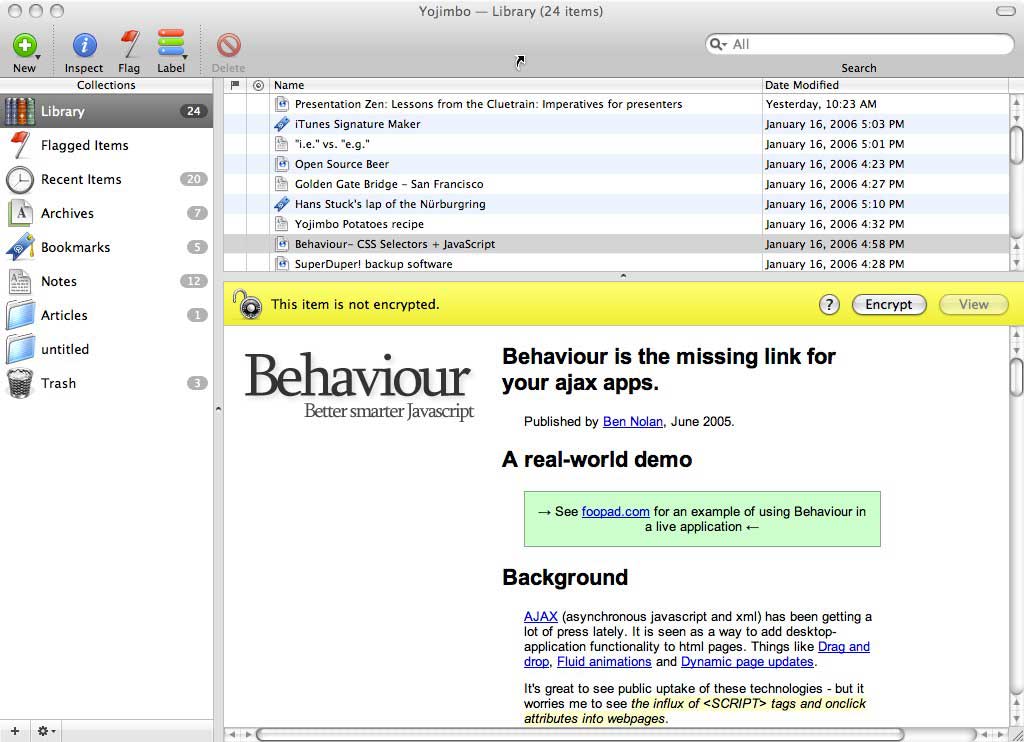
The user interface is a simple, single-window design, not unlike
iPhoto or iTunes. In fact, these apps appear to represent the
metaphor Yojimbo is going for: If you like the way iTunes and
iPhoto allow you to organize your music and photos, you will
probably like the way Yojimbo allows you to organize other parts of
your digital "life" - serial numbers, passwords, email clippings,
and other snippets of information.
It's very easy to get new information into Yojimbo. Besides
using the File menu's "Import..." command and dragging a file (or
group of files) onto Yojimbo's icon, Bare Bones has provided a
handful of other ways to get data into the database. You can
drag-and-drop URLs and clips from websites as you're surfing. You
can use Yojimbo's Services menu, which offers to copy either a text
selection or a URL. You can use Yojimbo's "print-to-PDF" feature
that, partnering with Apple's PDF printing capability, allows the
creation of a new PDF already imported into Yojimbo.
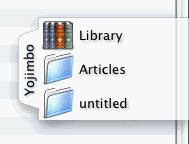 There are editable hotkey combinations that allow for easy
information depositing (though one of the default choices overlaps
with a system keystroke). Or, in perhaps the freshest and most
useful addition, drag a document, URL (from the browser's address
window), or other file or clipping to the "Drop Dock", and a tab
that can be placed on either side of the screen and automatically
reveals your Yojimbo depositing options.
There are editable hotkey combinations that allow for easy
information depositing (though one of the default choices overlaps
with a system keystroke). Or, in perhaps the freshest and most
useful addition, drag a document, URL (from the browser's address
window), or other file or clipping to the "Drop Dock", and a tab
that can be placed on either side of the screen and automatically
reveals your Yojimbo depositing options.
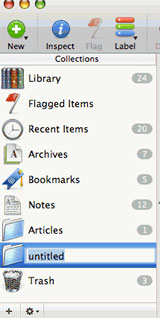 Once your information is imported, using it is very
straightforward. Yojimbo organizes your data into "Collections".
There are user-defined Collections, created with the familiar Plus
button at the bottom of a sidebar; you can drag files into these, a
la iTunes, and they will be added while also remaining available in
the main "Library". User-defined collections also become available
in the Drop Dock. Yojimbo also includes a set of Smart Collections
- Bookmarks, Archives, Recent Items, etc. - that are automatically
updated based on the file's Kind category.
Once your information is imported, using it is very
straightforward. Yojimbo organizes your data into "Collections".
There are user-defined Collections, created with the familiar Plus
button at the bottom of a sidebar; you can drag files into these, a
la iTunes, and they will be added while also remaining available in
the main "Library". User-defined collections also become available
in the Drop Dock. Yojimbo also includes a set of Smart Collections
- Bookmarks, Archives, Recent Items, etc. - that are automatically
updated based on the file's Kind category.
Oddly, Yojimbo does not include the option to create custom
Smart Collections, so users are stuck with the predefined list.
Still, this sort of organizational system is strong in function and
should be familiar to most Mac users.
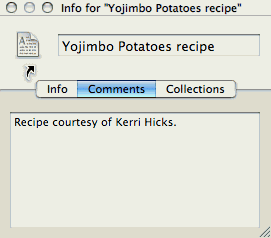 Another
familiar aspect of the interface is the Inspector. This window
allows users to edit one type of metadata - Comments - and have
quick reference to other metadata such as the file's kind, when it
was added to the Library, and what Collections it belongs to.
Another
familiar aspect of the interface is the Inspector. This window
allows users to edit one type of metadata - Comments - and have
quick reference to other metadata such as the file's kind, when it
was added to the Library, and what Collections it belongs to.
Yojimbo is also Spotlight-searchable; Spotlight can search
within the contents of the Yojimbo database, and the application
utilizes the Spotlight engine to perform internal searches. One
nice addition here is that, within a search, clicking on the
various Collections will narrow the results accordingly.
Some may say that metadata in Yojimbo is somewhat thin. (Others
might find it refreshingly lean!) You can add comments to any file
or document, and these are searchable in addition to the document's
title and body. And Yojimbo uses a set of Labels, such as
"Personal", "To-Do", or "News" - again predefined, although these
are user-editable - that applies both a color and a category to any
file. Files can be flagged, and the addition to any Collection also
becomes a part of the metadata set.
Yojimbo offers a basic text editor, which appears to be the
Apple TextEdit shell. You can also choose to edit text through
TextEdit directly by selecting "View in TextEdit" in the Items
menu. It's curious that Bare Bones elected not to use Text Wrangler
as the accompanying text editor, and that they did not offer BBEdit
as an alternative external editor.
New documents are created as .txt files, and while Yojimbo can
read RTF-formatted documents, it cannot create them (though it is
easy enough to convert a file to RTF, if necessary, by viewing it
with TextEdit).
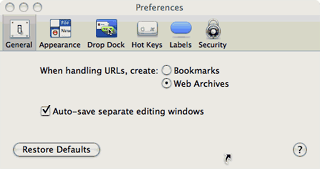 This
application may find its most popular use as a companion to the
avid Web surfer. As I've already mentioned, it's easy to get
information from the Web into Yojimbo. You can choose to handle
URLs as bookmarks or as Web archives, though this choice must be
made through the Preferences pane each time you want to switch
(unless you start from the File menu to create a new bookmark or
Web archive).
This
application may find its most popular use as a companion to the
avid Web surfer. As I've already mentioned, it's easy to get
information from the Web into Yojimbo. You can choose to handle
URLs as bookmarks or as Web archives, though this choice must be
made through the Preferences pane each time you want to switch
(unless you start from the File menu to create a new bookmark or
Web archive).
Bare Bones includes the interesting bookmark option to "Move to
trash after opening", which affords a surfer an easy way to tag a
URL for a return visit without committing it to a permanent set of
bookmarks.
One of the biggest features for Yojimbo is that it is .mac sync
compatible. In other words, you can use your .mac account to sync
your Yojimbo information between two Macs. This is great for users
who must work on more than one machine regularly, or for users who
need to access personal information at work but needs it to remain
secure. It might also be helpful for a family to put to use if they
share a lot of information, like Marcie and I sometimes do.
Probably the most appealing feature for me is the secure storage
of select information, such as serial numbers and passwords. Any
document in Yojimbo can be encrypted, and the security for the
application uses the AES-256 algorithm standard.
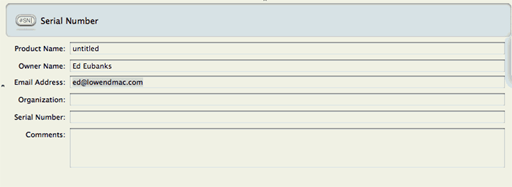
Yojimbo has preformatted templates for this kind of information,
so it's suddenly easy to keep all of this information in one place.
This means that all of the user names and passwords that my family
and I use - whether frequently or infrequently - can be warehoused
in a safe place that is also readily accessible. I'm sure there are
other applications that do this job well, but I like the
flexibility of having an information manager do it without
requiring a single-purpose application that I'll forget to
maintain.
Yojimbo is a Cocoa-developed application. This brings a few
benefits that are not immediately apparent: It will necessarily be
lean and functional without requiring an enormous amount of RAM
(about the same as Address Book) or hard drive space (just under
6 MB, compared to AppleWorks' 16 MB). And it is universal
binary right out of the box - great if you plan to upgrade your Mac
to a new Intel-based model soon.
Notably missing is AppleScript support. Bare Bones' other
products are thoroughly scripted, so it's curious that they haven't
offered any scripting for Yojimbo. Also notable is the requirement
for a very recent operating system; users of OS X versions
prior to 10.4.3 will be frustrated that Yojimbo does not work for
them.
Yojimbo is available with three licenses: the standard
single-license version allows installation on a single computer,
and a family license affords up to five installations in a single
household. An educational license is also available, though the
ability to sync with .mac - perhaps one of the bigger draws to
this application - is prominently absent. (Are educators not
allowed to have more than one computer?)
Licensing fees are reasonably low, and most users in the market
for this sort of product will find their prices competitive. A
trial version is available online.
Comparison
As a deeply committed DEVONthink user, Yojimbo offers me a
redundant feature-set that doesn't provide nearly enough power for
my day-to-day usage. However, it's perfect for Marcie, who has a
use for something more than just a big text file but considerably
less than DEVONthink. Our license, therefore, will live on her
Mac mini.
Overall, I found Yojimbo to be a good addition to the admittedly
crowded market for information management. It offers a good balance
of powerful capabilities and simple user-friendliness that will fit
the needs of many.
Though there are some missing or limited features that make the
program feel incomplete, it is a very good effort for version 1.0.
I recommend Yojimbo for those who need something to keep their
information in, but don't need the heavy-duty research ability and
artificial intelligence features of a program like DEVONthink.
 Since this
is the first software package I've reviewed, I'll introduce a new
rating system for Efficient Mac User software reviews. I'll rank
software on a scale of one to six "cals", indicating how much I
estimate a given application will improve efficiency and
effectiveness in computing. Obviously, six cals is the best, while
only one or two cals is not a very high recommendation.
Since this
is the first software package I've reviewed, I'll introduce a new
rating system for Efficient Mac User software reviews. I'll rank
software on a scale of one to six "cals", indicating how much I
estimate a given application will improve efficiency and
effectiveness in computing. Obviously, six cals is the best, while
only one or two cals is not a very high recommendation.
For Yojimbo, I give it 4.5 cals. Except for the handful of
missing/limited features (which I'm inclined to write off as a
typical v.1.0 issue), it would have earned 5 cals; those elements,
however, were enough to knock off a half.