Microsoft's Sturdy, Low-cost Wireless Keyboard Ideal for Typing
- 2007.01.23 - Tip Jar
Low End Mac Reader Specials
Memory To Go Special: New 2008 iMac 2GB $42 / iMac Intel Core2 DUO & MacBook Pro 2GB $36 - 1GB $20. MacPro 8 Core Memory 8GB kit $286 / 4GB kit $143 / 2GB kit $93 -- Free shipping available. LIfetime warranty.
Download Typestyler, still the Ultimate Styling Tool for Internet, Print and Video Graphics. Works great in Classic with a Native OS X Version on the way. Free Tryout: www.typestyler.com
LA Computer Company: Specials on AppleCare, iMac's, Apple Batteries and Apple A/C Adapters. Also Great prices on Used Apple Computers. Call 1-800-941-7654 Click Here.
OWC: Burn DVDs, DVD-DL, CDs, DVD-Ram - FAST! Superdrive upgrades from OWC starting from $31.99 with options for nearly every Mac. Models with Lightscribe, Blu-Ray too!
Mac users can finally play Party Poker for Mac. Not only that, they can also learn how to play PokerStars for Mac.
Laptop Hardware Provided by TechRestore - Overnight Mac & iPod Repairs.
Compare products like desktop computers, laptops, and LCD TVs side by side! All the information and reviews to make the best purchasing decision for a new cell phone GPS products or MP3 players. The Ciao network makes searching products easy for you.
A week ago I reviewed the old IBM Model M keyboard. Today I thought I would look at a more contemporary offering and give my impression.
As anyone who has read my column regularly knows, I run a small law firm and do double duty as the company's computer guy. I have three other people working for me, and I'm responsible for providing technology to enable them to be more efficient and more productive.
One of those employees, a paralegal who types at an astonishing 140 words per minute, was in need of a new keyboard when she came to work for me, and after hearing her preference for a firm-though-quiet-touch and wireless keyboard, I settled on the Microsoft Wireless Optical Desktop 1000. This is Microsoft's least expensive wireless desktop kit - and their best, in my opinion.
When I purchased this kit, I spent a lot of time comparing the various offerings from Logitech, Microsoft, Kensington, and others. Due to the blistering typing speed of its intended user, I placed feel far higher than price in my priorities.
I honestly expected to spend well over $100 for a wireless outfit, but this Microsoft set cost me only $30 (after a $10 instant rebate). I would have bought it at triple the price for the following reasons:
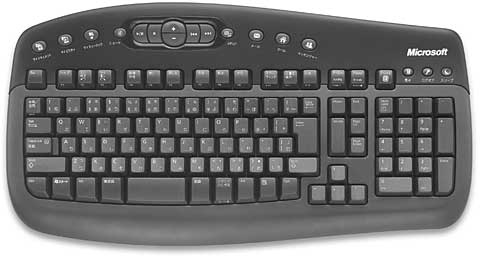
Microsoft Wireless Optical Desktop 1000 keyboard
First is the feel, which was the absolute most important consideration. The keyboard has nice, firm keys, but they are quiet and land gently at the end of their stroke. It's a standard rubber-dome mechanism and as such lacks the distinct clicks of my IBM Model M, but the actuation is still very precise and quiet - and for hard typists (people who press hard on the keys) the landing is well-cushioned.
My speed was a full 60 words per minute on this keyboard, faster than I ever was on my 12" PowerBook (still the fastest laptop keyboard I've used) and very close to my speed on the old IBM. So good was this keyboard that I seriously considered buying a second one for my use at the office instead of the new Model M that I ultimately bought.
Just as important as switch feel, this keyboard is made of sturdy plastic and has a solid, flex-free feel. Pick it up and you can feel the difference in build quality compared to lesser keyboards, including most of the more expensive models from Microsoft. This thing, while lacking the weapon-like rigidity and heft of the old Model M, is pretty close, weighing perhaps half as much as the old IBM - or double the more expensive keyboards against which I compared it.
The keyboard includes some basic function keys and a locking FN key that changes your F-keys to special functions. Microsoft includes a driver CD with drivers for both Windows (2000 and XP) and Mac OS X, though both PCs and Macs recognize and can use the keyboard without installing the drivers. The drivers add some extra functions, but I'm a purist and like to keep things simple, so I haven't installed the software on the Windows XP PC that the keyboard is connected to.
I played with the keyboard first on my tablet PC and installed the driver to explore its functions. Sadly, the driver broke the pen functionality of my tablet until I uninstalled the keyboard/mouse software, so beware.
It worked flawlessly on the Mac (a Power Mac G4 Sawtooth) without the driver, although the driver is required if you want the volume controls and sleep buttons to work.
Despite the existence of a few extra functions, it is when used as a basic keyboard (without the driver) that the Wireless Desktop 1000 is at its best. Since the special functions are mostly embedded in the regular F keys, you can ignore them completely and just enjoy fast typing on a solidly built board with quiet and firm keypress and a soft landing.
The mouse is also simple and sturdy. It's nice and heavy, aided by the two AA batteries that give it long battery life (after five months of daily use the batteries still show a half charge) and a simple two button and scroll wheel design that is symmetrical for easy left- or right-hand use. It is an optical mouse that tracks well on every surface I've tried, including a desk that gives my USB Apple Mighty Mouse fits.
The keyboard and mouse connect to your PC or Mac through a single USB connection. The USB cable is about 6' long and leads to a small receiver with styling to match the dark gray keyboard and mouse perfectly. Better still, the receiver has a button on its front to reestablish connection to the mouse and keyboard should another device interfere. It has indicators to show CAPS, NUM, and FUNC lock.
I've used the mouse as far as 10 feet from the receiver when giving a presentation and had no problems whatsoever, so range appears to be fine. My paralegal did have the mouse stop responding once, but a single press of the button on the receiver followed by a five second light show on the display, and everything was back to normal. We have three other wireless mice in the office, two of them Microsoft, so the fact that we've had one signal loss in five months really impresses me.
There are no frills here, just a well made, solid product that has exceeded my expectations in every way. Microsoft doesn't offer a Mac-labeled version in this budget model, requiring an upgrade (downgrade?) to a more expensive series for that, but the inclusion of Mac drivers and OS X's native support for Windows keyboards makes this a great option for Mac as well as PC users. I like this a lot better than the Apple keyboard that came with my 20" iMac, and also far more than even the $100 and $150 Microsoft offerings that I compared it to.
In conclusion, this is a product that really gives a lot of bang
for the buck. It's proof that more expensive isn't always better.
If you want a wireless keyboard and mouse, I strongly recommend the
Microsoft Wireless Desktop 1000. Forget about the fancier models;
you'll generate more words in less time with greater comfort on
Microsoft's cheapest wireless set than with anything else you are
likely to find at a modern computer store.
- Microsoft Wireless Optical Desktop 1000, $45 from Amazon.com
Andrew J Fishkin, Esq, is a laptop using attorney in Los Angeles, CA.

Recent Best Tools for the Job Columns
- The Cost of Moving to Small Business Server vs. Moving to Leopard Server., 10.06. Upgrading the existing SBS 2003 Server would cost less, the the server will run up against hardware limitations long before a Mac Pro does.
- Why I'm Switching from Windows Small Business Server to Leopard Server, 10.02. Windows SBS 2003 has served very well, but with SBS 2008 just around the corner, it's time to reconsider that choice. Leopard Server has a lot to offer.
- Why one Mac user chose BlackBerry over iPhone, 05.08. The advantages of OS X, Safari, Mail, and iSync don't outweigh the familiarity of BlackBerry, its excellent software, easily replaceable batteries, and a camera-free option.
- Mac again: Picking the right MacBook, 02.29. The 5-year-old PowerBook needed replacing, but is the MacBook Air or the regular MacBook the better choice?
- More in the Best Tools for the Job index.
Links for the Day
- Mac of the Day: SuperMac S900, Aug. 1996 - This 6-slot tower supported dual CPUs and still has a following.
- List of the Day: Macintel List for discussion and support of Intel-based Macs.
- October 7 in LEM history: 98: Love that PowerBook G3 - 99: Troubleshooting 101 - Love at first sight - 02: Hot rodding a Power Mac for OS X - Beefing up Windows networking - 05: Choose FireWire 800 over USB 2.0 and FireWire 400 - Faster Mac minis shipping - Speedy 100 GB 7200 rpm notebook drives
Recent Content on Low End Mac
- New Apple Notebooks at Zero Minus One Week, Charles W. Moore, 'Book Value, 10.07. It's widely anticipated that Apple will overhaul the MacBook Pro and MacBook lines next Tuesday. What should we expect?
- How to Clone Mac OS X to a New Hard Drive, Simon Royal, Mac Spectrum, 10.07. Whether you want to put a bigger, faster drive in your Mac or clone OS X for use in another Mac, here's the simple process.
- Best 12" PowerBook G4 Deals, Low End Mac Deals, 10.07. Used 867 MHz Combo, no APX, $490; 1.33 GHz, $496; 1.5 GHz SuperDrive, $542.
- Best Mac mini Deals, Low End Mac Deals, 10.07. Used 1.25 GHz G4 Combo, $399; 1.42 SuperDrive, $559; 1.66 Core Duo, $499; new 1.83 Core 2 Combo, $570 after rebate; 2.0 SD, $770 a/r.
- Best Power Mac G3 and PCI Video Card Deals, Low End Mac Deals, 10.07. Used beige 300 MHz, $25; 333, $198; blue & white 300, $49; 350, $55; 400, $90; 450, $105; PCI video cards from $15.
- $19,800 Bentley Ego Laptop Remarkably Similar to 1999 Clamshell iBook, Charles W. Moore, Miscellaneous Ramblings, 10.06. Granted, Apple's iBook didn't have white gold trim, a padded leather exterior, or come in colors to match your Bentley automobile.
- Use Your FileMaker Pro Databases on Your iPhone, Adam Rosen, Adam's Apple, 10.06. Although there's no version of FileMaker Pro for the iPhone, FMTouch will let you use your data and layouts on it.
- Best eMac Deals, Low End Mac Deals, 10.06. Used 700 MHz CD, $110; CD-RW, $130; Combo, $170; 800 CD, $170; 1 GHz Combo, $250; SuperDrive, $280; 1.25 Combo, $290; SD, $360; 1.42 Combo, $359.
- Best MacBook Air Deals, Low End Mac Deals, 10.06. Used 1.6 HD, $1,299; refurb, $1,499; new, $1,669 after rebate; 1.8, $1,919 a/r; 1.6 SSD, $2,294 a/r; used 1.8 SSD, $1,997; refurb, $2,299; new, $2,349 a/r.
- Best iPod shuffle Deals, Low End Mac Deals, 10.06. Refurb 3G/1 GB, $39; 2 GB, $59; new 1 GB (3G or 4G), $47; 2 GB (3G or 4G), $67. Prices include ground shipping.
- Mac Netbook Coming?, $179 64 GB SSD, Apple Owns 20% of US Notebook Market, and More, The 'Book Review, 10.03. Also head of Norton AntiVirus team uses a Mac, Toshiba demos new battery technology, 1 TB notebook drives due in 2010, bargain 'Books from $150 to $2,699, and more.
- Getting the Most from Your G3 Mac, Simon Royal, Mac Spectrum, 10.03. Most G3 Macs can be upgraded so they can run Mac OS X 10.4 'Tiger' quite nicely. Here's how.
- Apple Drops iPhone NDA, Defecting to Android, Auto Performance Apps for the iPhone, and More, iNews Review, 10.03. Also more research needed on cellphone cancer link, file sharing app for the iPhone, three new power accessories from Macally, several new iPhone apps, and more.
- Best Power Mac G4 and AGP Video Card Deals, Low End Mac Deals, 10.03. Used 450 MHz, $75; 500, $99; 733, $150; 800, $199; 1.25 GHz, C$349; 867 MHz dual, $225; 1 GHz, $349; 1.25, $499; 1.42, $600.
- OS X and Safari Shares Grow in September, Toxic Mac Pro?, Green Hard Drives, and More, Mac News Review, 10.03. Also Vista terrible as Mac market grows, CrossOver Mac Pro reviewed, SimpleTech Pro Drives, and a new toolkit for working on computers.
- Best iBook G3 Deals, Low End Mac Deals, 10.03. Used 300 MHz clamshell, $150; 366, $199; 500 CD, $149; 800, $190; 600 CD-RW, $240; 800 Combo, $300; 900, $399; 14" 600, $360; 900, $469.
- Best Mac OS X 10.0-10.3 Deals, Low End Mac Deals, 10.03. Mac OS X 10.0.3, $30; 10.1, $20; 10.2, $60; 10.3 CD, DVD, $100; CD, $119; 10.1 Server, unlimited users, $65; 10.3 Server, unlimited, $150.
- More links in our archive.
About LEM | Support | Usage | Privacy | Contacts



