Here we go with another look at defeating region coding on Macs and
PCs.
As the continued flood of email I receive from my previous looks at
this subject (linked at the end of this article) suggests, this remains
a common problem that has gotten worse as time goes on, not better.
Simply put, region coding is a scheme that prevents a DVD player, be it
a console player or an optical drive and decoder program in your
computer, from playing DVD movies coded for a different geographic
region.
No, that doesn't mean that a DVD from New York won't play in Los
Angeles. What it does mean is that the movie industry has created an
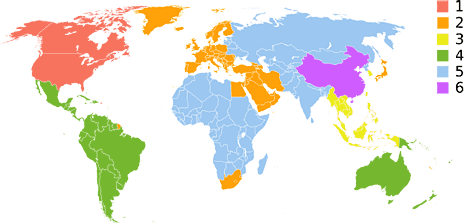
artificial map that divides the world into six regions, assigning
countries to region codes.
The United States, for instance, is region 1 (go figure), while the
United Kingdom is region 2, and South Korea is region 3. For Mr. and
Mrs. Middle America, who obtains all of their movies in one country,
this poses little problem, but for people who travel, it is a major
inconvenience and, if the movie industry gets their way, expense.
Getting Around Region Coding
In this article I will look at the three ways a user can get around
region coding and discuss each in turn as it relates to given hardware
and software situations. Which options you have depends on your
operating system, the type of drive installed in your computer, and
whether that hardware has compatible replacement parts available that
can be modified for region free use.
The three methods, in order of convenience, are what I refer to as
software bypass, hardware bypass, and extraction.
Software Bypass
Software bypass is best when available, because it involves no
modification to your hardware and only the use of software that can be
easily removed should it conflict with something else.
On the Mac, there are no bypass applications for the hardware coding
of your drive. The use of a non-Apple DVD player, such as VLC, works on some Macs and doesn't
work on others. The only way to know for sure is to try it. Set your
Mac's CD/DVD preferences to do nothing on insert of a DVD, install VLC,
and then insert a DVD with a different region coding. If your Mac
prompts you to change the region setting of your drive, your Mac is not
compatible.
If your Mac is an Intel Mac, you could use the Windows tools for
region bypass, though you will need a Windows DVD decoder program or a
"media center" version of Windows, like Vista Home Premium, which
includes one. Yes, you will be forced to boot into Windows to watch
your movies (I haven't tested this in Parallels,
as I don't own a copy;
I use Boot Camp), but this is only necessary for the foreign DVDs.
Like an Intel Mac running Windows, a straight Windows PC has the
same bypass options. As mentioned earlier, I use DVDRegionFree to bypass the region
coding on PCs with non-Matsushita drives. This is by far the cleanest
and easiest way to ignore region coding, allowing your Windows PC to
simply treat out-of-region disks as though they were home region.
Hardware Bypass
Method two is what I call hardware bypass, which is simply using a
different drive to access your foreign movie. This can be as simple as
an external USB or FireWire DVD drive that you only take out for
foreign movies - or on desktops installing a second drive coded for
another region. One of my desktops has a modern Matsushita DVD-RW drive
in its bay that can't use software bypass, but I was able to install an
older DVD-ROM drive (playback only) that I locked at Region 3, allowing
me to play all except for my few region 2 movies on that PC.
Some laptops, like older G3 PowerBooks and many business model PC
laptops, have removable drives, which makes it easy to add a cheap
DVD-ROM coded to another region, or, if it's not a Matsushita
mechanism, flashed to region free.
I own two IBM ThinkPads that use tray-loading 9.5mm drives. The more
modern T60 came with a Matsushita DVD-RW drive that cannot be bypassed,
but the older one with its Hitachi combo drive is flashed to region
free. I usually bring the DVD-RW with me on domestic trips, but on
trips overseas, where I may buy a new movie for the flight home, I
always pack the DVD-RW in my luggage and use the region free combo
drive on the airplane.
In hardware bypass, you still need to worry about region change
counters in your operating system (both Mac and Windows count changes)
and on Windows in your DVD playback application. For Macs, I use
Region X
(Region,
without the X, is available for OS 9) to reset the counter in
OS X. For Windows, I used to use DVD Genie, but now I just use
DVDRegionFree, as most Windows DVD applications have their own counters
and DVD Genie hasn't been updated in years (neither has DVDRegionFree,
but it still bypasses on compatible drives).
Unlike the hardware locks, however, even if you hit your last change
in your OS, one of the reset utilities described above will unlock your
computer's counter, and there is no limit to how many times it can be
unlocked.
Extraction
The third and final method is also the only one that may be illegal.
It is forced on multi-region movie fans by companies like Matsushita
and laptop makers who specify their drives (cough, Apple, cough cough).
Simply put, you extract the DVD's content and then put it into some
other, compatible format.
Macs are far easier to use than PCs here, but PCs have more powerful
extraction tools available. I always try first on a Mac, and if the rip
fails, I take it to my PC and try again, with the Mac having about 80%
success on modern DVDs and close to 100% on disks that are more than
five years old.
For PCs, the list of ripping programs is far too extensive to even
get into. For the Mac, I use a little program called Mac the Ripper that does exactly
what its title suggests. Put in a DVD, run Mac the Ripper, and after 15
minutes to an hour, depending on the length of the movie and the speed
of your Mac, you have a folder on your hard drive containing all of the
DVD's necessary files. Mac the Ripper gives you an option to set the
region code to whatever you want - or to eliminate it entirely.
The next step is to open Toast
(I have version 7 Titanium and haven't bothered upgrading to 8) and
create a DVD "From TOS folder" or something to that effect. This again
is dependent on the speed of your Mac. Toast also gives you some very
cool options, like compressing a long movie to fit on a single-layer
DVD and the ability to remove extra features, subtitles, and alternate
language dubs in order to reduce file size when compressing - and by
extension reduce the amount of required compression. I've compressed a
four-hour movie into a single-layer DVD and viewing it on a laptop the
quality is indistinguishable from the original. For playback on a TV,
however, I'll get a dual-layer disk for full quality.
Another option instead of making an actual DVD movie is to use an
application like HandBrake
(available for Mac and Windows) to convert your DVD or TOS folder into
a movie file that can be burned to a data DVD, moved to your laptop's
hard drive, or even put on a flash drive. This is a great option for
longer flights, as your hard drive uses far less battery power than
your optical drive, and you don't have to carry all of those DVDs with
you. Of course, at about 1 GB per hour at high quality levels,
your hard drive might fill up quickly.
This is my favorite method when I travel with the older of my two
laptops, an ultralight that has no optical drive at all unless I attach
a "media slice". Without the slice, I can carry a 2.7 lb. machine and
put 8-10 movies on the hard drive for a trip, with the added benefit of
quieter operation and longer battery life when watching from the hard
drive or a flash drive.
So there you have it, the state of the region free art in late
2007.
The good old days of putting a flashed Pioneer drive into my 12"
PowerBook are long gone, but with some planning and forethought, you
can still watch foreign movies on your Mac or PC. 
Further Reading
Andrew J Fishkin, Esq, is a laptop using attorney in Los Angeles, CA.



