In
my last column we began discussing
alternatives to Apple Mail. We looked at Mozilla Thunderbird, a
young, powerful, and promising open-source option.
Now, do you want to take a look at the most powerful Mail
replacement on the market?
It's called Eudora.
There are many ways it could be described: a 1,000-pound
gorilla, an old-timer, a reliable veteran, etc. Eudora has been
under development since 1988, and it's still going strong. This
veteran has always offered more raw power than any other email
application on the planet, and it kept improving.
Despite MS Entourage's progress, Eudora still beats them
all.
Q: Is switching to Eudora worthwhile?
A: If you need advanced features for mail handling, yes.
There is one catch - you have to put up with an interface that
is bitterly unfriendly in comparison with all the competition.
Really.
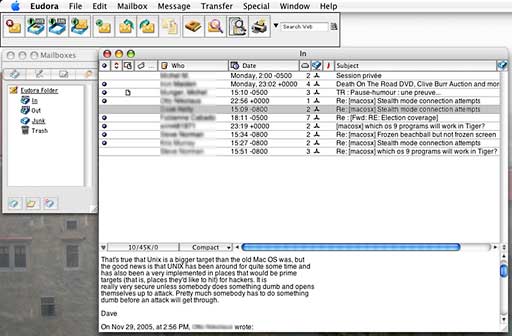
Click image for full-sized view
Eudora has had a difficult interface since the beginning, and it
barely evolved over time. Its separate windows are no fun to
manage, and many of the potential customizations are only known to
people who people who have been using Eudora forever and people who
really take the time to get familiar with it.
For instance, you would never think that hitting the Command (or
Apple) key when clicking on the main toolbar is the way to modify
it, since you have learned to control-click (or right-click) on
order to get the Personalize contextual menu. Or that clicking on a
mailbox-looking button opens a mailbox drawer similar to
Mail's.

How can people make Eudora friendlier? There are two ways. Do I
as did by being familiar with the software for the last 10 years -
or spend time reading the help documents.
If you are ready to learn and don't care much about the poor
interface, the beauty of Eudora is that its only limit is taking
out the trash, feeding the dog, and giving a massage to the wife.
I'm barely kidding.
Eudora uses its own address book, which has a very large number
of fields to enter data about your contacts. It uses a time-tested
system to create and modify stationery, which lets you create
message templates.
Filtering is also very powerful, with perhaps the most
comprehensive number of options available, from what criteria
should be used to the type of email to be filtered, including
outgoing messages.
How can you really use these kinds of features?
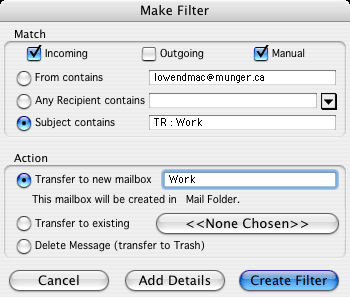
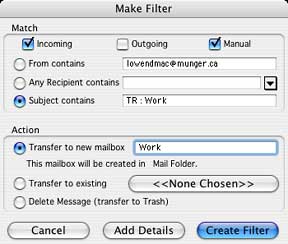 You could use the stationery to create a template for
messages sent to, say, a client. Then the sent messages would be
filtered to a specific folder instead of the regular Sent box. And
when you would pull down the Special menu and select Make Filter
while one of that contact's messages is selected, you would create
a new mailbox with a filter that automatically contains a certain
number of pre-filled criteria.
You could use the stationery to create a template for
messages sent to, say, a client. Then the sent messages would be
filtered to a specific folder instead of the regular Sent box. And
when you would pull down the Special menu and select Make Filter
while one of that contact's messages is selected, you would create
a new mailbox with a filter that automatically contains a certain
number of pre-filled criteria.
At the same time, the Mood Watch would show an ice block or
peppers in your compose windows, letting you know if you are
writing an aggressive email. This is useful to keep you in check
when you are staying in touch with a contact on a regular
basis.
That's the tip of the iceberg. Eudora can easily be compared to
Microsoft Word
- you will never use 100% of its power, and using
half of it can accomplish great things.
Dig in the preferences window, and you will find hundreds of
options that let you tailor Eudora's behavior to your liking. The
software can produce detailed statistics about your email,
including about the efficiency of spam filtering.
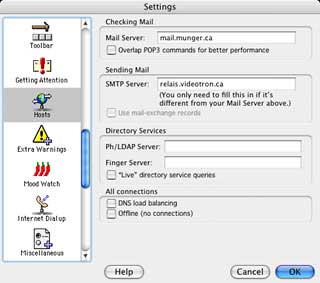 Interface customization is the
perfect illustration of the philosophy behind Eudora.
Interface customization is the
perfect illustration of the philosophy behind Eudora.
Let's take toolbar changes as an example. The Command-click
combination is not intuitive, but once you know about it, you can
do more than with any other software. You can hit any of the menu
elements (not just a small selection of buttons) to add them to the
toolbar, in addition to removing buttons or moving them around.
If one specific menu element is particularly useful to you even
though it doesn't appeal to the masses, you can still create a
toolbar button that includes it. No need for a focus group before
getting the option....
Eudora can thank its long and steady evolution for a few things.
It has been hugging email standards closely forever, and its
interface has been the same for a long time. For users who adopt
it, the rare changes make it feel as comfortable as an old pair of
socks.
The people at Qualcomm always add features, however. There was a
time when Eudora didn't filter spam or support HTML.
At the same time, the software doesn't conform to things like
contextual menus, simple tooltips, or pleasant Aqua interface
elements.
As you can guess, I can't start making a list of all the things
that can be done with Eudora because it would be very long. What
you need to know is that Eudora offers you a tremendous amount of
power to handle your email if you're ready to accept making
sacrifices as far as user-friendliness is concerned.
If you truly learn to use it, you may refuse to use anything
else afterwards.
To find out if this is the kind of beast you can tame, I
strongly suggest that you download Eudora and start using it in the
free "Sponsored" mode. 
Michel Munger is a journalist who lives in Montréal. He discovered the Mac in 1994, and his work on a PC reminds him every day why he embraced Apple's platform. Munger has also authored some MacDaniel columns.