Now here's some advice for Apple. This sort of consolidates a bunch
of advice I've been sharing over the past few months. Recent news
report about Apple's slipping education segment make this advice timely
again. There are some new points here, too, plus some of my trademark
smart-alecky remarks. Think of it as "advocacy with an attitude."
Here's what Apple should be talking about in executive briefings
regarding education:
If you want the education market, work with your strengths. Bring
back the distinguished educators and make them visible.
Make a few well-placed grants of hardware for publicity's sake.
As an alternative to price discounts, think about "buy 10 and get
one free" kind of promotions. There's always someone who would benefit
from an extra machine here and there. Gives the buyer some clout back
home.
Release OS 8 to keep those legacy computers up and running. That
doesn't hurt sales, it helps because it increases the
lock the OS has on a district's culture. Duh. Double-Duh!
Triple-Dog-Dare-Ya-Duh! The new machines won't run 8 anyway. This would
be great publicity with Dell knocking at the Gates and Gateway spitting
in your eye. You know you want to. C'mon, you can do it. You can.
Really really.
Offer a trade-in rebate for schools that want to adopt OS X.
Maybe a free copy of Jaguar for every pre-Power Mac they trade in for a
new model. See, I didn't even call it Jagular this time. How sincere is
that?
Offer free training for district IT staff if a contract is above a
certain size, such as 20-50 machines. Don't pay transport, but don't
charge anything for the seminar, either. Do it twice a quarter or so.
Okay, maybe charge $10.20 just for the publicity.
Try to get Macs into teacher's homes. That will help them want to
have the same thing at work. Deeper personal teacher discounts might
mean more sales.
iTools for teachers should be free. How about a truly cheap school
license? Give us a reason to stay beyond some consumer-oriented gizmo
that won't work through a district firewall anyway. Think, think,
think. Personal PowerSchool license. Copy of Grade Machine. LAN-based
iDisk server. Some sort of new class management tool outside the box
such as a Tardy Tracker or an automated home-caller - or a package that
includes a floppy drive with a full copy of MacLink conversion software
to use as a conversion station just to accommodate Wintel users. Throw
us a bone, Apple.
Develop a midrange Web development package and get it out there.
Something more sophisticated than the not-so-free HomePage - and less
difficult to master than what Macromedia and Adobe offer. You know you
want to. [Editor's chant: Home Page. Home Page. Home Page. Please
consider porting good old Claris Home Page to Mac OS X. I've even
got a name for ya: iPage. And another one: iWeb.]
Give teachers control of their computers again: Bring back
HyperCard. Make it work with X. How many frickin' times do I have
to tell you?
You buy more than 10 Macs, you get OS X Server free. Boom. The
software's developed; it's just a CD, right? That's what you said about
Bill. Put up or shut up.
Stop dropping money into the ALI. No one
uses it. Why? We don't teach those kids. Our kids are real. We don't do
Web conferences with submarines or count fleas on seals in Alaska by
high-speed Internet - because we don't have high-speed Internet.
We want something that's engaging, all right, but also something that
works. For over 10 kids at a time. See, these folks don't even know
what ALI stands for. Ought to tell you something.
Offer a package that speaks to low-income schools: Package a set of
30 Palms or Handsprings with keyboards with one low-end iMac. Everyone
hotsyncs with the teacher and bam, there's a market segment sewn
up. Think eMate
with teeth. Hey, put a Handspring in an eMate. It's a little bigger,
but the software's already developed . . . all you have to do
is collect the student work. Hmm.
Emphasize your strengths. What if teacher iMacs came with FileMaker
Pro? What if FileMaker had a gradebook program right in it? A classroom
ID database with a digital camera and seating chart manager? An
autodialer that could support telephony? "John Q. Public wasn't in
class today. If you have a question call 555-teach." Something you
could plop on a teacher's desk with 15 different shareware gradebooks
to pick from?
Ooh. Ooh. That give's me another idea.
Here's a good one. This one is really, really good. If you do this,
you'll get a truckload of press (I mean a trainload! Seriously! More
press than you can shake a stick at!), and all it'll cost you is a
little clock time. Are you ready?
All the states are making standards as text documents, not
searchable databases. Put a database (FileMaker) copy of each state's
content standards on the hard drive for every education customer.
Include a little solution for linking standards to lesson plans and
handouts. Imagine writing a real lesson plan - not some candy-ass
lesson plan that you show to the visitors and put on a shelf - that
automatically searches itself for keywords that match the standards for
your approval. One that collects all your lesson plans and reports to
you on the fly which standards you've never addressed.
Teachers do this by hand now, man, and it is a pain.
This is what a computer is for! We would love you for it. No
one else is doing it. There are some vendors that have proprietary
solutions, but they're narrow, Web-only, or limited in that your lesson
plans fit on a form and can't include things like clip art. Or they're
horrendously expensive. Some are only for assessment items - take a
look at <http://www.clearlearning.com/siteMap.html>.
Others are only for lesson plans. No one has put the whole package
together yet. Or they're only for large groups, not individuals.
You could make AppleWorks the Ultimate Teacher Tool by
linking its document archive to this thing. Oh, man, this one is
sweet. This is state board of education candy, man.
Districts will eat this one alive. A computer that supports the
standards right out of the box. Mike Dell will wet his pants. I kid
you not. You have to do this and bundle FileMaker with it. Gates
doesn't even bundle Access with everything. (And who understands
Access, anyway?) FileMaker rocks.
Come on, what are you waiting for?
Oh geeze, I think I just had a billion dollar idea, and I gave it
away on the frickin' Internet. I am an idiot.
Okay, going back to the iTools item earlier: You know what? We still
have to have gradebooks, even though you're trying to get us to make
movies about our immigrant grandparents starting out in a monolithic
culture with nothing but dried up potatoes as collateral. See, teachers
know about gradebooks, but none of us went to film school. Yes, yes, I
know about PowerSchool . . . but individual teachers don't
get to buy PowerSchool. When was the last time you had a strategy
meeting where someone even used the phrase "gradebook program" without
sneering and huffing about PowerSchool? We don't even get to
smell PowerSchool. Besides which, our Internet goes down a
couple times a month, so you ain't going to be selling no PowerSchool
here, see? What about the rest of us? See this: 8====8 This is
a bone! Throw it to us!
Everybody's calling "eMac, eMac, saaaave us!" Guess
what? You don't come out with an education computer that's more
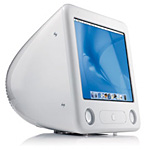 expensive than your low-end consumer model!
Helloooooo, MacFly? Hellooooo? eMac is not in the equation. If
you have a dribble of money, you'll get a CRT iMac or a PC. If you have
a lot of money, you'll get a flat panel iMac, like I'm
going to do.
expensive than your low-end consumer model!
Helloooooo, MacFly? Hellooooo? eMac is not in the equation. If
you have a dribble of money, you'll get a CRT iMac or a PC. If you have
a lot of money, you'll get a flat panel iMac, like I'm
going to do.
Exactly who is the eMac for? Teachers either get a lot of money that has to be spent by next Tuesday,
or they get a tiny amount of money that
has to be spent by next Tuesday. There ain't no in-between. Digital
High School (a CA tech grant program) is kaput, baby. Back to square
zero. Do not pass Go, do not collect $1,000.
Here's a thought: Drop the CRT iMac. All CRT iMacs are eMacs now.
That does several things for you. It distinguishes iMac = flat panel
from eMac = CRT. It makes news because you've dropped the famous CRT
iMac form factor. How daring. It gives you an excuse for dropping the
eMac price. It simplifies sales channels. It focuses your somewhat
scattered product matrix. I like it.
Bundle StarQuiz
with every eMac or iMac purchased by a school. And for heaven's sake,
don't pull another Watson and steal the idea. (There's starting to be
some press about that, huh. It's the news item that just keeps on
giving....) Just pay for it, or at least put the trial version on
there.
You think about that Standards Compliant Computer Out of the Box
thing - now. That one's a doozy. Think annual updates. Think relational
database links to PowerSchool. Somebody wipe up my drool.
Too bad I'm not in charge of Apple. I'd surely run the company right
into the ground with all the stuff I'd give away. But you know what?
You don't have to do all of these things. One will do. Bones
last a long time for dogs . . . and for teachers.
is a longtime Mac user. He was using digital sensors on Apple II computers in the 1980's and has networked computers in his classroom since before the internet existed. In 2006 he was selected at the California Computer Using Educator's teacher of the year. His students have used NASA space probes and regularly participate in piloting new materials for NASA. He is the author of two books and numerous articles and scientific papers. He currently teaches astronomy and physics in California, where he lives with his twin sons, Jony and Ben.< And there's still a Mac G3 in his classroom which finds occasional use.



