Low End Mac Reader Specials
TypeStyler For Mac OS X is Now Shipping! Download The Free Fully Functional 60 Day Tryout at www.typestyler.com
Don't install Parallels to play poker online! Poker Mac will show you how
to download and install a native Mac poker application such as Full
Tilt Poker Mac.
Laptop Hardware Provided by TechRestore - Overnight Mac & iPod Repairs.
Compare products like desktop computers, apple laptops, apple macs, and LCD Monitors side by side! All the information and reviews to make the best purchasing decision for new mobile phones, sat nav systems, or MP3 players. The Ciao online shopping community makes searching products easy for you.
Mac Lab Report
Using the QuickCam Orbit on a Mac
- 2004.03.12
I was one of the early adopters of the Connectix QuickCam for the Mac back when it attached via serial ports and worked in black and white. I still have pictures taken through this camera that have managed to survive my various computer transitions and now reside in my iPhoto library.
Logitech now makes the QuickCam, and they continue to support the Mac as much as they can.
Remember when we thought that we would get a slew of peripherals previously denied us because Apple adopted both FireWire and USB interfaces? For the most part, that has happened, but in some cases the Mac plays a second cousin to the PC.
This is what has happened with the QuickCam. We can still use it, but we don't get to do all the stuff a PC user does.
For example, for videoconferencing: We could use Yahoo messenger but not MSN messenger or Windows Messenger (natch). Unfortunately the camera is not compatible with iChat AV, because Apple only supports FireWire webcams for that application.
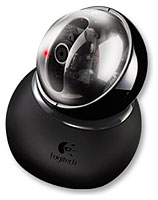
The
QuickCam Orbit comes in a box, encased in a plastic shell
nearly as massive as it is. Once you manage to extract it, you find a
ball on the base, another ball containing the camera, and a stem them
you can use to raise the ball closer to eye level.
The gimmick for this particular camera is that you can remotely direct the camera to pan left and right as well as tilt up and down. It also sports a "face tracking" feature that is supposed to keep track of your head movements during video conferencing.
I found the face tracking worked about as well as voice commands on the Mac. If you don't move too fast and keep your face towards the camera, it works all right. But if you lean over suddenly, the camera tends to swing in some random direction and start zooming in and out until you return.
There is a nice long 9 foot cable. Props for that.
Electronically the QuickCam is essentially a Pro 4000 with a pan and tilt head. The video quality is about the same as it was when the first color QuickCam came out, maxing out at 640 x 480 in video (1280 x 960 larger in still images).
The refresh rate on a 1 GHz TiBook didn't impress me too much. The thing is a webcam, and it performs like one. Perhaps I've been spoiled by the faster response time I see with DV cameras over FireWire. The frame rate is probably better with the current generation of Macs equipped with USB 2.0.
Zooming is sluggish. If you drag the slider over the edge of the controller window, it jumps back to where it started instead of maximizing in the direction you were going. This feels clumsy.
The main problem I have with the camera is the interface. There is a 4-way mouse-clickable arrow interface to activate the pan and tilt. If you hold the mouse button down, the pan takes a single step and stops. There are no keyboard equivalents, so you couldn't program a joystick to control it, which is a real shame for budding robot designers. You would have to go deeper into the control system and talk to the USB port directly, I suppose.
The thing is obviously capable of smooth panning, because it does so when you click the "Home" button. Why can't I do that myself?
We bought the camera to serve as part of a display on the Mars Rovers. We set ours on top of a Lego™ model of a Mars rover and voilà, an instant interactive display. It's good for a table at open house, which is where we intend to use it.
I wish I could embed the video output and controllers in a HyperCard Stack, but those days are long gone. It would make a great kiosk for a display, though. Pity.
Installation was simple and quick, although it did require a restart, which seems a bit rare these days on OS X. At one point the camera software couldn't find the camera, so I had to reinstall it. I haven't been able to reproduce the problem, so I'm not exactly sure what happened.
Overall, at the price I paid (retail is US$129.95) I'm getting more or less what I paid for. There are cheaper webcams. There are less expensive FireWire webcams (the iBot comes to mind). You pay a little for the gimmick, and I wish I had more control over it in a greater variety of ways. The QuickCam Orbit is so new that Logitech hasn't yet posted any Mac drivers for it.
Jeff Adkins is a science teacher who isn't afraid to state his preferences in computing platforms. In his classroom he has everything from a beige All-in-One to a a G4 XServe, and they all work together nicely. He calls himself the "poster child for technology integration" in the classroom. He was the 2006 Outstanding Educator of the Year for the California Computer Using Educators (CUE) organization. He also maintains a site for astronomy teachers at www.AstronomyTeacher.com.
Recent Mac Lab Reports
- Microsoft Word 2004 vs. iWork Pages 1.0 for writing a book, 01.10. Microsoft Word is great for technical writing, powerful yet slow, while Pages lets you concentrate on just writing, making it great for novels.
- iWeb a great tool for quickly creating an attractive website, 09.11. Apple's iWeb software isn't just easy to use, it also integrates nicely with .mac and other programs in the iLife bundle.
- Use your Bluetooth phone to control your Mac? Maybe, 02.27. Salling Clicker software turns many Bluetooth phones into remote controls for Bluetooth-equipped Macs.
- Two more markets the iPhone could conquer, 02.01. How Apple could redefine the ebook and calculator markets with a pair of free apps for the iPhone.
- More in the Mac Lab Report index.
Links for the Day
- Mac of the Day: Mac mini Core Solo, Feb. 2006 - The only Mac to use a Core Solo CPU, this model ran at 1.5 GHz, has integrated graphics, and includes a Combo drive
- Group of the Day: SuperMacs is for those using Umax SuperMac clones.
- November 24 in LEM history: 98: Microsoft's heavy hand - 00: Looking at the iMac - 04: The best Mac for the holidays - Picking the right replacement for a dead mouse - Better battery for 15" AlBook
- Support Low End Mac
Recent Content on Low End Mac
- Why Spaces is My Favorite Leopard (and Snow Leopard) Feature, Charles W. Moore, Miscellaneous Ramblings, 11.23. Spaces, a feature introduced with OS X 10.5, is like having several monitors on your Mac without the cost and space of using multiple displays.
- i5 iMac Benchmarked, Mac mini 'Shouldn't Be Overlooked', Twitter Client for Classic Mac OS, and More, Mac News Review, 11.20. Also why Apple leaves the low end to others, 10.6.2 fixes video playback problem in 27" iMac, 3D Leopard and Snow Leopard performance, and more.
- Apple's Tablet an End Run Beyond Netbooks, Frank Fox, Stop the Noiz, 11.20. Whatever Apple has planned will leverage existing technologies while going beyond what its competitors can offer.
- Apple #4 in Reliability, Apple Tablet a Gadget for All?, HP's i7 Notebook Outdoes Mac Rivals, and More, The 'Book Review, 11.20. Also Flash 10.1 improves video on Hackintosh netbooks, thin-and-light notebooks impress, Windows XP finally on the way out, and more.
- NASA Chemical Sensor for iPhone, Smartphone Death Match, iPhone Earrings, and More, Ian R Campbell, 11.20. Also mobile phone dangers, new apps, GPS solution for iPod touch, new iPod and iPhone cases, and more.
- Replacing the Hard Drive in a Clamshell iBook, John Hatchett, Recycled Computing, 11.19. Yes, it is one of the most difficult Apple notebooks to disassemble and reassemble, but a 10 GB hard drive just will not do.
- IBM Model F: A Great Old Keyboard with an Outdated Layout, Tommy Thomas, Welcome to Macintosh, 11.19. Although it used a different technology than the revered IBM Model M keyboard, the Model F was a great keyboard in its own right.
- More links in our archive.
Recent Deals
- Best G4 iMac Deals, 11.24. Used 15" 700 MHz CD-RW, $150; 800 MHz Combo, $229; 1 GHz, $289; 17" 1.25 GHz, $200; 20" 1.25 GHz, $509.
- Best MacBook Air Deals, 11.24. Used from $899; refurb from $1,099; new 1.6 GHz/120 HD, $1,150 after rebate; 1.8/64 SSD, $1,150 a/r; 1.86/128 SSD, $1,350 a/r; 2.13/128 SSD, $1,694 a/r.
- Best PowerBook G3 Deals, 11.24. Used 233 MHz WallStreet, $75; 266 MHz, $160; 400 MHz Lombard, $199; 400 MHz Pismo, $289; 500 MHz, $350.
- Best 12" PowerBook G4 Deals, 11.23. Used 867 MHz SuperDrive, $348; 1 GHz Combo, $379; SD, $519; 1.33 GHz, $529; 1.5 GHz Combo, $549; SuperDrive, $609.
- Best Mac Pro Deals, 11.23. Used 2.66 GHz 4-core, $1,300; 3.0 4-core. $1,919; refurb 2.66 4-core Nehalem, $2,149; 2.93, $2,549; 2.93 8-core, $4,999; new 2.26 8-core, $2,290.
- Best Time Capsule and AirPort Deals, 11.23. Used 802.11g AirPort Extreme, $49; 500 GB Time Capsule, $150; new, $190; 1 TB dual-band, $280; 2 TB, $469; 802.11n AirPort Extreme, $170.
- Best eMac Deals, 11.18. Used 1 GHz Combo, $100; SuperDrive, $269; 1.25 GHz Combo, $119; SD, $319; 1.42 GHz Combo, $289; SD, $498.
- Best Mac OS X 10.6 and Mac Box Set Deals, 11.18. "Snow Leopard", single user, $25; 5 users, $45; Mac Box Set, single user, $139; 5 users, $180; Server, $414. Shipping included.
- Best Xserve Deals, 11.18. Used 1 GHz dual G4, $649; 2.3 dual G5, $795; 3.0 4-core Xeon, $1,899; refurb 2.26 4-core, $2,499; new, $2,888; refurb 8-core, $2,999; new, $3,449; more.
- More deals in our archive.
About LEM | Support | Usage | Privacy | Contacts
Navigation
Used Mac Dealers
Apple History
Video Cards
Email Lists
Favorite Sites
MacSurfer
MacMinute
MacInTouch
MyAppleMenu
InfoMac
Macs Only!
The Mac Observer
Accelerate Your Mac
RetroMacCast
PB Central
MacWindows
The Vintage Mac
Museum
DealMac
DealsOnTheWeb
Mac2Sell
ramseeker
Mac Driver Museum
JAG's House
System
6 Heaven
System 7 Today
the pickle's Low-End
Mac FAQ
Abandonware
Petition
Mac vs. PC Info
Affiliates
The Apple
Store
Mac
Connection
B&H
MacMall
TechRestore
ExperCom
Crucial
Memory
batteries.com
Advertise
MacMinute
MacInTouch
MyAppleMenu
InfoMac
Macs Only!
The Mac Observer
Accelerate Your Mac
RetroMacCast
PB Central
MacWindows
The Vintage Mac
Museum
DealMac
DealsOnTheWeb
Mac2Sell
ramseeker
Mac Driver Museum
JAG's House
System 6 Heaven
System 7 Today
the pickle's Low-End
Mac FAQ
Abandonware
Petition
Mac vs. PC Info
Mac Connection
B&H
MacMall
TechRestore
ExperCom
Crucial Memory
batteries.com



