Seven Tips for Buying an MP3 Player
Low End Mac Reader Specials
Download Typestyler, still the Ultimate Styling Tool for Internet, Print and Video
Graphics. Works great in Classic with a Native OS X Version on the way. Free
Tryout: www.typestyler.com
LA Computer Company: LA Computer Company: Specials on AppleCare, Apple Displays, MacBooks, iMac's, MacBook Pros, Laptop and iPod accessories and more. Apple A/C Adapters for laptops starting at $25.00 Call 1-800-941-7654 or Click Here.
OWC: OWC Mercury On-The-Go FW400/800/USB2/eSATA Portables High Performance A/V Rated, **Bus Powered** **Up to 500GB in the Palm of your Hand** Macworld Editor's Choice, CNET 'Very Good' - from $75.99!
Mac users can finally play Party Poker for Mac. Not only that, they can also learn how to play PokerStars for Mac.
Laptop Hardware Provided by TechRestore - Overnight Mac & iPod Repairs.
Compare products like desktop computers, laptops, and LCD TVs side by side! All the information and reviews to make the best purchasing decision for a new cell phone GPS products or MP3 players. The Ciao network makes searching products easy for you.
New iMac 800Mhz Memory 4GB $98, 2GB $50. Click to Maximize your Macs...
Dan Knight
- 2005.03.28
With no
apologies whatsoever to Microsoft's
Six Tips for Buying an MP3 Player with Flash Memory, the
Lite Side presents
Seven Tips for Buying an MP3 Player
If you're the type of person who's on the go all the time and
wants to jam to your favorite tunes while commuting to work,
trekking across campus, or working out, then having the right
digital music player is essential. Here are six
seven tips to help you find the digital music player that's right
for you:
1. Understand the basics.
For the klutz, a player that uses flash memory to store music
has distinct advantages over a player that uses a hard drive.
Simply put, flash memory players have no moving parts, meaning that
you can drop them and not worry about damaging a hard drive - even
if you do damage the rest of the player.
For the forgetful, a player that uses flash memory has another
advantage - it's more likely to survive a trip through the laundry
than a player with a delicate hard drive. No promises here, but
survival chances are better.
Those stupid hard drive iPods digital music
players are just sooooo delicate that they'd never survive a drop.
If you're an active person, a klutz, or absent-minded, think flash
memory. Hard drives are for wimps - or at least people who are
going to take very good care of their hardware.
2. Make sure you're getting all the goodies.
Many digital music players can do more than just play music.
Some can sync with your personal calendar and your address book.
Some can be used as portable file storage. Some can even store and
display your digital photographs.
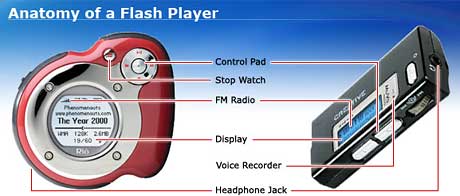
Why would you want a music player without all this?
Some have a built-in FM tuner, clock, or stopwatch - features
that can be found in tiny radios and cheesy wristwatches at any
dollar store. Some come with extra accessories like decent
headphones or a lanyard.
Some let you add specialized things like voice recording, a
FireWire cable, or an FM transmitter so you can listen to your
iTunes music on your car radio. Of course, these
features come at an additional cost so only those who need these
feature have to pay for them.
3. You'll want a display.
When you have hundreds of songs on your player, you really need
an easy way to select your music by artist, album, or genre. This
is critical if you want to find that one song or artist you really
want to hear. You know, like the iPod has, with that wonderful
navigation system. (Remember, players under 512 MB just don't hold
that much music....)
A display also comes in handy when you're looking for your
favorite radio station, which is why most of those crappy dollar
store FM radios with headphones are pretty horrid to use. Then
again, if you want to listen to the radio, why not buy a cheap
radio instead a more expensive digital music player?
If you just want to listen to part of your music collection
randomly, there's no point in having a display. If you're busy
jogging, working at your computer, or driving around town, you need
your eyes and hands free.
4. Let a professional make your next playlist.
Having an FM radio lets you put your player on autopilot as you
mountain bike, cycle, or roller blade.
That's what you really want, isn't it? Letting the DJ at your
favorite radio station pick the music is the reason you bought a
digital music player in the first place and then filled it with
your favorite music.
Trust the professionals. You could never create as good a
playlist - and just think of all the ads you'd miss out on!
5. Pick the right size for you.
The price of a player will depend on its storage capacity - the
more megabytes (MB) of storage it has, the more music it can hold,
and the more it will cost. If you're ripping your own CDs, using a
player with Windows Media Audio (WMA) support as well as MP3
support gives you the most music per megabyte by using lo-fi 64
Kbps sampling.
Here are some quick rules of thumb for how much music per
megabyte you get, depending on the quality of the compression. For
FM radio quality 64 Kbps sampling:
Capacity
Number of songs
Hours of play*
128 MB
60
4
256 MB
100
8
512 MB
250
16
1 gigabyte
500
32
- * How long you can listen before your digital music player
plays every song you've installed on it.
If you want better sounding music, you might want to consider
128 Kbps sampling, such as Apple uses in iTunes (if you don't care
about quality, why are you buying a digital music player?):
Capacity
Number of songs
Hours of play*
128 MB
30
2
256 MB
60
4
512 MB
125
8
1 gigabyte
250
16
4 gigabytes
1000
64
6 gigabytes
1500
96
20 gigabytes
5000
320
Now do you understand why Apple doesn't make low-capacity iPod
shuffles. Who'd pay $50-80 so they could carry only four CD's worth
of music on a digital music player?
The question is, How much music do you want on hand? If you want
your whole music library, you probably won't be happy with any
flash music player. But if you just want something so you can take
part of your collection on a run or bike ride, that's where the
flash players excel.
6. Don't worry about multiple one online stores.
Have you ever been on the hunt for a particular song? Some
obscure indie rock tune or rare jazz performance you heard on the
radio? If you don't use an iPod, you might have to shop at more
than one store before you find the song you're looking for. Having
the flexibility to choose from over 1 million tracks of music from
multiple online music stores such as MSN Music, Napster,
MusicMatch, and Wal-Mart can consume a lot of your time and try
your patience.
With the iPod, you only have to check one source -
the iTunes Music Store
. If they don't have it, you're SOL, and you
know it without wasting time trying to find an online music store
that just might have that obscure CD available. (What are the odds
that one service will have a noticeably different selection from
the rest?)
Want Natalie Cole's Unforgettable CD? Forget it! Something by
Garth Brooks? You're up a creek without a paddle. The Beatles?
Sorry, but they don't want you buying their music from an online
music service. Even the industry-leading iTunes Music Store doesn't
offer everything you might want, but if they don't have it, you'll
discover that pretty quickly. Then it's time to look for a
low-priced (maybe previously played) CD....
Some non-Apple online music stores offer subscription services
so you can download all the songs you want for about the cost of a
CD each month. Just don't forget to pay, or you won't be able to
listen to all of those digitally protected files you downloaded to
that digital music player.
7. Don't worry about multiple software choices.
Whether you use a Windows PC or a Macintosh computer, Apple's
iTunes is the right software for you - and it's free. With iTunes,
you can rip your CDs to high quality MP3 or AAC files, buy music
online, organize your music collection your way, easily burn your
own mix CDs, and even share your music library with up to five
other networked iTunes users each and every day.
iTunes even makes it easy to create a playlist just for the iPod
shuffle.
Does that make life too easy for you?
PlaysForKeeps
If you buy a device that has the PlaysForKeeps logo, you'll know
that you can use it with Apple's free iTunes music software, iPod
music players, and iTunes music stores.
Or you can pick the Windows-only PlaysForSure products and be
sure it won't work with the world's leading online music service or
most popular music players.
Sometimes it pays to follow the crowd.
Recent Lite Sides
- What if Apple thought like a PC company?, 11.01.
Apple has innovated and blazed its own trail. But what if it had followed the path taken by the PC copycats?
- How Microsoft can turn Vista lemons into lemonade, 10.22.
How Microsoft could profit by no longer allowing manufacturers to sell new PCs with Windows XP installed.
- iPods that never passed beta or focus groups, 09.13.
"What most Apple fans don't realize is that there were a few iPod variants that never made it out of beta testing and the focus group stage."
- More in the The Lite Side index.
Recent Content on Low End Mac
- Mac Pro overclocking, Windependence with Darwine, Blu-ray for Macs, and more, Mac News Review, 07.04.
Also more on running Leopard on non-Apple hardware, Ubuntu on a Mac mini, the first autofocus webcam with Zeiss optics for Macs, and more.
- Wouldn't life be great with an iSlate?, John Hatchett, Recycled Computing, 07.04.
PDAs and smartphones are too small for some tasks, full-fledged Tablet PCs are overkill, and ebook readers are too limited. Apple has the tech to own this niche.
- Mac of the Day: Original iMac G3/233, Aug. 98 - The Bondi blue wonder that bounced Apple back to profitability and into the public eye.
- List of the Day: Mac Pro List is for those using a Mac Pro.
- July 5 in LEM history: 98: The iMac: First of a family? - iMac Perfect for schools - 00: Apple is not your friend - 01: 75 Mac Advantages - Do you trust me? - 02: The joy of X with Classic - The good, the bad, and the intrusive - 05: No Quartz Extreme for Pismo - A brief history of NeXT - 06: Education iMac - iTunes and the French interoperability law - TopXNotes - Apple's secret battery reset utility - Misleading hard drive capacity
- The Macintosh Portable started a notebook revolution, Carl Nygren, Classic Macs in the Intel Age, 07.03.
Before Apple introduced the Mac Portable, notebook computers were text-based and ran MS-DOS. Ever since, graphical interfaces have been the norm for laptops.
- More links in our archive.
About LEM | Support | Usage | Privacy | Contacts
Low End Mac Reader Specials
Download Typestyler, still the Ultimate Styling Tool for Internet, Print and Video Graphics. Works great in Classic with a Native OS X Version on the way. Free Tryout: www.typestyler.com
LA Computer Company: LA Computer Company: Specials on AppleCare, Apple Displays, MacBooks, iMac's, MacBook Pros, Laptop and iPod accessories and more. Apple A/C Adapters for laptops starting at $25.00 Call 1-800-941-7654 or Click Here.
OWC: OWC Mercury On-The-Go FW400/800/USB2/eSATA Portables High Performance A/V Rated, **Bus Powered** **Up to 500GB in the Palm of your Hand** Macworld Editor's Choice, CNET 'Very Good' - from $75.99!
Mac users can finally play Party Poker for Mac. Not only that, they can also learn how to play PokerStars for Mac.
Laptop Hardware Provided by TechRestore - Overnight Mac & iPod Repairs.
Compare products like desktop computers, laptops, and LCD TVs side by side! All the information and reviews to make the best purchasing decision for a new cell phone GPS products or MP3 players. The Ciao network makes searching products easy for you.
New iMac 800Mhz Memory 4GB $98, 2GB $50. Click to Maximize your Macs...
Dan Knight - 2005.03.28
With no apologies whatsoever to Microsoft's Six Tips for Buying an MP3 Player with Flash Memory, the Lite Side presents
Seven Tips for Buying an MP3 Player
If you're the type of person who's on the go all the time and
wants to jam to your favorite tunes while commuting to work,
trekking across campus, or working out, then having the right
digital music player is essential. Here are six
seven tips to help you find the digital music player that's right
for you:
1. Understand the basics.
For the klutz, a player that uses flash memory to store music has distinct advantages over a player that uses a hard drive. Simply put, flash memory players have no moving parts, meaning that you can drop them and not worry about damaging a hard drive - even if you do damage the rest of the player.
For the forgetful, a player that uses flash memory has another advantage - it's more likely to survive a trip through the laundry than a player with a delicate hard drive. No promises here, but survival chances are better.
Those stupid hard drive iPods digital music
players are just sooooo delicate that they'd never survive a drop.
If you're an active person, a klutz, or absent-minded, think flash
memory. Hard drives are for wimps - or at least people who are
going to take very good care of their hardware.
2. Make sure you're getting all the goodies.
Many digital music players can do more than just play music. Some can sync with your personal calendar and your address book. Some can be used as portable file storage. Some can even store and display your digital photographs.

Why would you want a music player without all this?
Some have a built-in FM tuner, clock, or stopwatch - features that can be found in tiny radios and cheesy wristwatches at any dollar store. Some come with extra accessories like decent headphones or a lanyard.
Some let you add specialized things like voice recording, a
FireWire cable, or an FM transmitter so you can listen to your
iTunes music on your car radio. Of course, these
features come at an additional cost so only those who need these
feature have to pay for them.
3. You'll want a display.
When you have hundreds of songs on your player, you really need an easy way to select your music by artist, album, or genre. This is critical if you want to find that one song or artist you really want to hear. You know, like the iPod has, with that wonderful navigation system. (Remember, players under 512 MB just don't hold that much music....)
A display also comes in handy when you're looking for your favorite radio station, which is why most of those crappy dollar store FM radios with headphones are pretty horrid to use. Then again, if you want to listen to the radio, why not buy a cheap radio instead a more expensive digital music player?
If you just want to listen to part of your music collection randomly, there's no point in having a display. If you're busy jogging, working at your computer, or driving around town, you need your eyes and hands free.
4. Let a professional make your next playlist.
Having an FM radio lets you put your player on autopilot as you mountain bike, cycle, or roller blade.
That's what you really want, isn't it? Letting the DJ at your favorite radio station pick the music is the reason you bought a digital music player in the first place and then filled it with your favorite music.
Trust the professionals. You could never create as good a playlist - and just think of all the ads you'd miss out on!
5. Pick the right size for you.
The price of a player will depend on its storage capacity - the more megabytes (MB) of storage it has, the more music it can hold, and the more it will cost. If you're ripping your own CDs, using a player with Windows Media Audio (WMA) support as well as MP3 support gives you the most music per megabyte by using lo-fi 64 Kbps sampling.
Here are some quick rules of thumb for how much music per megabyte you get, depending on the quality of the compression. For FM radio quality 64 Kbps sampling:
|
Capacity |
Number of songs |
Hours of play* |
|---|---|---|
|
128 MB |
60 |
4 |
|
256 MB |
100 |
8 |
|
512 MB |
250 |
16 |
|
1 gigabyte |
500 |
32 |
- * How long you can listen before your digital music player plays every song you've installed on it.
If you want better sounding music, you might want to consider 128 Kbps sampling, such as Apple uses in iTunes (if you don't care about quality, why are you buying a digital music player?):
|
Capacity |
Number of songs |
Hours of play* |
|---|---|---|
|
128 MB |
30 |
2 |
|
256 MB |
60 |
4 |
|
512 MB |
125 |
8 |
|
1 gigabyte |
250 |
16 |
|
4 gigabytes |
1000 |
64 |
|
6 gigabytes |
1500 |
96 |
|
20 gigabytes |
5000 |
320 |
Now do you understand why Apple doesn't make low-capacity iPod shuffles. Who'd pay $50-80 so they could carry only four CD's worth of music on a digital music player?
The question is, How much music do you want on hand? If you want your whole music library, you probably won't be happy with any flash music player. But if you just want something so you can take part of your collection on a run or bike ride, that's where the flash players excel.
6. Don't worry about multiple one online stores.
Have you ever been on the hunt for a particular song? Some obscure indie rock tune or rare jazz performance you heard on the radio? If you don't use an iPod, you might have to shop at more than one store before you find the song you're looking for. Having the flexibility to choose from over 1 million tracks of music from multiple online music stores such as MSN Music, Napster, MusicMatch, and Wal-Mart can consume a lot of your time and try your patience.
With the iPod, you only have to check one source -
the iTunes Music Store. If they don't have it, you're SOL, and you
know it without wasting time trying to find an online music store
that just might have that obscure CD available. (What are the odds
that one service will have a noticeably different selection from
the rest?)
Want Natalie Cole's Unforgettable CD? Forget it! Something by Garth Brooks? You're up a creek without a paddle. The Beatles? Sorry, but they don't want you buying their music from an online music service. Even the industry-leading iTunes Music Store doesn't offer everything you might want, but if they don't have it, you'll discover that pretty quickly. Then it's time to look for a low-priced (maybe previously played) CD....
Some non-Apple online music stores offer subscription services so you can download all the songs you want for about the cost of a CD each month. Just don't forget to pay, or you won't be able to listen to all of those digitally protected files you downloaded to that digital music player.
7. Don't worry about multiple software choices.
Whether you use a Windows PC or a Macintosh computer, Apple's iTunes is the right software for you - and it's free. With iTunes, you can rip your CDs to high quality MP3 or AAC files, buy music online, organize your music collection your way, easily burn your own mix CDs, and even share your music library with up to five other networked iTunes users each and every day.
iTunes even makes it easy to create a playlist just for the iPod shuffle.
Does that make life too easy for you?

PlaysForKeeps
If you buy a device that has the PlaysForKeeps logo, you'll know that you can use it with Apple's free iTunes music software, iPod music players, and iTunes music stores.
Or you can pick the Windows-only PlaysForSure products and be sure it won't work with the world's leading online music service or most popular music players.
Sometimes it pays to follow the crowd.




