With the increased popularity of the Mac, Apple has taken to
boasting of the number of switchers - Windows users who have purchased
a Mac, either to replace their no-longer-in-use Windows system or as an
additional computer. Much about the Mac makes immediate sense to
longtime Windows-users, but some things are a puzzle.
Among the top puzzlements:
- Where's the maximize button? Despite the name
Windows, many users prefer to make their foreground
window fullscreen, covering any other windows. Windows offers them a
maximize button - a little square near the right-end of the title bar -
to do this. The Mac seems to offer the equivalent - the green circle
near the left-end of the title bar, but while it makes the window
larger, it doesn't fill the screen.
- Where's the Start Menu? The Start Button in the lower
left-corner has been a prominent feature since Windows 95, whose
introduction used the Rolling Stones' Start Me Up in its
advertising. Many switchers need help to look in their Mac's
Applications folder to find applications that lack Dock icons. Frankly,
that does seem a bit old school.
- Why don't programs close when I close their window? Some do,
but many or most Mac apps don't, a black mark against the Mac's fabled
user interface consistency.
The kind folks at Blazing Tools
Software have taken pity on the switchers, releasing free tools for
the first two of these puzzlements, making new Macs a little bit more
(dare I say) Windows-like.
Maximize Windows
Right
Zoom is a 416 KB download. When run, apparently nothing happens.
But click the Mac's green Zoom button, and now it will maximize the
window, Windows-style, filling all available horizontal space and all
the space between the menu bar and the Dock. Clicking the green gumdrop
again restores the window to its previous size.
However, it doesn't work with all programs. The Finder, Safari,
Microsoft Office components, and iWork components are supported by
default, but not necessarily others. To make it work with other
programs, you first need to stop Right Zoom from running - not
something obvious in a program without an interface. You can also
restart or log out and log back in. Or open a Terminal windows and
type: killall RightZoom
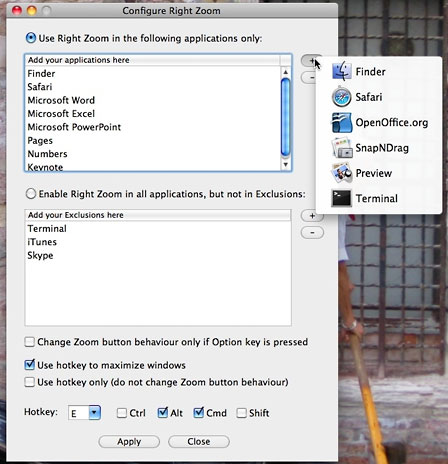 To get to Right Zoom's configuration settings, find the
application in the Finder and hold the Command key down while
double-clicking the program's icon.
To get to Right Zoom's configuration settings, find the
application in the Finder and hold the Command key down while
double-clicking the program's icon.
The configure dialogue box lets you choose to apply Right Zoom only
to the default list of applications or to try it with all applications
(except a select listed few). You can add or remove applications from
the lists - removing an application simply requires highlighting its
name in the list and clicking the [ - ] button. Adding an
application is a bit quirky, however. Clicking the [ + ]
button pops up a list of all currently running applications, letting
you add from those if desired - in other words, an application must be
running to add it to the list.
If you click on the [ + ] button and nothing happens, go to the
Terminal and try to shut down Right Zoom again. Unlike most Mac
dialogue boxes, your changes don't immediately take effect - there are
Apply and Close buttons at the bottom; if you click the Close button
without previously clicking Apply, no changes will take place.
Blazing Tools notes that you may not be able to maximize an inactive
window - you should click on it first to make it active, then maximize
it.
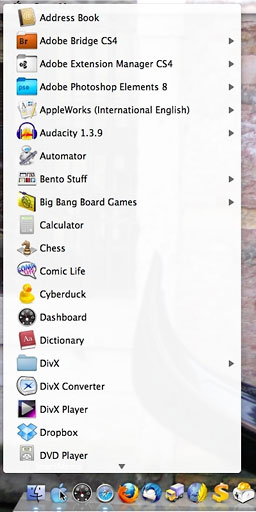 A Start Menu for
Macs
A Start Menu for
Macs
Blazing Tools' Start Menu is
also a small free download. Running it adds a blue apple icon to the
Dock - leave it alone for a moment as it takes a minute or two before
it's ready to work. After that, clicking on it opens up a large,
scrollable menu showing the contents of the Application folder, in
effect, a faux Windows-style Start Menu.
Right-clicking (or Control-clicking) the icon gives a more compact
list, and scrolling down to the very bottom (it can be a long list!)
includes the option to quit the program.
You can change Start Menu's dock icon - Blazing Tools includes a few
alternate icons: black and grey ("graphite") Apple logos along with a
Vista-style Windows logo. The procedure is somewhat awkward, though -
explained in the "Important!" PDF file that accompanies the downloaded
program.
There are a number of other ways to add a Start Menu-equivalent to
your Mac; I previously wrote about one of them, Xmenu. Alternatively, you could simply
drag the Applications folder to the right end of the Dock,
accomplishing pretty much the same thing, though without the blue Apple
icon or the ability to move it to a more Windows-like location near the
left-end of the Dock.
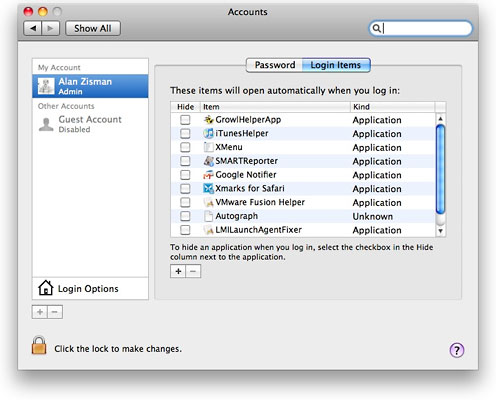
Adding a login item using the Accounts system preference.
If you become attached to Right Zoom and/or Start Menu, you may want
to have them start up automatically with your Mac. In that case, you
can add them to the startup list in the normal way: open System
Preferences, go to Accounts, and click on the Login Items tab. Either
drag the program icon from the Finder into the list or click on the [ +
] button to add it to the list. (You may need to first click on the
Lock icon and enter your password to allow changes to your
preferences). 



